

A broker execution rejection means your broker declined to fill an order, so the trade never opened at the price you clicked. The cause is usually one of a few things: not enough margin, an invalid volume or stop distance, a closed market, an account restriction, or a price that moved past what the broker’s execution model allows. The rejection message normally tells you which one, and this guide shows how to read it, fix it, and stop it from repeating, including when you copy trades across several accounts.
TL;DR
- A rejection is different from slippage and a partial fill: the order did not proceed to execution at all.
- Most rejections trace back to margin, volume, stop distance, market hours, account permissions, or fast price movement.
- Read the exact error text first, then check account, order settings, platform, and connection in that order.
- With a trade copier, one master order can fail on a client account for reasons the master never sees, so each account needs its own check.
- Keep screenshots and timestamps of any rejection you think was unfair. Past results do not guarantee future performance.
What a rejection is, and what it is not
Three outcomes get confused because they all feel like “my trade did not go as planned.”
- Rejection: the broker refuses the instruction. No position opens. A rejection means the instruction did not proceed to execution, as EBC Financial Group’s guide to partial fills, requotes and rejections puts it.
- Slippage: the order fills, but at a different price than you expected.
- Partial fill: only part of the requested volume fills.
A requote sits next to a rejection. The broker declines the clicked price and offers a new one. The CFTC’s 2013 enforcement release on FXDirectDealer gives a real example of the mechanism: the firm’s system rejected customer orders when the price moved more than 2 pips in the customer’s favor and requoted a less favorable price. That case was about unfair practice, but it shows what a rejection is in mechanical terms: the streamed quote moved past the broker’s slippage parameter, so the trade did not execute at the price on screen.
Order type matters too. The SEC explains that a limit order executes only at its specified price or better and is not guaranteed to execute. It also describes Immediate-or-Cancel orders, where any unfilled portion is canceled, and Fill-or-Kill orders, which are canceled entirely if they cannot be filled immediately and completely. Those order types come from securities markets, but the logic carries over: an instruction with strict conditions will sometimes be declined because the market could not meet them.
Why orders get rejected
In forex and CFD trading, the common causes are consistent across brokers. Monaxa’s breakdown of common rejection causes and the EBC guide above list the same core group.
Margin and account status
Insufficient free margin is the most frequent cause. The order’s required margin exceeds what the account has available, so the broker declines it. Past results do not guarantee future performance, and margin is also where capital risk concentrates, so this is the first thing to check when a larger order fails.
Account-level restrictions also reject orders: leverage limits, a symbol not enabled for your account type, a trading permission turned off, or a jurisdiction restriction.
Volume and symbol specifications
Every symbol has a minimum volume, a maximum volume, and a step. A request of 0.015 lots on a symbol with a 0.01 step is invalid. So is a request above the broker’s maximum. The fix is to read the symbol specification in your platform before sending the order.
Stop and limit distances
If a stop loss or take profit sits too close to the current price, MetaTrader returns an “invalid stops” message. Monaxa notes that the spread can make a stop that looks far enough away on the chart too close in reality. Pending orders have the same minimum-distance rule, which is why copied pending orders fail so often. We cover that in how to copy pending orders in MT4 without rejections.
Closed markets and trading breaks
Orders sent when the instrument is closed, on a break, or in a limit-only mode get rejected. This matters around session rollovers and for CFDs on indices, which have daily breaks that forex pairs do not.
Fast prices and the execution model
When the market moves quickly, the price you requested may no longer be available. What happens next depends on the broker’s execution model. Instant execution is less flexible on price, so it tends to produce more requotes and rejections. Market execution fills at the best available price and generally avoids requotes, though a rejection for lack of liquidity or a validation error is still possible.
In MetaTrader 4, instant execution has a setting that helps. According to the MetaTrader 4 help on opening positions, enabling maximum deviation lets the broker execute within a price range you set without asking you to confirm a new price. Set too tight, it produces rejections in fast markets. Set sensibly, it reduces them.
Reading common rejection messages
The wording differs by platform, but the meanings are close. Here are some you will meet.
| Message type | What it usually means | First thing to check |
|---|---|---|
| Not enough money / insufficient margin | Required margin exceeds free margin | Free margin, leverage, open positions |
| Invalid volume | Lot size outside min, max or step | Symbol specification |
| Invalid stops | Stop loss or take profit too close to price | Minimum stop distance plus spread |
| Market closed | Instrument not open for trading | Session times for the symbol |
| Trade disabled | Permission or account restriction | Account type and broker settings |
| Requote / price changed | Quote moved past the allowed deviation | Maximum deviation and execution mode |
| Off quotes / no prices | No liquidity or feed gap at that moment | Connection and timing |
Equities platforms have their own vocabulary. For example, thinkorswim’s order rejection reasons explain that “limit price too aggressive” means the price is on the wrong side of the market and too far past the current price, and “price outside band” means the order is too far from the contract’s current price. If you trade both forex and other products, do not assume a message means the same thing everywhere.
How to tell where the rejection came from
A rejection can come from your account, your order, your platform, your connection, or the broker’s own system. Work through them in order, because the cheapest explanations come first.
- Read the full message and code. MetroTrade’s guide to order error codes groups codes into funding, account, order or symbol, risk-setting, and technical problems. That grouping is a good mental model for any broker.
- Check the account. Free margin, trading permissions, account type, and whether the symbol is enabled.
- Check the order. Volume against the symbol step, stop distances against the minimum, order direction and type, expiry on pending orders.
- Check the platform. Is the terminal connected? Is auto trading enabled? Is the symbol name correct on this broker (suffixes such as “.m” or “pro” vary)?
- Check timing. Did it fail at a news release, at rollover, or at the open? Those moments cause price and liquidity problems.
- Then suspect the broker. If the same order is accepted a minute later and the only difference was a price move, you are looking at execution conditions, not a mistake on your side.
It also helps to understand the path an order takes. The SEC’s explanation of trade execution describes an order traveling from the investor through the broker to a market, with prices able to change before it arrives. That is why the price you saw is not always the price you can get. Some of that delay is yours: a slow connection or an overloaded machine adds time between click and arrival. Our guide on what trade execution speed means explains the pieces.
What to do right after a rejection
Keep it simple and in this order.
- Do not resend immediately and repeatedly. If the cause is margin or volume, resending only produces more rejections and clutters your log.
- Read the message and fix what it names: add funds, reduce volume, widen the stop, wait for the market to open.
- If the code is technical and keeps appearing, take a screenshot and contact your broker’s support. MetroTrade’s guidance says exactly that for persistent technical codes.
- Note the time, symbol, volume, price, and message. This record costs you thirty seconds and is the thing you will wish you had if you later dispute something.
Reducing repeat rejections
Most repeat rejections come from settings, not bad luck.
- Use realistic stop and limit distances. Check the broker’s minimum and add the spread.
- Match volume to the symbol. Confirm minimum, maximum, and step in the specification.
- Keep margin headroom. Do not size so close to your free margin that a small price move blocks the next order.
- Choose the execution mode deliberately. Market execution avoids most requotes. If you use instant execution, set a maximum deviation that suits the volatility of what you trade.
- Avoid the worst minutes. News releases and rollover are when quotes gap and liquidity thins.
- Monitor automated tools. Any EA or script that keeps hitting the same error code needs its settings reviewed, not more attempts.
There is one account rule worth knowing if you hold a U.S. account. U.S. forex rules restrict some order behavior, and opposite-direction orders on the same symbol can be refused. Our article on why MT4 hedging is blocked for U.S. traders explains how NFA Rule 2-43 plays into this, so you can recognize that rejection for what it is.
When a rejection may be a trade error or unfair practice
Most rejections are ordinary. Occasionally they are not, and U.S. regulators have acted against dealers over it.
The NFA alleged in a regulatory action against FXDD that the firm used asymmetrical slippage: rejecting customer-favorable price moves beyond two pips while allowing unlimited adverse movement. The CFTC’s 2013 order against FXDirectDealer described the same pattern. And in 2023, the CFTC charged a firm with using specialized software to secretly add delay or slippage to customer orders.
An execution rule also exists on the adjustment side. Under NFA Rule 2-43, a forex dealer member generally may not cancel or adjust an executed order unless the change is favorable to the customer as part of a complaint settlement, or the dealer exclusively uses straight-through processing with an unaffiliated counterparty that adjusts the offsetting position.
What does this mean for you? One rejection is not evidence of anything. A pattern is different: rejections that fall only on orders that would have filled in your favor, at consistent times, across many trades. If you see that, your records are the evidence. Keep:
- Platform journal or log exports with timestamps
- Screenshots of error messages and the quote at the moment of the order
- Your order details (symbol, volume, price, stops, order type)
- Any support tickets and replies
Then take it to your broker’s compliance or complaints channel. The broker’s regulator is the next step if that goes nowhere. Past results do not guarantee future performance, and a few unlucky rejections do not make a case; documented patterns might.
Why copied trades get rejected more often
A trade copier does not change how a broker decides. It sends the same kind of order your master account sent, to each client account. The difference is that now several brokers, several account types, and several symbol setups are in play, and the master only sees its own.
The usual causes are these:
- Different symbol rules. A volume that is valid on the master can be below the minimum or off the step on a client account.
- Different margin. A client account with a smaller balance cannot carry the same size. This is why lot scaling per account matters: Local Trade Copier can scale volume to each client account’s balance, so a copied order is sized for the account receiving it.
- Different stop distances. A stop that is acceptable at one broker can be too close at another with a wider spread.
- Pending orders. These fail most often, because price can pass the entry before the copy arrives. See copying pending orders in MT4 without rejections.
- Account restrictions. Hedging limits, trade permissions, or an account where trading is disabled. Our page on error 133 on the MT4 client account walks through that specific message.
- Delay. The longer a copy takes, the more the price can move before it reaches the client broker. Our notes on why a trade copier is slow list the causes, and the scalping and copy trading setup guide covers what to tune if you trade fast.
A useful habit: when a copy fails, look at the client terminal’s Experts and Journal tabs, not the master’s. The reason is logged where the rejection happened.
Where Local Trade Copier fits
Local Trade Copier is replication software only. It copies trades that already exist on a master account to your other accounts. It has no market logic and does not decide what to trade, and it cannot stop a broker from declining an order. What it can do is remove the avoidable causes of failed copies.
Because it runs on your own Windows PC or VPS, with no cloud routing, there is no external server between your master and your client terminals. Execution is local and typically completes in under a second, which shortens the gap in which a price can move. It also offers configurable lot sizing, automatic scaling by client balance, trade filtering, and a manual-like entry mode, which is useful where a firm or broker does not allow EA trading. Our write-up on a fast trade copier on MetaTrader 4 shows ten orders copied in one second.
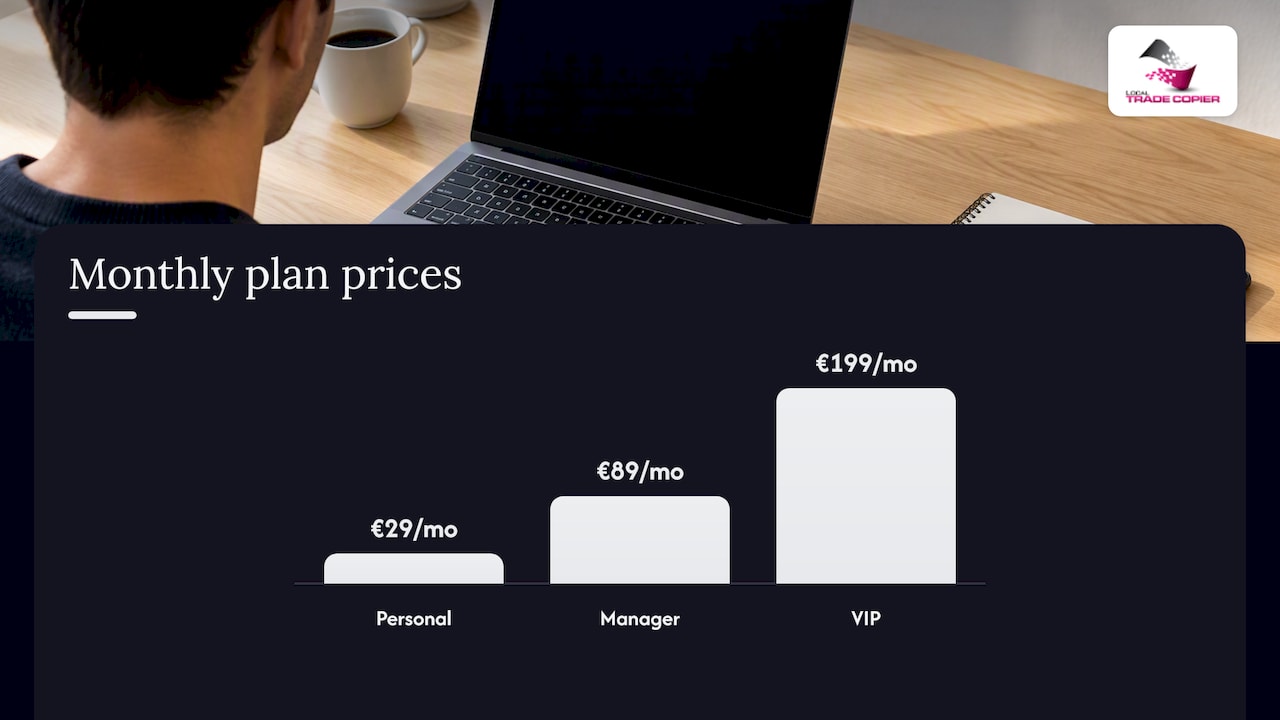
Plans are billed monthly or yearly and include a 7-day free trial. Personal is €29 per month or €290 per year, Manager is €89 per month or €890 per year, and VIP is €199 per month or €1990 per year. You can see what each includes on the pricing page, or watch the demo video first.

If you manage several of your own accounts and keep seeing failed copies, the trial is a low-effort way to see whether sizing and timing were the cause. Past results do not guarantee future performance, and the software does not change your trading outcomes: it only replicates what you already do.
Our perspective
We have been building trade copying software since 2010, and the pattern behind most support questions is the same: the copier is blamed for a rejection that the client broker issued for a clear reason. Lot size below the minimum, a stop too close, a symbol with a different suffix, margin short on a small account. The copier delivered the instruction; the broker declined it.
So our advice is to treat each client account as its own trading account with its own rules. Test a copy on a demo or small size first. Read the journal on the receiving terminal. Fix the cause named in the message instead of widening everything blindly. Keep the machine running MetaTrader stable and close to your broker’s server, because delay is the one cause you can shorten.
We also keep expectations plain. A copier removes manual re-entry. It does not make a rejected order acceptable, and it does not change what any trade earns or loses.
— Rimantas
FAQ
Why is my order getting rejected?
The most common reasons are insufficient free margin, an invalid volume, stops placed too close to the market, a closed market, or an account restriction. Fast price movement can also cause it under instant execution. Read the exact message in your platform’s journal, because it normally names the cause.
Is a rejection the same as slippage?
No. With slippage, the order fills at a different price than you expected. With a rejection, the order does not fill at all. A requote is a related case where the broker declines the price and offers a new one.
Can a broker reject orders unfairly?
It has happened. U.S. regulators have taken action against dealers for rejecting only customer-favorable price moves, as in the FXDD and FXDirectDealer matters cited above. A single rejection proves nothing, but a documented pattern of one-sided rejections is worth raising with your broker and, if needed, its regulator.
Why do copied trades fail on one client account but not another?
Each account has its own margin, symbol specification, stop distance rules, and permissions. A trade valid on the master can break a rule on a client account. Check the client terminal’s journal, then compare volume, stops, and symbol names with the master.
Does a trade copier cause rejections?
A copier sends ordinary orders, so a rejection comes from the receiving broker’s rules. Delay can contribute, because price may move before the order arrives, which is why local, low-latency execution and correct per-account lot sizing help.
Sources
- CFTC: FXDirectDealer enforcement release, 2013
- SEC: Trading basics
- SEC: Trade execution
- EBC Financial Group: Partial fills, requotes and order rejections
- Monaxa: Why do forex orders reject
- MetaTrader 4 Help: Open positions
- thinkorswim: Order rejection reasons
- MetroTrade: Understanding order error codes
- NFA: Regulatory action involving FXDD
- NFA: Rule 2-43
- CFTC: 2023 complaint on delayed and slipped customer orders
