
Today’s LTC question is:
Trade copier gives an OrderSend error (133) and says that my broker disabled a few pairs. What does that mean?
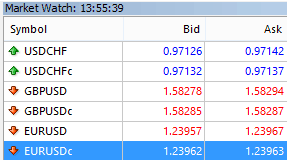
In most cases this happens when your broker uses a symbol suffix or prefix (for example EURUSD.m or EURUSDc) and the trade copier tried to trade a symbol name that your broker doesn’t allow.
How to fix it in the current Local Trade Copier:
- Attach LTC Client to a chart of the exact symbol your client broker uses, for example a EURUSD.m chart. With the default Symbol Mapping Mode “Automatic – detect from Client EA chart”, LTC Client takes the prefix and suffix from that chart.
- If that doesn’t help, set Symbol Mapping Mode = “Custom – use prefix/suffix below” and enter the suffix in CustomSymbolSuffix (and the prefix, if any, in CustomSymbolPrefix).
- For a symbol with a completely different name, use CustomSymbolMapping, for example GOLD=XAUUSD.
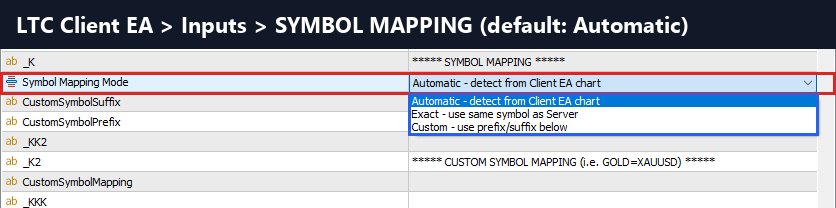
Older LTC versions had the settings CurrencyNameSuffix and TurnOffAutoSuffixDetection instead. They no longer exist. More details and examples: copying trades when symbol names are different.
This usually can happen when your broker has more than one symbol for the same currency pair, for example EURUSD and then the same pair with some suffix at the end like EURUSD_Ask.
Another reason for such error can be when trading on some or all pairs is disabled by your broker. Trading might be disabled temporarily or permanently. Maybe it’s your new account and your broker needs to enable auto trading option on their side. You should contact your broker about this if the 1st solution did not help.
Also there were cases that clients got the same error because of a poor Internet connection on their VPS server or computer.
In any case, you can always try to open a position manually on the same currency pair and see if it works. If you get the same error then probably trading is disabled for that pair and only your broker can help you with this.
Please like and share if this video was helpful to you, and tell me what you think in the comments below!
If you have any more questions watch other videos on my MT4 Copier Blog or contact my support team.

One response to “Local Trade Copier and error 133 on the MT4 Client Account”
Good Work!