

Yes, pending orders copy between MT4 accounts, but the result depends entirely on how your copier handles them and what your broker’s execution rules allow. A Buy Limit sitting untouched on your master account can arrive on the follower as an identical pending order, or it can wait silently and convert to a market order the instant price triggers it. Which one happens depends on copier mode, not luck.
The two dominant approaches are copy as pending (the follower gets the same Limit or Stop order, sitting at the same price) and convert to market on trigger (the follower does nothing until the master’s order fires, then gets a market fill). Each has trade-offs tied to your broker’s StopLevel and execution model.
Before you risk anything live, run a demo copy test. Place one of each pending order type on a demo master, confirm the follower receives it correctly, and check the logs for rejection codes.
Quick verdict, if you only read three lines:
- Pending orders can be copied, but broker StopLevel differences are the number one cause of failed replication.
- Match account types and brokers when you can; use convert-to-market mode when you can’t.
- Enable retry logic and verbose logging before you ever go live.
Key Takeaways
Pending orders copy reliably in MT4 when the copier mode matches your broker pairing and retries are enabled to absorb StopLevel rejections.
| Point | Details |
|---|---|
| Two copy modes exist | Duplicate the pending order exactly, or convert to a market order once the master triggers. |
| StopLevel causes most rejections | Check both brokers’ minimum distance rules before assuming a bug in the copier. |
| Test on demo first | Place all four pending order types on a demo master and verify follower behavior before going live. |
| Enable retries and logging | Retry logic resolves temporary rejections; logs are your only way to diagnose recurring ones. |
| Local Trade Copier retries automatically | It attempts pending order creation repeatedly until it succeeds or the master order is canceled, per product documentation. |
Can Trade Copiers Copy Pending Orders in MT4?
MT4 supports four pending order types: Buy Limit (buy below current price), Sell Limit (sell above current price), Buy Stop (buy above current price), and Sell Stop (sell below current price). A capable copier can replicate any of these, but “replicate” means different things depending on the tool.
Most copiers handle pending orders one of two ways. The first duplicates the pending order itself: your master places a Buy Limit at 1.0850, and the follower gets its own Buy Limit at 1.0850 (or an adjusted price if you’ve configured an offset). The second waits for the trigger. Nothing happens on the follower account until the master’s pending order actually fires and becomes a live position, at which point the follower opens a market order.
Duplicating the pending order preserves your exact strategy, including the wait for a specific price. But it’s more fragile across brokers with different StopLevel rules, since the follower has to accept a pending order at a price that might now be too close to the current market on that account. Converting to market on trigger sidesteps StopLevel rejections entirely because the follower never places a pending order at all. It just reacts when the master’s trade goes live, which trades exact price replication for reliability.
| Behavior | Duplicate pending order | Convert to market on trigger |
|---|---|---|
| Price match with master | Exact, if broker accepts it | Approximate, subject to slippage |
| Broker StopLevel exposure | High, rejection risk near market | None, no pending order placed |
| Best for | Matched brokers, same account type | Mismatched brokers, cross-broker setups |
| Typical failure mode | Rejected order, invalid stops error | Slippage or missed entry if feed lags |
Duplicating tends to work better when master and follower sit on the same broker or the same liquidity provider, because StopLevel and spread behavior are usually aligned. Convert-to-market is the safer default when you’re bridging two different brokers, especially if one runs a market-maker model and the other runs MT4 vs MT5 style ECN execution with tighter or wider minimum distances.
Pro Tip: Don’t guess which mode fits your setup. Open a demo follower account with your actual broker, place both a tight and a wide pending order on the master, and watch what happens to each on the follower before you touch a live account.
What Happens Mechanically When a Pending Order Copies
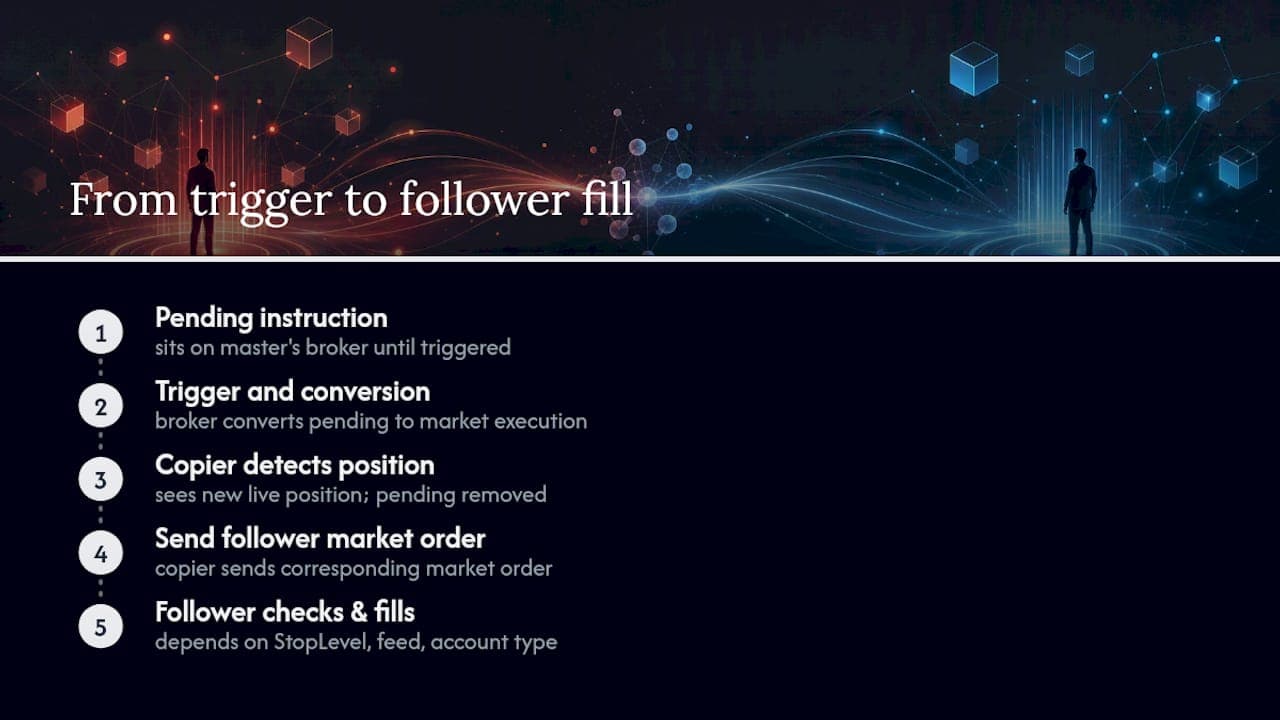
A pending order isn’t a trade yet. It’s an instruction sitting on the broker’s server waiting for price to reach a level. When the master’s Buy Limit at 1.0850 triggers, the broker converts it into a market execution at whatever price is available at that instant, which might be 1.0850 exactly or a few pips off if the market gapped.
That gap between “trigger price” and “fill price” is where a lot of copying confusion comes from. StopLevel is the minimum distance, in points, a broker requires between the current market price and any pending order. MQL4’s platform documentation defines this limit explicitly. If your follower’s broker enforces a StopLevel of 10 points and you try to copy a pending order that sits 5 points from the current price, the broker rejects it outright. Slippage is the difference between the price you expected and the price you got, and it shows up most often during trigger conversion, not during pending order placement.
Here’s the sequence when a master pending order fires: the master’s Buy Limit hits its trigger price, the master’s broker converts it to a live position, the copier detects the new position (not the old pending order, which no longer exists once triggered), and it sends a corresponding market order to the follower. The follower’s fill price depends on that broker’s own live feed at that exact millisecond. If master and follower run on different liquidity providers, don’t expect identical fill prices. A few pips of difference is normal, not a malfunction.
Account type matters here too. A follower on a market-execution account will get whatever price the broker’s liquidity pool offers. A follower on an instant-execution account might reject the trade entirely if the price has moved beyond the requested tolerance. Different brokers, different feeds, different outcomes from the same master signal.
Why Pending Orders Get Rejected When You Try to Copy Them
Most rejection issues trace back to a handful of repeat offenders. Here’s what typically goes wrong and why:
- StopLevel violation: the pending order’s distance from current market price is smaller than the follower broker’s minimum, and the broker refuses to place it.
- Mismatched account types: copying from a hedging account to a netting account (or vice versa) can cause unexpected order behavior, especially with multiple pending orders on the same symbol.
- Insufficient margin: the follower account doesn’t have enough free margin to support the order size once it’s calculated, particularly with lot scaling enabled.
- Symbol naming mismatch: your master’s “EURUSD” isn’t the follower broker’s “EURUSD.m” or “EURUSDpro,” so the copier can’t map the trade at all.
- Trade context busy: MT4’s terminal is processing another request when the copy attempt fires, causing a temporary rejection that a retry usually resolves.
- Wrong suffix or prefix: similar to naming mismatch, but specifically tied to broker-added characters around the symbol string.
When you hit a rejection, check the copier’s log first. Every failed attempt should generate a return code, and those codes map directly to documented errors. MQL4’s trade return codes list the exact values you’ll see, and the MQL5 equivalent covers the same ground for MT5 bridges. If you see an invalid stops error, that’s almost always StopLevel. If you see invalid volume, check margin and lot step settings on the follower.
Worth saying plainly here: past results do not guarantee future performance, and no copier setting changes that. Fixing a rejection issue improves reliability of replication, not trading outcomes.
Copier Settings That Control How Pending Orders Behave
The controls that matter most sit in your copier’s configuration panel, and most traders never open them until something breaks. Look for these specifically:
A skip pending orders flag lets you exclude pending orders from replication entirely, copying only live positions. Some cloud-based copiers, like CopyFactory’s skipPendingOrders setting, apply this at the strategy or subscription level, and it defaults to copying pending orders unless you turn it off. A copy-as-pending versus convert-to-market toggle determines which of the two modes discussed earlier the copier defaults to. Retry attempts control how many times the copier tries to place a rejected pending order before giving up, which matters enormously when StopLevel issues are intermittent rather than constant. A time-to-live setting for pending orders decides how long the copier keeps trying before it abandons the attempt. Price-shift or offset options let you adjust the follower’s pending order price by a fixed number of points, useful when brokers quote slightly different spreads. And trade-type filters let you copy only Stop orders, only Limit orders, or exclude specific types by magic number or EA name, which you can dig into further in our guide on filtering by trade type.
For most users, the safest starting configuration is: retries enabled, verbose logging on, and testing on demo before touching live capital. Change one setting at a time. If you adjust price-shift and retry count simultaneously and something breaks, you won’t know which change caused it.
How Local Trade Copier Handles Pending Orders
Local Trade Copier is built to copy both pending and market orders, and its default behavior on pending orders is to keep trying. If a pending order fails to create on the follower because of a StopLevel restriction or a temporary broker rejection, the software reattempts creation repeatedly until it succeeds or the master’s original pending order is canceled. That retry loop is the difference between a one-shot failed copy and an order that eventually lands once conditions allow it, for example once price moves far enough from the trigger level to satisfy the follower broker’s minimum distance.
Recommended setup for pending orders specifically:
- Start on a demo follower account, always. Confirm symbol names match exactly between master and follower before enabling live copying.
- Enable retry logic in the settings so temporary rejections resolve themselves instead of silently failing.
- If your follower broker has a wider StopLevel than your master’s broker, expect some pending orders to need retries before they place. That’s expected behavior, not a bug.
- Review the installation guide for the exact symbol mapping fields if you’re bridging brokers with different naming conventions.
Sub-0.5-second local execution is the latency figure the product documentation publishes for trade replication on a local machine, meaning trade data never leaves your PC or VPS to route through a cloud server. That local-only design is also why prop firm traders often prefer it: everything runs on one IP address, with no external routing to flag.
To be clear: Local Trade Copier is replication software. It copies pending and market orders that already exist on a master account. It doesn’t generate signals, evaluate strategy, or influence which trades you place. Past results do not guarantee future performance, and nothing about faster or more reliable copying changes the underlying risk of the trades themselves.
Best Practices for Reliable Pending Order Copying
Reliability here comes down to reducing variables, not finding a magic setting. A few habits separate traders who rarely see rejected orders from those who fight the copier every week.
Match your broker and account type wherever you reasonably can. Two accounts on the same broker, same execution model, same StopLevel rules will replicate pending orders far more predictably than a pairing across a market maker and an ECN broker. When matching isn’t possible, that’s your signal to run convert-to-market mode rather than fighting duplicate-pending mode against incompatible StopLevel values.
Run staged tests before any live deployment. Place a Buy Limit, Sell Limit, Buy Stop, and Sell Stop on a demo master, one at a time, and confirm each replicates as expected on the demo follower. Record the return codes for each attempt, even the successful ones, so you have a baseline to compare against later if something changes on the broker side.
Latency matters more than most traders assume, especially for orders that trigger during fast market moves. A stable VPS with synchronized time and a low-latency connection to your broker’s server reduces the gap between trigger and fill. Our breakdown of network latency’s impact on copier speed covers why a few hundred milliseconds of lag can be the difference between a filled pending order and a missed one during a fast breakout.

Risk management around pending orders needs its own checklist item. If a master’s pending order triggers and becomes a position, but the follower’s copy attempt fails or lags, you can end up with a position on one account and nothing on the other, a mismatch that’s easy to miss if you’re not watching closely. Test how your copier handles Stop Loss and Take Profit levels attached to pending orders specifically, since waiting for SL/TP conditions is a separate behavior from the initial pending order copy. Position sizing discipline matters here too. FundedAxe’s write-up on overtrading risk is a useful read if you’re scaling pending order copying across several follower accounts at once, since more accounts means more exposure per signal, not less.
Pro Tip: Keep two or three dedicated demo follower accounts permanently set up for regression testing. Any time you change a copier setting or update an EA, run the same battery of pending order tests against those accounts before touching anything live.
Pre-Launch Checklist for Copying Pending Orders
Run through this in the five minutes before you flip any pending order copying live.
- Confirm symbol names match exactly between master and follower, including suffixes and prefixes (EURUSD versus EURUSD.m versus EURUSDpro).
- Check StopLevel and minimum distance settings on both brokers. If they differ significantly, switch to convert-to-market mode rather than fighting rejections.
- Place one demo copy of each pending order type, Buy Limit, Sell Limit, Buy Stop, and Sell Stop, and capture the logs for all four.
- Verify retries are enabled and set a reasonable time-to-live for pending orders so failed attempts don’t hang indefinitely.
- Confirm the follower account has enough free margin to support the order once it fills, not just enough to place the pending order.
- Turn on verbose logging and save every log file from your test session, since you’ll want them if anything goes sideways later.
Troubleshooting a Rejected or Missing Pending Order
When something doesn’t copy correctly, work through this in order rather than guessing.
- Pull the copier logs first. Look for the timestamp of the master’s action and the follower’s corresponding response. A missing follower entry entirely usually points to a connectivity or trade-context issue rather than a rejection.
- Match the return code against documentation. Compare whatever error value appears against MQL4’s return code list or the MQL5 equivalent. An invalid stops code points to StopLevel. An invalid volume code points to lot sizing or margin.
- Check symbol naming, account type, and margin on the follower. This trio causes more silent failures than actual broker-side rejections. Confirm you’re testing on the account type you think you’re testing on, demo versus live matters more than people expect when settings get copied between environments.
- Re-run the copy under controlled conditions. Reproduce the same pending order on demo, adjust one variable at a time (retry count, price offset, TTL), and note which change resolves the issue.
Capture these fields every time you log an attempt: master order ID, timestamp, master price, pending order type, the price the follower attempted, the return code received, and any server message text. That log becomes your reference the next time the same symbol or broker pairing acts up.
What Actually Determines Reliability Here
A trade copier is a bridge, not a guarantee. It moves an instruction from one account to another, but the broker on the receiving end still decides whether to accept it, at what price, and under what execution rules. That’s the part conventional advice glosses over: people troubleshoot copier settings for hours when the real constraint is a StopLevel mismatch or an execution model difference that no software setting fixes.
My practical read, after working through how these systems behave: demo verification isn’t optional busywork, it’s the only way to actually see how your specific broker pairing handles pending orders before money is on the line. If you’re bridging two different brokers, lean toward convert-to-market mode. You’ll sacrifice exact price replication, but you’ll stop fighting rejected orders every time volatility pushes price near a StopLevel boundary. Reliability, in most cases, matters more than getting the exact trigger price.
None of this changes the fact that a copier only replicates what the master account does. It has no opinion on the trade itself, and no setting configuration turns a bad entry into a good one.
Set Up Reliable Pending Order Copying With Local Trade Copier
If StopLevel mismatches and rejected pending orders are the problem, the fix isn’t more manual monitoring, it’s a copier built to retry until conditions allow the order through. Local Trade Copier runs entirely on your own machine or VPS, which means no cloud routing delay between your master triggering a pending order and your follower receiving it.

The software copies both pending and market orders, offers a copy-as-pending or convert-to-market toggle for cross-broker setups, and includes trade-type filters so you can exclude order types you don’t want replicated. Retry logic runs automatically in the background, attempting pending order creation again whenever a StopLevel restriction blocks the first try. None of this changes trading outcomes. It’s replication software with no strategy layer, and past results do not guarantee future performance regardless of how fast or reliably an order copies.
Start with the free 7-day trial, install it following the setup guide, and run the checklist above on a demo follower before connecting anything live.
Frequently Asked Questions
Can MT4 trade copiers copy pending orders reliably across different brokers?
Yes, but reliability depends on matching StopLevel rules or using convert-to-market mode when brokers differ significantly. Cross-broker pairs with mismatched execution models see more rejected pending orders than same-broker setups.
Why does my copied pending order get rejected on the follower account?
The most common cause is a StopLevel violation, where the pending order sits closer to the current market price than the follower broker allows. Symbol naming mismatches and insufficient margin are the next most frequent causes.
Does copying a pending order guarantee the same fill price on both accounts?
No. Once a pending order triggers, the fill price depends on each broker’s own live feed and execution model, so a few pips of difference between master and follower is normal, not an error.
Should I use demo or live accounts to test pending order copying?
Always test on demo first. Place each pending order type, review the logs, and confirm the follower receives them correctly before connecting any live account to the copier.
What settings reduce missed or rejected pending orders?
Enable retry logic, set a reasonable time-to-live for pending attempts, and turn on verbose logging so you can trace exactly what happened when an order fails to copy.
This article is general information, not a substitute for advice from a qualified financial advisor. Consult a qualified financial professional about your own circumstances before acting on anything here.
Sources
Recommended
- Copying only certain types of trades on MT4
- CloseBy transactions copied to MT4 client account
- Partial close transactions copied to MT4 client account
- Copy Open Trades From Master MT4 Account
