
The Definitive Guide to Forex Trade Copying · Chapter 1 of 10
What Trade Copying Is and How a Trade Copier Works
By Rimantas Petrauskas · Updated November 2026 · 7 min read
A trade copier is software that repeats the trades of one trading account, the master, on other accounts, the clients. It opens a copy when the master trade opens, changes it when the master trade changes and closes it when the master trade closes. It runs either locally, inside MetaTrader terminals on your own PC or VPS, or in the cloud, on the provider’s servers. Brokers offer a third way, MAM and PAMM accounts, and MetaTrader has its own Signals service. This chapter explains what each one does and which setups traders use.
Key facts
- The master is the account you copy from. The clients, also called followers or slaves, are the accounts you copy to.
- A trade copier copies trade events: new trades, pending orders, stop loss and take profit changes, partial closes and closes.
- A local copier runs on your own computer: your account passwords stay in your MetaTrader terminals.
- A cloud copier needs no computer of yours, but it logs in to your accounts on the provider’s servers.
- Each copy is sized for its own account, so a €1,000 account and a €100,000 account can follow the same master.
- A phone can’t run a trade copier, but trades you place in the MT4 or MT5 phone app can still be copied.
What does a trade copier copy?
A trade copier doesn’t copy a strategy or a chart. It copies what happens to the trades on the master account:
- New trades (market orders), in the same direction, with a lot size calculated for each client account.
- Pending orders (buy and sell limit and stop orders). They are placed on the client account and filled there by the client’s own broker.
- Changes: a moved stop loss or take profit, or a changed pending order price.
- Partial closes: close half of the master trade, and half of each copy is closed.
- Closes: when the master trade closes, its copies close.
Most copiers let you switch each of these on or off, choose which trades are copied, or change them on the way, for example reverse the direction or shift the entry price. Chapter 7 covers those controls.
What are master and client accounts?
The master is the account whose trades are copied. You trade it as usual, by hand, with an Expert Advisor (EA) or both. The copier only reads it. The client accounts receive the copies, and the copier places and manages the trades there.
Older guides call the clients “slave” accounts, and some products say “follower” or “receiver”. They all mean the same thing. This guide says master and client.
Because the copier only reads the master, a local copier can usually work with the master’s investor password, the read-only password your broker gives you. Client accounts always need the trading password, because the copier has to place orders on them.
How does a local trade copier work?
A local trade copier is an Expert Advisor, or a pair of them, that runs inside your MetaTrader terminals. Each account has its own terminal, and all the terminals run on the same computer, usually your own Windows PC, or a VPS in a data centre.
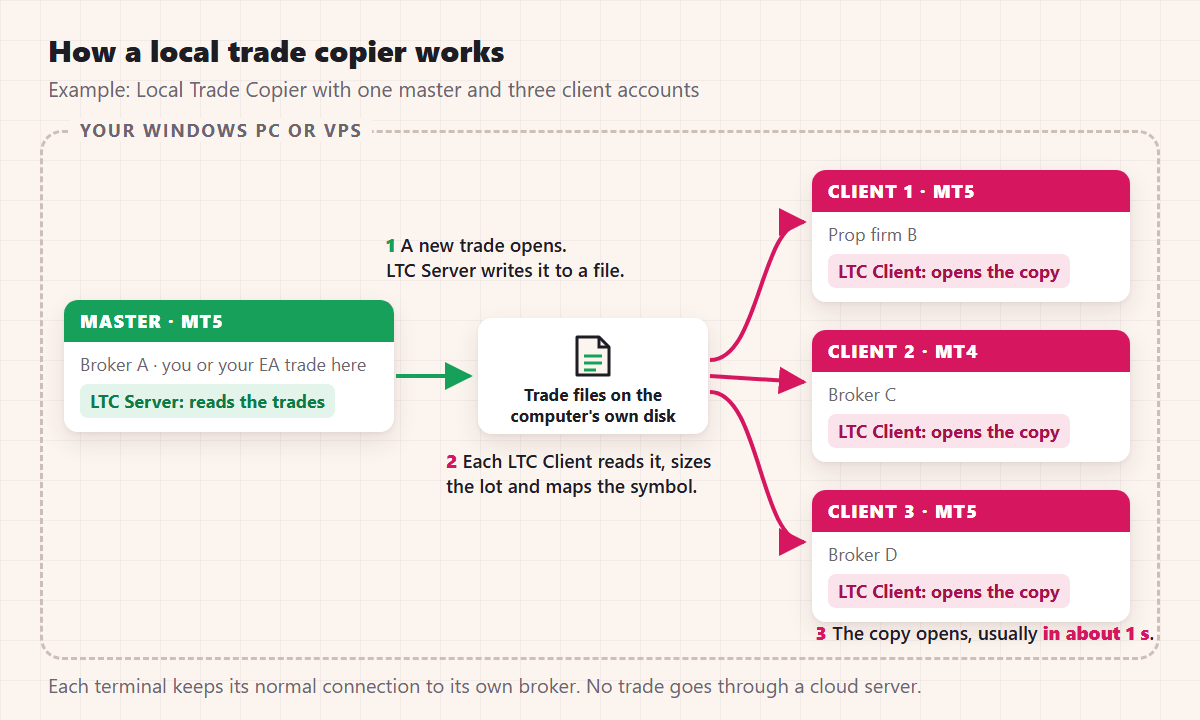
This is what happens when a trade is copied, with Local Trade Copier (LTC) by Algonexis Technologies, mt4copier.com as the example:
- You open a trade on the master account. LTC Server, attached to a chart in the master terminal, sees the new trade and saves its details to a small file on the computer’s disk.
- LTC Client, attached to a chart in each client terminal, reads that file. It works out the lot size for its own account and finds the matching symbol at its own broker, for example GOLD for XAUUSD.
- LTC Client sends the order to the client’s broker. The copy usually opens about 1 second after the master trade.
- When the master trade is changed or closed, the same steps repeat.
Apart from each terminal’s normal connection to its own broker, no trade and no password leaves the computer. That’s why a local copier works across brokers and account types, and why it’s fast: the trade doesn’t travel through anyone else’s server. The only connection LTC makes itself is LTC Server’s licence check, at start and about once an hour, and it sends no trades and no passwords. The cost is that the computer has to stay on while you want trades copied, which is why most traders run their terminals on a VPS (chapter 8).
How does a cloud trade copier work?
A cloud trade copier runs on the provider’s servers. You give it the login details of each account. Its servers log in to the master and the clients, watch for new trades and place the copies.
The advantages are real. You don’t need a computer that stays on, you can set it up from a phone or a browser, and many cloud copiers also connect trading platforms other than MetaTrader. The trade-offs: your account passwords are stored on someone else’s servers, every copy travels over the internet between data centres, pricing is usually per account, and some prop firms restrict third-party cloud copiers by name while allowing a copier on your own computer. Chapter 9 covers prop firm rules, and copying trades locally, without the cloud explains why Local Trade Copier works locally.
Local copier, cloud copier, MAM/PAMM or Signals: what’s the difference?
| Local trade copier | Cloud trade copier | Broker MAM / PAMM | MetaTrader Signals | |
|---|---|---|---|---|
| Where it runs | Your PC or VPS, inside MT4 and MT5 | The provider’s servers | The broker’s server | Your terminal, or MetaTrader’s own VPS |
| Which accounts | Any broker, MT4 and MT5 mixed | Any broker and platform the provider supports | One broker only | Same platform only: MT4 to MT4, MT5 to MT5 |
| Your passwords | Stay on your computer | Stored by the provider | Not needed (the broker allocates) | Stay in your terminal |
| Needs your computer on | Yes (a VPS works) | No | No | Your terminal, or MetaTrader’s VPS |
| Typical pricing | Per computer, monthly or one-time | Per account, monthly | The broker’s fees | The signal provider’s monthly fee |
| Typical use | Your own accounts, EAs, prop firm accounts | Your own accounts without a computer, other platforms | Money managers with investors at one broker | Following a public signal provider |
MetaTrader Signals only copy between accounts on the same platform, because MT4 and MT5 account for orders differently (MetaQuotes signals FAQ). MAM and PAMM accounts are run by money managers; whether trading for other people needs a licence depends on your country, so check with your financial regulator before you do it.
For copying between your own accounts, especially at different brokers or between MT4 and MT5, a local or a cloud copier is the practical choice. The rest of this guide is about those two, with a local copier as the worked example.
Which copy setups are common?
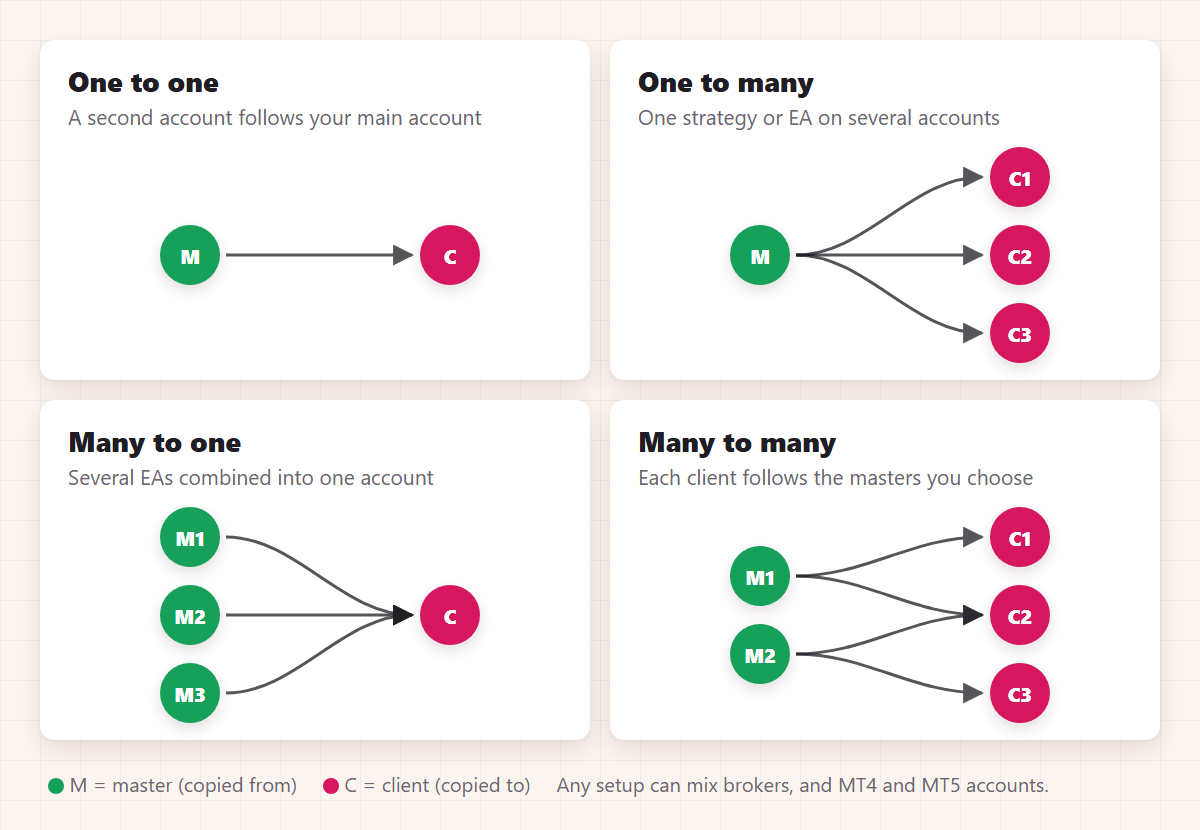
- One to one: one master, one client. For example, a second account at another broker that follows your main account.
- One to many: one master, several clients. The most common setup: one strategy or EA traded on several personal or prop firm accounts.
- Many to one: several masters, one client. For example, three EAs on three demo accounts combined into one live account.
- Many to many: several masters and several clients, with each client following the masters you choose for it.
- Across brokers and platforms: any of the setups above with accounts at different brokers, and with MT4 and MT5 mixed in any direction.
With Local Trade Copier, every client copies every master on the same computer by default, and a client setting limits it to the masters you choose. All the accounts of one setup run on one computer. If the same master has to be copied on a second computer, log the master account in on that computer too (chapter 8).
What can’t a trade copier do?
- Make every copy identical to the master. Each account has its own broker, prices, spread, commission and swap, and each copy opens about a second later. Small differences are normal. Big ones have a cause you can find (chapter 10).
- Copy a trade the client account can’t take. If the market is closed for that symbol, the account doesn’t have the margin, or the lot is below the broker’s minimum, the copy is delayed or skipped. A good copier tells you which, and why, in its log.
- Run on a phone or tablet. The MT4 and MT5 mobile apps can’t run Expert Advisors. You can still trade the master account from your phone: when the same account is also logged in on your PC or VPS, the copier there copies the trades you place on the phone (how copying from the phone app works).
- Turn a losing strategy into a winning one. Copying puts a strategy’s results on more accounts, the good results and the bad. Start with a demo client account, check that the copies match what you expect, then go live.
- Change a prop firm’s or broker’s rules. If a firm doesn’t allow copy trading on an account, a copier doesn’t change that. Chapter 9 explains what to check first.
Where to go next
If you’re still choosing a copier, chapter 2 lists the 12 questions to ask before you buy. If you already use Local Trade Copier, go to chapter 3 and install a terminal for each account.
All 10 chapters of the guide
The Definitive Guide to Forex Trade Copying: contents
- What trade copying is and how a trade copier works (you are here)
- How to choose a trade copier: 12 questions
- Run several MT4 and MT5 terminals on one PC or VPS
- Set up a trade copier and copy your first trade
- Lot size and risk: how copied trades are sized
- Symbol mapping between brokers
- Control what gets copied
- Run your copier 24/5 on a VPS, and scale up
- Prop firms, US FIFO rules and MT5 netting accounts
- Troubleshooting: why a trade wasn't copied

About the author
Rimantas Petrauskas
Rimantas Petrauskas is a software developer who has built trading tools for MetaTrader traders since 2009. He created Local Trade Copier in 2010 and still develops it today. It copies trades locally between MT4 and MT5 accounts on a trader’s own PC or VPS. He also created the Signal Magician trade copier, FxMagnetic and Equity Sentry EA. Rimantas is the author of two books: “How to Start Your Own Forex Signals Service”, which reached #4 in Amazon’s Forex category in its launch week, and “Trading Mindset Unlocked” (2025), a guide to the psychology of prop and retail traders. He runs Algonexis Technologies, based in Dubai.
Local Trade Copier
Try it on your own demo accounts
Local Trade Copier (LTC) by Algonexis Technologies copies trades between MT4 and MT5 accounts on your own Windows PC or VPS, with unlimited accounts per computer. Start the 7-day trial and copy your first trade between two demo accounts.
Card required. After 7 days the trial continues as the PERSONAL plan (€29 a month, 1 PC/VPS) unless you cancel. 30-day conditional money-back guarantee on your first purchase.