
The Definitive Guide to Forex Trade Copying · Chapter 10 of 10
Troubleshooting: Why a Trade Wasn’t Copied, and How to Fix It
By Rimantas Petrauskas · Updated November 2026 · 10 min read
When a trade isn’t copied, the copier’s log says why. Open the Experts tab of the client terminal and look for the master trade’s ticket number: Local Trade Copier writes a DELAYED line while it keeps trying and an IGNORED line when it gives up, each with the reason. Most missed trades have one of a few causes: algorithmic trading or DLL imports switched off, a symbol name the client broker doesn’t have, a lot size below the broker’s minimum, not enough free margin, a closed market, or a filter or limit you set yourself. This chapter shows where to look, what each message means and how to fix it, with Local Trade Copier (LTC) by Algonexis Technologies, mt4copier.com, version 3.1.10.
Key facts
- A copy can be missed (never opened), delayed (opened later, at a later price) or copied at a slightly different price. Each one changes the result.
- LTC Client writes one DELAYED line while it retries a trade, and one IGNORED line if it gives up, with the reason.
- LTC 3.1.10 retries broker rejections by type: connection problems while the master trade is open, a changed price for up to 10 minutes.
- Not enough margin is retried for up to 10 minutes only while other trades are open that could free margin. Otherwise the trade is ignored at once.
- On one computer, a copy normally opens about 1 second after the master trade. Slower copies point to the VPS, the connection or the broker.
Missed, delayed or different: which problem do you have?
A client account rarely ends up exactly like the master. There are three reasons, and each needs a different fix:
- Missed trades: the copy never opened. The Experts tab has an IGNORED line for it.
- Delayed trades: the copy opened later than the master, at a later price, or it’s still waiting. The Experts tab has a DELAYED line for it. A delayed trade becomes a missed one if the master closes it before the copy can open.
- Copies at another price: every trade was copied, but at slightly different prices, because each account has its own broker, spread, commission and execution.
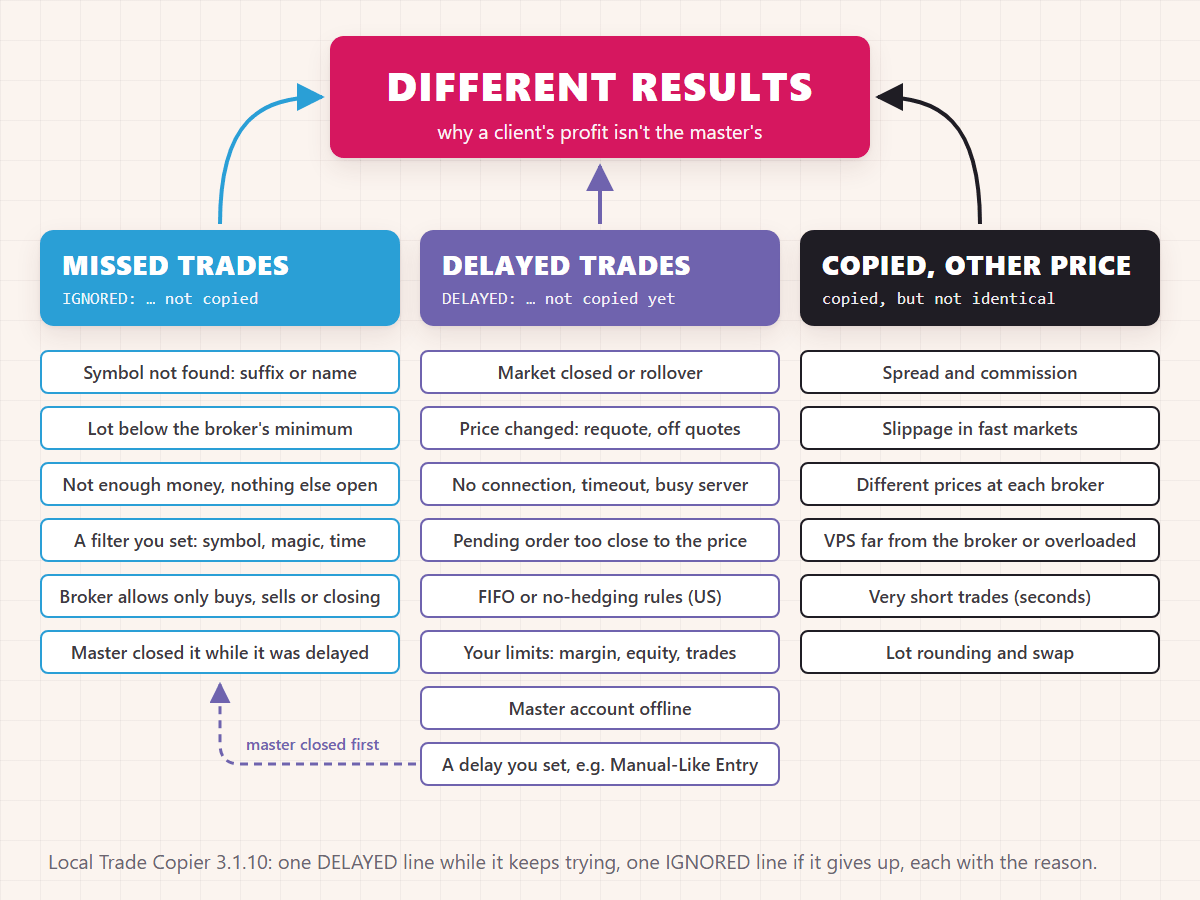
Where do you look first?
Check in this order. Most problems show up in the first two steps.
- The LTC Client panel on the client’s chart. “Copied” and “Ignored” count the trades since LTC Client started, and “Delayed” the trades that are waiting right now. Its icons turn red when something needs a look: hover over one to see what it means.
- The Experts tab of the client terminal (View > Toolbox in MT5, View > Terminal in MT4). Find the master trade’s ticket number. The line that starts with DELAYED or IGNORED gives the reason. To see older days, right-click in the tab and choose Open: each day has its own log file.
- The Journal tab of the same terminal, for connection problems, such as a lost connection or a failed login.
- The master terminal: LTC Server running on one chart, and the terminal connected.
- Your own settings: a filter, a limit or a lot mode that excludes the trade.
What if nothing is copied at all?
When no trade reaches a client, the cause is almost always one of these:
- Algorithmic trading is off. The Algo Trading (MT5) or AutoTrading (MT4) button isn’t green, or “Allow Algo Trading” (MT5) or “Allow live trading” (MT4) is unticked on the EA’s Common tab. Switch it on (chapter 4).
- DLL imports are off. LTC can’t start without them. On MT5, the EA window then has no OK button. Tick “Allow DLL imports” (chapter 4).
- The client is logged in with its investor password. The copies fail because the account can’t trade. Log in again with the trading password.
- The broker has disabled automated trading on the account. LTC Client shows “Automated trading for this account is disabled by your broker”. Only the broker can change that.
- The master is offline. The client’s Experts tab says the trade was “delayed because its Master account … is offline”. Start the master terminal, or LTC Server on it. The trade is copied when the master is back, if it’s still open.
- The client follows another master. It copies only masters with its own SPID and, if you list accounts in Copy From These Master Accounts, only those masters (chapter 4).
- LTC Server and LTC Client run on the same account. The trades are ignored “to avoid the Copy Trade Loop”. Run one or the other on each account.
- New trades are switched off. AcceptNewTradeSignals is false, or Max Daily Loss has stopped copying until the next day (chapter 5).
- The trades were open before LTC Client started. They aren’t copied by default (chapter 4).
What do the DELAYED and IGNORED messages mean?
Every message names the master ticket, the trade type and the symbol, then the reason. These are the ones you’ll see most, shortened:
| The Experts tab says | What it means and what to do |
|---|---|
| IGNORED … Symbol … does not exist on your account | The client broker has no symbol by that name. Attach LTC Client to a chart of the broker’s own symbol name, or add a custom mapping (chapter 6). |
| IGNORED … hidden from the Market Watch | LTC Client couldn’t show the symbol by itself. Show it in Market Watch (right-click > Symbols), and the next trades are copied. |
| IGNORED … does not allow lot sizes smaller than … | The calculated lot is below the broker’s minimum. Raise the lot mode’s value, or see MaxMinLotUpsize in chapter 5. |
| IGNORED … not copied: not enough free margin | The account can’t afford the trade, and no other trade is open that could free margin. Reduce the lot size or add funds. |
| DELAYED … not copied yet: not enough free margin | Other trades are open. LTC Client keeps trying for up to 10 minutes, in case some of them close. |
| DELAYED … margin limit … | Your MarginLimitPercent (90% by default) is reached. The copy opens when margin frees up. |
| DELAYED … Market is closed or broker is performing a rollover | The client broker isn’t trading the symbol right now. The copy opens when trading resumes, at the price of that moment. |
| DELAYED … Entry price … is too close or too far | A pending order is closer to the price than the client broker allows. Retried while the master’s order is pending (chapter 7). |
| DELAYED … stop loss is not set yet | A risk mode needs the master’s stop loss to size the copy (chapter 5). Copied when the master sets one. |
| DELAYED … to obey FIFO restrictions | A US account can’t hold the opposite trade (chapter 9). |
| DELAYED or IGNORED … a limit of … trade(s) per pair, or MaxTrades | Your limit on open trades is reached. You choose whether extra trades wait or are skipped (chapter 7). |
| IGNORED … because EA is set to … | A filter you set: symbols, trade types, magic numbers, comments, weekdays or times. The line names it. |
| DELAYED or IGNORED … violates price deviation rule | You changed Deviation Type from “Copy at any price”, and the price had moved further than you allow. LTC Client waits until the price is back within your range, or skips the trade if IgnoreTradesWhenTooFar is true. |
| IGNORED … to avoid the Copy Trade Loop | LTC Server and LTC Client run on the same account. Use one per account. |
When the broker refuses the copy itself, the line also gives the broker’s error number and, on MT5, its own reply. Common ones are error 133 or 10017 (trading disabled for that symbol or account), 134 or 10019 (not enough money), 131 or 10014 (invalid lot size) and 149, 150, 10045 or 10046 (FIFO and hedging rules).
How long does LTC Client keep trying?
A broker can refuse an order for a moment or for good, and LTC Client treats the two differently. In version 3.1.10:
| Why the broker refused the copy | What LTC Client does |
|---|---|
| No connection, a timeout, a busy server or terminal | Keeps trying while the master trade is open |
| The price changed: requote, off quotes | Keeps trying for up to 10 minutes |
| Trading on the symbol is disabled right now | Keeps trying for up to 10 minutes |
| Not enough money, other trades open | Keeps trying for up to 10 minutes |
| Not enough money, nothing else open | Ignores the trade at once |
| Market closed or rollover | Keeps trying while the master trade is open |
| A pending order too close to the price | Keeps trying while the master’s order is pending |
| FIFO or no-hedging rules | Waits until the opposite trade has closed |
| Lot size not accepted, only buys, only sells or only closing allowed | Ignores the trade at once, with the reason |
Between attempts, LTC Client waits 3, 6, 12 and 24 seconds, then 30 seconds, and starts at 10 seconds for margin and disabled trading, so the broker’s server isn’t flooded with requests. It writes one DELAYED line per trade and reason, and one IGNORED line if it gives up.
A delayed copy opens at the price of the moment it opens, which can be far from the master’s entry. That’s the default (Deviation Type “Copy at any price”), because a late copy is usually better than a missed one. If you’d rather skip copies that moved too far, choose another Deviation Type, such as “Copy if the price is within the range of X”, and set IgnoreTradesWhenTooFar to skip them instead of waiting.
Why are the results different when every trade was copied?
Even when every trade is copied on time, the client’s profit won’t match the master’s to the cent:
- Spread and commission. Each broker has its own. A copy at a broker with a spread 1 pip wider starts 1 pip further behind.
- Slippage. A copy opens about a second after the master trade, at the price of that moment. In calm markets that’s usually nothing or a fraction of a pip. Around news it can be several pips, in either direction.
- Different prices at different brokers, especially for indices, gold and oil. A stop loss at the same price can be hit at one broker and not at the other. Chapter 7 shows how to copy the stop’s distance instead.
- Swap. Overnight swap differs between brokers.
- Lot rounding. Each copy is rounded to the client broker’s lot step, so 0.013 lot becomes 0.01 (chapter 5).
- Very short trades. For an EA that holds trades for seconds, a fraction of a pip of slippage is a large share of each trade’s profit, so copies of fast scalping EAs can end up quite different from the master. Test them on demo accounts before you go live.
- Delays you set yourself, such as DelayPendingOrdersForSeconds, a trade limit set to delay, or Manual-Like Entry, which opens copies a few seconds after the master (chapter 9).
How fast should copying be?
On one computer, a new master trade is usually open on the client accounts about 1 second later. That includes the client broker’s time to execute the order, which depends on the distance to its server and on the broker itself.
The LTC Client panel watches this for you. The execution delay icon turns orange when the broker takes 1–3 seconds to execute an order, and red above 3 seconds. At the top, Computer Speed and Internet Speed show which side is slow:
- Computer Speed “Slow” or “Critical”: the PC or VPS can’t keep up. Close extra charts and terminals, or move to a bigger VPS.
- Internet Speed “Slow”: the ping to the broker is over 300 ms, or the broker takes over 0.5 seconds to answer. Move the VPS closer to the broker’s server (chapter 8).
- Both “Fast”, but copies are still slow at news time: the broker’s own execution slows down when the market moves fast. That’s the broker’s side, and it affects the master too.
What should you send support?
If you can’t find the cause, write to support with:
- The Experts tab lines of the client for that trade, and the LTC Server lines from the master terminal. Right-click in the Experts tab, choose Open, and attach that day’s log file.
- Screenshots of the LTC Client panel and of its Inputs tab.
- The details: the master and client brokers, MT4 or MT5, the master trade’s ticket number and time, and the LTC version shown on the panel.
Never send passwords: support doesn’t need them. The contact page has the support form, and the AI assistant answers questions about the settings at any time.
Checklist
- Algorithmic trading and DLL imports on in every terminal, with the toolbar button green
- The Experts tab read first: every IGNORED line has a reason you understand
- Every symbol tested with a pending order (chapter 4)
- Lot sizes above the broker’s minimum on the smallest account
- Free margin for the largest copy, with room to spare
- A VPS near the brokers, with Computer Speed and Internet Speed “Fast” or “Normal”
- Alerts on for trade open errors
This is the last chapter of the guide. If your question isn’t answered here, ask support: the questions people ask most go into the next edition.
All 10 chapters of the guide
The Definitive Guide to Forex Trade Copying: contents
- What trade copying is and how a trade copier works
- How to choose a trade copier: 12 questions
- Run several MT4 and MT5 terminals on one PC or VPS
- Set up a trade copier and copy your first trade
- Lot size and risk: how copied trades are sized
- Symbol mapping between brokers
- Control what gets copied
- Run your copier 24/5 on a VPS, and scale up
- Prop firms, US FIFO rules and MT5 netting accounts
- Troubleshooting: why a trade wasn't copied (you are here)

About the author
Rimantas Petrauskas
Rimantas Petrauskas is a software developer who has built trading tools for MetaTrader traders since 2009. He created Local Trade Copier in 2010 and still develops it today. It copies trades locally between MT4 and MT5 accounts on a trader’s own PC or VPS. He also created the Signal Magician trade copier, FxMagnetic and Equity Sentry EA. Rimantas is the author of two books: “How to Start Your Own Forex Signals Service”, which reached #4 in Amazon’s Forex category in its launch week, and “Trading Mindset Unlocked” (2025), a guide to the psychology of prop and retail traders. He runs Algonexis Technologies, based in Dubai.
Local Trade Copier
Try it on your own demo accounts
Local Trade Copier (LTC) by Algonexis Technologies copies trades between MT4 and MT5 accounts on your own Windows PC or VPS, with unlimited accounts per computer. Start the 7-day trial and copy your first trade between two demo accounts.
Card required. After 7 days the trial continues as the PERSONAL plan (€29 a month, 1 PC/VPS) unless you cancel. 30-day conditional money-back guarantee on your first purchase.