
The Definitive Guide to Forex Trade Copying · Chapter 2 of 10
How to Choose a Trade Copier: 12 Questions to Ask Before You Buy
By Rimantas Petrauskas · Updated November 2026 · 7 min read
The right trade copier depends on four things: where your accounts can run, which platforms and account types you use, how each copy should be sized, and what the copier will cost as your number of accounts grows. The 12 questions below cover everything that matters, roughly in the order buyers discover it. Each answer says what to look for. The table at the end shows how Local Trade Copier answers the same questions, with the date the facts were checked.
Key facts
- A local copier needs a computer that stays on, usually a Windows PC or VPS. A cloud copier doesn’t, but it logs in to your accounts on its own servers.
- Per-account pricing grows with every account you add. Per-computer pricing doesn’t.
- MetaTrader’s built-in VPS allows one account per subscription and no DLLs, so a local copier runs on a regular Windows VPS instead.
- Lot sizing and symbol names cause more setup problems than anything else, so test both on demo accounts first.
- A free trial on demo accounts tells you more than any review.
1. Local or cloud: can you keep a computer running?
If all your accounts can run on one Windows PC or VPS, a local copier usually costs less per account and keeps your passwords on your own machine. If you can’t keep a computer running and don’t want a VPS, or you want nothing installed at all, a cloud copier is the simpler choice. Chapter 1 explains how both work.
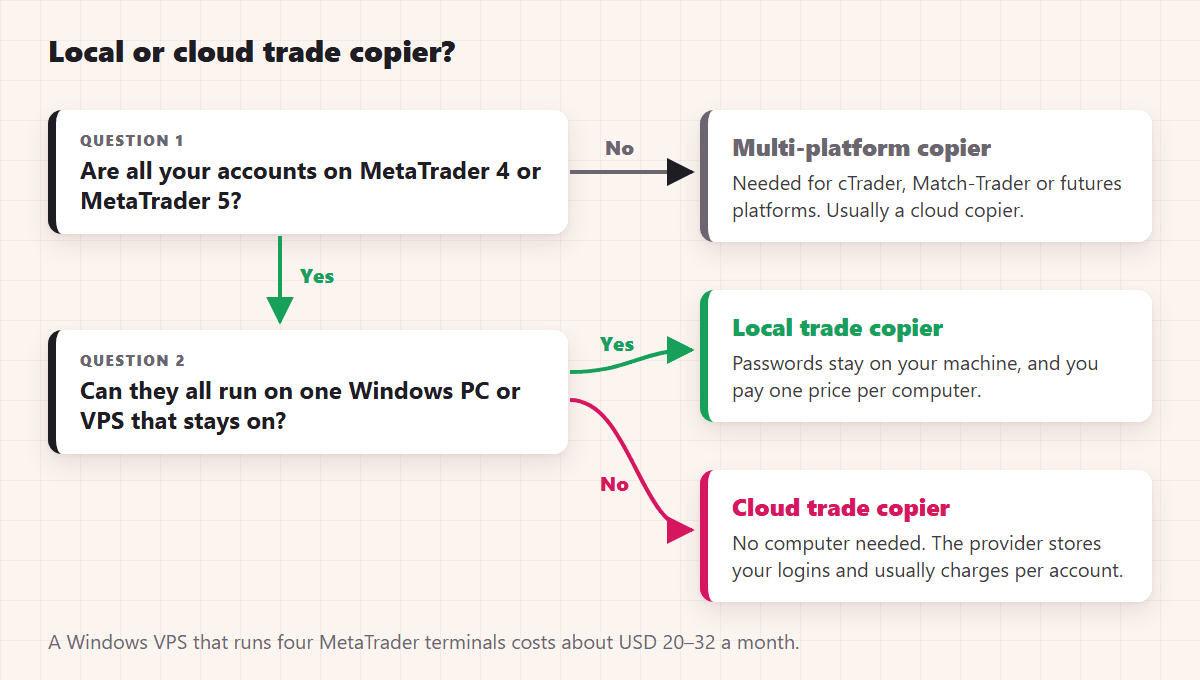
A VPS doesn’t have to be expensive. A Windows VPS that runs four MetaTrader terminals costs about USD 20 to 32 a month (chapter 3 compares the options).
2. Which platforms do you copy between, and in which direction?
Check every platform you use, and every direction: MT4 to MT4, MT5 to MT5, MT4 to MT5 and MT5 to MT4. MetaTrader’s own Signals service only copies within the same platform. If you also trade cTrader, Match-Trader or a futures platform, you need a copier that supports those, which is usually a cloud copier.
3. Does it work with your account types?
MT5 accounts are either hedging, where every trade is its own position, or netting, where there is one position per symbol and a new trade adds to it or reduces it. Accounts at US brokers follow the NFA’s FIFO and no-hedging rules. Ask whether the copier handles each account type you have, on the master side and on the client side. Many copiers support hedging accounts only. Chapter 9 explains the differences and what changes when you copy.
4. How does it size the copies?
A copier should size each copy for the client account, not just repeat the master’s lot size. Look for at least these modes: same lot as the master, a fixed lot, a multiplier, a ratio between the account balances, and a risk percentage based on the stop loss. Then check the safety limits: a maximum lot, an equity stop and a cap on open trades. Chapter 5 shows each mode with numbers.
5. Does it handle different symbol names between brokers?
The same instrument has different names at different brokers: EURUSD, EURUSD.m or EURUSD+, GOLD or XAUUSD, NAS100, US100 or USTEC. A copier should recognise suffixes and common aliases by itself and let you map anything else by hand. Also check contract sizes: one lot of gold or of an index isn’t the same size at every broker, so the copier should let you adjust the lot per symbol. Chapter 6 covers symbol mapping.
6. Which order types and events does it copy?
Check market orders, pending orders, stop loss and take profit changes, partial closes and close-by. Copying a pending order as a pending order matters, because the client’s copy then fills at the client broker’s own price. One platform limit to know about: MT5 has two pending order types that MT4 doesn’t have, Buy Stop Limit and Sell Stop Limit, so those two can’t be copied to MT4 as they are. The usual Buy Limit, Sell Limit, Buy Stop and Sell Stop orders exist on both platforms.
7. Can you control what gets copied?
Filters let you copy only some trades: by symbol, by direction, by magic number (one EA’s trades), by comment or by time. Other useful controls are reverse copying, a shifted entry price, and options to ignore the master’s stop loss or take profit. Chapter 7 covers them.
8. How fast is it, and what happens when a copy can’t open?
Speed depends on the path a trade takes. A local copier passes trades between terminals on the same computer, usually in about a second. A cloud copier’s speed depends on its servers and its connections to the brokers.
What happens when a copy can’t open is just as important. If the client’s broker rejects an order (the market is closed, there isn’t enough margin, the price moved), does the copier retry, skip the trade, or tell you? Ask to see a log entry for a skipped trade. It should name the trade and the reason. Chapter 10 lists the usual reasons.
9. Which passwords does it need, and where are they kept?
A copier that only reads the master can work with its investor (read-only) password. Client accounts need the trading password. With a local copier, the passwords stay in your own MetaTrader terminals. With a cloud copier, the provider stores them, so check its security, and check that your prop firm allows it.
10. How is it priced as you add accounts?
Work out the cost for the number of accounts you expect to have in a year, not today. Per-account pricing grows with every account: at €10 per account a month, 10 accounts cost €100 a month. Per-computer pricing stays the same for 2 accounts or 20 on one machine; add the cost of the VPS. Also check what counts as an account. Some products count the master too.
11. Can you test it before you pay, and get your money back?
A free trial on demo accounts is the best test you can do. Copy a few trades, check the lot sizes and the symbol names, then break something on purpose, such as a symbol the client broker doesn’t have, and see how the copier reports it. Also read the refund policy and check how easy it is to cancel.
12. Who is behind it, and how is it supported?
Look for a track record you can check: years on the market, independent reviews, a public changelog, manuals that match the current version, and a support channel that answers. A trade copier handles real money, so you want the people who wrote it to still be there next year.
Local Trade Copier at a glance (checked November 2026)
These are the answers for Local Trade Copier (LTC) by Algonexis Technologies, mt4copier.com, version 3.1.10.
| Question | Local Trade Copier |
|---|---|
| Type | Local copier: runs inside MT4 and MT5 terminals on your Windows PC or VPS, or on a Mac via Wine |
| Platforms | MetaTrader 4 and MetaTrader 5, copying in every direction (MT4 to MT5 and MT5 to MT4 included) |
| Account types | MT5 hedging and netting accounts, as master and as client; US FIFO accounts with FIFO modes |
| Lot sizing | 8 money management modes, plus a maximum lot, equity stops and a limit on trades per symbol |
| Symbol names | Automatic suffix and alias mapping; custom mapping, with a lot multiplier per symbol |
| Order events | Market and pending orders, SL/TP changes, partial closes and closes |
| Speed | Usually about 1 second between terminals on the same computer |
| Passwords | Master: trading or investor password. Clients: trading password. Passwords stay in your MetaTrader terminals. |
| Price | Per PC/VPS with unlimited accounts: PERSONAL €29/month (1 PC/VPS), MANAGER €89/month (5), VIP €199/month (15); yearly plans get 2 months free (pricing) |
| Licence transfers | Unlimited, between your own computers |
| Trial and refund | 7-day trial; 30-day conditional money-back guarantee on your first purchase (refund policy) |
| Track record | Developed since 2010; 15,000+ licences sold; buyers in 140+ countries; 500+ reviews on Trustpilot and Forex Peace Army combined |
| Support | E-mail support Monday to Friday, an AI assistant, manuals, videos and a public changelog |
| Limits | Windows, or a Mac via Wine; all accounts of one setup run on the same computer; doesn’t run on MetaTrader’s built-in VPS |
The 8 money management modes are: auto-adjust to the account size (AA), auto-adjust and multiply, the same lot as the master, multiply by X, fixed lot, risk per trade in percent, risk per trade in money, and lot-to-money ratio (LMR). Chapter 5 explains when to use each one.
When is another kind of tool a better fit?
- You can’t keep a computer or a VPS running: a cloud copier.
- You trade platforms other than MT4 and MT5: a copier that supports them, usually a cloud copier.
- You want to follow a public signal provider: MetaTrader Signals, or the provider’s own service.
Where to go next
Chose a local copier? Chapter 3 shows how to run one terminal per account on your PC or VPS. Already have the terminals? Chapter 4 sets up the copier and copies the first trade.
← Chapter 1: What trade copying is and how a trade copier works
Next: Chapter 3: Run several MT4 and MT5 terminals on one PC or VPS →
All 10 chapters of the guide
The Definitive Guide to Forex Trade Copying: contents
- What trade copying is and how a trade copier works
- How to choose a trade copier: 12 questions (you are here)
- Run several MT4 and MT5 terminals on one PC or VPS
- Set up a trade copier and copy your first trade
- Lot size and risk: how copied trades are sized
- Symbol mapping between brokers
- Control what gets copied
- Run your copier 24/5 on a VPS, and scale up
- Prop firms, US FIFO rules and MT5 netting accounts
- Troubleshooting: why a trade wasn't copied

About the author
Rimantas Petrauskas
Rimantas Petrauskas is a software developer who has built trading tools for MetaTrader traders since 2009. He created Local Trade Copier in 2010 and still develops it today. It copies trades locally between MT4 and MT5 accounts on a trader’s own PC or VPS. He also created the Signal Magician trade copier, FxMagnetic and Equity Sentry EA. Rimantas is the author of two books: “How to Start Your Own Forex Signals Service”, which reached #4 in Amazon’s Forex category in its launch week, and “Trading Mindset Unlocked” (2025), a guide to the psychology of prop and retail traders. He runs Algonexis Technologies, based in Dubai.
Local Trade Copier
Try it on your own demo accounts
Local Trade Copier (LTC) by Algonexis Technologies copies trades between MT4 and MT5 accounts on your own Windows PC or VPS, with unlimited accounts per computer. Start the 7-day trial and copy your first trade between two demo accounts.
Card required. After 7 days the trial continues as the PERSONAL plan (€29 a month, 1 PC/VPS) unless you cancel. 30-day conditional money-back guarantee on your first purchase.