

TL;DR:
- Trade sharing distributes trades in real time with per-account control, unlike passive copying.
- It enables scalable, coordinated multi-account management, ideal for traders and managers.
- Setting up trade sharing with reliable software like MT4Copier improves efficiency and reduces manual effort.
Most retail forex traders use “trade sharing” and “trade copying” as if they mean the same thing. They don’t. Confusing the two leads to poor software choices, unexpected latency, and a mess of manual corrections across multiple accounts. If you’re managing more than one account, whether personal, funded, or client-owned, getting this distinction right isn’t a technicality. It’s the difference between a workflow that scales and one that breaks under pressure. This article breaks down exactly what trade sharing is, how it works, where it differs from copying, and how to apply it for real efficiency gains.
Key Takeaways
| Point | Details |
|---|---|
| Trade sharing defined | Trade sharing synchronizes strategies or trades across multiple accounts instantly, improving control and execution. |
| Key differences | Trade sharing and trade copying are related but serve different needs based on control, latency, and scalability. |
| Right tool matters | The ideal solution depends on your trading scale, goals, and need for real-time coordination. |
| Practical application | With efficient software, even solo retail forex traders can manage multiple accounts with ease. |
Defining trade sharing in the forex market
Trade sharing is the practice of distributing a single trade signal across multiple accounts or participants in real time, with each recipient acting on that signal according to their own settings, lot sizes, and risk rules. It’s not a one-way mirror. It’s a coordinated broadcast.
The clearest way to think about it: a master trader executes a position, and that position is simultaneously mapped and executed across a defined group of accounts, each with its own parameters. Unlike simple trade copying, sharing forex trades involves active orchestration, not passive replication.
Here’s what makes trade sharing distinct from adjacent concepts:
- Real-time execution: Signals are broadcast and filled across all accounts with minimal delay, not queued or batched.
- Per-account control: Each recipient account can have its own lot size multiplier, risk cap, or instrument filter applied independently.
- Privacy and access management: Signal sources don’t need to expose account credentials. Participants receive trade data without seeing the master account directly.
- Scalability: A single master signal can reach two accounts or two hundred, without manual intervention per account.
- Audit transparency: Most platforms log every shared signal and execution, giving account managers a clean record for compliance or client reporting.
Who uses trade sharing? Primarily three groups: retail traders managing a cluster of personal accounts under different brokers, independent account managers distributing strategy signals to client portfolios, and signal providers sharing live trade activity with subscribers who want real-time fills rather than delayed alerts.
The difference between a functional setup and a fragile one comes down to the platform underneath it. Strong platforms offer real-time execution pipelines, granular risk settings per account, and access controls that prevent unauthorized signal interception. These aren’t nice-to-haves. They’re what keep a coordinated workflow from becoming a coordination failure.
How trade sharing works: Mechanisms and technology explained
Understanding the mechanism matters because it directly affects your execution quality. Trade copying best practices consistently point to latency as the single biggest variable separating efficient multi-account setups from unreliable ones. And ultra-low latency software is what makes synchronization across accounts instantaneous rather than sequential.
Here’s how a standard trade sharing workflow runs, step by step:
- Master account executes a trade: The source account, typically running on MetaTrader 4 or MT5, opens a position. This is the trigger.
- Signal is captured by the copier software: A trade copier EA (Expert Advisor) running on the master terminal reads the new order immediately upon execution.
- Signal is mapped to recipient accounts: The software applies each receiver’s individual settings: lot multiplier, risk percentage, instrument mapping, or fixed lot size.
- Orders are placed on receiver accounts: Each receiver terminal gets its own order placed by the copier EA running locally on that account. No cloud routing. No third-party server.
- Execution is confirmed and logged: The software monitors fill status and logs results, flagging any discrepancies for review.
- Monitoring continues in real time: Modifications to the master trade, partial closes, stop adjustments, are mirrored immediately across all receivers.
The technology stack behind this is straightforward but requires discipline. You need compatible platforms (MT4, MT5, or cross-broker replication across different broker infrastructures), local execution to avoid network latency, and tight security practices to prevent unauthorized access to the copier bridge.

Technician configuring multi-platform forex stack
Pro Tip: Running your trade sharing software on a Windows VPS instead of a local desktop does two things at once. It keeps the software online 24/5 without depending on your home connection, and it reduces execution time because the VPS is typically hosted closer to broker servers. Use strong, unique passwords for every terminal and VPS login. A single compromised credential can disrupt every account in your network simultaneously.
Trade sharing vs. trade copying: Similarities, differences, and best-fit scenarios
Both methods automate multi-account execution. That’s where the similarity ends. The operational models and use cases for each are meaningfully different, and choosing the wrong one for your situation creates unnecessary complexity.
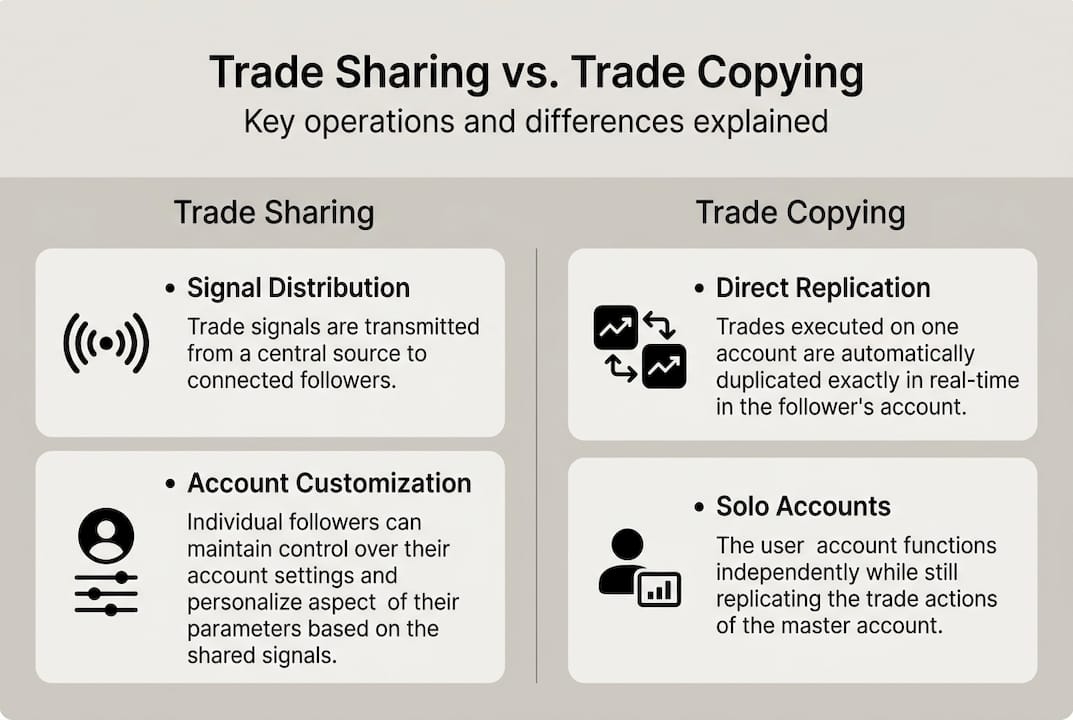
Infographic comparing trade sharing and copying models
| Feature | Trade sharing | Trade copying |
|---|---|---|
| Core function | Distributes signals to coordinated accounts | Mirrors master trades to follower accounts |
| Latency | Sub-second when run locally | Varies; cloud solutions add delay |
| Per-account control | Yes, granular settings per receiver | Limited; usually proportional or fixed lots |
| Privacy | High; no credential sharing required | Moderate; depends on platform |
| Scalability | High; built for multi-account orchestration | Moderate; works best with fewer accounts |
| Primary users | Account managers, signal providers, groups | Individual traders, copy traders |
| Ideal scenario | Coordinated portfolio management | Simple signal following |
Note: Execution speed figures are indicative. Actual latency depends on VPS location relative to broker servers, broker execution quality, and network conditions.
A few misconceptions worth clearing up. Many traders assume trade copying is less capable. It isn’t. For a solo trader replicating one strategy across two personal accounts, copying is exactly the right tool. Trade sharing adds value when coordination, per-account customization, and scale become priorities.
The forex trade copying guide and its trade copying chapter outline this in detail. The short version: copying is efficient replication; sharing is orchestrated distribution.
Hybrid approaches make sense in these situations:
- You manage both personal accounts (copying) and client accounts (sharing) under one platform.
- You run a prop trading operation where some accounts need identical lot sizing and others need balance-adjusted scaling.
- You operate a signal room where some participants want passive copy fills and others want manual confirmation before entry.
- You need trade copier security practices that protect both master and receiver accounts simultaneously.
Practical applications of trade sharing for retail and managed accounts
Knowing the distinction is only useful if it changes how you build your workflow. Trade sharing scales efficiently across dozens of managed accounts with minimal manual intervention, and that’s the practical payoff for getting the setup right.
Here are the most common real-world applications:
- Retail cluster trading: A trader running three accounts under different brokers uses one master signal to enter the same position across all three simultaneously, diversifying broker risk without tripling execution time.
- Managed account distribution: An independent account manager oversees 15 client accounts. One trade on the master instantly populates all clients with correctly scaled lots based on each account balance.
- Prop firm multi-account management: Traders operating across multiple funded accounts use local execution to avoid cloud IP detection, keeping all activity on one machine and one IP address.
- Collaborative trade rooms: A group of traders shares a single signal source, each with individually configured risk settings, so one signal reaches all members with appropriate sizing for each.
Trade sharing setups scale from small retail clusters of two to four accounts up to signal groups of fifty or more. Actual execution speed and administrative overhead depend on your VPS configuration, broker execution quality, and the number of receiver accounts in your setup.
Common pitfalls: Not configuring per-account lot limits leads to overexposure on larger accounts. Not monitoring fill confirmations lets missed trades accumulate unnoticed. Not securing the VPS exposes the entire network to a single point of failure.
Pro Tip: When setting risk allocations across different account types, assign a maximum lot cap per receiver, not just a multiplier. A percentage multiplier on an unexpectedly large account balance can generate positions far bigger than intended. A hard cap protects you when account balances shift between check-ins.
Actionable steps for deploying a trade sharing workflow:
- Audit all accounts you intend to include and document their current balance and risk tolerance.
- Select a locally installed copier that supports multi-account best practices and cross-platform execution.
- Configure each receiver with its own lot sizing rule, not a global default.
- Run a test cycle with minimum lot sizes before going live.
- Set monitoring alerts for failed fills or connection drops.
Risk note: Trade copying software replicates all master account activity, including losses. Running the same signal across multiple accounts multiplies both gains and drawdowns. Test all configurations on demo accounts before deploying live capital.
Why trade sharing is the smart evolution for serious forex management
Here’s the part most articles skip. Trade copying works fine until it doesn’t. The moment you add a third account, a second broker, or a client with a different risk profile, the gaps appear. Slippage stacks. Coordination errors compound. You start doing manually what the software was supposed to handle.
Trade sharing solves this not by being more complex, but by being more intentional. It centralizes control at the signal level while distributing execution across accounts. That’s not a small difference. It’s the architectural shift that separates traders who scale from traders who stall.
The contrarian point worth making: not every trader needs trade sharing. If you have one master account and one receiver with identical settings, basic copying covers it. But anyone managing more than two accounts with different risk profiles, different brokers, or different clients should look seriously at what forex copying best practices say about building for scale from the start. Retrofitting a sharing setup onto a copying workflow is harder than building it right the first time.
How to start with trade sharing using MT4Copier
Local Trade Copier has been the go-to locally installed trade copier since 2010, with 3,000+ active users and 491 Trustpilot reviews backing its reliability. It runs entirely on your Windows machine or VPS, with no cloud routing and no third-party server touching your trade data.
If you’re ready to set up efficient trade sharing across MT4, MT5, or DXTrade accounts, the fast trade copier delivers local execution at 1 second or faster under normal market conditions, with eight money management modes per receiver account. Getting started is straightforward: the trade copier installation guide walks you through configuration step by step, and a 7-day free trial lets you test every feature before committing to a subscription.
Frequently asked questions
What is the main difference between trade sharing and trade copying?
Trade sharing actively distributes signals to multiple accounts with individual settings applied per receiver, while trade copying mirrors orders one-way from a master account without coordinated distribution logic. Sharing involves active orchestration; copying is one-directional replication.
Who benefits most from trade sharing in forex trading?
Account managers, prop traders, and collaborative strategy groups gain the most from trade sharing because it lets them scale across multiple accounts with per-account risk controls and minimal manual intervention per trade.
How do I set up trade sharing for MetaTrader platforms?
You install a trade copier EA on both master and receiver MT4 or MT5 terminals, configure account mappings and lot sizing rules, then secure access via a low-latency installation on a Windows VPS for reliable 24/5 uptime.
Is trade sharing suitable for individual retail traders?
Yes. Solo traders running multiple personal or funded accounts can use trade sharing independently to eliminate manual re-entry and coordinate positions across brokers without sharing credentials or adding administrative overhead.
Recommended
- Trade copying best practices for efficient forex management
- What is a trade master account? Unlock efficient forex copying
- What is forex account management: optimize multi-account trading
- How to Copy Trades Between Two or More MT5 Trading Accounts
Revised Copy — What is trade sharing? Multi-account forex management explained
