

TL;DR: Trading latency is the total delay from order initiation to confirmation, which can significantly impact trade execution. It consists of network, broker, exchange, and data feed delays, with broker processing often being the largest contributor. To reduce latency, traders should use a nearby VPS, choose brokers with faster routing, and ensure a stable internet connection.
Trading latency is defined as the total time delay between initiating an order and receiving execution confirmation, measured in milliseconds or microseconds. For retail traders, that delay typically falls between 10–100ms. Institutional traders operate in the 1–10ms range, while high-frequency trading firms push below 50 microseconds. Those numbers are not just technical trivia. Every millisecond of delay is a window where price can move against you, turning a planned entry into a worse fill. Understanding what is latency in trading is the first step toward protecting your execution quality.
What makes up trading latency and how is it measured?
Trading latency is not a single number. It is the sum of several distinct delays that stack up between your click and your confirmed fill.
The four main components are:
- Network latency. The time for your order to travel from your machine to the broker’s server. Physical distance is the dominant factor here. Light travels roughly 300 km per millisecond through fiber optics, so a trader in London connecting to a New York server starts with a built-in delay before anything else happens.
- Broker processing delay. Once your order reaches the broker, their system runs risk checks and routes the order. This step alone can add 20–150ms, often exceeding the network delay. A-Book brokers that pass orders directly to liquidity providers tend to be faster than B-Book brokers that internalize fills.
- Exchange matching latency. The time the exchange or liquidity pool takes to match your order against available supply.
- Data feed delay. The lag between a price moving in the market and that price appearing on your platform. Stale quotes lead to fills at prices you did not see.
How traders measure latency
The standard measurement is round-trip time (RTT): the total time from sending an order to receiving the execution confirmation. RTT captures all four components in one number. A simple network ping to your broker’s server gives you only the network leg. To understand true latency impact, test total round-trip latency to the broker’s execution engine, not just the ping.

Trader’s hands measuring round-trip time with papers and devices
| Latency component | Typical range | Primary driver |
|---|---|---|
| Network (retail home PC) | 20–100ms | Physical distance to server |
| Network (VPS near broker) | 1–5ms | Co-location proximity |
| Broker processing | 20–150ms | Execution model, risk checks |
| Exchange matching | 0.1–5ms | Venue technology |
| Data feed delay | 1–50ms | Feed provider, connection type |
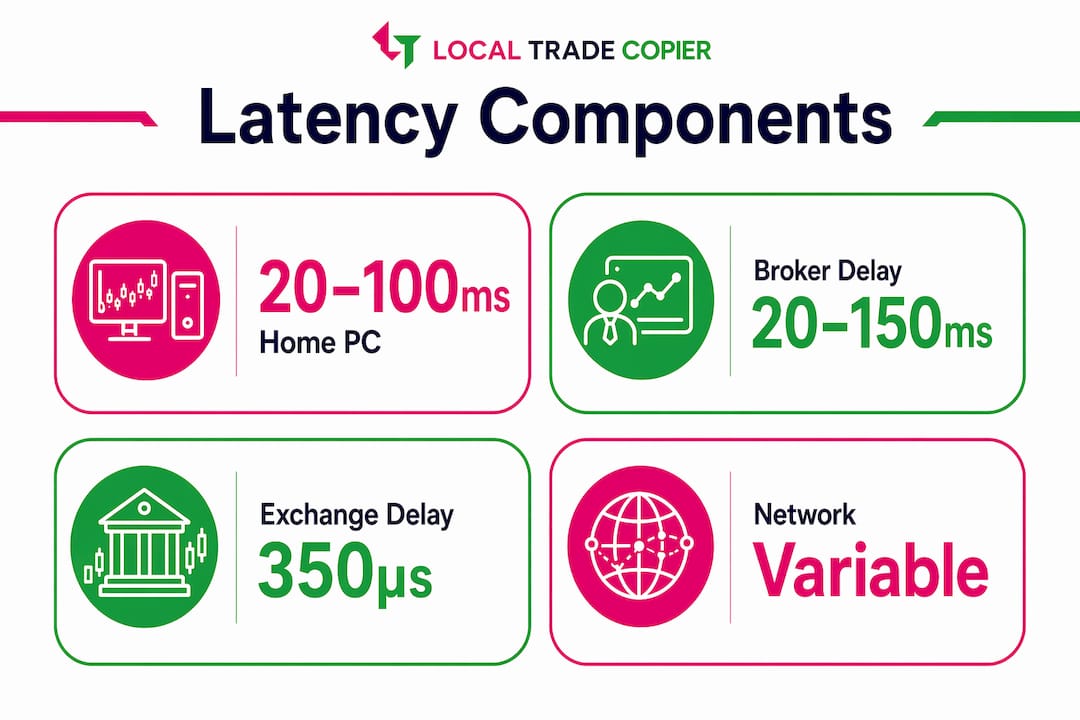
Infographic showing latency components with typical ranges and drivers
Pro Tip: Ping alone does not tell you your real latency. Use your broker’s order execution report or a dedicated latency testing tool to measure the full round-trip from order sent to fill confirmed.
How does latency affect trading performance and profitability?
Latency directly causes slippage, and slippage has a measurable dollar cost. A 0.5-pip slip on a standard lot costs approximately $5 per trade. For an active trader placing 20 trades per day, that adds up to $100 in daily losses from latency alone. Projected monthly, that figure reaches roughly $2,600. Past results do not guarantee future performance, but those numbers illustrate why latency is a cost of doing business, not a background technical detail.
The financial impact of latency shows up differently depending on your trading style:
- Scalpers enter and exit within seconds. A 50ms delay can mean the difference between entering at the intended price and chasing a move that has already happened.
- Algorithmic traders rely on backtested models. A strategy with a strong theoretical Sharpe ratio can drop well below 0.5 when realistic latency and slippage are modeled in. Backtests that ignore latency consistently overestimate real-world performance.
- News traders face the sharpest exposure. Prices move fastest in the seconds after a major release. High latency during those windows means fills at prices far from the intended entry.
- Swing and position traders feel the impact less acutely on any single trade, but latency still affects the quality of limit order fills and stop execution.
Pro Tip: Before blaming your strategy for underperformance, calculate your average slippage per trade over 30 days. If it exceeds 0.3 pips consistently, latency is likely the culprit, not the strategy itself.
One underappreciated angle: exchanges sometimes introduce latency deliberately. NYSE American implemented a 350-microsecond speed bump to reduce the advantage of fast traders over slower participants. That shows latency is not always a problem to eliminate. It can be a design feature that shapes market fairness.
What are acceptable latency levels for different trading strategies?
Latency requirements are not universal. The right target depends entirely on what you are trading and how fast your strategy needs to act.
Scalpers and algorithmic traders need latency under 20ms to execute reliably at intended prices. At that speed, the market has not moved enough to create meaningful slippage on most currency pairs. Trend followers and swing traders can tolerate latencies up to 100ms without significant execution degradation, because their entries and exits are not time-critical to the millisecond.
| Trading strategy | Acceptable latency | Key reason |
|---|---|---|
| High-frequency trading | Under 1ms | Competes on speed for edge |
| Scalping | Under 20ms | Price moves fast at entry points |
| Algorithmic (intraday) | 5–50ms | Model precision requires tight fills |
| Swing trading | Up to 100ms | Entry timing is less critical |
| Long-term / position | 100ms or more | Execution price matters less |
Consistency matters as much as absolute speed. Consistent latency performance is more valuable than occasional ultra-low latency spikes. A connection that delivers 30ms reliably is better for execution quality than one that averages 10ms but spikes to 200ms during volatility. Unpredictable latency is the real enemy of systematic trading.
Pro Tip: Track your latency distribution, not just the average. A wide spread between your best and worst latency readings signals an unstable connection that will hurt you most during high-impact news events.
How can traders reduce latency in their trading setups?
The single most effective method for reducing latency is physical proximity to your broker’s servers. Co-location can reduce latency from 20–100ms to sub-2ms. Most retail traders cannot co-locate hardware in a data center, but a VPS hosted in the same city as your broker’s servers achieves a similar result at a fraction of the cost.
Here are the most impactful steps to reduce execution delay, ordered by return on effort:
- Move to a VPS near your broker’s server. Choose a VPS provider with data centers in the same city as your broker’s execution engine. New York, London, and Tokyo are the most common hubs. A VPS in the same data center as your broker can cut network latency to under 5ms.
- Test your broker’s execution model. Ask whether they use A-Book or B-Book routing. A-Book brokers pass orders directly to liquidity providers, which typically means faster and more transparent fills. Broker processing delays can add 20–150ms on top of your network time.
- Audit your home network. A wired Ethernet connection is faster and more stable than Wi-Fi. Consumer-grade routers introduce inconsistent routing delays. If you trade from home, a wired connection to a quality router is a low-cost improvement.
- Choose the right trading platform. MetaTrader 4 and MetaTrader 5 both support VPS deployment and Expert Advisors that execute without human delay. Platform choice affects how quickly orders reach the broker’s API.
- Eliminate unnecessary software overhead. Background processes on your trading machine consume CPU and memory, adding micro-delays to order processing. A dedicated trading machine or VPS with minimal background tasks runs cleaner.
- Avoid chasing sub-millisecond improvements. Primary gains come from eliminating local bottlenecks like unstable home internet, not from expensive ultra-low latency hardware. For retail traders, the jump from 80ms to 10ms matters far more than the jump from 2ms to 0.5ms.
The impact of network latency on trade copier speed follows the same logic. When trades are replicated across multiple accounts, each millisecond of delay compounds. A local execution setup keeps all replication on one machine, removing the cloud routing step entirely.
Pro Tip: Use your broker’s server address and a tool like PingPlotter to map your latency over 24 hours. You will see exactly when your connection degrades and whether a VPS would solve the problem.
Key Takeaways
Latency in trading is a measurable cost that affects every trader, and managing it starts with understanding where the delay actually comes from.
| Point | Details |
|---|---|
| Latency definition | Total delay from order initiation to execution confirmation, measured in milliseconds. |
| Biggest cost driver | Broker processing delays of 20–150ms often exceed network latency in total impact. |
| Strategy-specific targets | Scalpers need under 20ms; swing traders can tolerate up to 100ms without major impact. |
| Consistency over speed | Stable, predictable latency protects execution quality better than occasional ultra-low readings. |
| Best reduction method | A VPS near your broker’s server cuts network latency from 80ms to under 5ms for most retail traders. |
Why I stopped obsessing over milliseconds and started measuring consistency
Traders new to latency optimization often make the same mistake. They fixate on the lowest possible number and treat it as the goal, running tests, comparing VPS providers, and chasing marginal improvements that have no real impact on actual fills.
The more productive shift is from tracking latency averages to tracking latency distribution. A connection with a healthy average can still conceal severe spikes at the worst moments. During the London open and major news releases, latency can spike to 300ms or more. Those spikes carry disproportionate cost compared to what average figures suggest. The problem is rarely typical speed. It is unpredictability.
Latency should be viewed as a measure of the entire trading ecosystem’s efficiency, not just raw speed. Approaching it that way shifts the objective: the goal is to build a setup where worst-case latency is acceptable, not just best-case. A VPS in the same city as the broker’s server resolves the majority of the gap. Switching to a direct-market-access broker addresses most of the rest.
One point worth stating plainly: if a strategy only works at sub-5ms latency, it is not a retail strategy. Retail traders do not have co-location access or direct exchange feeds. The right approach is to build strategies that work within the latency envelope realistic for retail infrastructure. Chasing institutional-grade execution without institutional resources is a path to expensive disappointment.
How Mt4copier addresses latency in trade replication
For traders managing multiple accounts, latency does not just affect your entry. It affects every replicated trade across every account you run.
Mt4copier’s Local Trade Copier runs entirely on a local Windows machine or VPS, with no cloud routing between accounts. All replication happens on one machine, at one IP address, which removes the external server hop that cloud-based copiers introduce. Local Trade Copier executes trade replication in 1 second or faster under normal market conditions. Pair that with a VPS for secure execution near your broker’s servers, and you get a setup where replication delay does not compound your existing network latency. The fast trade copier handles up to 10 orders per second, which matters when you are copying scalp trades where every fraction of a second counts. Mt4copier has served 3,000+ traders since 2010, with 491 Trustpilot reviews.
FAQ
What is latency in trading, simply defined?
Latency in trading is the time delay between sending a trade order and receiving execution confirmation. It is measured in milliseconds and directly affects the price at which your order fills.
What causes the most latency in forex trading?
Broker processing delays are often the largest contributor, adding 20–150ms depending on the broker’s execution model. Network distance between your machine and the broker’s server is the second major factor.
How does latency affect scalping strategies?
Scalpers need latency under 20ms to execute at intended prices. Higher latency causes slippage that erodes the small profit margins scalping strategies depend on.
Is a VPS worth it for reducing trading latency?
A VPS hosted near your broker’s server is the most cost-effective latency reduction method available to retail traders. Co-location can reduce latency from 20–100ms down to sub-2ms.
Does latency matter for long-term traders?
Long-term and position traders are largely unaffected by millisecond-level latency. Their entry and exit timing is measured in hours or days, not seconds, so execution delay has minimal impact on overall trade quality.
Recommended
- Why speed matters in trade copying: boost profits & cut risk
- How technology sharpens your edge in forex trading
- What Is Trade Execution Speed? A Trader’s Guide
- How to Speed Up and Streamline Trade Execution
