
The Definitive Guide to Forex Trade Copying · Chapter 9 of 10
Prop Firms, US FIFO Rules and MT5 Netting Accounts: What to Check Before You Copy
By Rimantas Petrauskas · Updated November 2026 · 9 min read
Before you copy trades to a prop firm account, a US account or an MT5 netting account, check the rules that come with it. Prop firms set their own copy trading rules: copying between your own accounts is often allowed, but copying another trader’s trades or signals usually isn’t, so read the firm’s current rules and get its answer in writing. US forex accounts can’t hold opposite trades on the same symbol and must close trades first in, first out. MT5 netting accounts hold one position per symbol, so several master trades become one position. This chapter explains each case, and how Local Trade Copier (LTC) by Algonexis Technologies, mt4copier.com handles it.
Key facts
- Prop firm rules differ between firms and change often. Read the current rules, and keep the firm’s written answer about your setup.
- Firms commonly allow copying between accounts you own, and ban copying someone else’s trades or signals and letting someone else manage your account.
- Size the copies so that a normal losing day stays well inside the firm’s daily and maximum loss limits.
- US forex brokers can’t keep opposite positions on the same symbol in one account and must close trades first in, first out (NFA Compliance Rule 2-43(b)).
- An MT5 netting account holds one position per symbol. Local Trade Copier has supported netting accounts as clients for years, and as master since version 3.1.10.
- Copying trades for other people can need a licence, depending on your country.
Can you use a trade copier on prop firm accounts?
Usually yes, within the firm’s rules. Every firm writes its own rules and changes them often, so this section describes what firms commonly allow and ban, not what yours does. Read your firm’s current rules for the account type you have.
| What you do | What firms commonly say |
|---|---|
| Copy between accounts you own at the same firm | Often allowed, sometimes with a cap on the total balance of your accounts |
| Copy your own trades, or your own EA’s, from a personal account to a funded account | Often allowed, as long as every trade is yours |
| Copy another trader’s trades, a signal service or a “pass your challenge” service | Usually banned |
| Let someone else trade or manage your account | Usually banned |
| Hold opposite trades across accounts, long on one and short on another | Usually banned, also when all the accounts are yours |
| Trade exactly like other traders at the firm | Often banned as group trading, even when it happens by accident |
| Run an Expert Advisor | Rules differ: some firms allow any EA, some only your own, and many ban certain strategies |
Strategies that firms commonly ban include high-frequency trading, latency arbitrage and trading on price feed errors. Opposite trades across accounts need special care with a copier: reverse copying (chapter 7) creates exactly that pattern, so don’t reverse onto a funded account without the firm’s written approval.
What should you ask the firm before you copy?
Describe your setup to the firm’s support and ask for a written answer. For example: “I trade my own MT5 account at broker X and copy the trades with a trade copier on my own VPS to my two accounts with you. Is this allowed?” Keep the reply. Rules change, and a written answer about your exact setup is worth more than a forum post or a list of “copy-friendly” firms.
Ask about:
- Copy trading: is it allowed, and between which accounts? Only your own accounts at this firm, or also from accounts elsewhere?
- Expert Advisors: are they allowed, and which strategies are banned?
- Total allocation: the maximum balance you may hold across all your accounts with the firm.
- IP address and VPS: may you trade from a VPS, and all your accounts from the same one?
- Other trading rules: a minimum time a trade must stay open, news trading, weekend holding, and consistency rules such as a cap on the share of the profit made in one day.
Does a local copier help with prop firm rules?
With some of them. A local copier runs on your own PC or VPS, so your accounts trade from your own IP address, nothing logs in to them from a provider’s servers, and your passwords stay in your terminals. Some firms restrict third-party cloud copiers, and many check whether accounts of different people trade from the same IP address. Use a VPS of your own, not one shared with other traders. The prop firm page shows how Local Trade Copier is set up for funded accounts.
But no copier and no setting changes a firm’s rules. If a firm doesn’t allow copy trading on an account, or doesn’t allow you to copy someone else’s trades, that stays true with any copier, local or cloud.
How do you size copies for the daily and maximum loss limits?
A prop firm closes an account that breaks its daily loss or maximum loss limit. Size the copies for the funded account instead of repeating the master’s lots. Chapter 5 explains the lot modes in detail. In short:
- Find out how the firm measures the daily loss: from the balance or the equity, at what time of day, and whether open trades count.
- Size the copies so that a normal losing day stays well inside the limit. AAM with a value below 1, or risk per trade in money, makes this easy to control.
- Set Max Daily Loss in LTC Client below the firm’s limit, with a margin: 4% for a 5% limit, for example. When it’s reached, LTC Client closes all trades on the account, including the ones you opened by hand. Also set If MDL violated, do this to “Close all trades & do not copy until tomorrow”: its default, “Nothing”, leaves the protection off.
- Check the maximum loss limit too. If it trails your highest balance, the room left shrinks after every losing day; recheck the sizing when it does.
What is Manual-Like Entry, and does it change the rules?
Local Trade Copier has two execution modes (the ExecutionMode setting). Standard, the default, opens copies with MetaTrader’s trading functions for Expert Advisors. Manual-Like Entry, also known as trade humanization, opens each copy through MetaTrader’s New Order window, the way you would by hand (how Manual-Like Execution Mode works). MetaTrader then records the trade as a manual one, and it opens a few seconds after the master trade.
It changes how the order is placed, not what is allowed. A firm’s rules on copy trading, Expert Advisors and other people’s trades apply to the trades themselves, however they were placed. Use it only for what the account’s rules allow.
What are the US FIFO and no-hedging rules?
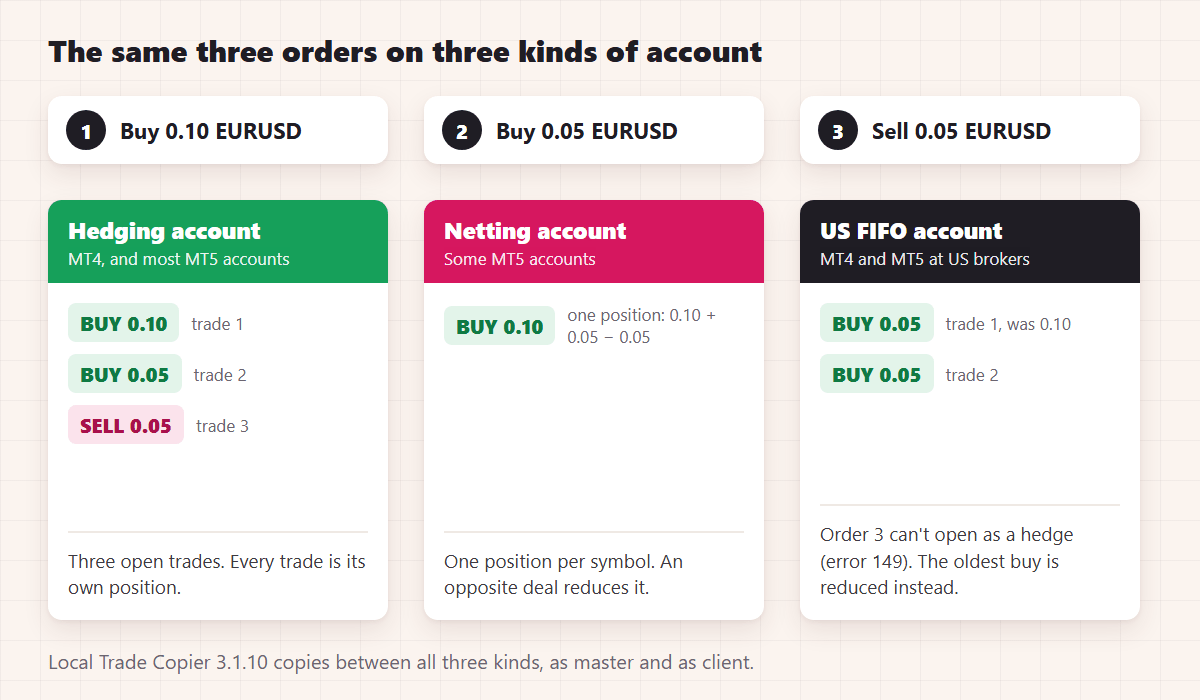
Forex brokers regulated in the US follow NFA Compliance Rule 2-43(b). It says they “may not carry offsetting positions in a customer account” and must offset positions on a first-in, first-out basis (NFA rulebook). On a US account, that means:
- No hedging: you can’t hold a buy and a sell on the same symbol in one account.
- FIFO: when several trades are open on the same symbol, the oldest one has to close first.
The broker’s server enforces this, so an order that breaks it is refused: error 149 (hedging prohibited) or 150 (prohibited by FIFO rules) on MT4, and the matching return codes 10046 and 10045 on MT5.
What does FIFO mean for copying?
A master that trades freely can hold a buy and a sell on EURUSD at the same time, or close a newer trade before an older one. Neither can be repeated as it is on a US account, so the copier has to choose: wait until the opposite trade has closed, or net the trades against each other. The MT4 LTC Client lets you choose with FIFO_Restrictions:
| FIFO_Restrictions | What LTC Client does |
|---|---|
| Detect automatically (default) | Follows FIFO rules on known US servers, and from the first time the broker refuses a trade under FIFO or hedging rules |
| No FIFO restrictions | Copies as on a normal account |
| FIFO restrictions (simple) | Closes the copies oldest first. An opposite trade waits until the open trades on that symbol are closed |
| FIFO restrictions + Netting | Closes the copies oldest first. An opposite trade reduces the open trades on that symbol instead, and only the rest opens |
A trade that waits for FIFO reasons shows a DELAYED line in the Experts tab: “delayed to obey FIFO restrictions, because there is a EURUSD BUY trade already running”. On MT5, LTC Client detects netting accounts by itself and follows FIFO rules as soon as the broker refuses a trade under them. If the master hedges or closes trades out of order, test the setup on a demo account at the same US broker first.
What changes on MT5 netting accounts?
The broker sets one of two position accounting systems for every MT5 account (MetaTrader 5 help):
- Hedging: every trade is its own position, and you can hold several on the same symbol, opposite ones included. MT4 accounts work this way too, except at US brokers.
- Netting: there is one position per symbol. A new deal in the same direction adds to it. An opposite deal reduces it, closes it or turns it around.
The account type appears in the title of the MT5 terminal window and in the Journal when you log in.
Copying to a netting account
LTC Client detects an MT5 netting account by itself. Every copy adds to or reduces the account’s single position on that symbol, and LTC Client keeps track of how much of the position belongs to each master trade. When the master closes a trade, or part of it, LTC Client reduces the position by that copy’s share. A netting position has one stop loss and one take profit, so LTC Client gives it those of the most recent open master trade on that symbol.
If the master holds a buy and a sell on the same symbol, the netting client holds only the difference. Its profit follows the master’s net position, but its trade history looks different from the master’s.
Copying from a netting master (new in 3.1.10)
Since version 3.1.10, LTC Server also runs on MT5 netting accounts. It turns the master’s single position back into separate trades, which clients of any account type can follow. An example with one symbol:
| The master (netting) | Its position | What the clients copy |
|---|---|---|
| Buys 0.10 EURUSD | Long 0.10 | Trade A: buy 0.10 |
| Buys 0.05 more | Long 0.15 | Trade B: buy 0.05 |
| Sells 0.12 | Long 0.03 | A is closed; B is partly closed, 0.03 left |
| Sells 0.08 | Short 0.05 | B is closed; trade C: sell 0.05 |
Every opening deal becomes its own trade, and a reduction closes the oldest trades first. The position’s stop loss and take profit apply to each of its trades. Clients on hedging, netting and US FIFO accounts follow this with their usual settings. The master needs LTC Server 3.1.10.
Do you need a licence to copy trades for other people?
Copying your trades to accounts that belong to other people, for a fee or a share of the profit, counts as managing money or giving investment advice in many countries. Whether you need a licence depends on your country and on where the account holders live, so check with your financial regulator before you start. This guide isn’t legal advice.
Prop firms usually ban it too: a funded account must be traded by the person it belongs to.
Checklist
- The firm’s current rules read for your account type, and its written answer about your setup kept
- No other people’s trades or signals copied to funded accounts, and no opposite trades across accounts
- Copies sized for the daily and maximum loss limits, with Max Daily Loss below the firm’s limit
- US accounts: FIFO_Restrictions on “Detect automatically” or a FIFO mode, tested on demo first
- MT5 netting master: LTC Server 3.1.10
- Copying for other people: checked with your regulator first
Something still not copied? Chapter 10 explains why a trade wasn’t copied, and how to fix it.
← Chapter 8: Run your copier 24/5 on a VPS, and scale up
Next: Chapter 10: Troubleshooting: why a trade wasn't copied →
All 10 chapters of the guide
The Definitive Guide to Forex Trade Copying: contents
- What trade copying is and how a trade copier works
- How to choose a trade copier: 12 questions
- Run several MT4 and MT5 terminals on one PC or VPS
- Set up a trade copier and copy your first trade
- Lot size and risk: how copied trades are sized
- Symbol mapping between brokers
- Control what gets copied
- Run your copier 24/5 on a VPS, and scale up
- Prop firms, US FIFO rules and MT5 netting accounts (you are here)
- Troubleshooting: why a trade wasn't copied

About the author
Rimantas Petrauskas
Rimantas Petrauskas is a software developer who has built trading tools for MetaTrader traders since 2009. He created Local Trade Copier in 2010 and still develops it today. It copies trades locally between MT4 and MT5 accounts on a trader’s own PC or VPS. He also created the Signal Magician trade copier, FxMagnetic and Equity Sentry EA. Rimantas is the author of two books: “How to Start Your Own Forex Signals Service”, which reached #4 in Amazon’s Forex category in its launch week, and “Trading Mindset Unlocked” (2025), a guide to the psychology of prop and retail traders. He runs Algonexis Technologies, based in Dubai.
Local Trade Copier
Try it on your own demo accounts
Local Trade Copier (LTC) by Algonexis Technologies copies trades between MT4 and MT5 accounts on your own Windows PC or VPS, with unlimited accounts per computer. Start the 7-day trial and copy your first trade between two demo accounts.
Card required. After 7 days the trial continues as the PERSONAL plan (€29 a month, 1 PC/VPS) unless you cancel. 30-day conditional money-back guarantee on your first purchase.