
The Definitive Guide to Forex Trade Copying · Chapter 6 of 10
Symbol Mapping: Copying Between Brokers With Different Symbol Names
By Rimantas Petrauskas · Updated November 2026 · 7 min read
Brokers name the same instrument differently. EURUSD can be EURUSD.m or EURUSD+, gold can be XAUUSD or GOLD, and the Nasdaq 100 can be NAS100, US100 or USTEC. A trade copier has to translate every master symbol into the client broker’s name, or the copy fails. Good copiers do this automatically for suffixes, prefixes and common alternative names, and let you add a one-line mapping such as GOLD=XAUUSD for everything else. For indices, metals and oil, check the contract size too: the same lot can be a much bigger or smaller position at another broker. This chapter shows how Local Trade Copier (LTC) by Algonexis Technologies, mt4copier.com handles both.
Key facts
- LTC Client’s default Symbol Mapping Mode, “Automatic”, reads the client broker’s prefix and suffix from the chart it runs on.
- Common alternative names are matched automatically, such as XAUUSD and GOLD, NAS100, US100 and USTEC, US30, DJ30 and WS30, GER40, DE40 and DAX40, and USOIL and WTI.
- Since version 3.1.10, a symbol with a completely different name can be found by its description, such as “Apple Inc.”.
- A custom mapping always wins: GOLD=XAUUSD. It can carry a lot multiplier: GER40=DE40=0.1.
- In the AA and AAM lot modes, LTC Client adjusts the lot for a different contract size by itself.
Why do brokers use different symbol names?
There’s no standard for symbol names in MetaTrader. Each broker chooses its own, and the differences come in three kinds:
- A suffix or prefix for the account type: EURUSD.m for micro accounts, EURUSD.raw, EURUSD+, EURUSDc or mEURUSD. One broker can offer several of these groups side by side.
- Another name for the same instrument: gold is XAUUSD or GOLD; the Dow Jones is US30, DJ30 or WS30; the Nasdaq 100 is NAS100, US100 or USTEC; the DAX is GER40, DE40 or DAX40 (GER30 and DAX30 at older brokers); US oil is USOIL or WTI.
- A completely different code: shares and less common instruments, for example AAPL, AAPL.NAS or #AAPL.
When the copier sends a trade on a symbol the client broker doesn’t have, the broker refuses it. That’s why symbol names are, together with lot sizes, the most common setup problem when the master and the clients are at different brokers.
How does automatic symbol mapping work?
In LTC Client, Symbol Mapping Mode is set to “Automatic – detect from Client EA chart” by default. For every master symbol, LTC Client looks for the client’s symbol in this order:
- Your custom mappings (CustomSymbolMapping), if one matches.
- The symbol family of its own chart. On a EURUSD.raw chart, it prefers symbols ending in .raw. On a plain EURUSD chart, it prefers symbols without a prefix or suffix. That’s how you choose between a broker’s account groups: attach LTC Client to a chart from the group you trade.
- The same name, then known alternative names, also with the broker’s prefix or suffix: GOLD for XAUUSD, US100 or USTEC for NAS100, and so on for the main indices, metals, oil and gas.
- The symbol description (since 3.1.10). If the name matches nothing, LTC Client looks for a symbol whose description is exactly the same as the master’s, such as “Euro vs US Dollar” or “Apple Inc.”. This needs LTC Server 3.1.10 as well. If several symbols share the description and LTC Client can’t tell which one you use, it doesn’t guess: it asks you to add a custom mapping.
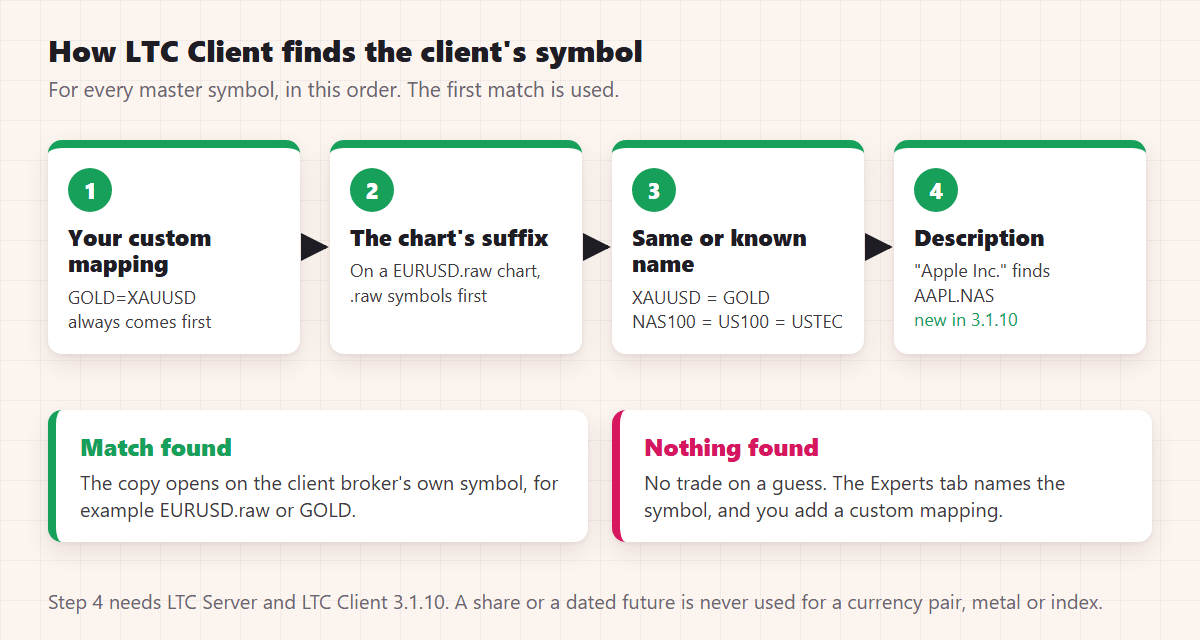
Automatic mapping never picks a dated futures contract or a share for a currency pair, a metal or an index, even if the name looks similar. And if nothing matches, it doesn’t open a trade on a guess: the Experts tab names the master symbol it couldn’t find.
The chart shows the suffix LTC Client detected, so you can check it at a glance:

When should you set the symbol names yourself?
Automatic mapping covers most setups. The other two modes are for special cases:
| Symbol Mapping Mode | What LTC Client does | Use it when |
|---|---|---|
| Automatic – detect from Client EA chart (default) | Reads the prefix and suffix from its chart, matches known alternative names and, since 3.1.10, descriptions | Almost always |
| Exact – use same symbol as Server | Uses the master’s symbol names unchanged | The master and the client are at the same broker, with the same account type |
| Custom – use prefix/suffix below | Adds the prefix and suffix you enter to every master symbol | The broker’s suffixes are irregular, or automatic mapping picked the wrong account group |
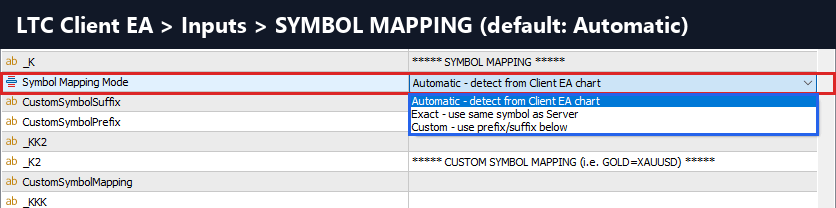
In Custom mode, enter the prefix in CustomSymbolPrefix and the suffix in CustomSymbolSuffix, right below the mode. They’re case-sensitive: type them exactly as the Market Watch window shows them, dots and dashes included.
How do you map a symbol with a completely different name?
Use CustomSymbolMapping in the LTC Client inputs. Write the master’s symbol, an equals sign and the client’s symbol, and separate several mappings with commas:
GOLD=XAUUSD,US30=DJ30,AAPL=#AAPL
The master’s name always comes first. Spell both names exactly as they appear in Market Watch, including any suffix. Custom mappings take priority over automatic mapping, so leave the mode on Automatic and add mappings only for the symbols it gets wrong or can’t find.
A mapping can also carry a lot multiplier as a third value. GER40=DE40=0.1 copies GER40 trades to DE40 and multiplies the master’s lot by 0.1 before LTC Client sizes the copy. That’s how you correct a contract size difference in the lot modes that don’t do it by themselves (see below).
For a long list, LTC Client can also read the mappings from a text file named LTC-sct.txt, one mapping per line in the same format. Put it in the client terminal’s data folder (File > Open Data Folder), under MQL4\Files or MQL5\Files. If a symbol appears in both places, the mapping in the inputs wins.
Why isn’t the same lot the same trade on gold and indices?
The contract size says how much one lot is. For forex pairs it’s almost always 100,000 units of the base currency. For metals, indices and oil it varies between brokers. If the master’s GER40 has a contract size of 1 (EUR 1 per point per lot) and the client’s DE40 has a contract size of 10 (EUR 10 per point), the same 1.00 lot is a position ten times bigger on the client.
To compare two brokers, right-click the symbol in Market Watch and choose Specification. Check the contract size, tick size, tick value, minimum volume and volume step on both accounts.
What Local Trade Copier does about a contract size difference depends on the lot mode (chapter 5):
| Lot mode | Contract size difference |
|---|---|
| AA and AAM | Adjusted automatically: the lot is multiplied by the master’s contract size divided by the client’s (in version 3.1.10, only when the master’s contract size is a whole number) |
| Same lot size, Multiply by X | Not adjusted: add a lot multiplier to the mapping, such as GER40=DE40=0.1 |
| Risk per trade (% or money) | Already included: the lot comes from the client’s own loss at the stop loss |
| Fixed lot size | You choose the lot: check the contract size before you set it |
Test each instrument with a small demo trade and compare the profit per point on both accounts. If the copy gains or loses much more or less per point than the master’s trade, the contract sizes differ.
Points or pips?
LTC Client settings that move prices, such as a stop loss in points, EmergencyStopLossPoints and ShiftEntryPoints, count in points, exactly as MetaTrader shows them. A point is the smallest price step of the symbol at that broker:
- EURUSD with 5 decimals: 1 point = 0.00001, so 1 pip = 10 points.
- Gold quoted with 2 decimals: 1 point = 0.01. With 3 decimals, 1 point = 0.001.
- Indices: 1 point can be 1.0, 0.1 or 0.01, depending on the broker.
To measure a distance in points, use the crosshair (Ctrl+F) and drag it across the chart. If the broker’s point size doesn’t suit your settings, CustomPointSizes sets your own, for example DAX40=0.1,XAUUSD=0.1.
By default, the master’s stop loss and take profit are copied at the same prices, so points don’t matter for them. They do matter when the two brokers’ prices differ, which is common for indices. Chapter 7 shows how to copy the distance instead of the price.
How do you test symbol mapping before you trade?
Use the pending-order test from chapter 4 for every symbol you trade, and especially for gold, indices and oil:
- On the master, place a pending order far from the price, with the smallest lot.
- On each client, check the symbol (the client broker’s own name) and the lot size.
- Delete the order on the master and check that the copies are deleted too.
Then make one small demo trade per instrument and compare the profit per point, to catch contract size differences.
Checklist
- LTC Client attached to a chart of the client broker’s own symbol name, from the account group you trade
- The panel shows the suffix you expect
- Every symbol you trade tested with a pending order: right name, right lot
- Contract sizes compared for metals, indices and oil
- Custom mappings only for the exceptions, spelled exactly as in Market Watch
Next: what to copy and how. Chapter 7 covers stop loss and take profit rules, pending orders, partial closes and filters.
All 10 chapters of the guide
The Definitive Guide to Forex Trade Copying: contents
- What trade copying is and how a trade copier works
- How to choose a trade copier: 12 questions
- Run several MT4 and MT5 terminals on one PC or VPS
- Set up a trade copier and copy your first trade
- Lot size and risk: how copied trades are sized
- Symbol mapping between brokers (you are here)
- Control what gets copied
- Run your copier 24/5 on a VPS, and scale up
- Prop firms, US FIFO rules and MT5 netting accounts
- Troubleshooting: why a trade wasn't copied

About the author
Rimantas Petrauskas
Rimantas Petrauskas is a software developer who has built trading tools for MetaTrader traders since 2009. He created Local Trade Copier in 2010 and still develops it today. It copies trades locally between MT4 and MT5 accounts on a trader’s own PC or VPS. He also created the Signal Magician trade copier, FxMagnetic and Equity Sentry EA. Rimantas is the author of two books: “How to Start Your Own Forex Signals Service”, which reached #4 in Amazon’s Forex category in its launch week, and “Trading Mindset Unlocked” (2025), a guide to the psychology of prop and retail traders. He runs Algonexis Technologies, based in Dubai.
Local Trade Copier
Try it on your own demo accounts
Local Trade Copier (LTC) by Algonexis Technologies copies trades between MT4 and MT5 accounts on your own Windows PC or VPS, with unlimited accounts per computer. Start the 7-day trial and copy your first trade between two demo accounts.
Card required. After 7 days the trial continues as the PERSONAL plan (€29 a month, 1 PC/VPS) unless you cancel. 30-day conditional money-back guarantee on your first purchase.