

TL;DR:
Trailing stop automation dynamically adjusts stop-loss levels as prices move in your favor, protecting gains and minimizing manual intervention. Different platforms handle it uniquely, with broker-side stops offering independence from terminal connectivity, enhancing reliability. Proper implementation requires understanding risks like slippage, gaps, and volatility to integrate it effectively into risk management and trade replication strategies.
Most retail forex traders treat their stop-loss as a one-time decision. You set it, walk away, and hope for the best. But that thinking misses the entire point of trailing stop automation, which is not a fixed order you forget about. It is a live, adaptive mechanism that follows price as it moves in your favor and cuts the position when momentum stalls. Many traders confuse it with a standard stop-loss, and that confusion costs real money. This guide breaks down what trailing stop automation actually is, how it works across platforms, and how to apply it inside a trade replication workflow.
Key Takeaways
| Point | Details |
|---|---|
| Dynamic stop loss | Trailing stop automation automatically adjusts your stop-loss to protect profits as price moves favorably. |
| Platform differences | MetaTrader uses EAs and Interactive Brokers attach trailing stops to entry orders with different automation behavior. |
| Execution risks | Trailing stops submit market orders upon trigger, which may execute at prices different from the stop price. |
| Trade replication use | Trailing stop automation streamlines risk management by offloading stop adjustment to brokers post-entry. |
| Calibration needed | Setting the right trailing distance and step is crucial to match forex instrument volatility and avoid missed triggers. |
What is trailing stop automation and how does it work?
Trailing stop automation is the process of automatically adjusting your stop-loss level as price moves in your favor, without any manual input. It adjusts the stop price as the asset price moves favorably and closes the position when price reverses by the configured trailing distance. The stop only moves in one direction. For a long trade, it moves up. It never steps backward.
Two parameters control everything:
- Trailing distance: how far below the current price your stop sits (for long trades)
- Trailing step: the minimum price movement needed before the stop adjusts upward
The trailing step matters more than most traders realize. Without it, every tick would trigger a recalculation, which creates server load and erratic stop behavior on volatile pairs. Setting a trailing step of 10 pips on EUR/USD, for example, means the stop only repositions after every 10-pip gain, keeping the logic clean and predictable.
Here is a simple trailing stop loss example. You buy EUR/USD at 1.0800 and set a 30-pip trailing stop. Your initial stop sits at 1.0770. Price moves to 1.0850. Your stop automatically advances to 1.0820. Price then reverses and hits 1.0820. The trade closes. You captured 20 pips instead of losing 30. The automation did the work.
Compare that to a fixed stop-loss, which stays where you placed it. If you had left the stop at 1.0770 while price ran to 1.0850 and reversed to 1.0760, you would have turned a winning position into a loss. That is the core difference between trailing stop vs fixed stop: one locks in gains dynamically, the other does not move at all.
One of the cleanest ways to understand how trailing stops work inside a broader system is to automate forex trading with MetaTrader, where trailing stop logic can be embedded directly into an Expert Advisor strategy.
Platform implementations: MetaTrader, Interactive Brokers, and broker order types
Different platforms handle trailing stop automation in very different ways, and getting this wrong is a common source of frustration.

Trader using MetaTrader on laptop workspace
Interactive Brokers attaches trailing stops directly to parent limit orders. An IBKR auto trailing stop is a limit order with an attached trailing stop that activates automatically after the parent order fills. This means the broker’s server handles all the stop ratcheting. You set the rules once, and the exchange infrastructure does the rest.
MetaTrader 4 and MetaTrader 5 work differently. The platform has a built-in trailing stop feature in the terminal, but it only runs while the terminal is open and connected. For true automation, EAs manage trailing stop logic by monitoring positions and adjusting stops following rule sets. This is a fundamental distinction. EA-driven trailing stops are more flexible but depend on the terminal running continuously, which is why a VPS is almost mandatory for serious use.
Key differences to keep in mind:
- Broker-side trailing stops (like IBKR) run on the broker’s servers, independent of your terminal connection
- EA-driven trailing stops on MetaTrader require an active terminal and execute locally
- Broker-attached stops reduce execution latency because no round-trip to your machine is needed
- EA stops offer more customization, including dynamic trailing based on ATR or volatility indicators
- Parameter ranges differ by platform: IBKR uses dollar or percentage trailing, MetaTrader typically uses points or pips
Pro Tip: If you are managing trailing stops for multiple client accounts via a trade copier, consider configuring stop loss and take profit settings on the server EA level so copied trades carry stop parameters from the master account rather than requiring manual input per client.
Key nuances and risks in trailing stop automation for forex trading
Understanding the mechanics is one thing. Understanding what can go wrong is another, and the two are not the same lesson.
One of the most overlooked rules about trailing stops is session timing. Trailing stops only trigger during regular market hours and may not execute in pre-market or after-hours sessions, affecting trade exit timing. For forex traders on currency pairs that trade 24 hours, this matters most around broker maintenance windows or when trading exotic pairs with limited liquidity sessions.
The execution risk is equally important. When a trailing stop triggers, it submits a market order with no price guarantee, meaning slippage or price gaps may occur. The stop level is not a guaranteed fill price. It is a trigger point.
Here are the most common execution risks in trailing stop automation:
- Slippage on fast-moving pairs: EUR/JPY or GBP/USD during news events can gap past your stop
- Weekend gaps: positions held over Friday close can open Monday well beyond the stop level
- Broker spread widening: some brokers widen spreads during low-liquidity windows, triggering stops prematurely
- Trailing step miscalibration: too small a step causes stop chasing; too large a step negates the automation benefit
The 2015 Swiss Franc flash crash is the clearest case study in trailing stop execution risk. When price gapped hundreds of pips instantly, trailing stop orders triggered as market orders and filled dramatically below the stop level. The automation executed correctly. The fills were catastrophic. That distinction matters: trailing stops do not fail at the mechanism level. They fail when market structure creates gaps larger than the stop distance.
Understanding when stop loss or take profit events execute in your replication setup is critical to building automation you can actually trust under real market conditions.
Applications of trailing stop automation in trade replication and risk management
Trade replication adds a layer of complexity to trailing stop automation because you are not managing one position. You are managing copies of that position across multiple accounts, potentially at different lot sizes. This is where the benefits of trailing stop automation become most visible.
Here is a step-by-step approach to implementing trailing stop automation inside a replication workflow:
- Set the trailing stop on the master account with your chosen distance and step, calibrated to the pair’s average daily range
- Confirm your trade copier handles stop parameters on the copied trade, either by mirroring the master stop or by allowing per-account stop adjustments
- Use broker-attached trailing stops where available so the broker handles ratcheting independently after each order fills
- Test the full chain on a demo account before live deployment, specifically checking that copied stops move in sync with the master
- Monitor the first live batch of trades manually to confirm automation behavior matches expected logic
The replication workflow includes pairing entry brackets with attached trailing stops so the broker handles stop ratcheting automatically after order fills. This offloads the mechanical work from your replication software and places it where it belongs: on the broker’s execution infrastructure.
Trailing stop automation removes the need to continuously monitor trades by automating exits when momentum reverses by the trailing amount. For independent account managers running 10, 20, or 50 client accounts simultaneously, that difference is not just convenient. It is operationally necessary.
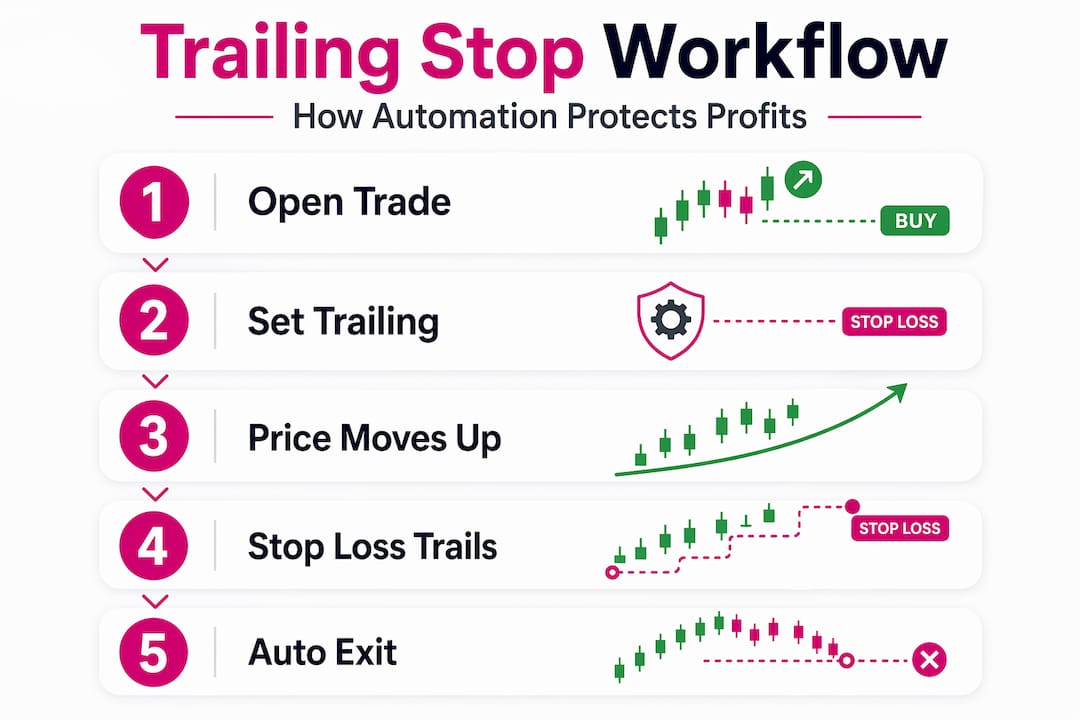
Infographic with steps in trailing stop automation
Pro Tip: Match your trailing distance to the instrument’s average true range (ATR). A 20-pip trailing stop on a pair averaging 150 pips per day will get stopped out on normal noise. A distance of 50 to 80 pips gives the trade enough room to breathe while still protecting the bulk of your gains.
The overlooked complexities and opportunities in trailing stop automation
Here is something most articles on this subject will not tell you: trailing stop automation rewards traders who treat it as a system design problem, not a feature to toggle on.
The most common mistake among experienced traders is assuming trailing stop automation is set-and-forget. It is not. The trailing step and distance need to reflect the current volatility of the instrument, not the volatility from last month. EUR/USD during a quiet Asian session behaves nothing like EUR/USD during a Fed announcement. A single fixed trailing distance fails across both environments.
There is also a less obvious risk specific to MetaTrader multi-trade accounts. When you run platform-level trailing stops across multiple open positions on the same account, those positions share the same terminal-level automation logic. This can create unintended coupling between unrelated trades. If the terminal restarts or the EA pauses for any reason, all trailing stops across all positions freeze until the EA resumes. Account managers running client portfolios need to design around this explicitly, not hope it does not happen.
Broker-side trailing stops sidestep this entirely. Because the trailing logic lives on the broker’s servers, it runs regardless of your terminal state. That is a meaningful architectural advantage that professional reliance on automation increasingly favors for multi-account execution.
Automation does reduce emotion in exits, which is genuinely valuable. Most traders exit too early when a position is winning and too late when it is losing. A trailing stop solves the first problem mechanically. But it does not solve slippage, it does not solve weekend gaps, and it does not solve the miscalibration problem. Those require active oversight.
The traders who extract the most from trailing stop automation treat it as one layer in a risk management system, not as the whole system.
Integrate trailing stop automation with seamless trade copying on MT4 and MT5
Trailing stop automation works best when your trade execution infrastructure keeps up with it. Slow copy speeds or cloud routing delays can cause client account stops to lag behind the master, which breaks the entire risk design.
Local Trade Copier replicates trades across MT4, MT5, and DXTrade accounts in 1 second or faster under normal market conditions, running entirely on your local machine or VPS with no cloud routing. When you configure trailing stops on the master account, copied trades carry those stop parameters to client accounts instantly. The software includes built-in support for stop loss and take profit waiting events, so your replication logic accounts for stop movement correctly rather than treating it as a new order. You can also review the full forex replication workflow guide to see how trailing stop automation fits into a complete multi-account setup. Start with the Local Trade Copier installation guide and a 7-day free trial to test your trailing stop configuration before going live.
Frequently asked questions
What exactly does trailing stop automation do in forex trading?
Trailing stop automation automatically adjusts your stop-loss as price moves in your favor, protecting profits without any manual input required.
Can I use trailing stop automation on all forex platforms?
Most major platforms support it, but implementation differs significantly. MetaTrader relies on EAs for trailing logic, while IBKR uses attached trailing stop orders that activate after the parent order fills.
Are trailing stop orders guaranteed to execute at the stop price?
No. Trailing stops trigger as market orders when activated, meaning execution price can differ from the stop price due to slippage or gaps.
How does trailing stop automation improve trade replication for independent account managers?
It moves stop management to the broker level after each order fills, so stop ratcheting runs automatically without adding complexity to the replication software.
What are the risks of using trailing stop automation in volatile forex markets?
The main risks include slippage on fast moves, execution gaps over weekends, and delayed triggers outside regular sessions, all of which can affect your actual exit price.
