

TL;DR:
- A trade copier for mentorship programs automatically replicates trades from a mentor’s account to student accounts in real time, providing consistency and reducing manual effort.
- It requires both master and follower terminals to run simultaneously on the same Windows machine or VPS, ensuring fast, reliable synchronization without external servers.
A trade copier for mentorship programs is software that automatically mirrors trades from a mentor’s master account to multiple student accounts in real time, ensuring every follower receives the same entry, exit, and lot size without manual intervention. The industry term for this category is “local trade copier,” which distinguishes on-machine execution from cloud-based social trading platforms. Tools like Mt4copier run as Expert Advisors on MetaTrader 4, MetaTrader 5, or DXTrade, replicating fills across accounts in under 0.5 seconds with no external server involved. For educators running structured forex mentorship programs, this technology removes the bottleneck of manual re-entry and creates a consistent, repeatable learning environment for every student.
What does a trade copier for mentorship programs require to set up?
The technical foundation matters more than most educators expect. A local trade copier requires both the master terminal and each follower terminal to run simultaneously on the same Windows machine or VPS. Local copiers use shared file systems or memory mapping to sync trades, which eliminates external server latency and keeps all account data on one IP address. That architecture is what separates professional-grade replication from browser-based copy trading platforms.
Platform compatibility
MetaTrader 4 and MetaTrader 5 are the two dominant platforms for local trade copying in forex mentorship settings. Mt4copier supports both, plus DXTrade, under a single subscription. Educators whose students use different broker platforms can copy from an MT4 master to MT5 followers, or from MT5 to DXTrade, without switching tools. Understanding MT4 vs MT5 differences before setting up your program saves significant reconfiguration time later.
Step-by-step setup overview
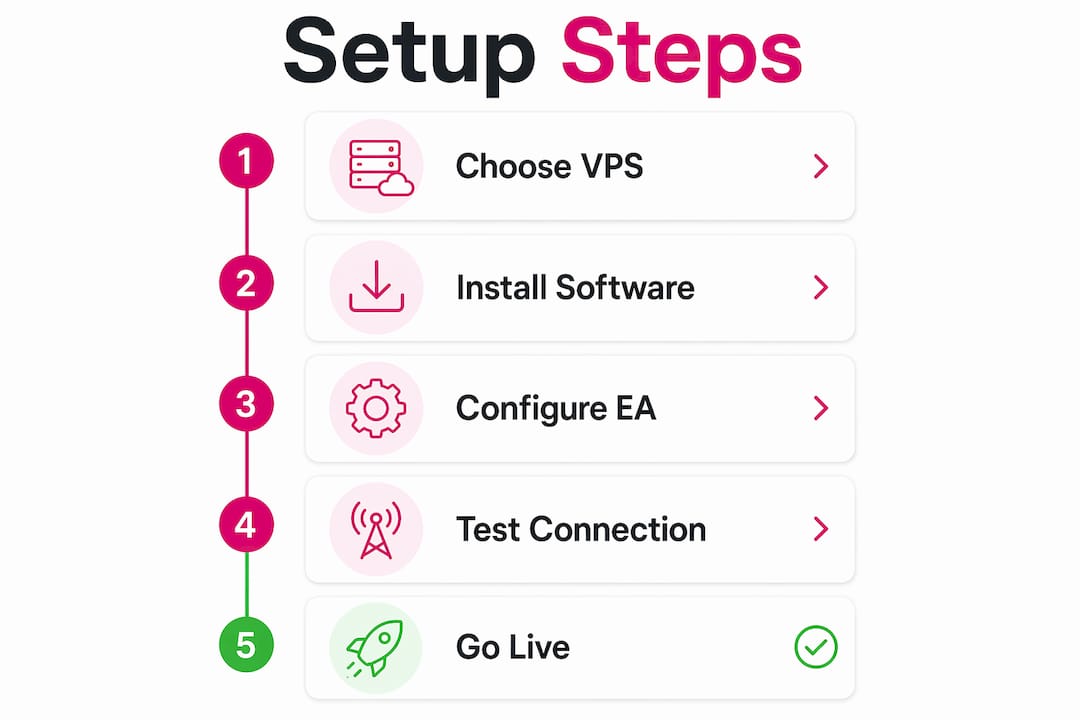
- Choose your hardware. A dedicated Windows VPS with administrative control is the standard choice for 24/5 operation. Professional-grade local copiers require dedicated Windows VPS access because shared hosting environments introduce interruptions and cloud-routing latency.
- Install the Expert Advisor on both terminals. The master EA sends trade signals; the follower EA receives them. Both must run inside the same machine environment.
- Match software versions. Mismatched software versions between master and follower terminals are one of the most common causes of copy failures. Always install the same build on every terminal.
- Configure lot sizing per student. Mt4copier offers 18 lot size and risk management options, including automatic scaling based on each follower account’s balance.
- Test on demo accounts first. Run the full setup on demo before going live with student accounts. This catches identifier mismatches and connectivity issues before real capital is involved.
Pro Tip: Choose a VPS with at least 2GB RAM, a Windows Server 2016 or later operating system, and a stable connection under 50ms latency to your broker’s server. Cheap shared VPS plans frequently restart without warning, which breaks the copy chain mid-session.
How do risk management features protect students in mentorship programs?
A mentorship copier must do more than mirror entries. Built-in risk management tools protect both the mentor’s reputation and each student’s capital. Without these controls, a single bad trade on the master account can cascade across every follower account simultaneously.
The most critical risk controls to configure in any mentorship setup include:
- Daily loss limits. Set a maximum drawdown per follower account per day. When the limit is hit, the copier stops accepting new trades automatically.
- Profit targets. Define a daily profit ceiling so the copier pauses copying once a student account reaches a set gain. This prevents overtrading on winning days.
- Automatic liquidation. Account Risk Manager features can close all open positions on a follower account when a drawdown threshold is breached, protecting the student from further loss.
- Exit shields. Restrict follower accounts from manually editing stop-loss or take-profit levels set by the master, preserving the original trade structure.
- Per-account risk adjustment. Assign different lot multipliers to different students based on their account size and risk tolerance. A student with a $1,000 account should not receive the same raw lot size as one with a $10,000 account.
The difference between simple mirroring and advanced risk management is significant. Simple mirroring copies every trade at face value. Advanced copiers like Mt4copier apply per-account scaling, enforce loss caps, and offer both Orders Mode and Executions Mode to match different trading styles and risk preferences. Past results do not guarantee future performance.
Pro Tip: Always configure the Account Risk Manager before your first live copy session. A mentor’s drawdown on the master account becomes every student’s drawdown simultaneously. One unchecked loss event can damage trust across your entire program.
What are best practices for managing client engagement with trade copiers?
Transparency is the single most important operational practice for educators using local trade copiers. Students often confuse platform-based social trading with local copiers that require a VPS and dedicated terminal setup. Clarifying this distinction upfront prevents frustration and support requests later.
Practical engagement strategies that work in structured mentorship programs:
- Send students a written setup guide before their first session. Include screenshots of the terminal configuration and VPS login steps.
- Schedule a live onboarding call to walk through the installation. Students who complete setup with a mentor present have far fewer technical issues afterward.
- Create a shared monitoring dashboard or spreadsheet where students can track their follower account performance alongside the master account.
- Set a weekly check-in cadence to review any copy discrepancies, slippage differences, or broker-specific execution gaps.
The table below shows how a mentorship program changes when trade copying is added as a structured feature.
| Feature | Without trade copier | With trade copier |
|---|---|---|
| Trade delivery | Manual alerts via Telegram or email | Automatic, sub-second replication |
| Consistency | Varies by student reaction time | Identical entries across all accounts |
| Risk control | Student-managed, inconsistent | Centrally configured per account |
| Scalability | Limited by mentor’s manual capacity | Scales to dozens of follower accounts |
| Program pricing | Standard subscription | Premium add-on tier possible |
Mentorship programs that add copy trading as a premium feature can charge meaningfully more. Copy trading add-ons typically start at $250 per month for members within structured mentorship offerings as of 2026. That pricing reflects the operational value of automated, consistent trade delivery. Educators who manage their tax exposure on that additional income can benefit from reviewing tax reduction strategies relevant to high-income earners.
How do you troubleshoot common trade copier mistakes in mentorship programs?
Most copy failures trace back to a small set of repeatable errors. Catching them early prevents the kind of downtime that erodes student confidence.
The most frequent issues educators encounter:
- Mismatched account identifiers. The master and follower EAs must share the same channel ID or file path. A single character difference breaks the connection silently.
- Terminal not running as administrator. MetaTrader requires administrator privileges on Windows to write to shared file locations. Without this, the copier runs but copies nothing.
- VPS restarts or disconnections. An unstable VPS drops the copy chain mid-session. Dedicated Windows VPS with admin control is the standard for reliable 24/5 operation.
- Broker symbol name differences. The master account may trade “EURUSD” while the follower broker uses “EURUSDm” or “EURUSD.pro.” Symbol mapping must be configured manually in the copier settings.
- Rejected orders on follower accounts. Brokers sometimes reject orders due to minimum lot size rules, margin requirements, or trading hour restrictions. The copier logs these rejections, but the mentor must check them regularly.
When a copy stops working mid-session, the fastest diagnostic is to check the trade copier troubleshooting guide before restarting terminals. Restarting without diagnosing often masks the root cause and creates the same failure again.
Pro Tip: Run a parallel demo account alongside every live follower account during the first two weeks of a new mentorship cohort. Demo accounts reveal copy errors without financial consequences, giving you time to fix configurations before they affect real student capital.
Key Takeaways
A local trade copier is the most reliable tool for delivering consistent, risk-controlled trade replication across student accounts in a structured forex mentorship program.
| Point | Details |
|---|---|
| Local execution is non-negotiable | Both master and follower terminals must run on the same Windows machine or VPS for reliable copying. |
| Risk controls protect everyone | Configure daily loss limits, profit targets, and auto-liquidation before the first live session. |
| Transparency reduces support load | Educate students on the VPS setup requirement upfront to prevent confusion and technical complaints. |
| Premium pricing is justified | Copy trading add-ons in mentorship programs typically start at $250 per month, reflecting real operational value. |
| Troubleshoot before restarting | Check identifier mismatches and broker symbol names first; blind restarts repeat the same errors. |
Why trade copiers changed how I think about forex education
The first time I watched a mentor manually paste trade alerts into a Telegram group while simultaneously managing open positions, I understood the core problem. The mentor was splitting attention between the market and the students, and doing neither well. A local trade copier removes that split entirely.
What surprises most educators is how much the technology changes the structure of the program, not just the delivery speed. When students receive trades automatically, the mentor’s time shifts from execution logistics to explanation and review. That shift is where real learning happens. A student who sees a trade appear in their account and then hears the mentor explain the reasoning in a live session retains far more than one who scrambles to enter manually from a Telegram alert.
The risk management layer is where I see the most ethical weight. A mentor who copies trades to student accounts without configuring loss limits is transferring risk without transferring control. That is not education. It is exposure. The Account Risk Manager features in tools like Mt4copier exist precisely to prevent that scenario, and I think every educator running a copy-based program should treat those settings as mandatory, not optional.
My honest observation after years of working with this software: the mentors who succeed long-term are the ones who treat the copier as infrastructure, not as the product. The product is the mentor’s judgment, explained clearly. The copier just makes sure every student experiences that judgment at the same moment, at the right position size, with the right guardrails in place.
— Rimantas
Mt4copier makes trade replication practical for educators
Running a mentorship program with manual trade alerts is a ceiling. At some point, the number of students outgrows what one person can manage by hand. Mt4copier removes that ceiling by handling the replication automatically, on your own machine, with no cloud routing and no third-party server between you and your students’ accounts.
Mt4copier supports MT4, MT5, and DXTrade under one subscription, with 18 lot sizing options and a full Account Risk Manager built in. The installation guide walks through the full setup process, and a demo video shows the configuration in real time. A 7-day free trial is available, and the software has served 3,000+ users since 2010 with 491 Trustpilot reviews. If you are building or scaling a mentorship program, Mt4copier is the place to start.
FAQ
What is a local trade copier for mentorship programs?
A local trade copier is Expert Advisor-based software that replicates trades from a mentor’s master account to student follower accounts in real time, running on a single Windows machine or VPS with no cloud routing.
Does a trade copier work across MT4 and MT5 accounts?
Yes. Tools like Mt4copier support cross-platform copying across MT4, MT5, and DXTrade accounts under one subscription, including MT4-to-MT5 and MT5-to-DXTrade replication.
How much do mentorship programs charge for copy trading access?
Copy trading add-ons in structured mentorship programs typically start at $250 per month for members and up to $500 per month for standalone access as of 2026.
What causes a trade copier to stop copying trades?
The most common causes are mismatched channel identifiers between master and follower EAs, broker symbol name differences, and VPS disconnections. Checking the copier’s log files is the fastest first diagnostic step.
Do students need their own VPS to use a local trade copier?
Yes. Each student running a follower terminal needs either a dedicated Windows VPS or a local Windows PC that stays online continuously during trading hours. Shared hosting or MT5 virtual hosting is not reliable for this purpose.
Recommended
- Prop trading best practices: Multi-account copying in 2026
- Trade Copier | MT4 MT5 DxTrade | Forex Copy Trading Software
- Trade Copier Hacking Secrets Masterclass | Trade Copier for MT4 & MT5
- Trade Copier | MT4 MT5 DxTrade | Forex Copy Trading Software
