

Low latency copying means running your master and slave MetaTrader or DXTrade terminals on the same Windows machine or VPS, so trade replication happens with minimal internal delay instead of routing through a cloud relay. For scalpers, funded-account traders, and EA users, that local architecture is the practical requirement, not a nice-to-have. The immediate next step: run a basic master-to-slave timestamp test on a properly sized Windows VPS before you trust any copier with real capital.
TL;DR:
- Local trade copiers run on a single Windows machine or VPS, minimizing latency to under 0.5 seconds and avoiding extra network delays common with cloud relays.
- Hardware should prioritize high CPU clock speed over core count, with a minimum of 4GB RAM to support multiple terminals comfortably, and “Allow DLL imports” must be enabled for proper operation.
- Running tests during quiet periods and volatile news events to record master-to-slave latency can help ensure your setup maintains low delays under different market conditions.
- Vertical communication over TCP in local setups avoids protocol overhead, while external broker connections depend largely on physical proximity rather than connection protocol.
- For best timing, process each trade immediately and avoid batching, with lightweight message formats improving speed and reducing parsing delays.
Why Low-Latency Copying Matters for Tight-Stop Strategies
Scalping and short-target intraday strategies live or die on tens to hundreds of milliseconds. A trade that fills 300ms late during a spread spike isn’t the same trade anymore. Once a strategy’s edge is measured in a handful of pips, replication delay eats directly into that margin.
There’s also a detection angle that surprises a lot of funded-account traders. Cloud copiers route signals through an external relay, which means multiple client accounts can share identical timestamps and IP signatures. Prop firms watch for exactly that pattern. Local copiers keep everything on the trader’s own machine, which avoids the shared-IP fingerprint that triggers automated risk reviews.
Delay compounds fast in volatile conditions:
- News spikes widen spreads in the seconds after release, so even small replication lag can shift entries onto a worse quote.
- Overlapping session opens (London/New York) create bursts of order flow that stress polling intervals and queue processing.
- A slave terminal running low on memory after hours of uptime slows internally, adding delay on top of network lag.
Internal replication on a local setup can run with very low latency, while a cloud relay typically tacks on an extra network delay in the range of 100 to 500 milliseconds. For a strategy targeting 10 to 15 pips, that gap is not trivial.
Local vs Cloud Trade Copiers: Where the Latency Actually Comes From
The two architectures move trade data through completely different paths. A local copier uses shared memory or inter-process communication between terminals sitting on the same machine. A cloud copier sends the signal out to an external server, which processes and redistributes it back down to each client terminal.
That extra hop is where the time goes:
- Local path: master terminal → shared memory/IPC → slave terminal → broker server. Internal steps happen in milliseconds.
- Cloud path: master terminal → webhook → cloud API → relay server → each client terminal → broker server. The relay round-trip is the added cost.
Vendors usually report the fastest link in that chain, not the full journey, which is why two products claiming “instant” execution can behave very differently in practice. Our own comparison of local versus cloud architectures breaks down where each layer’s latency budget actually goes.
Cloud copiers do have a real advantage: they run without a dedicated Windows machine and tend to be simpler for traders who never touch a VPS. That convenience is worth trading for latency only when the strategy tolerates a wider execution window and there’s no prop-firm detection risk to worry about.
Building a Low-Latency Local Copier Setup
Getting local replication right is mostly about sizing the machine correctly and not fighting MetaTrader’s own quirks. Work through this in order.
- Pick a real Windows VPS, not an MQL5 VPS. MQL5’s virtualized VPS blocks DLL imports and local inter-process communication, which means it simply cannot run a local copier EA. You need a standard Windows VPS or an on-premises machine.
- Size RAM to your terminal count. MT4 typically starts with moderate memory usage and grows over hours of uptime; MT5 starts with higher memory use. A 4 GB VPS accommodates a moderate number of MT4 terminals with a buffer for memory spikes, as described in VPS sizing guidance.
- Prioritize CPU clock speed over core count. MetaTrader terminals are mostly single-threaded, so a VPS with a higher clock speed on fewer cores outperforms a multi-core box running at a lower clock.
- Enable “Allow DLL imports” globally and per EA. This setting is required for the copier EA to communicate across terminals; skipping it is the single most common reason a fresh install refuses to copy anything.
- Install the copier EA identically on every terminal. Master and slave installs need matching versions and consistent chart attachment, including on any terminal you add later.
- Set symbol suffix mapping before you go live. Brokers append different suffixes (EURUSD vs EURUSD.m), and a copier that can’t map symbols will silently skip trades.
- Use balance-proportional lot sizing. A production-grade local copier synchronizes market orders, pending orders, and SL/TP while scaling lots to each account’s balance, so risk stays consistent across accounts of different sizes.
- Tune the sync interval conservatively. Default polling intervals are set for a reason; pushing below 100ms rarely gains meaningful speed and can overload the terminal under load.
- Build in operational hygiene. Schedule terminal restarts, rotate logs, and monitor memory growth so a slow leak doesn’t turn into a missed trade three days later.
Pro Tip: Log both the terminal timestamp and the broker order ID on every test trade. That combination is the only reliable way to tell whether a delay came from your copier or from the broker’s own fill time.
How to Measure and Validate Master-to-Slave Latency
Vendor claims and your own results rarely match, because most vendors measure internal processing time, not the full master-to-broker chain. Run your own test before trusting any number.
- Record three timestamps for every test trade: master send, slave receive, and broker acknowledgment.
- Place a series of timed market orders during quiet hours, then repeat the same test during a news release or session overlap to simulate load.
- Log every result and calculate both the median latency and the tail latency (the slowest 5 to 10% of trades).
The median tells you how the system behaves normally. The tail is what determines whether your edge survives a volatile session, since that’s exactly when a scalping strategy needs to speed the most.
Common Causes of Copy Delay and How to Fix Them
Most copying problems trace back to one of four causes:
- VPS memory growth causing terminal slowdown or crashes. Schedule daily or weekly restarts, or upgrade to a larger RAM tier if terminals are consistently pushing past their buffer.
- DLL imports disabled, globally or per EA. Re-check “Allow DLL imports” in both the terminal’s global options and the individual EA properties tab.
- Symbol mismatches and lot rounding errors. Configure explicit symbol mapping per broker suffix and confirm balance-proportional sizing is active, not fixed lots.
- Broker-side delays that no copier can fix. Broker response times can range from about one second to well over 60 seconds during peak volatility, and that bottleneck sits entirely outside the copier’s control.
Pro Tip: If fills are consistently slow only on one broker across all your accounts, that’s a broker RTT problem, not a copier problem. Test the same setup against a different broker before assuming your software needs fixing. For a deeper troubleshooting walkthrough, see why a trade copier copies with delay.
TCP, UDP, and WebSocket: How the Connection Type Affects Copying Speed
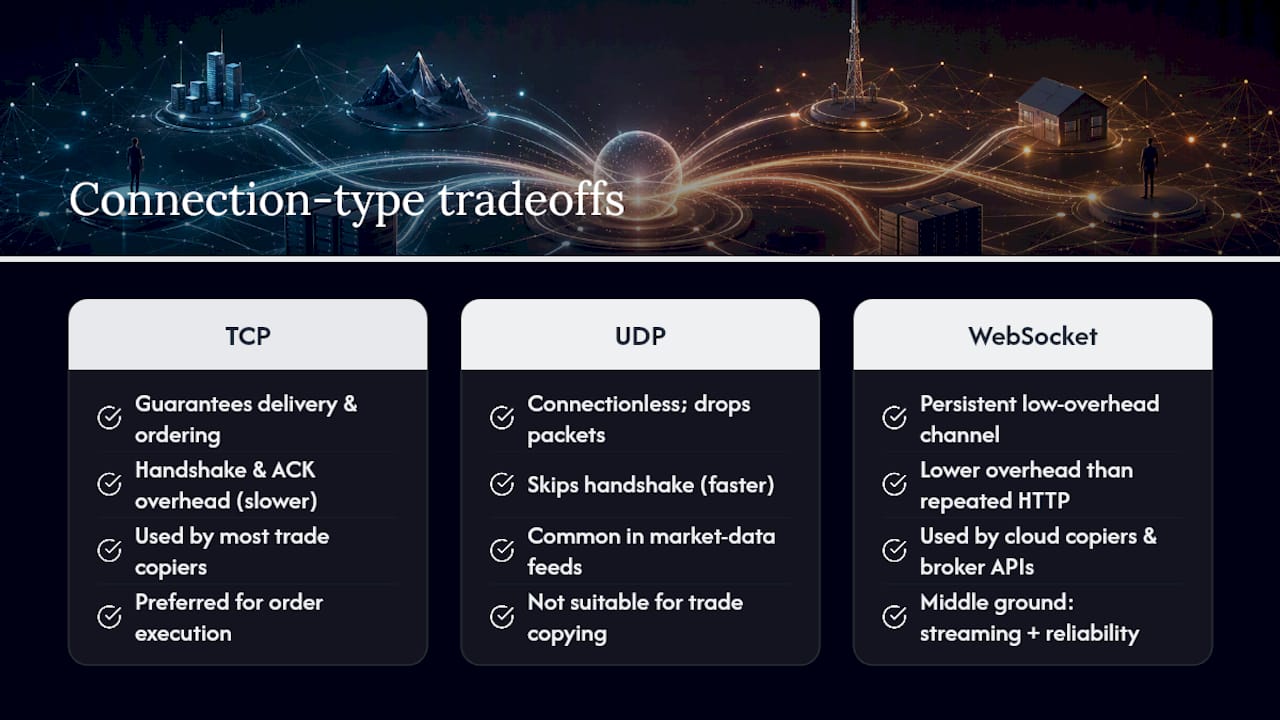
Most trade copiers, local and cloud alike, move data over TCP because it guarantees delivery and ordering, which matters when a missed packet means a missed trade. The tradeoff is TCP’s handshake and acknowledgment overhead, which adds a small but real delay compared to a connectionless protocol.
UDP skips that overhead and moves faster, but it drops packets without retrying, which is a bad trade for order execution data where a lost message means a lost trade. That’s why UDP shows up in market-data feeds far more often than in trade-copying pipelines, where reliability outweighs raw speed.
WebSocket connections sit in between. They keep a persistent, low-overhead channel open between client and server, which is why cloud-based copiers and broker APIs increasingly lean on WebSocket for streaming price updates and order confirmations instead of repeatedly opening new HTTP connections. For a local setup, none of this really applies, since master and slave terminals communicate through shared memory or inter-process calls on the same machine rather than over a network stack at all. That’s a meaningful part of why local replication avoids the protocol overhead entirely: there’s no TCP handshake to wait on when both terminals live on the same box.
Where protocol choice does matter for a local trader is the leg between your VPS and the broker’s server. That connection almost always runs over TCP, and its round-trip time depends far more on physical distance and broker infrastructure than on any setting you control. Choosing a VPS region close to your broker’s server, something covered in more detail in how network latency to broker servers affects copier speed, does more for that leg than any protocol tweak.
Optimizing Data Serialization for Faster Trade Replication
Every trade a copier sends, whether market order, pending order, or SL/TP update, has to be packaged into a message before it moves anywhere. How that message is built affects speed more than most traders realize.
Lightweight, fixed-structure messages process faster than verbose, deeply nested formats. A copier sending a compact struct with symbol, volume, price, and order type parses in microseconds. One wrapping the same data in a heavier, human-readable format like full JSON with descriptive field names adds parsing overhead on both ends, small per message, but it adds up across dozens of accounts and hundreds of daily trades.
Batching matters too, but only in the right direction. Grouping multiple unrelated trade signals into a single transmission to save overhead sounds efficient, but it introduces a queuing delay: the first trade in the batch waits for the last one before anything gets sent. For latency-sensitive copying, sending each trade signal the moment it fires, rather than waiting to bundle it with others, keeps the whole pipeline faster even though it means more individual messages.
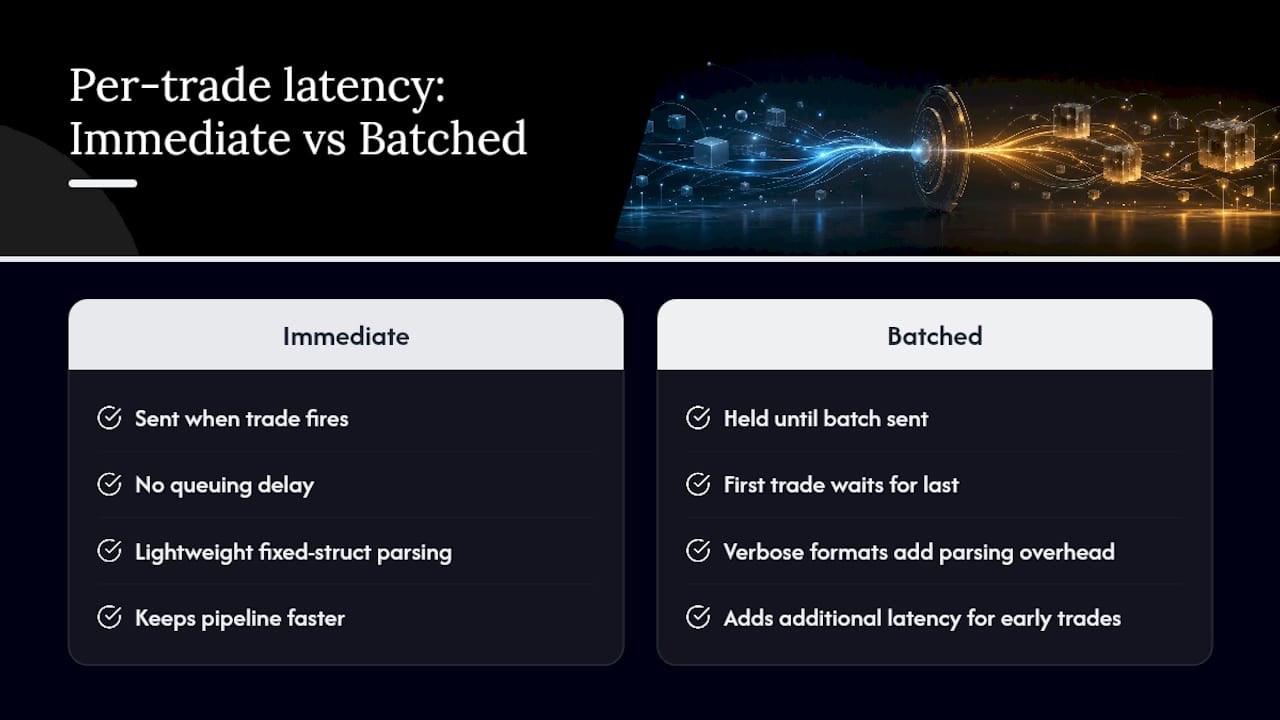
The practical takeaway for traders evaluating any copier: ask whether it processes trades individually and immediately, or queues and batches them. A copier that synchronizes market orders, pending orders, and SL/TP changes as discrete, immediate events rather than periodic batch updates will consistently replicate faster, especially across multiple client accounts.
Why Real-Time Price Feeds Matter for Copy Speed
A trade copier only replicates orders, it doesn’t generate them, but the quality of the price feed feeding your master terminal still shapes how fast that master reacts in the first place. A delayed or throttled feed means your master EA sees a stale price, decides to trade later than it should, and passes that lag straight down to every slave account.
Most brokers stream quotes continuously to the terminal rather than on a fixed polling schedule, which is why a stable, low-latency connection to your broker’s price server matters as much as the copier’s own internal speed. If your VPS sits geographically far from your broker’s servers, the price feed itself arrives slower, and no copier setting fixes that.
This is also where polling interval settings inside the copier come into play, but not the way people expect. A shorter poll interval doesn’t create data, it just checks for new orders more frequently. If the underlying price feed only updates every few hundred milliseconds, polling every 10ms accomplishes nothing except extra CPU load. Match your sync interval to something sensible relative to your feed’s actual update rate rather than pushing it as low as possible.
For funded-account traders running the same strategy across several brokers, feed consistency between master and slave accounts is worth checking too. If the master account’s broker feeds prices faster than a slave account’s broker, some divergence between the master’s entry and the slave’s fill is unavoidable, and it’s a feed issue rather than a copier fault.
Security Settings That Can Quietly Add Latency
Encryption and firewall rules exist for good reason, but they aren’t free. Every layer of security a setup adds introduces some processing overhead, and on a trade copier, that overhead lands directly in the execution path.
TLS encryption on any network connection, whether it’s your VPS’s remote desktop session or a broker’s API connection, adds a handshake and ongoing encryption/decryption cost. For a local copier, this overhead barely registers since terminal-to-terminal communication doesn’t cross a network boundary in the first place. It matters more for the broker connection itself, where TLS is standard and non-negotiable, but the added delay is typically small next to broker processing time.
Firewall configuration is where traders more often shoot themselves in the foot. An overly aggressive firewall or antivirus real-time scanner can inspect every packet the terminal sends or receives, adding inspection delay to each trade signal. The fix isn’t disabling security, it’s configuring exceptions correctly: whitelist your terminal executables and the copier’s process in both the Windows Firewall and any third-party antivirus so legitimate trade traffic isn’t queued for inspection.
VPS remote access adds one more consideration. Leaving Remote Desktop Protocol open on default ports with weak credentials is a common attack vector, and a compromised VPS undermines every latency optimization made elsewhere. Strong, unique passwords and a non-default RDP port cost nothing in terms of speed and close an obvious risk. For a fuller rundown of hardening a copier setup without sacrificing performance, see trade copier security best practices.
Why We Recommend Local Copying
This trade copier software is an established Expert Advisor based system with a sizable user base and numerous Trustpilot reviews, making it a recognized locally-installed copier for MT4, MT5, and DXTrade. That track record shapes the guidance in this piece: sub-0.5-second local execution and 18 lot size and risk management options exist specifically to keep replication fast without routing trade data through a cloud server.
Rimantas has spent years building and refining trade copier software for retail and funded-account traders, watching firsthand which architectural choices actually hold up under real broker conditions versus which ones just look good in marketing copy. That’s the lens behind every recommendation here: prioritize what’s measurable over what’s promised.
— Rimantas
Try Local Trade Copier: Demo, Pricing, and Next Steps
Everything in this guide points toward one architecture: local execution on a properly sized Windows machine. This trade copier software is built around exactly that. It runs entirely on your PC or VPS with no cloud routing, offers sub-0.5-second local execution, and supports cross-platform copying across MT4, MT5, and DXTrade, along with several lot size and risk management options to keep sizing consistent across accounts of different balances.

If you want to see the setup before committing, the demo walkthrough shows installation and copying behavior on live terminals. From there, the installation guide walks through the same DLL and symbol mapping steps covered above. Plans start with the PERSONAL Plan at 29€ per month, with MANAGER and VIP tiers available for account managers and higher-volume setups, and every plan includes a 7-day free trial. Past results do not guarantee future performance. Local Trade Copier is trade replication software only. It copies existing trades and has no market logic, strategy layer, or influence on trading outcomes.
Sources
- Local Trade Copier: Technical Guide to Latency and VPS
- Local vs Cloud Trade Copier: Which Is Best?
- How to Manage Multiple Prop Firm Accounts from One Master Account in a Local Trade Copier – Analytics & Forecasts – 17 June 2026 – Traders’ Blogs
FAQ
What Is Low Latency Copying in Forex Trading?
It means running master and slave trading terminals on the same local machine or VPS so trades replicate with minimal internal delay, instead of routing through an external cloud server. Local replication can happen in well under one second, while cloud relays typically add 100 to 500 milliseconds.
Does a Local Copier Really Beat a Cloud Copier on Speed?
Yes, because a local setup uses shared memory or inter-process communication on one machine, skipping the external relay step that cloud copiers require. That relay is where most of the added cloud latency comes from, along with a shared-IP signature that some prop firms flag.
Can I Use an MQL5 VPS for a Local Trade Copier?
No. MQL5’s VPS is a virtualized environment that blocks DLL imports and local inter-process communication, both of which a local copier EA needs to function. You need a standard Windows VPS or an on-premises Windows machine instead.
How Much RAM Does a Multi-Account Local Copier Setup Need?
It depends on how many terminals you’re running; MT4 terminals typically use 300 to 500 MB after a day of uptime, and MT5 terminals run heavier. A 4 GB VPS can comfortably handle six to ten MT4 terminals with a reasonable memory buffer.
What Does Local Trade Copier Cost?
Local Trade Copier offers a PERSONAL Plan at 29€ per month, a MANAGER Plan at 89€ per month, and a VIP Plan at 199€ per month, with annual pricing also available. Every plan includes a 7-day free trial before billing starts.
Recommended
- Scalping and Copy Trading on MT4 and MT5 (Best Setup to Avoid Delay and Slippage)
- Trade Copier Latency Reduction: A 2026 Forex Guide
- Fast Trade Copier on MetaTrader 4 (10 orders in 1 second)
- Subsecond Local Execution: Single IP Trade Copying for Prop Firm Traders
