
Short answer: Local Trade Copier (LTC) by Algonexis Technologies can be set to copy only one trade per pair, even when the master account opens five or ten trades on that pair at once. In the LTC Client EA, set LimitTradeCountPerPair to a list such as EURUSD=1,GBPUSD=1 and set If LimitTradeCountPerPair reached, then … (IfPairLimitReached) to ignore trades. The Client then copies one trade on each listed pair and ignores the others, so they are not opened later. You can write the pair with or without your broker’s suffix: EURUSD=1 also limits EURUSD+ or EURUSD.x on the client account. Pairs that are not in the list, such as gold, are copied as usual. The “ignore trades” option was introduced in Local Trade Copier version 3.1.10 and works on MT4 and MT5.
The use case: one signal, five split trades, one prop firm account
Many signal providers and trading robots don’t open one trade per signal. They open several trades at the same moment, each with its own Take Profit, so they can take profit in steps. A typical EURUSD buy signal looks like this on the master account:
- 5 buy trades of 0.10 lot, opened within a second,
- the same Stop Loss on all five,
- Take Profit 1 to Take Profit 5 at 150, 300, 450, 600 and 750 points.
That is fine on your own account. Now you copy the same master to a prop firm challenge or funded account, and you want something different there:
- One position per pair, not five. Five copies of a 0.10-lot split mean five times the volume, margin and risk of one trade. Some prop firms also limit the number of open positions.
- No late entries. When the one copied trade closes, the prop account should not jump into the next split trade minutes later at a worse price.
- Exceptions for some symbols. On gold, for example, the provider may use small 0.02-lot splits, so you may want to copy all five.
Local Trade Copier covers all three with two settings of the LTC Client EA. You don’t change anything on the master account or the LTC Server EA, and the signal provider doesn’t have to change anything either.
Key takeaways
LimitTradeCountPerPairsets the maximum number of open trades per symbol on the client account, for exampleEURUSD=1.- If LimitTradeCountPerPair reached, then … (internal name
IfPairLimitReached) decides what happens to the trades over that limit: delay trades (the default, the behaviour before 3.1.10) or ignore trades (new in 3.1.10). - With ignore trades, an extra trade is not opened later, even when the pair has room again. The one exception, after a restart of the Client EA, is explained under “Things to know”.
- Pairs that are not in the list are not limited.
ANY=Nsets one limit for all pairs that are not listed. - Write the pair with or without the client’s suffix:
EURUSD=1also limitsEURUSD.rorEURUSD+. The master’s symbol name works too, for exampleXAUUSD=1when the client’s broker calls goldGOLD.
The two settings
Both are in the TRADE FILTERS section of the LTC Client EA inputs, one under the other. They are the same in MT4 and MT5 and in every LTC edition. In the Inputs tab the second setting is shown as If LimitTradeCountPerPair reached, then …. Its internal name, IfPairLimitReached, appears in the Experts log and in saved .set files.
| Setting | Default | What it does |
|---|---|---|
LimitTradeCountPerPair |
empty (no limit) | A list of SYMBOL=NUMBER entries separated by commas, e.g. EURUSD=1,GBPUSD=2. The Client does not open a new trade on a symbol while the client account already has that many open trades on it. ANY=1 applies one limit to every symbol that is not listed. |
If LimitTradeCountPerPair reached, then … (IfPairLimitReached) |
delay trades | delay trades: the extra trade waits and is opened as soon as the pair has room again, as long as its master trade is still open. ignore trades: the extra trade is ignored and not opened later. New in version 3.1.10. |
Delay or ignore: what is the difference?
Both options copy exactly one trade when the master opens five at once. The difference shows up later, when the copied trade closes while the master’s other split trades are still running.
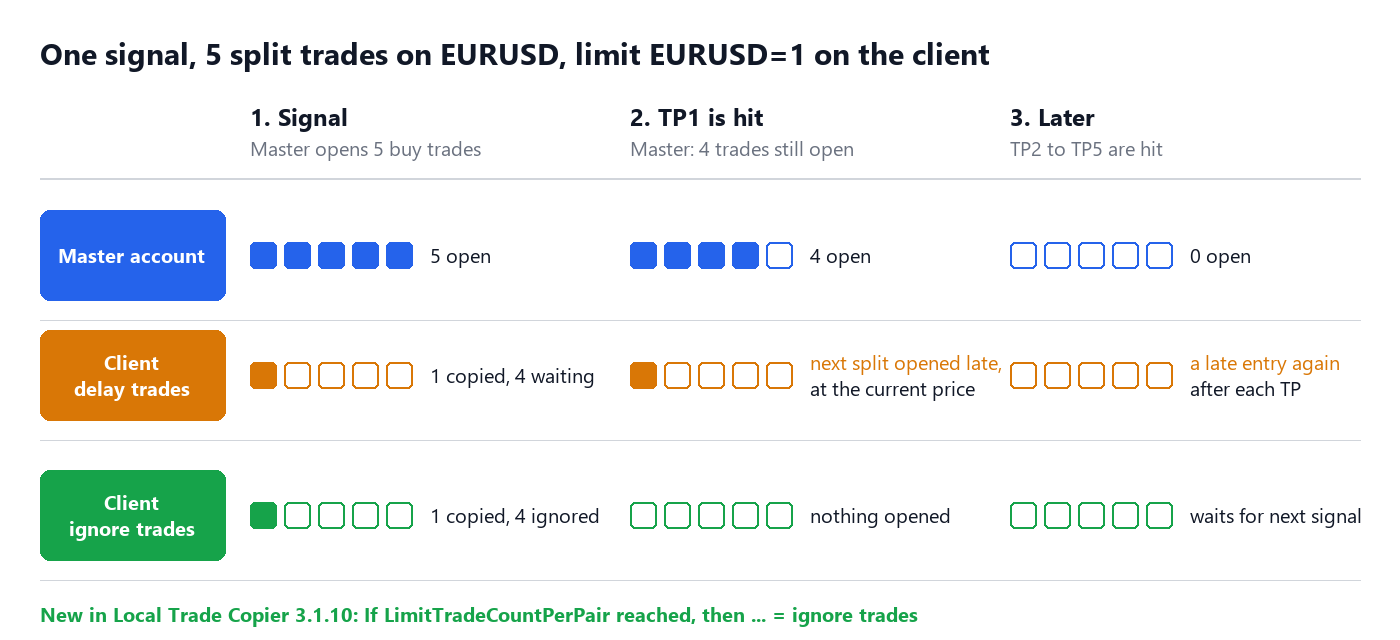
- delay trades: the moment your copy closes (for example at TP1), the Client opens one of the waiting split trades, at the current market price. If the price has already moved 150 points in the signal’s direction, your new entry is 150 points worse than the master’s, and this repeats after each Take Profit. Use it when you want to cap the number of open trades but still copy as many of the master’s trades as fit under the cap.
- ignore trades: the extra split trades were ignored when they arrived, so nothing is opened later. The prop account takes one trade per signal and then waits for the next signal. Use this option for split-trade signals on a prop account.
Before version 3.1.10, LimitTradeCountPerPair could only delay. If you used it in an older version and saw “late” trades on your client account, this is the reason, and “ignore trades” is the fix.
Step-by-step setup
Step 1: Decide which symbol names to use
Many brokers and prop firms add a suffix to their symbols: EURUSD.r, EURUSDm, EURUSD.pro or, as on our demo account for this guide, EURUSD+. In most cases you don’t have to type it. An entry in the list applies to a client symbol in this order:
- the entry is the client account’s symbol, exactly as in its Market Watch (
EURUSD+=1). This always works; - the entry is a symbol name that Local Trade Copier copies to that client symbol, using the same symbol mapping as for copying (automatic, or your
CustomSymbolMapping). SoEURUSD=1limitsEURUSD+, andXAUUSD=1limits a client symbol calledGOLD; - the entry is the client symbol without its suffix or prefix (
EURUSDforEURUSD+); - the entry is the master account’s symbol name.
Upper and lower case don’t matter. If several entries apply to the same symbol, the one higher in this order wins. For example, with EURUSD=3,EURUSD+=1 the exact client symbol wins, so the limit is 1. To keep it simple, list each instrument only once.
Step 2: Open the LTC Client EA inputs
Click the chart where the LTC Client EA runs on the client account and press F7. Open the Inputs tab and scroll down to TRADE FILTERS. The title of this window also shows your Client version, for example “LTC Client MT5 Personal v3.1.10”.
Step 3: Enter the limit per pair
Double-click the value of LimitTradeCountPerPair and enter your list. For our example, one trade per signal on EURUSD and GBPUSD. In the screenshots we typed the client’s names with the + suffix; EURUSD=1,GBPUSD=1 works the same:
EURUSD+=1,GBPUSD+=1
Separate the entries with commas. A space after a comma is fine, but don’t put spaces around the = sign: EURUSD+ = 1 is read as three separate entries and limits nothing. Gold (XAUUSD+) is not in the list, so every gold trade is copied.
Step 4: Choose “ignore trades”
Double-click the value of If LimitTradeCountPerPair reached, then … right below it and select ignore trades.
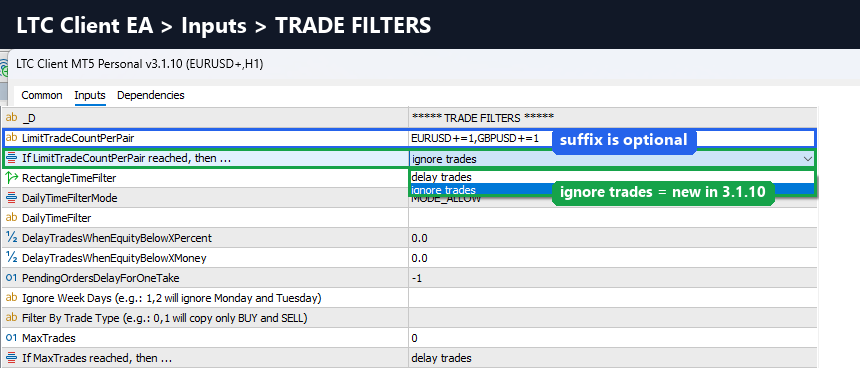
Click OK. The Client EA restarts with the new settings. Nothing changes on the master account or on the LTC Server EA.
Step 5: Check the Experts tab
When the Client EA starts, it writes the limits to the Experts tab of the client terminal, together with the chosen option:
Trade count limits per pair: EURUSD+=1, GBPUSD+=1 (ignore the rest)
When an entry stands for a client symbol with another name, the line shows it in brackets, for example EURUSD=1 (EURUSD+) or XAUUSD=1 (GOLD), so you can see which symbol each entry limits. If you see (delay the rest), the second setting is still on “delay trades”. If you see None, the list is empty. Check that each entry has the form SYMBOL=NUMBER. If you are not sure that a name will be recognised, use the client’s exact symbol name.
More examples
| LimitTradeCountPerPair | Result |
|---|---|
EURUSD=1,GBPUSD=1 |
One trade on EURUSD and one on GBPUSD. All other symbols unlimited. |
ANY=1 |
One trade on every symbol. |
ANY=1,XAUUSD=5 |
Up to 5 gold trades, one trade on every other symbol. A symbol listed with its own number uses that number instead of ANY. |
EURUSD=2,GBPUSD=2 on an account with the .r suffix |
Up to two trades on EURUSD.r and on GBPUSD.r. Writing EURUSD.r=2,GBPUSD.r=2 does the same. |
XAUUSD=1 when the client’s broker calls gold GOLD |
One gold trade: the master’s symbol name matches too. |
The test: a split-trade signal on two demo accounts
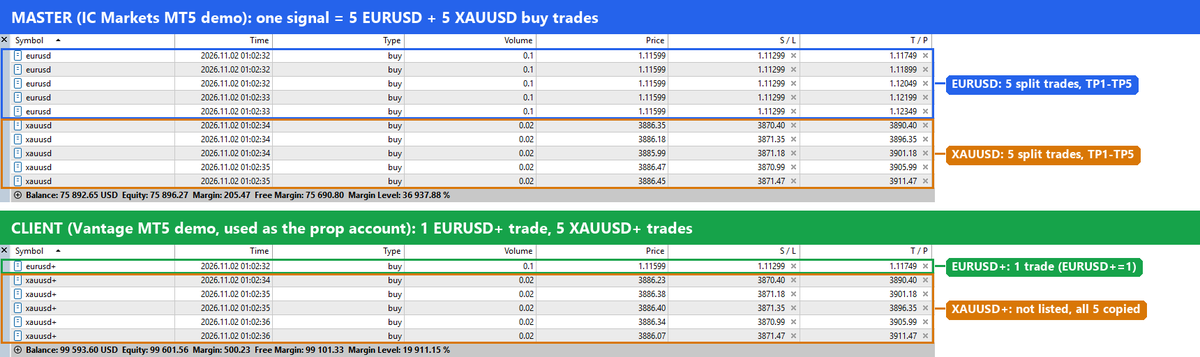
We tested this setup on 2 November 2026 on two MT5 demo accounts with Local Trade Copier 3.1.10: the master at IC Markets and the client at Vantage, where symbols carry a + suffix. The Client copies the same lot size as the master. Then the master opened one “signal”: five 0.10-lot buy trades on EURUSD and five 0.02-lot buy trades on gold, with Take Profit 1 to Take Profit 5 on the five trades of each symbol.

Each copy was opened within about a second of its master trade, and the client account ended up with one EURUSD+ trade and all five gold trades. The LTC Client chart counts it too: Copied=6; Delayed=0; Ignored=4.
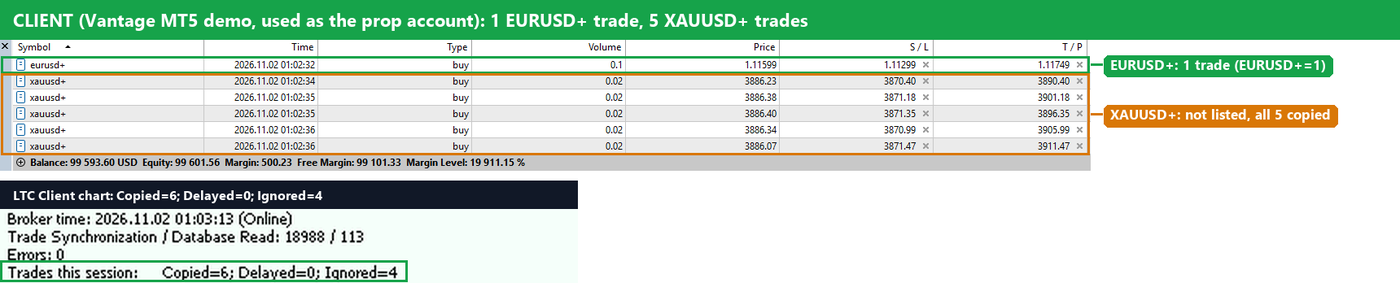
In this test the copied EURUSD trade was the TP1 split. That is not guaranteed: the Client copies whichever split it processes first (see “Things to know” below).
The Experts tab of the client shows one IGNORED line for every split trade that was ignored (three of the four lines are visible here):

The line reads, for example: IGNORED: Trade #… (BUY EURUSD) ignored because you set a limit of 1 trade(s) per pair and EURUSD+ already has 1 trade(s) open. It will not be copied later (IfPairLimitReached: ignore trades).
When the copied trade closes
Next we closed the master’s EURUSD trade that the client had copied, as if its TP1 had been hit. (Meanwhile gold had reached TP1 and TP2 on both accounts, so three gold trades were left.) The client’s EURUSD copy closed together with the master’s trade. The master still had four EURUSD trades open, and the client did not open any of them. The Client chart still shows Copied=6; Delayed=0; Ignored=4: nothing was copied after the close. The prop account stays flat on EURUSD until the next signal, which is exactly the goal.
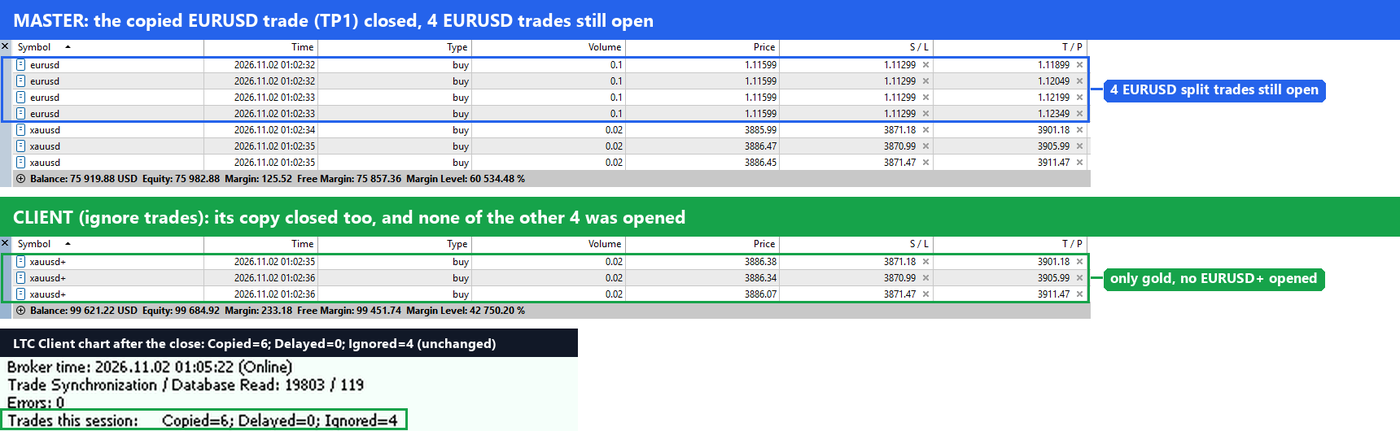
With delay trades the Client would have opened one of the remaining four split trades at this moment, at the current price.
Things to know before you use it
- The limit counts every open trade on that symbol on the client account: buys and sells together, and also trades you opened by hand or another EA opened. If you already have a manual EURUSD trade, a new EURUSD signal is ignored with
EURUSD=1and “ignore trades”, and it is not copied later when you close your manual trade. With “delay trades” it waits instead. - Pending orders on the client don’t count towards the limit, only open positions. The Client checks a master pending order when it is about to place its copy. So if the master places three EURUSD pending orders while no EURUSD position is open, the Client copies all three, and all three can fill. If your signal uses pending orders, set
IgnorePendingOrdersto true: the Client then copies each order as a market trade only when it fills on the master, and the limit is checked for every one of them. - Which split trade is copied depends on the order in which they arrive. You can’t choose “always TP1” with this setting. If you want a specific target on the single copy, set How to copy Take Profit? to Fixed X value in Points (Set X below) and enter the points in TP X value.
- Think about the lot size. One trade out of five means one fifth of the signal’s volume. That is often the point on a prop account. If you want more volume, raise it with the Client’s money management settings, but keep the prop firm’s risk rules in mind.
- Each Client EA has its own limits. Your personal account can copy all five trades, while the prop account copies one.
- After a restart of the Client EA (this includes changing its inputs), trades that were already open on the master are not copied by default (
CopyExistingMasterTradesOnStart = false), so ignored split trades stay ignored. If you set it to true, the Client checks those master trades again after the restart, and a split trade it ignored before can be copied if the pair has room by then. Keep it false when you use “ignore trades”. - Test on a demo account first, the same way we did for this guide.
Stop-and-reverse signals: the new trade waits for the old copy to close
Some strategies close the last trade and open the next signal at the same moment, for example a stop-and-reverse EA. For a short time the client account can still have the old copy open. Local Trade Copier closes it a moment later, or later still if you set a close delay (Close Delay Random Range Min (sec) / Max (sec) in TRADE MANIPULATIONS) or if the broker rejects the close and LTC tries again.
In “ignore trades” mode the Client does not count such a copy as a reason to ignore the new signal. The new trade waits until the old copy is closed and is then copied. The Experts tab shows one line like DELAYED: Trade #… waits: … 1 of them are copies of closed master trades that are being closed. If the pair is still full after that, the trade is ignored. The wait is limited to 90 seconds plus your Close Delay Random Range Max (sec). If the old copy is still open after that, the new trade is ignored as usual.
This works on hedging accounts, which most prop firms use. On MT5 netting accounts copies are closed by volume, so the old copy still counts there, and a new trade that arrives at the same moment can still be ignored. The same is true for copies that LTC does not close together with the master, for example with AcceptTradeCloseSignals = false.
FAQ
Can Local Trade Copier copy only one trade per pair when the master opens several?
Yes. In Local Trade Copier (LTC) by Algonexis Technologies, version 3.1.10 or later, set LimitTradeCountPerPair in the LTC Client EA, for example EURUSD=1, and set If LimitTradeCountPerPair reached, then … to ignore trades. One trade per listed pair is copied and the others are ignored.
Which version do I need?
You need the LTC Client EA version 3.1.10 or later. The “ignore trades” option was introduced in Local Trade Copier version 3.1.10. Older versions have LimitTradeCountPerPair with “delay” behaviour only, which is why they opened the extra split trades later. To check your version, look at the title of the Client EA’s Inputs window, for example “LTC Client MT5 Personal v3.1.10”.
Do I need to type my broker’s suffix, such as EURUSD.x?
Usually not. EURUSD=1 also limits EURUSD.x on the client account, because the Client uses the same symbol mapping as for copying, and XAUUSD=1 also limits a client symbol called GOLD. The Experts tab shows which client symbol each entry stands for when the Client EA starts. The exact client name, EURUSD.x=1, always works, and it wins if you list the same pair both ways.
Are pairs that are not in the list limited?
No. Only listed symbols are limited, unless you add ANY=N, which applies to every symbol that is not listed.
Can two trades slip through when ten arrive at the same moment?
No. The Client counts each copy right after it opens it, so the second split trade already sees the first one. In our test five EURUSD splits arrived within one second and exactly one was copied.
What is the difference between MaxTrades and LimitTradeCountPerPair?
MaxTrades limits the total number of trades and pending orders the Client keeps open, all symbols together. LimitTradeCountPerPair limits each listed symbol separately. Each has its own “delay trades / ignore trades” choice.
Does it work between MT4 and MT5?
Yes. It is a setting of the LTC Client EA for MT4 and for MT5, whatever platform the master account uses.
Related guides
- LTC Client EA settings and parameters explained
- Prop firm friendly trade copier
- Shift the entry price of copied trades
- Local Trade Copier quick start
Don’t have Local Trade Copier yet? Try it free for 7 days on your own PC or VPS.
