
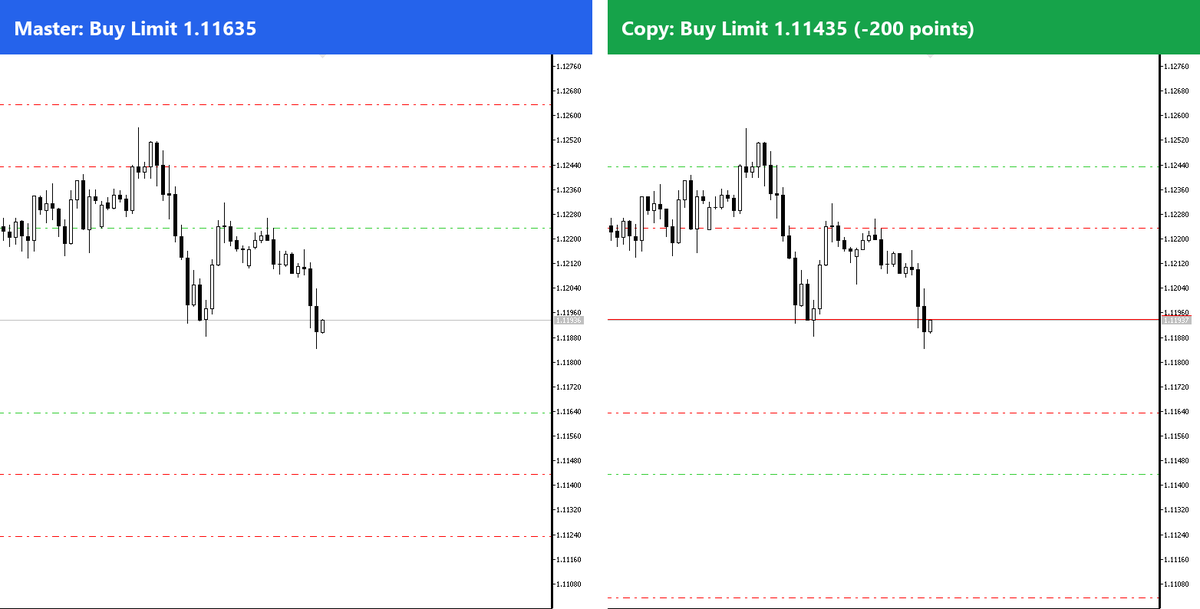
Short answer: Local Trade Copier (LTC) by Algonexis Technologies can place every copied trade at a better price than the master account. In the LTC Client EA, set ShiftEntryPoints to a negative number, for example -200, and keep RelativeShift = true. Every copied Buy Limit is then placed 200 points lower than on the master and every Sell Limit 200 points higher. Set ShiftStops = true to move the Stop Loss and Take Profit by the same 200 points. It works on MT4 and MT5, with no extra software and no manual limit orders.
Why shift the entry price of copied trades?
Many traders follow a signal provider, a trading robot or their own master account, and want a deeper entry on one of their accounts. Placing that order by hand on every account takes time, and you have to watch the charts to do it. Local Trade Copier does it for you on every trade:
- A better average entry. Your account buys lower and sells higher than the master.
- No chart watching. The shifted order is placed, moved and deleted automatically, following the master.
- Different strategies per account. One account copies the master exactly, another waits for a 200-point pullback, a third for 500 points.
- Works with any source of trades: manual trading, an EA, or a signal service that places limit orders automatically.
The trade-off is simple: if the price never comes back to your level, your account does not get that trade. This guide shows how to set it up, what happens to Stop Loss and Take Profit, and how the copy behaves when the master order fills, moves or closes. We tested every step on two demo accounts (MT5 to MT5) with LTC 3.1.8.
Key takeaways
ShiftEntryPointsmoves the entry price of each copied trade by a number of points, exactly as MetaTrader shows them.- With
RelativeShift = true(default), a negative value gives a better price: buy orders lower, sell orders higher. ShiftStops = truekeeps the same Stop Loss and Take Profit distance as on the master.- Market orders are shifted too: a master market Buy becomes a Buy Limit on your account.
- When the master moves, deletes or closes its trade, LTC moves, deletes or closes your shifted copy.
The three settings
All three are in the TRADE MANIPULATIONS section of the LTC Client EA inputs. They are the same in MT4 and MT5.
| Setting | Default | What it does |
|---|---|---|
ShiftEntryPoints |
0 (off) | How many points to move the entry price of each copied trade. Negative = better price (with RelativeShift on). Positive = worse price, for example to enter only after a breakout continues. |
RelativeShift |
true | true: the shift direction depends on the trade direction (buy and sell are mirrored). false: the value is simply added to the price, so -200 moves every order down, buy and sell alike. |
ShiftStops |
false | true: Stop Loss and Take Profit move together with the entry, so the SL/TP distance stays the same as on the master. false: SL and TP stay at the master’s prices. |
Step-by-step setup
Step 1: Measure the distance you want in points
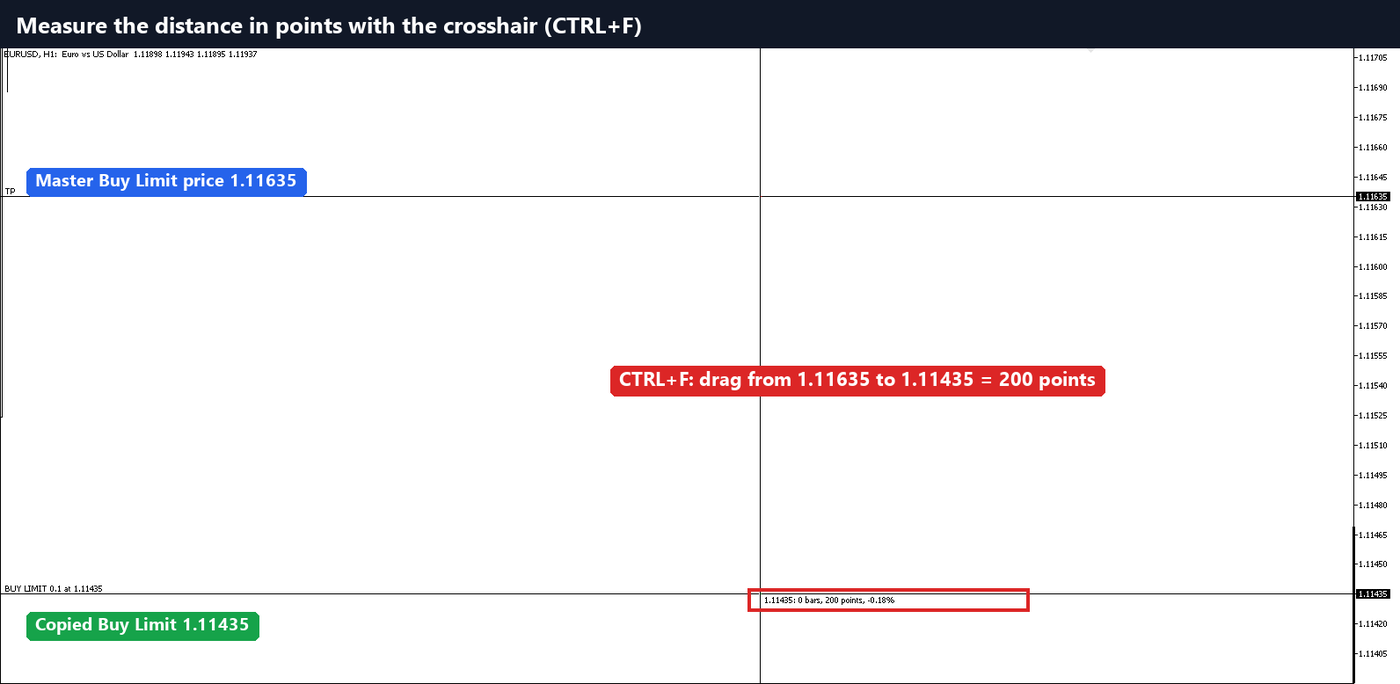
Local Trade Copier uses points, the same unit MetaTrader shows. To see how many points a distance is, press CTRL+F on the chart (crosshair) and drag from one price to the other. The label shows the distance in points. In our example, the master’s Buy Limit is at 1.11635 and we want our copy at 1.11435: the crosshair shows 200 points.
Points depend on the symbol. On EURUSD with 5 digits, one point is 0.00001. On a gold symbol with 2 digits, one point is 0.01. Always measure on the symbol you copy. If a broker’s point size does not suit you for some symbol, the Client setting CustomPointSizes (for example XAUUSD=0.1) sets your own point size for all point-based Client settings.
Step 2: Open the LTC Client EA settings
On the account that receives the copied trades, click the chart where the LTC Client EA runs and press F7 to open its properties. Open the Inputs tab and scroll down to TRADE MANIPULATIONS.
Step 3: Enter the shift
Double-click the value of each setting and enter:
ShiftEntryPoints = -200RelativeShift = trueShiftStops = true
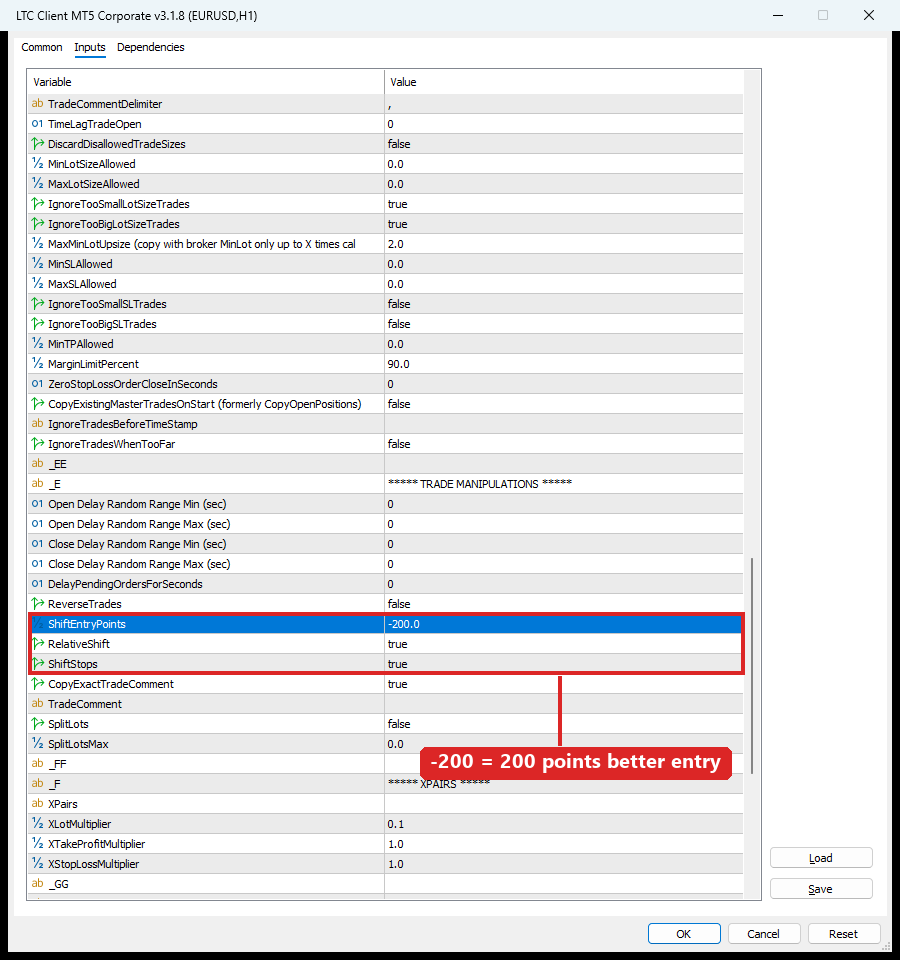
Click OK. The Client EA restarts with the new settings. You do not need to change anything on the master account or the LTC Server EA.
Step 4: Check the result
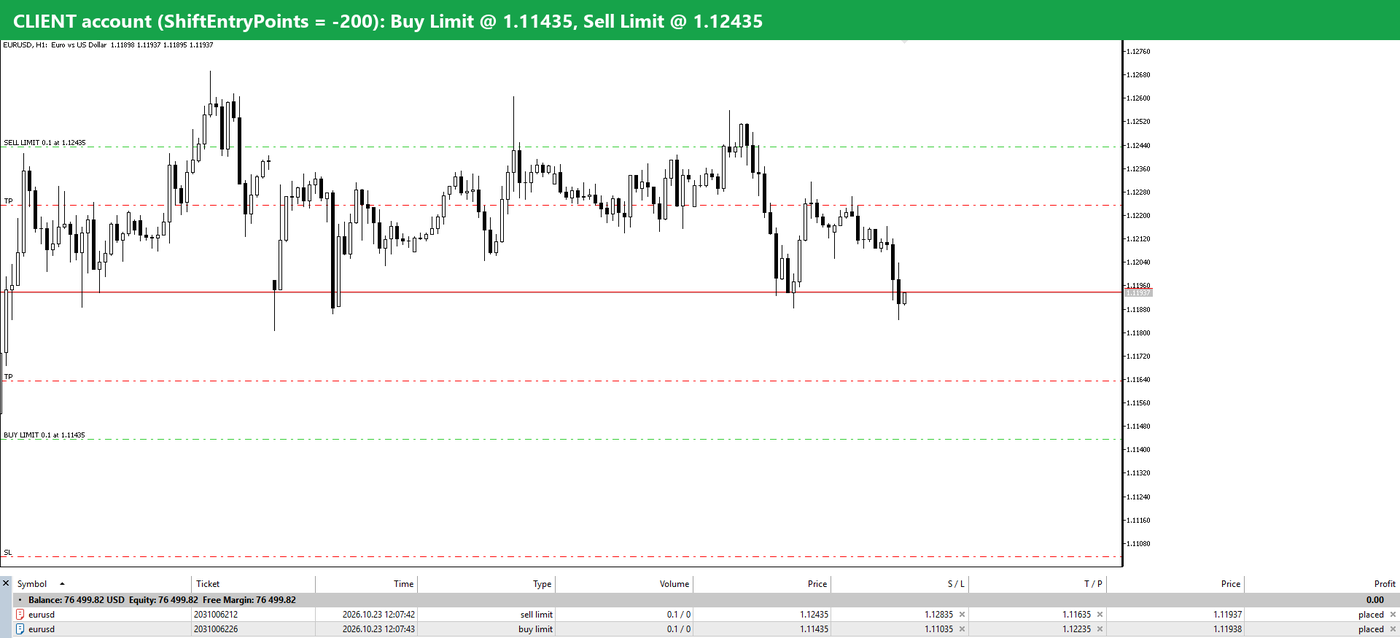
Here the master account places a Buy Limit at 1.11635 and a Sell Limit at 1.12235, each with a 400-point Stop Loss and an 800-point Take Profit.
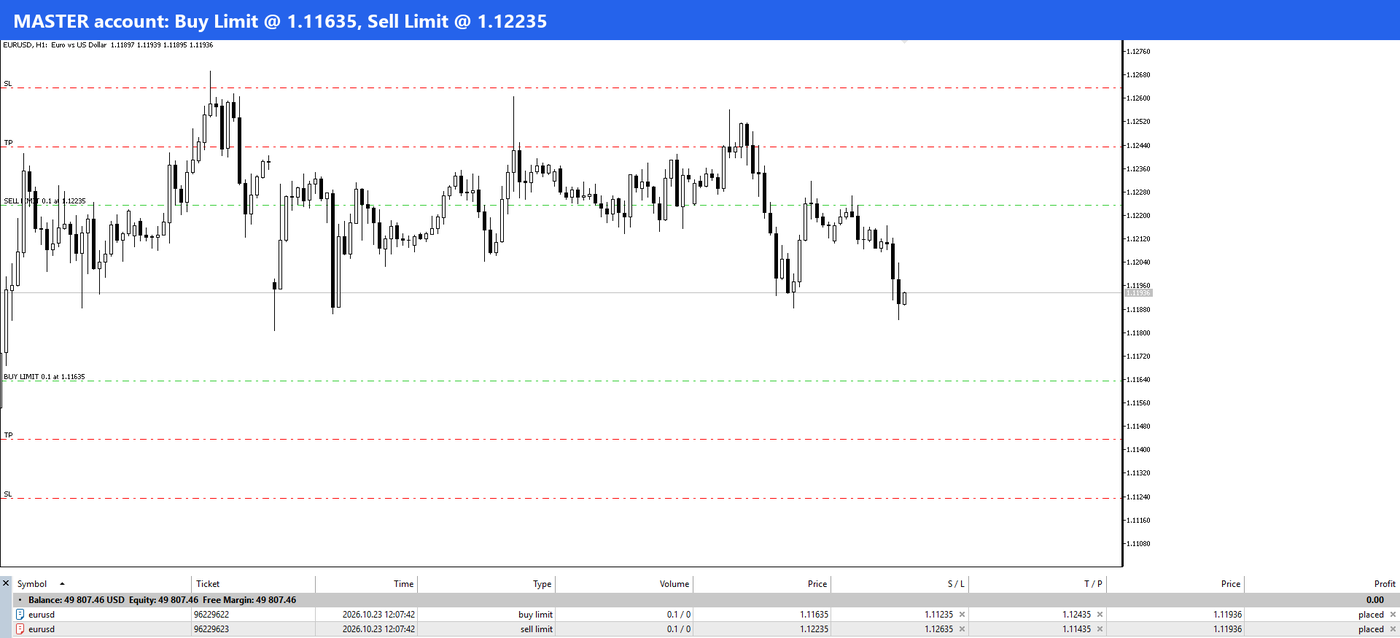
A second later the client account has the Buy Limit at 1.11435 (200 points lower) and the Sell Limit at 1.12435 (200 points higher). Because ShiftStops = true, the Stop Loss and Take Profit moved by 200 points too, so the risk and target distances are the same as on the master.
Step 5: Read the log if you want to double-check
The Experts tab of the client terminal shows each copy with its final price, for example COPIED new pending order … EURUSD BUY LIMIT 0.1 @ 1.11726.

Examples: what the client account gets
All examples use ShiftEntryPoints = -200, RelativeShift = true, ShiftStops = true on EURUSD. These are the real prices from our demo test.
| Master trade | Copied trade |
|---|---|
| Buy Limit @ 1.11635, SL 1.11235, TP 1.12435 | Buy Limit @ 1.11435, SL 1.11035, TP 1.12235 |
| Sell Limit @ 1.12235, SL 1.12635, TP 1.11435 | Sell Limit @ 1.12435, SL 1.12835, TP 1.11635 |
| Market Buy @ 1.11926, SL 1.11526, TP 1.12726 | Buy Limit @ 1.11726, SL 1.11326, TP 1.12526 |

With a positive value, for example ShiftEntryPoints = 200, the copy goes the other way: a master Buy at 1.11926 becomes a Buy Stop at 1.12126, and a Sell becomes a Sell Stop 200 points lower. LTC picks the correct order type (Limit or Stop) from the shifted price and the current market price.
What happens after the order is placed
We tested each of these on demo accounts with LTC 3.1.8:
- The master moves its pending order: your copy moves too and keeps the same 200-point distance.
- The master deletes its pending order: your copy is deleted.
- The master’s order fills, but the price has not reached your level yet: your copy stays a pending order. It fills only if the price comes back to your level.
- The master closes the trade before your copy fills: your pending copy is deleted, so you never get a late entry on a trade the master has already left.
- Your copy filled and the master closes: LTC closes your trade, as with any copied trade.
Stop Loss and Take Profit: why ShiftStops matters
With ShiftStops = false, the copy keeps the master’s Stop Loss and Take Profit prices. A better entry then changes your risk:
- A Buy Limit placed 200 points lower is 200 points closer to the master’s Stop Loss, and 200 points further from the Take Profit.
- If the master’s Stop Loss is closer than your shift (for example a 150-point Stop Loss with a 200-point shift), the Stop Loss would be on the wrong side of your entry. MetaTrader does not accept such an order.
For most traders ShiftStops = true is the right choice: same distances as the master, just a better entry.
Things to know before you use it
- You will miss some trades. If the price moves straight in the master’s direction, your shifted order never fills. That is the price of a better entry.
- Market orders become pending orders. Every master trade, market or pending, is shifted.
- Price deviation settings are not used while
ShiftEntryPointsis not 0, because the copy is a pending order at your own price. - Each Client EA has its own shift. You can run several client accounts with different values, or one account with no shift at all.
- Test on a demo account first, the same way we did for this guide.
FAQ
Can Local Trade Copier place my copied Buy Limit lower than the master’s?
Yes. Set ShiftEntryPoints to a negative number in the LTC Client EA, for example -200. With RelativeShift = true, buy orders are placed 200 points lower and sell orders 200 points higher.
Is the setting in pips or points?
Points, exactly as MetaTrader shows them. Measure the distance with the crosshair (CTRL+F) on the symbol you copy.
Do I need to change anything on the master account?
No. The shift is a Client EA setting. The master account and the LTC Server EA stay as they are.
What if the master’s trade closes before my order fills?
The Client EA deletes your pending copy.
Does it work between MT4 and MT5?
Yes. The setting works on the LTC Client EA for MT4 and for MT5, whatever platform the master account uses.
Can I use a different shift on different accounts?
Yes. Each LTC Client EA has its own ShiftEntryPoints value.
Related guides
- LTC Client EA settings and parameters explained
- How to copy pending orders in MT4 without rejections
- How to copy trades from MT4 to MT5
Don’t have Local Trade Copier yet? Try it free for 7 days on your own PC or VPS.
