
Short answer: Local Trade Copier (LTC) by Algonexis Technologies copies the master’s stop loss and take profit to every client account, and follows every change. You don’t have to copy them as they are, though. Two LTC Client settings, “How to copy Stop Loss?” and “How to copy Take Profit?”, each have 13 options: keep the master’s price, remove it, scale it, set a fixed distance, add points, add a random number of points, or keep the same distance from the copy’s own entry price. EmergencyStopLossPoints gives a stop loss to copies whose master trade has none.
Written for Local Trade Copier 3.1.10, with a test on demo accounts, November 2026.
Key facts
- By default, each copy gets the same SL and TP prices as the master trade, and every later change is copied too.
- The SL and TP are set separately, each with 13 options and its own X value. Every LTC Client has its own settings, so each account can be different.
- Options 8, 10, 11 and 12 measure from the copy’s own entry price. All the others measure from the master’s entry price.
EmergencyStopLossPointsgives a stop loss to a copy whose master trade has none. When the master sets its own stop loss, the copy follows it. If the master removes it again, the copy goes back to the emergency stop loss.- All distances are in points, the smallest price step of the symbol.
The settings
They’re in the STOPS MANIPULATIONS section of the LTC Client inputs:

The STOPS MANIPULATIONS section of LTC Client 3.1.10, at the default values.
- How to copy Take Profit? and TP X value
- How to copy Stop Loss? and SL X value
- EmergencyStopLossPoints
The X value is only used by the options that say “Set X below”. Its default is 1.
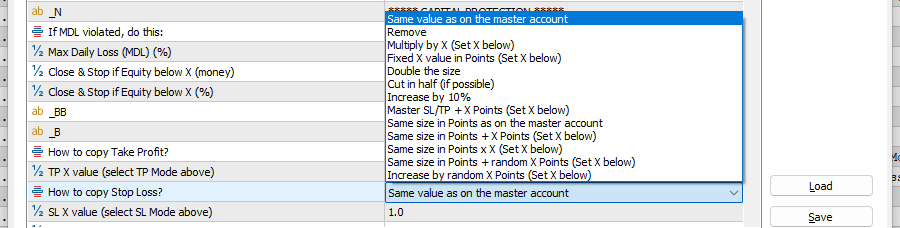
The 13 options of "How to copy Stop Loss?". "How to copy Take Profit?" has the same list.
The 13 options, with an example
Example: the master buys at 1.10000 with a stop loss at 1.09700, which is 300 points below its entry. The copy fills at 1.10010. Here is the stop loss the copy gets. The take profit options work the same way, in the other direction.
| Option | Copy’s stop loss in the example | Measured from |
|---|---|---|
| Same value as on the master account (default) | 1.09700, the master’s price | — |
| Remove | No stop loss | — |
| Multiply by X (X = 0.5) | 150 points: 1.09850 | Master’s entry |
| Fixed X value in Points (X = 200) | 200 points: 1.09800 | Master’s entry |
| Double the size | 600 points: 1.09400 | Master’s entry |
| Cut in half (if possible) | 150 points: 1.09850 | Master’s entry |
| Increase by 10% | 330 points: 1.09670 | Master’s entry |
| Master SL/TP + X Points (X = 50) | 350 points: 1.09650 | Master’s entry |
| Increase by random X Points (X = 50) | 300 to 350 points: 1.09650 to 1.09700 | Master’s entry |
| Same size in Points as on the master account | 300 points: 1.09710 | Copy’s entry |
| Same size in Points + X Points (X = 50) | 350 points: 1.09660 | Copy’s entry |
| Same size in Points x X (X = 0.5) | 150 points: 1.09860 | Copy’s entry |
| Same size in Points + random X Points (X = 50) | 300 to 350 points: 1.09660 to 1.09710 | Copy’s entry |
The random options pick a number between 0 and X points once per master trade. The same trade keeps the same offset, even after LTC Client restarts.
Master’s entry or the copy’s entry: why it matters
A copy rarely fills at exactly the master’s price. Another broker shows a slightly different price, and the market moves in the second it takes to copy. With “Same value as on the master account”, the copy gets the master’s stop loss price, so its distance from its own entry can be a little bigger or smaller than the master’s. The “Same size in Points” options keep the master’s distance instead, measured from the copy’s own entry. Use them when the copy should risk exactly as many points as the master.
Four common jobs
- The signal has no stop loss. Set
EmergencyStopLossPoints, for example 300. Every copy without a stop loss gets one, 300 points from the master’s entry, until the master sets its own. - A tighter take profit on a funded account. Set “How to copy Take Profit?” to “Multiply by X” with TP X value 0.8. The copy’s take profit is 80 % of the master’s distance.
- The same risk in points on every account. Set “How to copy Stop Loss?” to “Same size in Points as on the master account”.
- Stops that aren’t identical to the master’s. Set “Same size in Points + random X Points” with a small X. Combine it with the random open and close delays if you also want the timing to differ.
A test: emergency stop loss, then the master’s own
We set EmergencyStopLossPoints to 50000 on an IC Markets MT5 hedging demo with LTC Client 3.1.10. On BTCUSD one point is 0.01 USD, so that’s 500 USD. Everything else stayed at the defaults. The master, an IC Markets MT4 demo with LTC Server, bought 0.01 BTCUSD without a stop loss and set one 21 seconds later. The client’s Experts tab (master account number masked):
12:25:15  RECEIVED new market order #382659865 ... BTCUSD BUY @ 65450.75; Slave lot size: 0.010000; SL: 64950.75; TP: 0.00

12:25:16  COPIED new market order #382659865 from server #xxxxxxxx as #2090189866: BTCUSD BUY 0.010000 @ 65459.83; SL: 64950.75; TP: 0.00

12:25:34  BTCUSD BUY trade (remote #382659865; local #2090189866) Stop Loss changed from 64950.75 to 65150.75
The emergency stop loss was 500 USD below the master’s entry (65450.75 − 500 = 64950.75), not the copy’s. When the master set its own stop loss at 65150.75, the copy moved to it within a second.
Other stop loss and take profit settings
| Setting | Default | What it does |
|---|---|---|
| SwapSLTP | false | Swaps the SL and TP distances. Used with reverse copying, where a BUY becomes a SELL. |
| TradeProtectionRequirement | No Requirement | Copies a trade only once it has a stop loss, a take profit or both. Until then it waits. |
| WaitForSLTP | false | Ignores the master’s close and lets the copy close at its own SL or TP. Only for trades that have both. |
| AcceptTradeModifySignals | true | false = don’t follow the master’s SL/TP changes. |
| MinSLAllowed, MaxSLAllowed, MinTPAllowed | 0 (off) | Limits for the SL and TP distance in points. With IgnoreTooSmallSLTrades = false, a stop loss that is too small is widened to MinSLAllowed instead of the trade being skipped. |
| LTC Server: StopLossMultiplier, TakeProfitMultiplier, OverrideStopLossPoints, OverrideTakeProfitPoints, EmergencyStopLossPoints | 1, 1, 0, 0, 0 | The same ideas on the master side. They change what LTC Server sends, so they apply to every client. |
Good to know
- LTC Client opens the copy first and sets its SL/TP right after, in a second request. In our test that took about half a second.
- SL/TP changes on the master are followed at most once every 5 seconds and 60 times an hour per trade. This protects the account from a master that moves its stops constantly.
- If a symbol’s point size doesn’t suit you, as on some indices,
CustomPointSizes(for exampleDAX40=0.1) sets the point size used by all point-based settings. - In the Risk Per Trade modes, the lot is sized from the stop loss, so a trade needs one before it’s copied.
EmergencyStopLossPointslets those trades copy at once. See copy trades with a fixed risk per trade.
FAQ
Does Local Trade Copier copy the stop loss and take profit?
Yes. By default each copy gets the master’s SL and TP prices, and every change is copied too.
Can I use a different stop loss on the copies?
Yes. “How to copy Stop Loss?” has 13 options, from removing it to a fixed distance or the master’s distance times X. Each client account has its own setting.
What happens if the master trade has no stop loss?
With the default settings, the copy has none either. Set EmergencyStopLossPoints to give it one until the master sets its own.
Can the copies keep exactly the master’s distance in points?
Yes. “Same size in Points as on the master account” measures the master’s distance from the copy’s own entry price.
Can I stop the copies from following SL/TP changes?
Yes. Set AcceptTradeModifySignals to false.
Local Trade Copier copies trades between MT4 and MT5 accounts on your own PC or VPS, with unlimited accounts on every plan. More than 15,000 licences have been sold since 2010. For the other settings that change what gets copied, see control what gets copied, or try Local Trade Copier free for 7 days.
