

TL;DR:
- Trade copier latency reduction minimizes the delay between master and follower account trades, preventing slippage and drawdowns. A local copier on the same machine offers significantly faster execution, often around 1.6 milliseconds, compared to cloud-based systems. Key factors include VPS location, platform architecture, hardware resources, and network proximity to brokers.
Trade copier latency reduction is the process of minimizing the delay between a trade signal on the master account and its execution on follower accounts. Every millisecond of that gap can translate into slippage, missed fills, or a blown prop firm drawdown limit. Industry benchmarks set the acceptable threshold at under 200ms for swing trading and under 10ms for scalping. Local copiers like Mt4copier achieve sub-0.5-second execution by running entirely on one machine, with no cloud routing adding overhead. This guide breaks down every layer of delay, from detection to execution, and gives you a clear path to fix it.
What causes latency in trade copying systems?
Latency in a trade copier is additive. Each stage of the copy pipeline adds its own delay, and those delays stack before a single order reaches your follower account.
The three core components are:
- Detection latency. The time the copier takes to recognize a new trade on the master account. Polling-based copiers check for changes on a fixed interval, which can add 50–200ms before the signal even enters the pipeline.
- Network latency. The time data takes to travel between servers. Crossing the Atlantic adds roughly 70ms of unavoidable delay. Mismatched server locations between master and follower accounts multiply this.
- Execution latency. The time the broker’s API takes to process and confirm the order. During high-impact news events, brokers often throttle API access, causing unpredictable spikes on top of normal delays.
Cloud-based copiers compound all three. They route your trade signal through an external server, adding 30–100ms of relay latency before the order even touches your broker. Local copiers running on the same VPS as your terminals skip that relay entirely. Local copier internal latency sits around 1.6ms, compared to 30–100ms for cloud-based systems. That difference is not theoretical. It shows up in your fill prices on every single trade.
Latency also worsens under load. Cloud copiers can add 50–100ms per follower during high-volatility sessions due to shared infrastructure bottlenecks. A local copier running sequentially adds only about 1.6ms per follower account. The gap widens the more accounts you run.
What setup do you need to reduce trade copier lag?
The right environment does more for execution speed than any software setting. Hardware and geography set the ceiling; software works within it.
VPS location and broker proximity
Co-locating your VPS in the same data center as your broker’s server is the single highest-impact change you can make. Physical distance causes unavoidable latency, and no software fix overcomes physics. Major financial data centers in New York (NY4, NY5), London (LD4), and Tokyo (TY3) host most retail forex brokers. Choose a VPS provider with nodes in those locations and confirm which one your broker uses before you subscribe.
Platform architecture
MT5 copiers execute in 20–80ms, while MT4 copiers typically take 50–150ms due to MT4’s older single-threaded architecture. MT5’s 64-bit, multi-threaded design processes orders faster and handles multiple accounts with less overhead. If your prop firm or broker supports MT5, it is the lower-latency choice for copy trading.
System resource requirements
| Component | Minimum requirement | Why it matters |
|---|---|---|
| VPS CPU | 2+ dedicated cores | Prevents terminal queuing under load |
| RAM | 4GB per 3–4 terminals | Low RAM forces disk swapping, adding delay |
| Network | 100Mbps dedicated | Shared bandwidth spikes during news events |
| OS | Windows Server 2019+ | Better memory management for MT4/MT5 |
| Broker server distance | Under 5ms ping | Reduces execution latency at the broker level |
Most latency is not caused by software alone. ISP routing, broker throttling, and server geography dominate total delay in most setups. Fixing those three factors first makes every software tweak more effective.
How do you practically reduce trade execution latency?
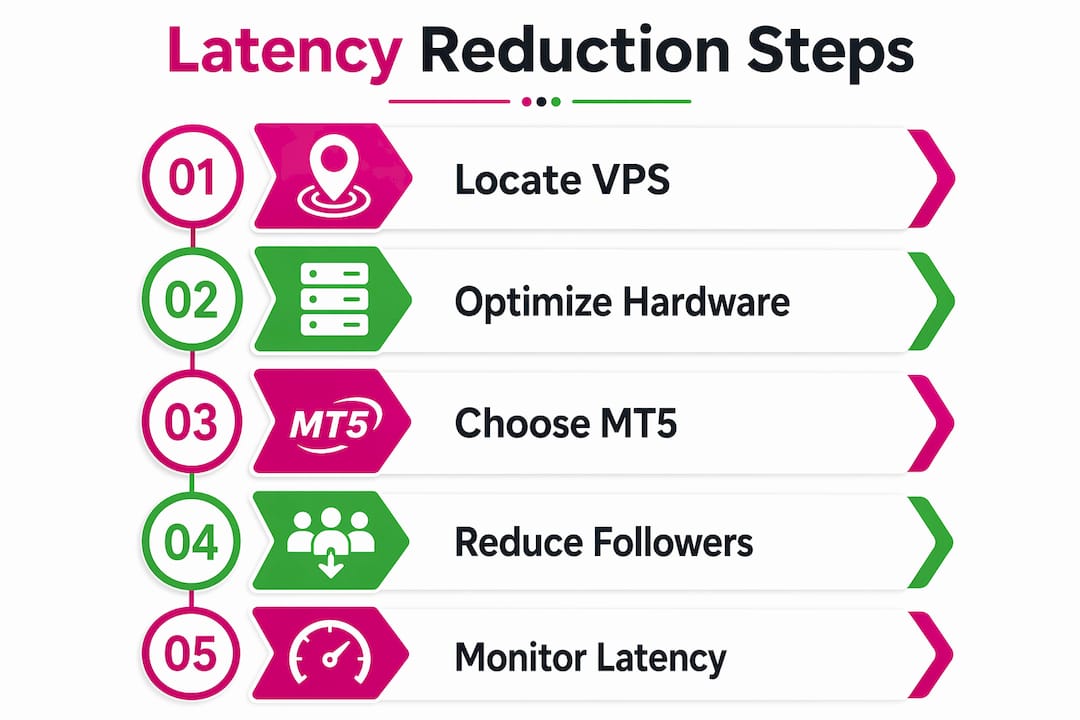
Reducing delay in a live copy trading setup requires changes at the infrastructure, software, and configuration levels. Work through these in order.
-
Install your copier software directly on the VPS. Running the copier on the same machine as your MetaTrader terminals eliminates one full network hop. Mt4copier runs as an Expert Advisor inside MetaTrader, so the copier and the terminal share the same process memory. Check the local trade copier installation guide for a step-by-step walkthrough on MT4 and MT5.
-
Align master and follower server locations. Open both accounts at brokers whose servers sit in the same data center, or as close as possible. Ping both servers from your VPS and aim for under 5ms round-trip time on each.
-
Reduce the number of open terminals on the VPS. Each MetaTrader terminal consumes CPU and RAM. Running six terminals on a 2-core VPS creates queuing. Close any terminal not actively copying trades. Disable unused indicators and EAs on every chart.
-
Set slippage controls in your copier settings. A slippage threshold tells the copier to reject fills beyond a set price deviation. This protects prop firm accounts from catastrophic fills during news spikes. Strict slippage control prevents executing trades beyond preset price deviation thresholds, which is critical for funded account compliance.
-
Keep your copier software updated. Software updates often include architecture improvements that reduce processing overhead. Mt4copier has been actively developed since 2010, and version updates regularly address execution efficiency.
-
Use MT5 where possible. MT5’s multi-threaded architecture processes copy signals faster than MT4. If your strategy and broker support MT5, switching cuts baseline execution latency by 30–70ms per trade.
Pro Tip: Ping your broker’s server from your VPS using a simple ping command before you place any trades. If round-trip time exceeds 10ms, contact your VPS provider about moving to a node closer to your broker’s data center.
How do you troubleshoot latency issues in trade copiers?
Diagnosing a latency problem requires separating copier delay from network delay from broker delay. Treating them as one problem leads to fixes that address the wrong layer.
Key diagnostic steps:
- Measure ping to your broker server from the VPS. This isolates network latency. Anything above 20ms warrants a VPS location change.
- Check CPU and RAM usage during copying. High CPU usage during trade events points to a resource bottleneck, not a network issue. Reduce the number of active terminals or upgrade the VPS plan.
- Review copier logs after news events. Most quality copiers log execution timestamps. Compare the master trade open time with the follower fill time. A consistent gap above 200ms signals a configuration problem.
- Test with a single follower account first. Sequential processing adds delay per account. If one follower executes cleanly but five do not, the bottleneck is processing capacity, not network.
- Monitor broker API response times. Some brokers throttle order requests during high-volatility windows. If fills degrade only during news, the broker’s API is the constraint, not your copier.
“Optimizing latency is not just about speed. It is about consistent execution. Advanced copiers with strict slippage control prevent executing trades beyond preset price deviation thresholds, protecting funded prop accounts from fills that trigger drawdown violations.”
Latency issues in trade copiers often appear intermittent because they only spike during the exact conditions that matter most: high-volatility news events, session opens, and large position changes. A setup that looks fine in quiet markets can fail badly when it counts.
Advanced techniques for optimizing trade copier performance
Once the fundamentals are solid, several advanced approaches push execution speed further.
- Use pre-configured EAs as internal copiers. An Expert Advisor running inside MetaTrader can detect and replicate trades within the same terminal process, bypassing any external communication layer entirely. Mt4copier operates on this architecture, which is why its local execution speed reaches sub-0.5 seconds even with multiple follower accounts.
- Run master and all followers on a single VPS. One machine, one IP address, zero network hops between accounts. This is the architecture Mt4copier is built for, and it is the reason prop firm traders prefer it. Cloud routing introduces an external IP, which some prop firms flag.
- Implement per-account slippage thresholds. Different accounts may have different tolerance levels. Setting individual slippage limits per follower prevents a single slow fill from cascading into a drawdown violation across all accounts.
- Minimize chart complexity on all terminals. Each indicator and EA running on a chart consumes CPU cycles during tick processing. Strip charts down to the minimum needed for monitoring.
- Monitor latency continuously, not just during setup. VPS performance degrades over time as the provider adds tenants to shared hardware. Schedule a monthly ping test and review copier logs after every major news event.
Pro Tip: If you manage more than four follower accounts, check whether your copier processes them in parallel or sequentially. Sequential processing adds cumulative delay. Mt4copier’s local architecture keeps this increment small, but the difference grows with account count.
Key takeaways
Trade copier latency reduction requires fixing infrastructure, software architecture, and configuration together. Addressing only one layer leaves the others as bottlenecks.
| Point | Details |
|---|---|
| Local beats cloud on latency | Local copiers deliver roughly 1.6ms internal latency versus 30–100ms for cloud-based systems. |
| Server geography is the biggest variable | Co-locating your VPS near your broker’s server cuts unavoidable physical distance delay. |
| MT5 executes faster than MT4 | MT5’s multi-threaded architecture reduces copy trade execution time by 30–70ms over MT4. |
| Slippage control protects prop accounts | Setting strict deviation thresholds prevents catastrophic fills during news-driven latency spikes. |
| Load amplifies cloud latency | Cloud copiers add 50–100ms per follower under high-volatility conditions; local copiers scale linearly with minimal overhead. |
Why latency costs more than most traders realize
I have seen traders spend weeks tuning their EA parameters while running a cloud copier on a VPS 200ms away from their broker. The EA was fine. The latency was eating the edge.
The uncomfortable truth about trade copier delay is that it is invisible until it is expensive. You do not see it on quiet days. You see it when a news candle moves 30 pips in two seconds and your follower fills 15 pips worse than the master. That is not bad luck. That is physics and architecture working against you.
The traders who get this right treat latency as an infrastructure problem, not a software problem. They pick the VPS location before they pick the copier. They confirm broker server addresses before they open accounts. They test ping times before they go live. The software choice matters, but it matters less than where the machine sits.
Local execution is not just a performance feature for prop firm traders. It is the only architecture that removes the cloud relay from the equation entirely. One machine, one IP, no external hops. That is the setup that holds up during the sessions where latency actually costs money.
The network latency impact on trade copier speed is something most traders underestimate until they run the numbers. When you calculate slippage across eight accounts over a month, the difference between local and cloud execution is not marginal. It is the kind of number that changes how you think about your entire setup.
— Rimantas
Mt4copier: built for low-latency local execution
Mt4copier is a locally installed Expert Advisor that copies trades across MT4, MT5, and DXTrade accounts on a single Windows machine or VPS, with no cloud routing involved. All trade data stays on one machine, which means one IP address and no external server adding delay between your master signal and your follower fills.
Mt4copier has been running for over 3,000 traders since 2010, with 491 Trustpilot reviews backing its track record. It includes 18 lot size and risk management options, automatic lot scaling per account balance, and strict slippage controls built for prop firm compliance. A 7-day free trial is available. Start with the trade copier installation guide to get your local setup running, or go straight to the sales page to review plan options.
FAQ
What is trade copier latency reduction?
Trade copier latency reduction is the process of minimizing the delay between a master account trade signal and its execution on follower accounts. The goal is consistent, fast fills that match the master as closely as possible.
What is an acceptable latency for a trade copier?
Under 200ms is acceptable for swing trading, and under 10ms is the target for scalping strategies. Latency above these thresholds causes slippage and can trigger prop firm drawdown violations.
Why is a local copier faster than a cloud copier?
A local copier runs on the same machine as your trading terminals, so it skips the external server relay entirely. Local copier latency averages around 1.6ms internally, compared to 30–100ms for cloud-based systems.
Does VPS location affect trade copier speed?
VPS location is one of the largest controllable latency factors. Physical distance between your VPS and your broker’s server adds unavoidable delay, with transatlantic routing adding roughly 70ms on its own.
How does MT5 reduce copy trade latency compared to MT4?
MT5’s 64-bit, multi-threaded architecture processes trade signals faster than MT4’s older single-threaded design. MT5 copiers typically execute in 20–80ms, while MT4 copiers take 50–150ms under comparable conditions.
Recommended
- Network Connection Latency Impact to MT4 Trade Copier Speed
- Trading Latency Explained: What It Is and Why It Matters
- Why Low Latency Is Important in Forex Trading
- Local vs Cloud Trade Copying: A 2026 Forex Guide
