

A prop-firm-friendly setup starts with internal stops set safely inside firm limits, not with squeezing extra pips out of a strategy. That means an internal daily loss stop, an internal drawdown stop, a fixed risk-per-trade cap, and news/session filters, all configured before you touch live evaluation capital. Set those four first, run a dry run on demo or VPS, and only then think about optimization.
TL;DR:
- Always set internal risk limits such as daily loss stops, drawdown stops, and session filters before trading evaluation capital, and run dry tests to verify safety.
- Convert prop firm percentages into internal stop-loss levels with a buffer of 1.5 to 2 percentage points to account for slippage and market volatility.
- Use portable setup and local or VPS-based execution with monitoring tools to reduce risk of missed alerts or crashes that could violate rules.
- Confirm specific EA permissions, risk parameters, and copy rules with the firm in writing to avoid violations during evaluation.
- Adjust risk settings and buffers proportionally as your account size scales during funding phases to maintain consistency and reduce account closure risk.
How common prop firm rules determine which settings matter
Every rule a prop firm publishes translates into a specific field somewhere in your EA, copier, or terminal. Miss the translation and you can violate a rule without ever meaning to.
Daily loss limits cap how much your equity can drop in a single day, which directly limits how many trades you can risk and how large each one can be. A firm allowing 5% daily loss doesn’t mean you should risk 5%. It means your EA’s internal stop needs to trigger well before that number, because slippage and multi-position closes eat into the buffer fast.
Drawdown rules split into two camps, and the difference changes your entire monitoring setup. Static drawdown measures losses against your starting balance. Trailing drawdown measures against the highest equity you’ve ever hit, which requires continuous equity monitoring rather than a one-time balance check.
Other rule types that shape configuration:
- Consistency and profit caps limit how much of your total profit can come from a single day or trade, forcing you to pace entries rather than swing for one big win.
- News and minimum trading day rules mean your EA needs session filters and a hard count of qualifying trading days, not just a profit target tracker.
- Position size and lot limits require checking whether your EA sizes off account balance or equity, since the two produce different lot sizes as your account fluctuates.
Terminal and workspace changes that reduce execution risk
Your terminal setup is part of your risk management, whether you treat it that way or not. A crashed terminal or a missed alert during a fast market move can turn a compliant trade into a rule violation.
Run MetaTrader in portable mode so your settings, templates, and logs stay in one folder you can back up and restore instantly if a machine fails. Limit max bars on charts to keep memory use predictable, and save a template or profile for every symbol/timeframe combo you trade so a restart doesn’t cost you your setup. Fewer charts, focused timeframes that match how you actually trade, and alerts tied to your daily-loss threshold and equity floor all reduce the chance you miss something critical.
- Use portable mode and save templates for fast recovery after a crash or reboot.
- Set price and equity alerts for your internal daily-loss and drawdown thresholds.
- Disable or lock down one-click trading and hotkeys you don’t use daily.
- Run on a VPS with a static IP and choose a server location close to your broker for lower latency.
Pro Tip: Keep a second, pre-configured VPS snapshot ready to deploy. If your primary VPS goes down mid-evaluation, you want to be back online in minutes, not hours.
Exact EA and trade copier fields to review before an evaluation
Most rule violations trace back to a handful of fields nobody double-checked before launch. Go through these in order, every time you set up a new evaluation account.
- Confirm EA/copier permission in writing. Some firms permit personal-account copying but ban copying from external providers or signal services, and violating that can trigger account closure. Get the answer in an email or support ticket, not a forum post.
- Set risk-per-trade conservatively. Base it on your worst realistic losing streak, not your average outcome, factoring in expected trade frequency.
- Enable an internal daily loss stop set below the firm’s published limit, with a buffer for slippage on the last trade or two before the stop fires.
- Enable an internal max-drawdown stop, calculated against equity if the firm uses trailing drawdown, against balance if it uses static.
- Add session and news filters, plus Friday-close and Monday-delay settings if the firm restricts weekend exposure or gap risk.
For the copier layer specifically:
- Prefer local or VPS-based copying over cloud bridges when firm rules or IP-detection concerns apply.
- Confirm every linked account belongs to the same trader before copying between them.
- Keep audit logs of every copied trade, timestamped, for dispute resolution.
How to convert firm percentages into internal stops and buffers
Translating a firm’s published limits into EA fields is arithmetic, not guesswork, but skipping the buffer is where most accounts get burned.
Say a firm allows a 5% daily loss and a 10% maximum drawdown. Don’t set your EA’s internal stop at 5% and 10%. Recommended practice is to leave a buffer of roughly 1.5 to 2.0 percentage points below each limit, so your internal daily stop sits closer to 3% to 3.5%, and your drawdown stop lands around 8%. That gap absorbs slippage on stop-loss fills, execution lag during fast markets, and the compounding effect of closing several open positions at once during a volatile spike.
Statistic Callout: Risk-per-trade recommendations for prop evaluations typically run between 0.5% and 2.0% depending on the firm’s own limits and how frequently your strategy trades. Past results do not guarantee future performance.
Risk per trade should scale down as trade frequency goes up. A strategy firing ten trades a day needs a tighter per-trade cap than one taking two trades a week, because a losing streak compounds faster.
- Include slippage and execution lag in every buffer calculation, not just the headline stop level.
- Build in an emergency manual stop button and, ideally, an automated equity-close script as a second layer of protection.
Testing workflow to validate settings before going live
Settings that look safe on paper can still fail under real market stress, which is why testing comes before any live evaluation attempt, never after.
- Backtest across a broad, recent period that includes at least one high-volatility event, not just calm trending months.
- Run a walk-forward test, then a demo or VPS dry run that deliberately includes a manual disconnect to see how your EA and copier recover.
- Test copier edge cases directly: force a reconnect, simulate a partial fill, and check that your audit log captures every copied trade accurately.
- Apply a clear decision rule. If drawdown or daily-loss breaches appear during testing, tighten parameters first; only revisit the underlying strategy if tightened parameters still fail.
What publisher-grade tools bring to compliant configuration
A trade copier’s job in this setup is narrow: replicate trades accurately and fast, with a record you can produce if a firm ever questions an account. Mt4copier is built around exactly that scope.
- Local execution on a Windows machine or VPS, with sub-0.5-second replication and no cloud routing.
- 18 lot size and risk management options, plus automatic lot scaling per client account balance.
- Cross-platform support across MT4, MT5, and DXTrade under one subscription.
Local execution keeps every trade on one IP address, which supports auditability and avoids the cloud-routing exposure some firms flag during evaluation reviews.
Local execution means all trade data stays on one machine. One IP address, no external server latency, no cloud routing risk for prop firm accounts.
Mt4copier is copies existing trades only. It carries no market logic, no strategy layer, and no influence on trading outcomes. Always confirm your specific firm’s EA and copier rules in writing before connecting any copier to an evaluation account.
A pre-launch checklist for applying these settings
Run through this list before you click “start” on any evaluation. It takes twenty minutes and it can save an account.
- Save the firm’s exact rule wording, screenshot or URL, for the product and stage you’re entering.
- Set your internal daily-loss stop and drawdown stop with buffers, then confirm session and news filters are active.
- Run one full demo or VPS dry run, including a forced disconnect and reconnect.
- Verify copier ownership across every linked account and confirm symbol mapping matches your broker’s naming.
- Capture logs and screenshots of your internal stop settings as of launch day.
Pro Tip: Store your checklist screenshots in the same folder as your portable-mode terminal backup. If a dispute ever comes up, you want every piece of evidence in one place, not scattered across email threads.
Minimum trading days and profit targets change how you should pace risk
A firm’s minimum trading day requirement isn’t just a box to check. It interacts directly with how you should size and pace trades against your profit target.
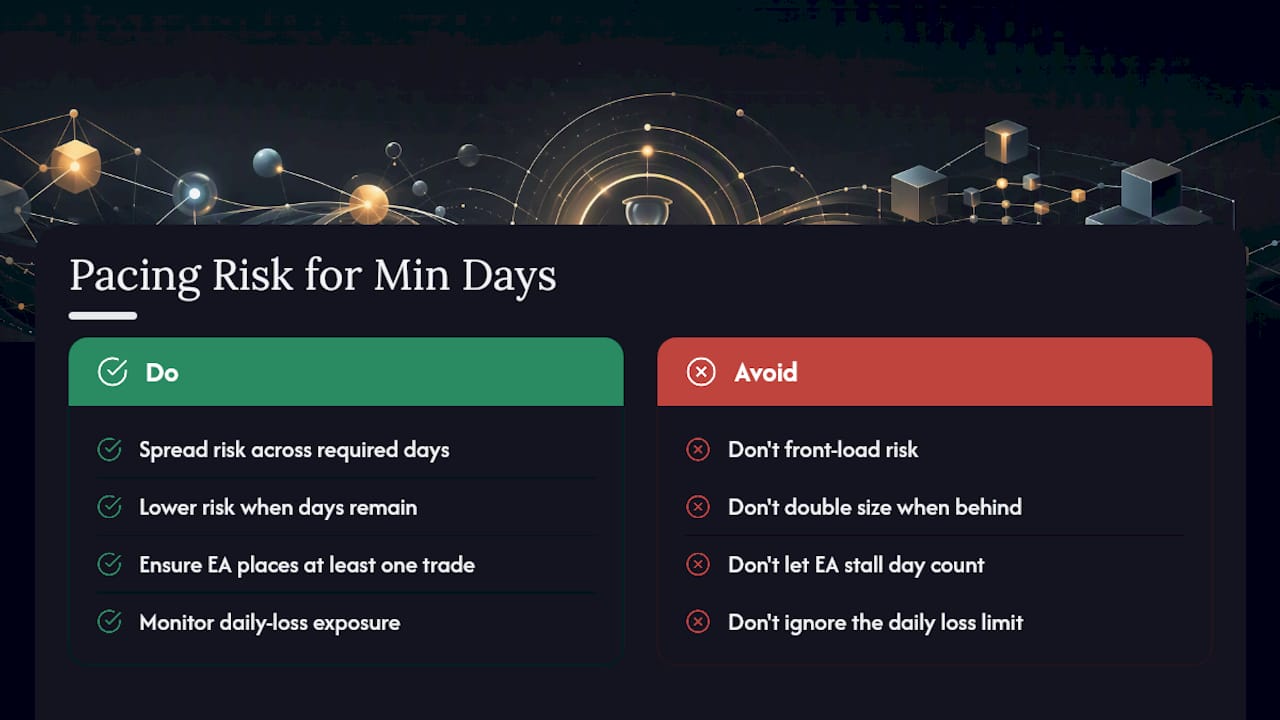
If a firm requires ten trading days minimum and sets a 10% profit target, hitting the target in three days with oversized risk doesn’t help you. You still have to wait out the remaining seven days, and every day you’re sitting on an evaluation account is another day the daily loss limit can end it. That argues for spreading risk evenly across the required window instead of front-loading it.
Some firms also count a “trading day” only if you place a trade that day, which changes how EAs with wide entry filters should be tuned. An EA that goes quiet for a week during low-volatility conditions can accidentally stall your minimum-day count even while technically compliant on risk.
Practical adjustment: once you’re within reach of the profit target but haven’t hit your minimum trading days, dial risk per trade down further rather than up. You have more days to fill and less need to press. Conversely, if you’re behind on the target with days running out, resist the instinct to double position size. Firms watch for exactly that pattern, and it’s often what triggers a consistency-rule review rather than an outright violation. Pace matters as much as the target number itself.
How to get your trading settings approved by a prop firm
Most firms don’t require pre-approval for every setting, but ambiguous cases (EA use, copier setup, specific instruments) are worth clearing in writing before you rely on them.
Start with the firm’s published rule page and terminal/EA policy documents. Screenshot the relevant sections and note the exact wording, since “EA use permitted” and “algorithmic trading permitted” aren’t always interpreted the same way by support staff.
For anything not explicitly covered, open a support ticket rather than asking in a community forum. Ask a specific, closed-ended question: “Can I use an EA with an internal daily-loss stop on this challenge account?” rather than a broad “is automation allowed?” Specific questions get specific, quotable answers. Save the response.
If you’re running a copier, ownership is usually the deciding factor in whether it’s permitted at all. Firms that allow copying between your own personally owned accounts often still prohibit copying trades from someone else’s account or a paid signal service. Confirm which category your setup falls into before connecting anything live.
Keep every approval, email, or ticket reference in the same folder as your other compliance documents. If a dispute ever comes up over a closed account, a written record from support carries far more weight than a claim that “the rules seemed to allow it.”

Examples of common firm-friendly trading settings configurations
A few configuration patterns show up again and again across firms with different rule structures, and adapting them to your specific limits is usually faster than building from scratch.
Conservative day-trading configuration: Risk per trade around 0.5% to 1%, internal daily stop set 1.5 points below the firm limit, max three open positions at once, and session filters restricting entries to major market overlaps only.
Copier-based multi-account configuration: Lot sizing scaled automatically per account balance rather than fixed lots, local or VPS execution to keep everything on one IP, and audit logging enabled on every linked account.
None of these are one-size-fits-all. The right combination depends on the firm’s specific daily-loss and drawdown structure, your strategy’s trade frequency, and how much manual oversight you can realistically provide during the evaluation window.
How settings need to change as you scale through funding phases
The settings that get you through an evaluation aren’t automatically the right settings once you’re funded and pushing for a scale-up. Loss limits often stay the same in percentage terms, but the dollar value they represent grows with account size, which changes how much room you actually have.
Many funded programs also tighten consistency requirements as balances grow, since firms want proof that gains came from a repeatable process rather than one lucky trade. That argues for keeping your internal stops and risk-per-trade caps stable rather than loosening them just because the account balance is bigger.
Scaling plans usually reward consistency over raw speed. An account that grows steadily within tight, documented settings tends to satisfy scale-up reviews better than one that hits the same target through a handful of oversized trades. If your evaluation configuration relied on wider buffers to survive occasional volatility, keep those same buffers in place once funded. The temptation to loosen internal stops after a firm relaxes daily monitoring is exactly the kind of shift that turns a stable, funded account into a closed one within a single bad session.
Conservative buffers beat aggressive tuning every time
Traders lose funded accounts more often from a skipped buffer than a bad strategy. Squeezing an extra half-point of risk per trade rarely matters. Documenting every firm approval and running the same tested configuration on every account does. Treat your settings as infrastructure, not a lever to optimize under pressure.
— Rimantas
How Mt4copier fits into a compliant setup
Mt4copier is a practical fit for exactly the configuration work this guide covers: local execution, fast replication, configurable lot sizing, and the audit trail firms sometimes ask to see. It runs entirely on your Windows machine or VPS, replicates trades from a master account to your other accounts with 18 lot size and risk options and automatic lot scaling per account balance, and keeps everything on one IP address instead of routing through a cloud bridge.

It’s trade replication software, nothing more. It runs copies existing trades across MT4, MT5, and DXTrade accounts; it has no strategy layer and doesn’t influence trading outcomes. Past results do not guarantee future performance, and no configuration eliminates rule risk entirely, which is why confirming your firm’s copier policy in writing still comes first.
If you’re setting up a new evaluation or funded account, start with the demo walkthrough to see the lot scaling and audit logging in action, then follow the installation guide to configure Local Trade Copier across your terminals before you run your dry-run test.
Sources
- PropTrade — Trading rules & copy rules
- Prop Firm EA settings optimization guide
- Master MT5: Pro config for prop firm success
This article is general information, not a substitute for advice from a qualified financial advisor. Consult a qualified financial professional about your own circumstances before acting on anything here.
