

TL;DR:
- Running a local trade copier on a low-latency Windows VPS with independent risk rules ensures survival in funded account trading. Proper setup includes environment optimization, detailed testing, and strict risk management to prevent rule violations and trading failures. Continuous monitoring, incident response, and regular policy reviews are essential for long-term success.
Run Local Trade Copier on a low-latency Windows VPS, designate a single master account, and configure per-account contract multipliers with individual daily-loss and trailing-drawdown enforcement before you copy a single live trade. That sequence covers the three things that actually determine whether a prop firm account manager copier setup survives contact with a real funded account.
Priority 1: Execution locality and uptime. A VPS near NY4 or LD4 keeps round-trip latency under control and eliminates the “my laptop went to sleep” failure mode. Disable Windows sleep, automatic restarts, and any scheduled maintenance windows that could interrupt an open session.

Priority 2: Per-account risk enforcement. Every follower account needs its own daily-loss ceiling, trailing-drawdown alert, and profit-target pause configured independently. A single shared risk setting across all followers is how one bad trade on an evaluation account bleeds into a funded account.
Priority 3: Anti-hedging and symbol mapping. Confirm that the copier cannot send opposite-direction fills across accounts you own, and verify symbol names and contract sizes match between your master broker and each follower broker before going live.

Pro Tip: Before touching a funded account, run the full-session demo test described in Section 5. Most account managers who get flagged or fail evaluations skipped this step.
What do you need before setting up a prop firm copier?
Getting the environment right before installation saves hours of debugging later. Here is the complete pre-setup checklist.
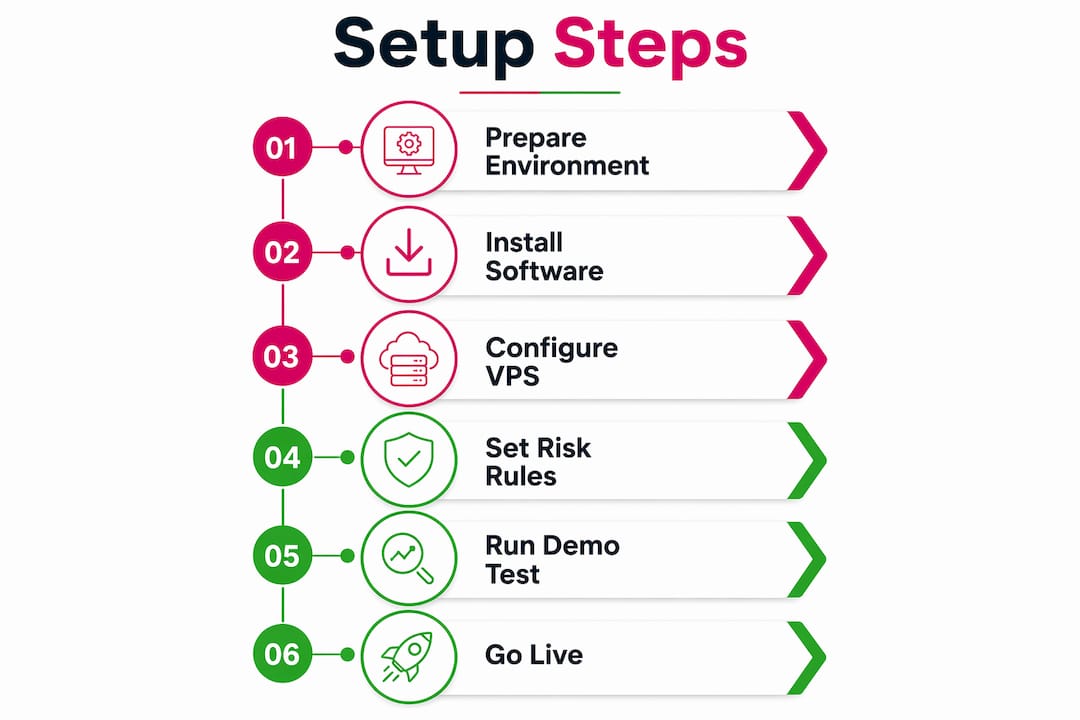
Software and terminal requirements
Local Trade Copier runs as an Expert Advisor on MT4 and MT5, and also supports DXTrade via dedicated MT4-to-DXTrade and MT5-to-DXTrade components. All components ship under a single subscription. Before installing, confirm:
- Your master account broker supports MT4 or MT5 (or DXTrade if copying cross-platform).
- Each follower account broker also supports one of those platforms.
- You have a valid Local Trade Copier license key and the correct installer for each platform version.
- Windows is the operating system on your VPS or local machine. Local Trade Copier does not run on macOS or Linux natively.
- Each MT4/MT5 terminal instance is a separate installation in its own folder, not multiple profiles inside one installation.
For cross-platform copying between MetaTrader and DXTrade, you will need the appropriate bridge component installed alongside the standard EA files.
Account permissions and credentials
- Each follower account must have trade execution permissions enabled at the broker level.
- Confirm the connection type each broker requires. Some brokers use legacy server addresses; connecting with the wrong server string causes silent authentication failures that look like network issues.
- Store credentials in a password manager, not in plain-text files on the VPS desktop.
- Create a separate Windows user account for each terminal group if you are running more than five terminals on one machine. This limits the blast radius when one terminal crashes.
Infrastructure sizing and location
| Component | Minimum | Recommended |
|---|---|---|
| RAM per 2–3 MT4/MT5 terminals | 1 GB | 2 GB |
| CPU cores | 2 | 4 |
| VPS location | Near your broker’s server | NY4 or LD4 data center |
| OS | Windows Server | Windows Server |
| Uptime SLA | majority percentage | nearly all percentage |
VPS hosting near major matching engines such as NY4 and LD4 is the standard recommendation for latency-critical multi-account trading. The practical heuristic: allocate at least 1 GB of RAM per 2–3 terminals to avoid out-of-memory crashes and heartbeat failures.
Data security and compliance matrix
Build a policy matrix before going live. Columns: firm name, copy-trading allowed (yes/no/conditional), documentation source (URL + date), and any specific restrictions (e.g., no copying across evaluation and funded accounts simultaneously). Keep this matrix version-controlled alongside your copier configuration files.
For credential security, the VPS and strong passwords guide from Mt4copier covers the practical steps for isolating account credentials and hardening your VPS environment.
How do you install and configure Local Trade Copier step by step?
Third-party copiers provide stateful control, account-level drawdown monitoring, and flexible scaling that native platform tools consistently lack. Local Trade Copier’s local execution model keeps all trade data on one machine, one IP address, with no external server in the path.
Pre-install checks
- Verify each MT4/MT5 terminal connects to its broker successfully before installing the EA.
- Confirm your license key is active and matches the platform version (MT4 key for MT4 terminals, MT5 key for MT5 terminals).
- Name each terminal folder descriptively:
MT4_Master_BrokerA,MT4_Follower_BrokerB_Acct1, and so on. You will thank yourself during troubleshooting. - Disable Windows Firewall exceptions that could block inter-terminal file communication, or add the Local Trade Copier data folder to the allowed list.
Installation steps
- Extract the Local Trade Copier files into the
MQL4/Experts(orMQL5/Experts) folder of each terminal. - Restart each terminal and confirm the EA appears in the Navigator panel.
- Attach the Server EA to a chart in the master terminal. This terminal originates all trades.
- Attach the Client EA to a chart in each follower terminal. Each follower gets its own EA instance with its own settings.
- Verify the connected status indicator turns green in each follower terminal before proceeding.
The full installation guide walks through folder structure, licensing activation, and common first-run errors on both Windows PC and VPS environments.
Scaling logic and contract multipliers
Equity-based scaling is the safest default for prop firm setups. Configure each follower’s lot size relative to the master using the balance-ratio method: if the master trades 1.0 lot on a $100,000 account, a $50,000 follower should copy at 0.5 lots. Local Trade Copier offers 18 lot-size and risk-management options, so you can also use fixed-ratio, fixed-lot, or risk-percentage methods depending on each account’s stage.
Pro Tip: Set each follower’s multiplier slightly below the mathematically exact ratio. A $50K follower copying a $100K master at exactly 0.5x will occasionally hit minimum-lot rounding issues on small positions. Using 0.48x or 0.49x gives you a small buffer without meaningfully changing exposure.
Symbol mapping
Symbol mapping errors are one of the most common causes of failed or incorrectly scaled trades across brokers. A master trading EURUSD may need to map to EURUSD.pro or EURUSDm on a follower broker. Check the exact symbol string in each follower terminal’s Market Watch before configuring the map.
Execution controls
Configure slippage filters to reject fills that deviate beyond an acceptable threshold. For market execution accounts, set the copier to use market orders on followers regardless of the master’s order type. Enable the queue/delay option to introduce micro-randomized entry timing across followers, which reduces the risk of identical-timestamp fills triggering group-trading detection.
Log files should be retained for at least 90 days, or longer if any of your prop firms have audit provisions in their terms.
How do you enforce risk controls and stay within prop firm rules?
A prop-firm-safe setup enforces per-account daily loss limits, trailing drawdown positions, consistency rule status, and profit targets automatically. Configuring these rules is not optional; it is the difference between a setup that survives evaluation and one that fails on day three.
Per-account risk rule configuration
- Daily loss limit: Set the copier’s auto-flatten trigger below the firm’s stated daily loss ceiling to allow for execution slippage. The buffer absorbs execution slippage so the copier stops copying before the firm’s hard limit is breached.
- Trailing drawdown alert: Configure warning thresholds at conservative levels well below the drawdown ceiling. The 85% threshold should trigger a pause on new entries; the ceiling itself triggers auto-flatten.
- Profit-target pause: For evaluation accounts, configure the copier to pause copying when the account approaches its profit target. Overtrading past a completed evaluation is a real failure mode.
- Auto-flatten trigger: Enable per account. This is the kill switch. When it fires, it must flatten that account only, without touching other followers.
Do not use identical settings across all accounts. An evaluation account in week one has different parameters than a funded account in its third payout cycle. Configure each follower independently.
Anti-hedging configuration
Most prop firms prohibit cross-account hedging: being long on one account while short on another in the same instrument simultaneously. The copier configuration should make this structurally impossible:
- All followers copy the same direction as the master at all times.
- Do not place manual orders on follower accounts while the copier is active.
- If you need to test an opposing position, do it on the master account, which copies to all followers in the same direction.
Consistency and anti-group-trading safeguards
Staggering entries using queue/delay functions or randomized entry offsets reduces the risk of triggering group-trading detection by firm auditors. Identical timestamps across dozens of accounts are a flag. Vary order sizes slightly when the account balance ratios naturally produce different lot sizes, and avoid mass-identical fills across a large number of accounts.
Risk matrix by account stage
| Account stage | Daily loss config | Drawdown alert | Profit-target pause | Auto-flatten |
|---|---|---|---|---|
| Evaluation (early) | Conservative buffer | warning at a high threshold | Yes, near target | Enabled |
| Evaluation (near target) | Conservative buffer | 85% warning | Yes, at target | Enabled |
| Funded (active) | Firm limit minus buffer | 85% warning | No (unless firm requires) | Enabled |
| Funded (mature/payout) | Firm limit minus buffer | 85% warning | Optional | Enabled |
For a broader trader risk management checklist that complements these copier-specific controls, the independent guide from Scalping-Algo covers capital protection principles applicable to multi-account setups.
What does a proper pre-live testing protocol look like?
The most common pitfall is skipping the full-session demo test. Experts insist test runs include stop moves and simulated daily-loss triggers to verify that per-account protections behave exactly as configured.
Full-session test protocol
Run this sequence on demo accounts before connecting any funded follower:
- Entry replication: Place a trade on the master. Verify it appears on all followers at the correct lot size within 1–3 seconds.
- Stop-loss update: Move the stop loss on the master position. Verify all followers update to the same level.
- Take-profit update: Adjust the take profit on the master. Verify synchronization across all followers.
- Partial close: Close 50% of the master position. Verify followers reduce proportionally.
- Full close: Close the master position entirely. Verify all followers close.
- Daily-loss trigger: Simulate a daily-loss breach on one follower (manually adjust the account balance in a demo environment or use a test scenario). Verify that follower auto-flattens and copying pauses to that account only, without affecting other followers.
- Consistency-rule alert: Approach the consistency threshold on a test account. Verify the alert fires correctly.
- Log review: Open the copy-confirmation log and verify every event above is recorded with correct timestamps, symbols, and lot sizes.
Pro Tip: Run at least one full simulated session during a real market window, not just in off-hours. Latency, liquidity conditions, and order rejection behavior during active sessions can differ significantly from quiet periods. The demo video shows what correct replication behavior looks like across a live session.
Acceptance criteria
| Test step | Pass criteria |
|---|---|
| Entry replication | Appears on all followers within 1–3 seconds, correct lot size |
| Stop-loss update | All followers update within 3 seconds, no missed accounts |
| Partial close | Followers reduce proportionally, no full close triggered |
| Daily-loss trigger | Only the affected follower flattens; others continue normally |
| Consistency alert | Alert fires before threshold is breached, not after |
| Log verification | Every event recorded with timestamp, symbol, lot size, result |
Staged live rollout
After passing the full-session demo test, connect a single funded follower first. Run it for at least three full trading sessions before adding additional followers. Keep the demo test environment running in parallel so you can reproduce any anomaly you see in live execution.
Capture a test-run changelog: date, tester, software version, test results, and any deviations. This document supports later audits or queries from prop firms. The demo account copying guide covers the configuration steps for setting up demo followers specifically for this purpose.
How should you run day-to-day operations and respond to incidents?
Local VPS setups remain the gold standard for latency-critical multi-account trading. But the VPS only keeps the machine running. The operational discipline that keeps accounts safe is yours.
Daily checklist
- Verify connection status on all terminals (green indicators, no “No connection” messages).
- Confirm open positions match between master and each follower.
- Check pending orders for any that failed to replicate.
- Review the alert queue for disconnects, failed SL syncs, or rejected orders from the previous session.
- Check for pending copier or VPS updates and schedule them outside active trading hours.
Monitoring signals to watch
- Heartbeat failures: If the copier stops sending heartbeat signals, copying has paused. Set up email or push notifications for heartbeat gaps longer than 60 seconds.
- Replication latency: Occasional 2–3 second delays are normal. Consistent delays above 5 seconds indicate a VPS resource or network issue.
- Rejected orders: A pattern of rejections on one follower usually points to a symbol mapping error, minimum lot violation, or broker-side restriction.
Incident-response flow
- Identify which follower account is affected.
- Pause copying to that follower immediately.
- Review the copy-confirmation log for the last 30 minutes of events.
- If the position is open and auto-flatten has not fired, flatten manually.
- Contact the prop firm’s support if the incident may have triggered a rule violation.
- Document the incident: time, affected account, log excerpt, action taken, and resolution.
- Resume copying only after the root cause is confirmed and resolved.
Segregation and automation
Run different account tiers in distinct terminal groups. Evaluation accounts in one group, funded accounts in another. When you investigate an issue in one group, copying in the other continues uninterrupted.
For automation, schedule daily config file backups to a separate location. Set auto-update windows for the VPS and copier software to occur between 2 AM and 5 AM local time, well outside any active session. Never apply updates during an open position.
How do you diagnose and fix the most common copier failures?
Most failures fall into five categories. Here is how to work through each one.
Connection failures
- Check VPS network connectivity first. Open a browser on the VPS and confirm internet access.
- Verify the broker server address in each terminal’s connection settings. A server address change at the broker level silently breaks the connection.
- Confirm account credentials are correct and the account has not been suspended or expired.
- Check whether the broker requires a specific connection type. Some brokers require plugin mode enabled in a separate application before the terminal can connect.
- Restart the terminal, not the VPS, as a first step. A full VPS restart during an open session can cause position discrepancies.
Order rejection and modification loops
- Minimum SL/TP distance: Many brokers enforce a minimum number of pips between entry and stop. If the master’s stop is tighter than the follower broker allows, the order will be rejected. Adjust the slippage filter or add a minimum-distance override in the copier settings.
- Contract-size mismatches: A standard lot on one broker may not equal a standard lot on another for indices or commodities. Verify the contract specification in each follower terminal’s symbol properties before copying those instruments.
- Symbol mapping errors: If the follower terminal shows “symbol not found” in the log, the symbol string in the copier’s mapping table does not match the broker’s exact symbol name. Correct the mapping and test with a single small position.
Latency and partial fills
Consistent replication delays above 5 seconds usually point to VPS resource exhaustion or geographic distance from the broker’s server. Reduce the number of concurrent terminal instances on the VPS, or upgrade RAM. Allocating at least 1 GB of RAM per 2–3 terminals is the practical baseline. For partial fills, switch follower accounts to market execution if they are currently set to instant execution, which can cause requotes and partial fills during fast markets.
Resource failures
Open Windows Event Viewer on the VPS and filter for application errors in the last 24 hours. Out-of-memory events appear as application crashes with Event ID 1000 or memory-related warnings. If you see them, either reduce the number of terminals on that VPS or upgrade the RAM allocation.
Copy verification and rollback
If you suspect a fill discrepancy, the rollback sequence is: pause the copier, compare open positions on master and all followers manually, flatten any orphaned positions on followers, investigate the log, and only resume after the discrepancy is explained. The troubleshooting guide covers the specific diagnostic steps for cases where Local Trade Copier stops copying entirely.
Key Takeaways
A safe prop firm account manager copier setup requires local VPS execution, per-account risk rules configured independently for every follower, and a full-session demo test completed before any funded account goes live.
| Point | Details |
|---|---|
| VPS execution is non-negotiable | Host Local Trade Copier on a Windows VPS near NY4 or LD4 with sleep and auto-restart disabled. |
| Configure risk rules per account | Set daily-loss, trailing-drawdown, and profit-target pause independently for each follower based on its current stage. |
| Run the full-session demo test | Test entry replication, stop moves, partial closes, and daily-loss triggers on demo accounts before connecting funded followers. |
| Map symbols and verify contract sizes | Confirm exact symbol strings and contract specifications match between master and each follower broker before going live. |
| Mt4copier for local execution | Local Trade Copier runs on your machine with no cloud routing, keeping all trade data on one IP address with very low latency local execution. |
What experienced account managers learn the hard way
Most new account managers underestimate how much the testing phase matters. The full-session demo test feels like a formality until the first time a daily-loss trigger fires on the wrong account because the auto-flatten was misconfigured. That one incident, on a live funded account, costs more time and money than a week of careful testing would have.
The other thing that surprises people is how often prop firm policies change. A firm that allowed copying across evaluation and funded accounts in January may quietly update its terms in March. The policy matrix described in Section 2 is not a one-time exercise. Review it monthly, or whenever a firm sends a terms update email.
Per-account buffers matter more than most guides acknowledge. Setting the daily-loss trigger at exactly the firm’s stated limit leaves no room for execution slippage, spread widening, or the small delay between the trigger firing and the flatten order executing. The 85–90% buffer is not conservative; it is the realistic minimum.
One clean, complete log file beats any amount of guesswork when a firm asks you to explain a position. Keep logs, version your configuration files, and document every change you make to the copier settings with a date and reason.
Local Trade Copier handles the operational complexity so you can focus on trading
Running multiple funded prop accounts from a single master is operationally demanding. Mt4copier’s Local Trade Copier addresses the specific problems described in this guide: local VPS execution with no cloud routing, sub-0.5-second replication, 18 lot-size and risk-management options for per-account scaling, automatic lot scaling by account balance, and copy-confirmation logs for every replication event.
The 3.0.0 update introduced execution controls specifically targeted at prop-firm traders: queue/delay options for randomized entry timing, anti-hedging configuration, and enhanced per-account risk settings. It covers MT4, MT5, and DXTrade under a single subscription, which matters when your funded accounts span multiple platforms.
Start with the 7-day free trial. Run the full-session demo test before connecting any funded account. The installation page walks through VPS deployment and licensing activation. The demo video shows exactly what correct replication behavior looks like so you know what to verify during your test sessions.
Local Trade Copier is trade-replication software only. It copies existing trades and has no market logic, strategy layer, or influence over trading outcomes. Past results do not guarantee future performance.
Useful sources and further reading
The resources below support the implementation steps and troubleshooting guidance covered in this guide.
Mt4copier internal resources:
- Local Trade Copier installation guide: Step-by-step VPS deployment, folder structure, and licensing activation. Start here before anything else.
- Demo video walkthrough: Shows the full-session test in action. Watch before running your own test to know what correct behavior looks like.
- Local Trade Copier 3.0.0 release notes: Documents the prop-firm-specific execution controls added in the most recent major update.
- Troubleshooting: copier not copying: Diagnostic steps for the most common failure mode.
- Adding a client account to an existing setup: Checklist for adding new followers without disrupting existing configuration.
- Cross-platform copying guide: Symbol mapping and integration details for MT4, MT5, and DXTrade setups.
External references:
- Prop-firm-safe copier setup guide: Detailed breakdown of rule-aware, non-hedging, proportionate copier configurations. Useful for validating your per-account risk rule logic.
- Multi-account execution guide: Covers VPS location choices, symbol mapping, and the case for local vs. cloud copiers. Good reference for infrastructure decisions.
- Copying across prop accounts without execution errors: Explains why third-party stateful copiers outperform native platform tools for multi-account prop setups.
Recommended
- Prop Firm Account Management Tips: Maximize Efficiency
- How to set different lot sizes for each copier account
- Local Trade Copier 3.0.0 Introduces New Execution Controls for Prop Firm and Multi-Account Traders | Trade Copier for MT4 & MT5
- Adding Client Account To Existing MT4 Trade Copier Setup [Checklist included]
