
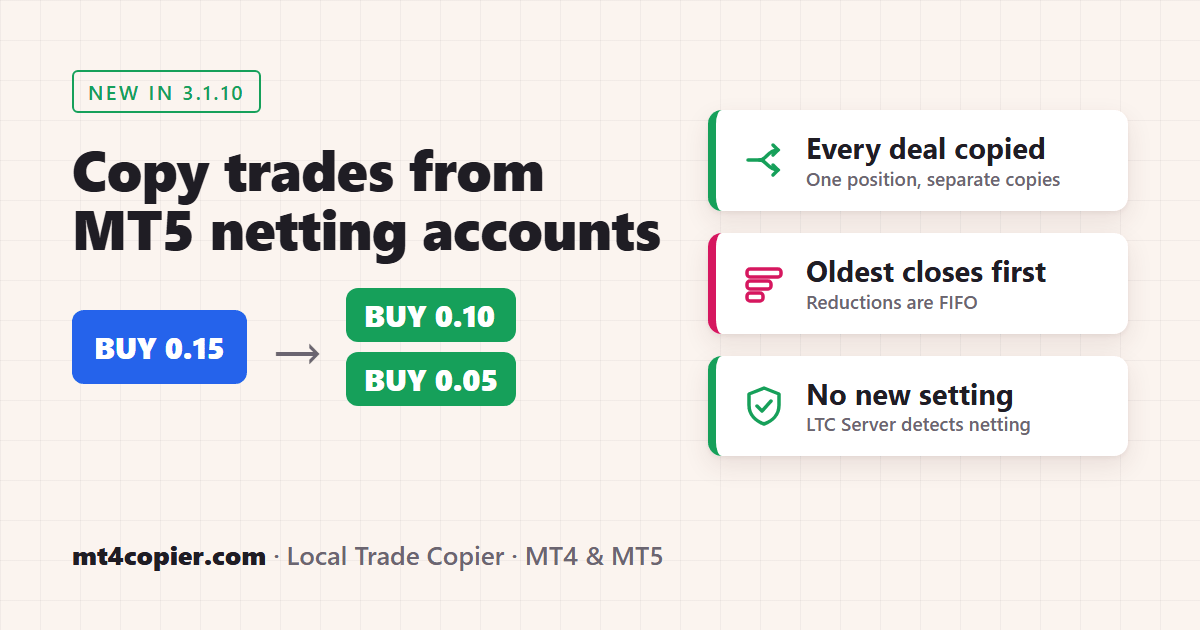
Short answer: Yes. Since version 3.1.10, Local Trade Copier (LTC) by Algonexis Technologies can copy trades from an MT5 netting account. Attach the LTC Server EA to the netting master as usual. It detects the netting account by itself, so there is no new setting. A netting account keeps only one position per symbol, but LTC Server sends every opening order (the first trade, each add-on, each filled pending order) to your client accounts as a separate trade. When the master reduces its position, the oldest copies are closed first. A reversal closes all copies and opens one new trade in the other direction. The client accounts can be MT4 or MT5, hedging or netting, and you don’t have to change anything in the LTC Client EA.
Hedging and netting accounts in MT5
An MT5 account uses one of two position accounting modes:
- Hedging: every trade is its own position with its own ticket. Buy EURUSD twice and you have two positions. Most forex brokers and prop firms use hedging accounts, and they work just like MT4.
- Netting: one position per symbol. Buy 0.10 EURUSD and then 0.05 more, and you have one EURUSD position of 0.15 lots at an average price. Sell 0.03 and the same position shrinks to 0.12 lots. Sell more than you hold and the position turns into a sell. Netting is common on exchange and futures accounts and on some brokers’ MT5 accounts.
You can see which mode an account uses in the title bar of the MT5 terminal: it says Hedging or Netting after the account type.

Exchange accounts (MT5 accounts for stocks and futures on an exchange) are handled the same way as netting accounts.
Before version 3.1.10, LTC Server could only run on MT5 hedging accounts. On a netting account it stopped at the start with the message “Software can only work on HEDGING accounts”. Netting accounts could already be client accounts, but not the master. Version 3.1.10 removes that limit.
Key takeaways
- You need LTC Server 3.1.10 or later on the MT5 netting master. The LTC Client EAs work with it from version 3.1 on. We recommend LTC Client 3.1.10, and for client accounts in FIFO + Netting mode it is required (earlier versions don’t follow the master’s reductions in that mode, so the copies keep their full size until the master closes).
- There is nothing to set up. LTC Server reads the account mode and switches to netting mode automatically.
- Every opening order is a separate copy: the first buy, every add-on and every filled pending order. An order that the broker fills in several parts is still one copy.
- When the master reduces its position, the oldest copies close first (first in, first out). A copy that is only partly reduced is partially closed on the client.
- A reversal closes all copies on that symbol and opens one new copy in the other direction for the remaining lots.
- All LTC Client settings keep working per copy: lot size modes, symbol mapping, filters, reverse trading, Shift Entry and the rest.
How LTC Server turns one netting position into separate trades
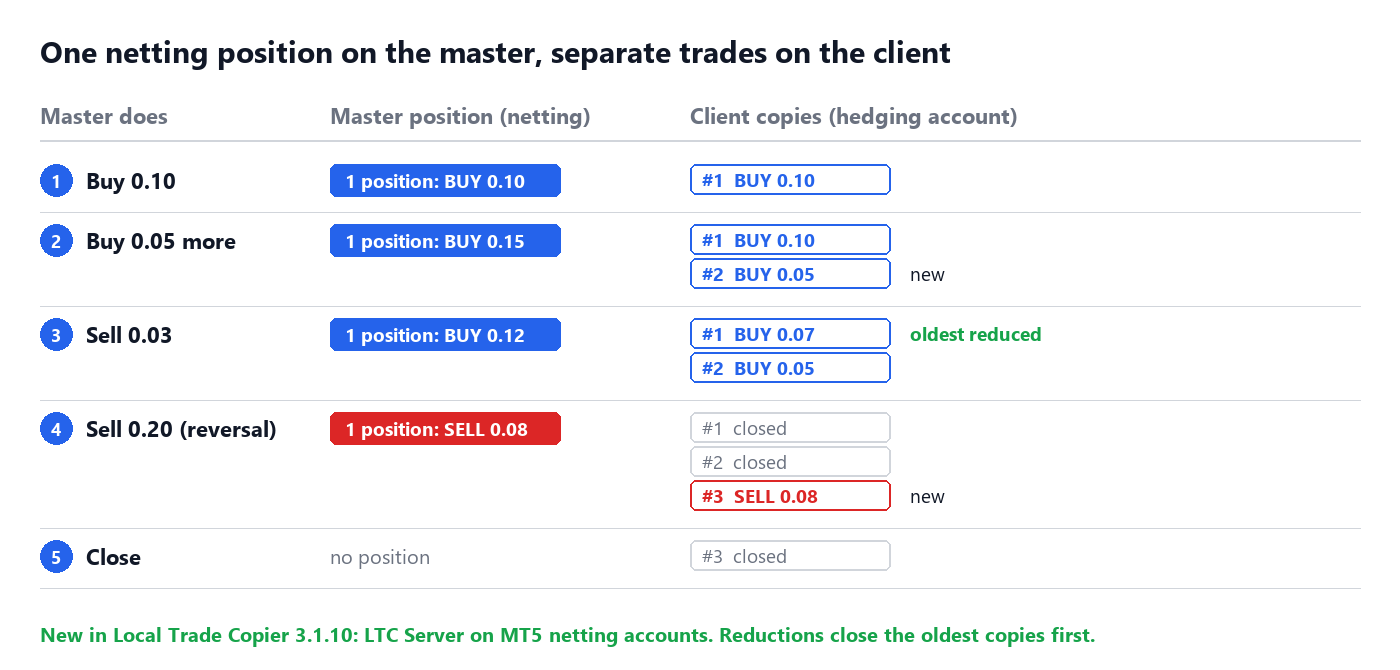
On a netting account the position has one ticket and one size, so the history of how it was built is only in its deals. LTC Server reads the deals of each position and rebuilds the trades from them, the way a hedging account would have them. The diagram at the top of this page shows a typical sequence:
| Master does | Master position | What your client accounts get |
|---|---|---|
| Buy 0.10 EURUSD | BUY 0.10 | Copy #1: BUY 0.10 |
| Buy 0.05 more | BUY 0.15 (average price) | Copy #1 stays, copy #2: BUY 0.05 opens at the new price |
| Sell 0.03 | BUY 0.12 | Copy #1 is partially closed to 0.07 (the oldest copy is reduced first), copy #2 stays |
| Sell 0.20 | SELL 0.08 (reversal) | Copies #1 and #2 close, copy #3: SELL 0.08 opens |
| Close the position | no position | Copy #3 closes |
For the client accounts the master looks exactly like a hedging account: an add-on is a new trade, a reduction is a normal close or partial close, and a full close is a close. That is why you don’t have to change anything on the client side, and why older Client versions copy it too.
Each copy is opened when its own deal happens on the master, so it gets an entry price close to that deal’s price, not the average price of the netting position.
Step-by-step setup
Step 1: Install LTC Server 3.1.10 on the netting master
Download Local Trade Copier 3.1.10 or later from the Download Center and install LTC Server MT5 into the MT5 terminal of your netting account. If you already use LTC, the new version appears as a separate EA in the Navigator: save your current settings to a .set file (Save button in the Inputs tab) so you can load them into the new EA.
Step 2: Attach LTC Server to one chart
Attach the LTC Server EA to any chart of the netting account, as you would on a hedging account, and click OK. You don’t need a special chart or symbol. LTC Server watches all symbols of the account. If you are new to LTC, the quick start guide shows this step in detail.
Step 3: Check the Experts tab
Open the Experts tab in the Toolbox of the master terminal (press Ctrl+T if the Toolbox is hidden). Right after the start, LTC Server writes one line that confirms netting mode:

The full line reads: This is a NETTING account (one position per symbol). LTC Server sends every opening deal to the clients as a separate trade. When a position is reduced, the oldest trades are closed first; a reversal closes them all and opens a new trade in the other direction.
On a hedging account this line doesn’t appear, because LTC Server works there as before.
Step 4: Set up the client accounts as usual
Attach the LTC Client EA to your client accounts with the same Signal_Provider_ID as the Server, exactly as with a hedging master. The client accounts can be MT4 or MT5, at the same broker or at different brokers. There is no netting setting on the client side for this.
The test: a netting master and a hedging client
We tested this on 10 November 2026 on two MT5 demo accounts with the released Local Trade Copier 3.1.10 VIP: the master on a MetaQuotes netting demo account and the client on an IC Markets hedging demo account. The Client copies the same lot size as the master (Money Management Mode = “Same lot size as on the master account”).
Step 1: a buy and an add-on
The master bought 0.10 lot of EURUSD with a Stop Loss of 300 points and a Take Profit of 600 points, and about 25 seconds later it bought 0.05 lot more. On the netting master that is one position of 0.15 lots at the average price. The client got two separate trades, each with its own entry price, and both with the position’s Stop Loss and Take Profit:

Step 2: the master reduces the position
Then the master sold 0.03 lot. Its position shrank to 0.12 lots. On the client the oldest copy was partially closed from 0.10 to 0.07 lots, and the 0.05 copy stayed open:

The Experts tab of the master shows how LTC Server read the reduction: Detected that someone partially CLOSED a trade #… (EURUSD netting position #…): 0.030 lots closed by deal #…, 0.070 lots left.

Step 3: the master reverses the position
Finally the master sold 0.20 lot. That is more than the 0.12 lots it held, so its position turned into a SELL of 0.08 lots. On the client both BUY copies were closed and one new SELL copy of 0.08 lots was opened:

Each step reached the client within 1 to 2 seconds.
Things to know
- Keep MagicNumber = 0 in the LTC Client (the default) so that reductions, which are partial closes on the client, are copied. With
MagicNumberabove zero the Client can’t follow partial closes, so it closes the whole copy instead. This is the same rule as for a hedging master. - Which copy closes is decided by time, not by price. A reduction always closes the oldest copy first, even if a newer copy has a better entry price. That keeps every client account in step with the master.
- Stop Loss and Take Profit: a netting position has one Stop Loss and one Take Profit. They apply to every copy on that symbol, and when the master changes them, all copies are changed.
- Pending orders: a pending order on the master is copied as a pending order, as usual. When it fills, the deal is a new copy if it adds to the position, or it closes the oldest copies if it reduces the position.
- Closing a copy from the client: with
CloseTradesWithClient = truein LTC Server, closing a copy on the client closes exactly that copy’s lots on the master, not the whole netting position. The other client accounts then close the same copy. - Restarts and VPS moves are safe. LTC Server rebuilds the copies from the deal history of the position each time, so it needs no saved state. After a restart there are no duplicate copies, and reductions made while LTC Server was off are applied as soon as it runs again.
- Netting client accounts: if a client account is also a netting account, the separate copies end up in one position there, as MT5 netting always does. The client still follows every add-on, reduction and reversal by volume.
- If the deal history doesn’t match the position, for example when the broker doesn’t show the full history, LTC Server sends that position as one trade and writes an ATTENTION line about it in the Experts tab. Make sure the master terminal shows the full account history, and check the copies on your client accounts if you see this line.
- MT4 masters: MT4 has no netting accounts. Even on US FIFO accounts with no hedging, every MT4 trade keeps its own ticket, so LTC Server MT4 already works there.
FAQ
Can Local Trade Copier copy trades from an MT5 netting account?
Yes, from version 3.1.10. Run LTC Server 3.1.10 or later on the netting account. It detects netting automatically and sends every opening order to the clients as a separate trade.
Do I have to change any setting for a netting master?
No. There is no new input. LTC Server reads the account mode when it starts, and the Experts tab shows “This is a NETTING account” when netting mode is on.
What happens when the master reduces its netting position?
The oldest copies are closed first. If the reduction is smaller than the oldest copy, that copy is partially closed. For example, with copies of 0.10 and 0.05 lots, a 0.03-lot reduction on the master turns the first copy into 0.07 lots and leaves the second one as it is.
What happens when the master reverses its position?
All copies on that symbol are closed, and one new copy opens in the other direction for the remaining lots. A master that goes from BUY 0.15 to SELL 0.08 in one deal gives the clients one new SELL copy of 0.08 lots (before the Client’s own lot size settings).
Which client accounts can copy from a netting master?
All of them: MT4 and MT5, hedging and netting accounts, and US FIFO accounts. The Client EA treats the netting master like any hedging master.
Do I need to update the LTC Client EA?
In most cases not: LTC Client 3.1 and later copies from a netting master. If a client account uses FIFO + Netting mode (US brokers), update it to 3.1.10, which fixed copying from MT5 masters in that mode. We recommend 3.1.10 for every client anyway, because it also brings automatic retries on temporary broker rejections and the corrected Risk Per Trade calculation.
My LTC Server says “Software can only work on HEDGING accounts”. What should I do?
You are running a version older than 3.1.10. Install LTC Server 3.1.10 or later from the Download Center.
Related guides
- Local Trade Copier quick start
- LTC Client EA settings and parameters explained
- How to copy trades from MT4 to MT5
- Local Trade Copier changelog
Don’t have Local Trade Copier yet? Try it free for 7 days on your own PC or VPS.
