

Per-account risk caps are settings inside your trade copier that stop any single follower account from taking a position larger than its configured maximum lot or risk percentage. The immediate move: pick a risk-aware sizing mode (balance percent or fixed-risk percent), pair it with a hard max lot per account, and run a minimum-lot test trade before you ever copy live.
This is a copier-level control, not a trading rule. It doesn’t touch your strategy, your entries, or your stop placement. It only governs how big a copied trade gets on each destination account.
- Copier-enforced max lot or max risk, applied per follower account
- Works alongside a sizing mode, not instead of one
- Requires verification with real test trades, not just a settings screenshot
Key Takeaways
Per-account risk caps only work when paired with a proportional sizing mode and verified through a real minimum-lot test trade before going live.
| Point | Details |
|---|---|
| Define the cap correctly | A per-account risk cap is a copier-enforced max lot or max risk, not a general trading rule. |
| Pick the right mode | Balance percent or fixed-risk percent scale exposure proportionally; fixed lot usually doesn’t. |
| Expect broker-side adjustments | Minimum lot, volume step, and symbol mapping can all change your calculated size before execution. |
| Test before trusting | Run a minimum-lot test trade and compare expected versus actual lot on every follower account. |
| Local Trade Copier fits this workflow | It offers 18 lot and risk options, sub-0.5-second local execution, and a 7-day free trial for testing setups. |
What Are Per-Account Risk Caps in a Trade Copier?
A per-account risk cap is a ceiling the copier checks before it sends an order to a follower account. The master account fires a trade, and the copier doesn’t just mirror the lot size. It runs that trade through a chain of checks specific to the destination account.
Here’s the sequence most copiers follow, including Local Trade Copier:
- The master order arrives with symbol, direction, and lot size.
- The copier pulls the follower account’s current balance, equity, and configuration.
- It calculates the theoretical follower lot size using whatever mode you’ve set (fixed lot, balance percent, multiplier, and so on).
- It checks that number against your configured cap, max lot, or max risk percent.
- It checks the result against the broker’s own constraints, minimum lot, maximum lot, and volume step.
- It either executes the trade, rounds it to fit, or skips it entirely if it falls below the broker’s minimum.
That last step trips up more traders than any other, as explained in this trading volume explained guide. A detailed breakdown on MQL5’s Traders’ Blogs walks through exactly how multi-account systems handle this: fixed lot, balance-based scaling, adjustable multipliers, and risk-based adjustment, plus what happens when the calculated volume doesn’t cleanly fit the broker’s step size. Volume gets rounded down, rounded to the nearest step, or the trade gets skipped if it can’t meet the minimum. None of that is a bug. It’s the cap doing its job.
Typical settings you’ll configure include a hard max lot per account, a max percent of equity you’ll risk on any single trade, and a rule for what happens when a calculated size falls under the broker’s minimum lot, either skip it or bump it up to the floor. Getting these three settings right is most of the work.
Which Lot-Sizing Mode Should You Pair With a Cap?
Five modes cover almost every setup you’ll encounter: fixed lot, lot multiplier, balance percent, equity percent, and fixed-risk percent. Each one translates the master’s lot size into a follower lot differently, and the mode you pick determines whether your cap is doing meaningful work or just sitting there as a rarely-triggered backstop.
- Fixed lot copies the exact same lot size to every follower, regardless of account size.
- Lot multiplier scales the master lot by a set factor (0.5x, 2x, and so on) per account.
- Balance percent sizes the follower trade as a share of that account’s current balance.
- Equity percent does the same but uses live equity, so it reacts to floating gains or losses.
- Fixed-risk percent calculates lot size from a defined dollar or percent risk based on stop distance.
Fixed lot is the mode most likely to blow past a cap without warning, because it ignores account size entirely. Copy a 1.0 lot trade to a $5,000 account and a $50,000 account with the same fixed-lot setting, and you’ve applied wildly different risk to each one. Trada’s breakdown of the five modes makes the case plainly: balance percent or fixed-risk percent are the better default for prop-firm accounts or any setup where follower balances differ, because they scale exposure proportionally instead of copying a flat number.
A hard max lot still matters even with a proportional mode. Balance percent will keep scaling upward as an account grows, and without a ceiling, a big winning streak on the master can eventually push a follower trade past what that account should reasonably carry.
Pro Tip: Set your proportional mode first, then add a max lot as a safety net, not the other way around. The mode handles day-to-day sizing; the cap only exists to catch the outlier trade.
Why Your Calculated Lot Size Doesn’t Always Match Reality
The copier can calculate a perfect number and still not deliver it, because the broker has the final say. A handful of mismatches show up constantly across live accounts:
- Minimum and maximum lot limits. If your calculated size lands below the broker’s minimum, the trade gets skipped or bumped to the floor, either way, it isn’t the size you expected.
- Volume step increments. Brokers round to specific increments (0.01, 0.1), so your exact calculated lot often gets adjusted up or down to the nearest valid step.
- Symbol name mismatches. “EURUSD” on one broker and “EURUSD.m” on another will block a copy entirely if the mapping isn’t set correctly.
- Order-type differences. A market order on the master copying to a limit order setup on the follower can produce partial fills or no fill at all.
- Leverage and margin gaps. Two accounts risking the same percent of equity can still carry very different cash exposure if their leverage or margin requirements diverge.
Prop accounts add another layer. Daily-loss limits and consistency rules mean your cap and sizing choices need a buffer, not just a ceiling that matches the firm’s stated maximum.
How to Configure Per-Account Caps Without Guessing
Configuration goes wrong less often from bad settings and more from skipping steps. Work through this order:
- Pick a sizing mode for each follower account and write it down. Balance percent or fixed-risk percent is the right call for most multi-account and prop setups, per Trada’s mode comparison.
- Set a hard cap on top of that mode, a max lot and, where the software supports it, a max cash risk or percent risk per trade.
- Configure what happens at the edges: rounding behavior, volume-step handling, and whether sub-minimum trades get skipped or floored.
- Place a minimum-lot test trade and check the actual lot that lands on each follower against what you expected.
- Set daily-loss or auto-lockout thresholds with a real buffer under any prop-firm limit, not right up against it.
- Turn on logging and alerts for anything skipped or truncated, so a broker-side rejection doesn’t go unnoticed for days.
That fourth step is the one traders skip most, and it’s the one that catches real problems. A guide on copier risk testing recommends testing with a single instrument and identical stop distance across every account, because that’s the fastest way to expose contract-size or tick-value differences before they cost you anything.
Pro Tip: Run your test on the smallest account in your lineup first. If a cap or minimum-lot rule is going to cause a problem, it shows up there before anywhere else.
For prop accounts specifically, look at how the copier handles thresholds automatically. Some systems tier down contract ratios as an account nears a daily-loss or consistency limit, which Copilink’s guide to dynamic position sizing describes as a way to preserve compliance without you manually adjusting every account by hand.
What to Test Before You Enable Live Copying
Run a minimum-lot test trade first and compare the lot the copier calculated against the lot that actually landed on the follower. Any gap tells you something, usually a rounding rule or a minimum-lot floor you hadn’t accounted for.
Next, deliberately test a trade sized to exceed your cap. Confirm whether the copier truncates it down to the max or skips it outright, and note which behavior you’re getting so it isn’t a surprise later.
- Check for partial fills, rejections, or unusual slippage, especially across brokers.
- Repeat the test across at least two instruments and both market and limit order types.
- Only flip on live copying once results are consistent across every follower account.
How Local Trade Copier Handles This in Practice
Local Trade Copier was built around exactly this workflow. Execution runs locally, sub 0.5 seconds, so the calculation and cap-check sequence isn’t waiting on a cloud round trip before it decides what to send.
- 18 lot-size and risk-management options cover fixed lot, multiplier, balance percent, equity percent, and fixed-risk modes in one settings panel.
- Automatic lot scaling adjusts per account balance without manual recalculation as accounts grow or shrink.
- A 7-day free trial and demo walkthroughs let you run the minimum-lot tests above before committing to a live setup.
In numbers: Local Trade Copier has been running since 2010, with over 3,000 users and 491 Trustpilot reviews behind it, built by developer Rimantas.
One clarification worth stating plainly: this software replicates trades. It doesn’t generate signals, adjust strategy, or influence outcomes. Past results do not guarantee future performance, and no cap or sizing mode changes what the underlying strategy does on the master account.
What the Conventional Advice Gets Wrong
Most guidance on trade copiers treats per-account caps as a set-and-forget checkbox. Turn it on, pick a number, move on. That’s backward. The cap is only the backstop. The sizing mode does the actual work, and if you’ve left every follower on fixed lot because it was the default, your “cap” is rarely even the thing preventing oversized risk. The mode is producing sizes so mismatched to account balance that the cap either fires constantly or never fires at all.
The bigger blind spot is testing. Traders configure caps carefully, then go live without ever placing a deliberate minimum-lot test. That’s the step that reveals a symbol mapping error or a rounding quirk before it costs anything real. Skipping it means your first “test” happens with live capital.
If you take one thing from this: verify before you trust. A copier’s settings screen tells you what should happen. Only a real test trade tells you what actually does.
Get Your Per-Account Caps Running With Local Trade Copier
Local Trade Copier gives you all 18 lot-sizing and risk options in one local installation, so you’re not stitching together fixed-lot workarounds or manual recalculations across a spread of prop and personal accounts. Because execution runs on your own PC or VPS, there’s no cloud routing delay between the cap check and the order hitting your follower account, which matters if you’re managing accounts with different daily-loss thresholds side by side.

If you’re running multiple accounts with different balances, or managing client accounts where each one needs its own cap, this is the exact scenario the software was built around. Start with the 7-day free trial, configure your sizing mode and caps, and run the minimum-lot test on your smallest account before copying anything live.
Frequently Asked Questions
What exactly is a per-account risk cap in a trade copier?
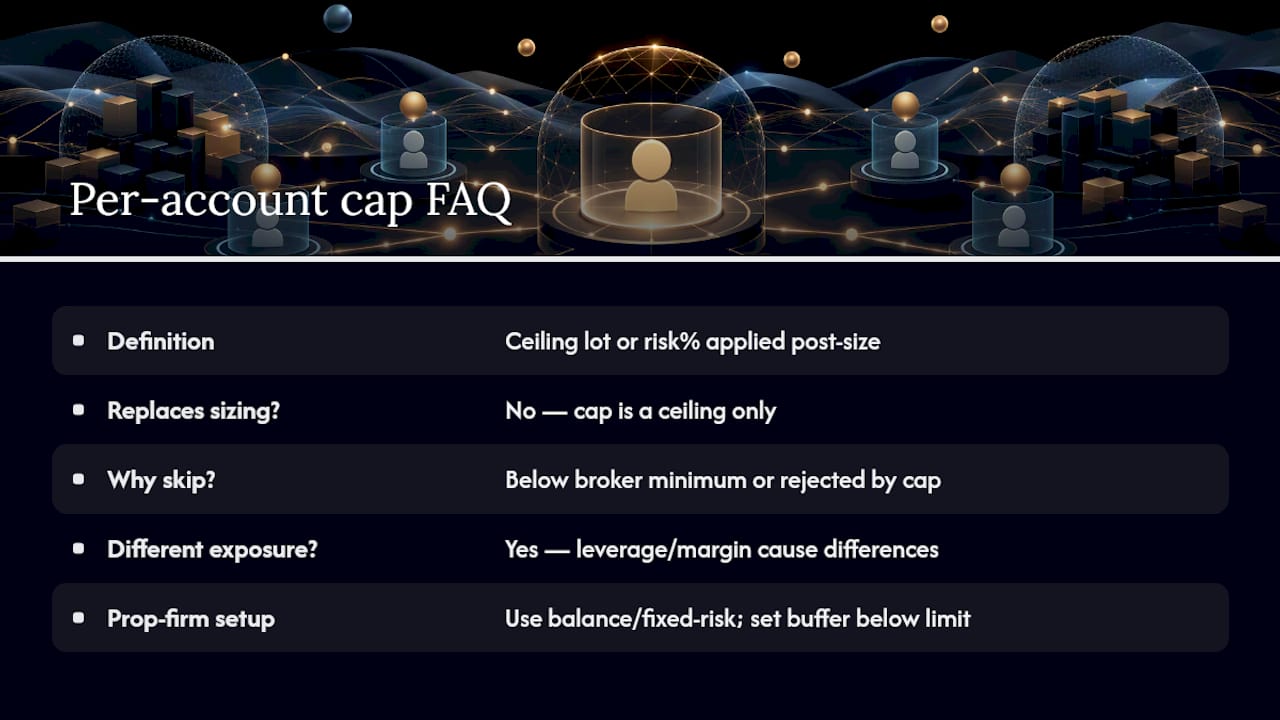
It’s a maximum lot size or risk percentage the copier enforces for one specific follower account, applied after the copier calculates the theoretical trade size and before the order gets sent to the broker.
Does a per-account cap replace the need for a sizing mode?
No. The cap is a ceiling, not a calculation method. You still need a mode, fixed lot, multiplier, balance percent, equity percent, or fixed-risk percent, to determine the base size before the cap checks it.
Why did my copier skip a trade instead of placing it?
Usually because the calculated lot fell below the broker’s minimum lot size, or because the order exceeded your configured cap and your skip rule was set to reject rather than truncate.
Can two accounts with the same percent risk setting still carry different real exposure?
Yes. Leverage and margin requirements vary by broker and account type, so two accounts running identical percent-risk settings can still carry different cash exposure on the same trade.
How do I set per-account caps for a prop-firm account specifically?
Use balance percent or fixed-risk percent as your base mode, then set your max lot and daily-loss thresholds with a buffer below the firm’s actual limit, not right up against it, so normal rounding or slippage doesn’t push you over.
Sources
- Managing Different Account Sizes with Intelligent Lot Scaling | Multi-Account Trade Replication System – Other – 8 July 2026 – Traders’ Blogs
- How to forex trade copier risk management?
- Dynamic Position Sizing Trade Copier Prop Accounts | Guide | Copilink
Recommended
- Add Missing Risk Management to Your Forex Robot or Signal
- MT4 Trade Copier limitations with Netting on FIFO accounts
- Best Risk Management Platforms for Forex Multi-Account Traders
- Local Trade Copier 3.0.0 Introduces New Execution Controls for Prop Firm and Multi-Account Traders | Trade Copier for MT4 & MT5
