

A per-account multiplier multiplies the master account’s lot size for each client account so trade size scales with that account’s balance or risk tolerance. Use it whenever accounts differ in size, leverage, or prop-firm lot caps. Always check margin and platform volume limits before applying one. Past results do not guarantee future performance.
TL;DR:
- Using a per-account multiplier requires checking margin and volume limits to prevent order rejection or margin calls, especially at higher scaling levels.
- Calculating the multiplier involves dividing client equity or balance by the master reference and multiplying by a risk factor, then rounding to symbol step constraints.
- The margin impact roughly doubles with each doubling of the lot size, increasing the risk of margin calls if the account’s free margin is inadequate.
- Combining a fixed or ratio-based multiplier with maximum lot caps or minimum lot enforcement ensures safer, compliant scaling across diverse account setups.
- Automating multiplier recalculations helps prevent mistakes caused by manual adjustments whenever account balances or leverage change.
Which Multiplier Type Fits Your Account Setup?
Not every account should copy the same way. A fixed multiplier applies one constant factor to every trade, regardless of what the master account does next, and works well when a client account intentionally wants steady, unchanging exposure. A balance-ratio multiplier recalculates automatically, scaling lot size proportionally to the client’s balance versus the master’s, which fits accounts that grow or shrink over time. An equity-ratio multiplier does the same thing but uses live equity instead of static balance, which matters once trades are open and floating profit or loss changes the real risk picture. A hybrid model combines a ratio calculation with a hard lot cap, useful for prop-firm accounts bound by strict per-trade limits.
- Fixed multiplier: best for small retail accounts that want predictable, unchanging position sizes.
- Balance-ratio multiplier: best for client-managed accounts where equity fluctuates and proportional risk matters.
- Equity-ratio multiplier: best for EA replication across accounts with open positions and floating P/L.
- Hybrid multiplier: best for prop-firm accounts constrained by lot-size or drawdown rules.
Account currency and symbol contract size complicate all four models. A EUR-denominated master copying to a USD client account needs a conversion step baked into the multiplier, or lot sizes will be quietly wrong.
How Do You Calculate a Per Account Lot Multiplier?
The core formula for calculating per account profit exposure through lot sizing is straightforward:
Multiplier = (Client Reference ÷ Master Reference) × Risk Factor
The “reference” is either balance or equity. Use equity when trades are open, since balance ignores floating profit or loss and can produce a multiplier that’s already stale by the time it’s applied. Use balance only when accounts are flat between copy events.
Here’s the calculation broken into steps:
- Confirm both accounts’ reference values (equity is safer than balance mid-trade).
- Divide client reference by master reference to get the raw ratio.
- Multiply by a risk factor (1.0 for full replication, 0.5 for half-size, etc.).
- Multiply the master’s lot size by that result.
- Round to the nearest allowed SYMBOL_VOLUME_STEP before sending the order.
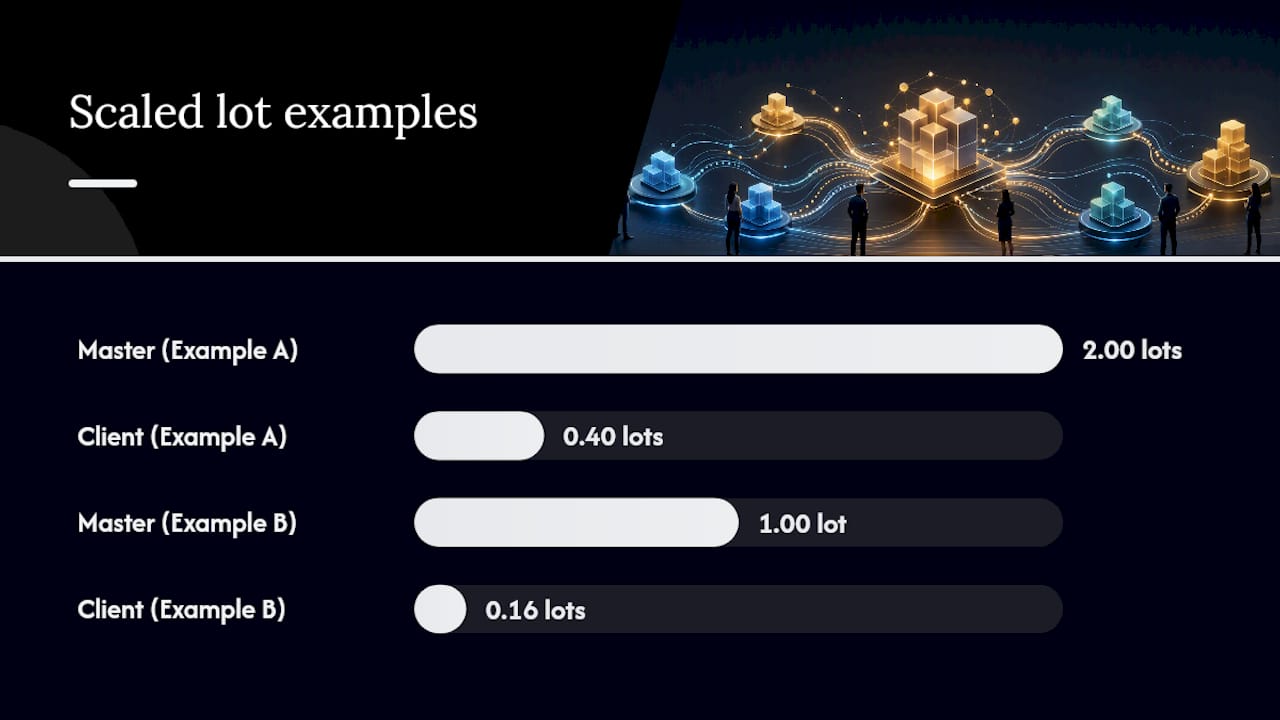
Worked Example A: Master account equity is $50,000, master trades 2.00 lots. Client account equity is $10,000. Ratio = 10,000 ÷ 50,000 = 0.2. With a risk factor of 1.0, the client should receive 2.00 × 0.2 = 0.40 lots.
Worked Example B: Master equity is $20,000, trading 1.00 lot. Client equity is $3,200. Ratio = 3,200 ÷ 20,000 = 0.16, so the raw lot size is 0.16. If the broker’s volume step is 0.01, 0.16 rounds cleanly. But if the client’s margin can only support 0.10 lots at current leverage, the multiplier needs a downward adjustment before the order goes out, not after it gets rejected.
Quick reference: MetaTrader’s own documentation defines SYMBOL_VOLUME_MIN, SYMBOL_VOLUME_STEP, and SYMBOL_VOLUME_MAX as the three constraints every scaled order must satisfy. Skip this check and the platform will reject the trade outright.
Always verify the resulting lot size against the client account’s actual free margin, not just the platform’s minimum volume. A mathematically correct multiplier can still produce an order the account can’t afford.
How Does the Multiplier Affect Margin and Order Execution?
Margin scales directly with lot size: required margin = lots × contract size × price ÷ leverage. Double the multiplier and you roughly double the margin commitment for that trade, assuming contract size and leverage stay constant. This is why a multiplier that looks fine on paper can trigger a margin call the moment volatility widens the price.
Several failure modes show up repeatedly once multipliers scale beyond a 1:1 copy:
- Insufficient margin — the scaled lot size demands more free margin than the client account holds.
- Max-lot rejection — the broker or prop firm caps position size, and the multiplier pushes past it.
- Volume step rounding errors — a raw multiplier output like 0.137 lots doesn’t match the broker’s allowed step and gets silently adjusted or rejected.
- FIFO or netting conflicts — some U.S. brokers enforce First-In-First-Out rules that interact badly with scaled partial closes.
Pro Tip: Set a hard max-lot cap per account, independent of the multiplier formula. A ratio calculation has no ceiling on its own, and a sudden balance spike or master lot increase can push a scaled order well past what the client account should risk.
Account managers should treat margin checks as part of standard recordkeeping, not an afterthought. The CFTC’s guidance on retail forex transactions outlines disclosure and recordkeeping expectations that apply directly to anyone managing multiple client accounts, and the eCFR’s Part 5 rules codify minimum security-deposit parameters that shape how much margin cushion a scaled account needs to hold.
What Are the Best Multiplier Configuration Patterns?
Three patterns cover most real-world lot multiplier settings, and each solves a different problem.
- Pattern A — Fixed multiplier plus max-lot cap. A constant multiplier (say, 0.5) with a hard ceiling on lot size per trade. This suits fee-paying clients who’ve agreed to a set exposure level and don’t want it drifting with account balance changes.
- Pattern B — Balance-ratio with minimum lot enforcement. The multiplier recalculates against current balance, but a floor prevents it from rounding down to zero on small accounts. This is the closest thing to proportional risk scaling across a mixed portfolio of account sizes.
- Pattern C — Hybrid with per-symbol caps and margin triggers. Combines a ratio calculation with per-symbol lot ceilings and an automatic pause if free margin drops below a set threshold. This pattern fits prop-firm accounts where compliance rules are stricter than ordinary risk preference.
For accounts whose calculated lot size falls below SYMBOL_VOLUME_MIN, two options work: round up to the minimum (accepting slightly higher relative risk) or split the master trade into smaller increments and allocate proportionally, which some copier setups handle through trade splitting logic built specifically for this problem.
How Do You Deploy a Multiplier Without Breaking Orders?
Run through this checklist before any live multiplier goes active:
- Confirm account currency, leverage, and broker-specific SYMBOL_VOLUME limits.
- Calculate expected margin usage at the proposed multiplier under a worst-case price move.
- Run a demo test first, then enable the multiplier on one small live account before rolling it out further.
- Review copier logs specifically for rejected orders, not just filled ones.
- Set alerts for margin usage thresholds and reconcile account balances daily.
When rejections happen anyway, the fix is usually one of three things: lower the multiplier slightly, split the order into smaller pieces, or cap risk at a fixed percentage per trade rather than a fixed lot size. Pro Tip: Keep a rejection log for at least two weeks after any multiplier change. Patterns that look random on day one (say, rejections only on high-volatility symbols) often point to a single fixable setting, like a missing per-symbol cap.
This kind of ongoing monitoring is also what regulatory guidance for account managers under NFA oversight expects as baseline practice, not an optional extra.
Why Multiplier Math Gets Overlooked Until It’s Too Late
Most traders treat the multiplier field as a number they set once and forget. That’s the mistake. Account balances change, brokers adjust leverage tiers, and a multiplier tuned for a $10,000 account in January can be dangerously oversized by June if nobody revisits it.
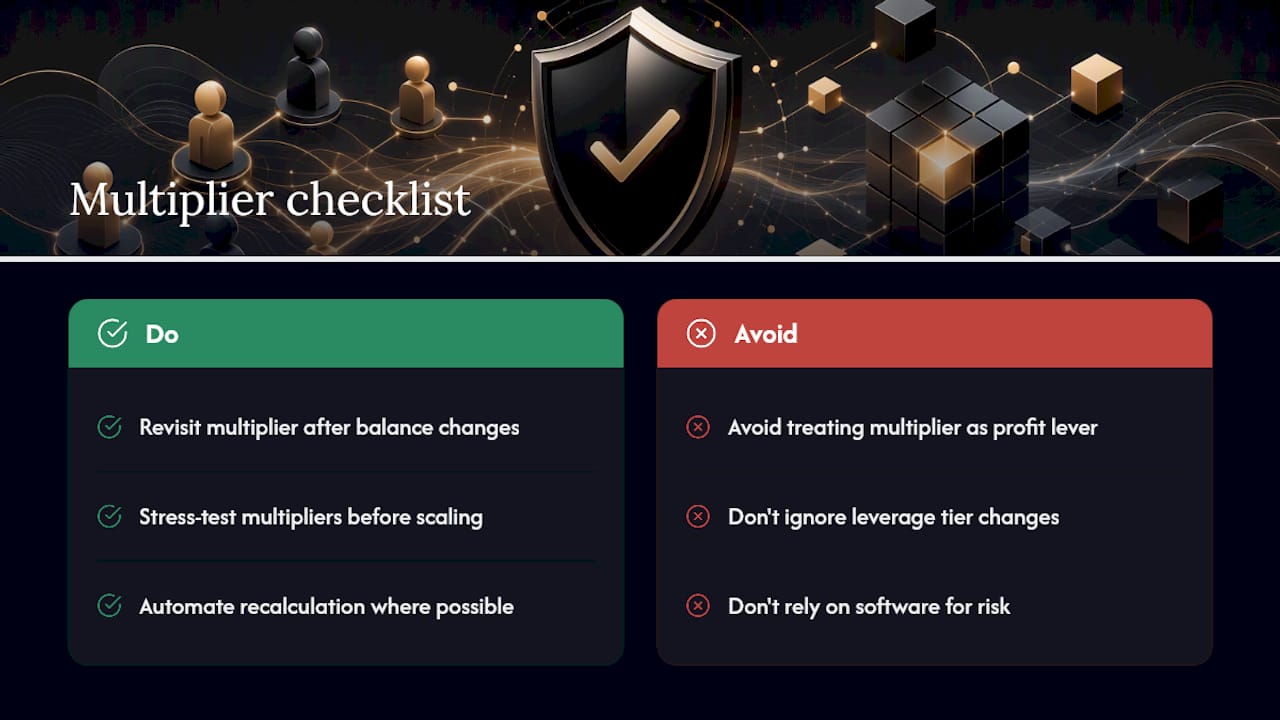
The bigger blind spot is treating multiplier selection as a profitability lever instead of what it actually is: a position-sizing control. It doesn’t make a strategy better or worse. It only changes how much of that strategy’s outcome, good or bad, lands on a given account. Practitioner guidance on multiplier stress-testing makes this point directly, and it’s worth internalizing before scaling anything past a 1:1 copy.
Local Trade Copier has been running since 2010 across 3,000-plus users and 491 Trustpilot reviews, and the recurring theme in support requests is never “the multiplier failed.” It’s that someone changed an account’s leverage or balance and never touched the multiplier that assumed the old numbers. Software can automate the recalculation. It can’t decide your risk tolerance for you.
— Rimantas
Set Multipliers Automatically Instead of Recalculating by Hand
Manually recalculating ratios every time a client account’s balance shifts is exactly the kind of error-prone busywork that turns a sound multiplier strategy into a margin call nobody saw coming. Local Trade Copier handles this differently: automatic lot scaling adjusts per client account balance in real time, backed by 18 separate lot and risk management options so you can build fixed, ratio, or hybrid patterns without hand-editing formulas after every deposit or withdrawal.

Execution happens locally, in under half a second, with no cloud routing, which matters if you’re running prop-firm accounts that need to stay on a single recognizable IP address. Cross-platform copying works across MT4, MT5, and DXTrade, so the same multiplier logic applies whether client accounts sit on different platforms entirely. If you want to see how the configuration patterns above translate into actual settings, the pricing page lists the PERSONAL, MANAGER, and VIP plans, and every plan includes a 7-day free trial to test multiplier behavior on a demo account before committing anything live.
Sources
- CFTC: Final Rule Q&A on off-exchange retail forex transactions
- MetaTrader 5 Help — Performing deals / Volume and margin
- MetaTrader 4 Help — Opening positions and volume rules
FAQ
What Is a Per Account Multiplier in Trade Copying?
A per-account multiplier is a setting that scales the master account’s lot size up or down for each connected client account, based on balance, equity, or a fixed ratio. It lets one strategy run across accounts of different sizes without manually recalculating lot sizes for every trade.
How Do I Calculate the Right Multiplier for a Smaller Account?
Divide the client account’s equity by the master account’s equity, then multiply by a risk factor between 0 and 1 depending on how closely you want exposure to match. Round the result to the broker’s allowed volume step before applying it live.
Can a Multiplier Cause Margin Calls?
Yes. Since required margin scales directly with lot size, a multiplier set too high for an account’s leverage and free margin can trigger a margin call or outright order rejection. Past results do not guarantee future performance, and stress-testing the multiplier against worst-case price moves before going live is standard practice.
What Happens if the Calculated Lot Size Is Below the Broker’s Minimum?
Most platforms enforce a SYMBOL_VOLUME_MIN below which no order can be placed, so you either round up to that minimum or split the master trade into smaller pieces allocated proportionally. Local Trade Copier includes trade splitting and lot scaling options built for exactly this scenario.
Does Local Trade Copier Set Multipliers Automatically?
Local Trade Copier includes automatic lot scaling per client account balance as one of its 18 lot and risk management options, so multipliers adjust without manual recalculation. It replicates trades exactly as they occur; it does not generate trading signals or influence strategy outcomes.
Recommended
- Prevent Margin Call Copies: 5 Checks for Copier Ops on MT4/5 & DXtrade
- Prop Traders: Local Copier Scales Leverage and Prevents Margin Calls
- MT4/MT5 Traders: Avoid 50-Lot Rejections with Max Lot Per Account
- Best Risk Management Platforms for Forex Multi-Account Traders
