

The fix comes down to five checks run before every copied trade: read the receiver’s ACCOUNT_MARGIN_SO_CALL and ACCOUNT_MARGIN_SO_SO thresholds, calculate the order’s required margin with OrderCalcMargin, project the resulting margin level, and block or downsize the copy if that projection breaches a safety buffer you set above the broker’s stop-out line. If the receiver’s account state can’t be read reliably, the copier should refuse to copy rather than guess. This applies whether you’re bridging MT4 to MT5, or copying into DXtrade.
TL;DR:
- Always check that the receiver’s account information can be reliably read before copying trades, especially the margin call and stop-out thresholds.
- Use
OrderCalcMarginto project the margin requirement and compare the projected margin level against a safety buffer above the broker’s stop-out line.- Implement runtime safeguards such as aggregated margin caps, per-symbol lot limits, and percent-of-equity restrictions to prevent cascading margin problems across multiple trades.
- Adjust lot sizes based on receiver account balance or equity, but always cap these volumes using margin projections to maintain a clear safety margin.
- Monitor the receiver’s margin level and free margin continuously after trade execution, and set alerts for early intervention to prevent account liquidation.
What Account Data Do You Need to Prevent Margin Call Copying?
A copier that only forwards trade signals without checking receiver capacity is gambling with someone else’s account. The properties that matter live in the MQL5 AccountInfo API, and every serious copier setup needs to pull them before, not after, execution.
Here’s the working set:
ACCOUNT_MARGIN_FREE: usable margin left before a broker restricts new positions.ACCOUNT_MARGIN_LEVEL: the live ratio brokers watch, expressed as a percentage.ACCOUNT_MARGIN: margin already locked by open positions.ACCOUNT_EQUITY: balance adjusted for floating profit and loss.ACCOUNT_MARGIN_SO_CALL: the margin-call threshold, which triggers a warning phase.ACCOUNT_MARGIN_SO_SO: the stop-out threshold, where the broker starts closing positions.ACCOUNT_MARGIN_SO_MODE: tells you whether the two thresholds above are percentages or flat currency amounts.ACCOUNT_LEVERAGE: the receiver’s leverage ratio, which changes how much margin a given lot size consumes.
That last mode flag trips up more copier builds than anything else. A copier comparing a projected margin level against a raw number without checking ACCOUNT_MARGIN_SO_MODE first will misjudge the risk on one of those accounts every time. MetaTrader’s own margin documentation defines margin level as Equity divided by Margin, times a typical 100%, and that formula only means something once you know which threshold format you’re comparing it to.
How Do You Calculate Margin Before Copying a Trade?
Projection is the step that separates a copier that protects receiver accounts from one that just fires and hopes. Before a copied order goes live, run through this sequence:
- Pull current account state. Grab
ACCOUNT_EQUITYandACCOUNT_MARGINfrom the receiver in real time, not from a cached value. - Calculate the order’s margin requirement. Call
OrderCalcMargin(or the DXtrade equivalent) for the candidate symbol, volume, and direction to get a figure, call it X, representing the additional margin the trade would consume. - Project the post-copy margin level. Use:
potentialMarginLevel = (AccountEquity − estimatedCommission) / (AccountMargin + X) × 100. Subtracting an estimated commission matters when the exact deduction isn’t available; underestimating cost is worse than overestimating it. - Compare against a safety buffer. Don’t compare against the receiver’s raw
ACCOUNT_MARGIN_SO_CALL. Set your own trigger meaningfully above it, for example blocking any copy that would push the projected level under a common safety buffer above the broker’s stop-out level when the broker’s actual margin call sits at a typical 100%. - Decide: copy, resize, or block. If the projection is sufficiently above your safety buffer, copy at full size. If it is near the buffer, reduce the lot size until it clears. If it does not clear even at minimal size, block the trade and log the reason.
Pro Tip: Build your safety buffer as a multiple of the broker’s stop-out level, not a fixed number. A common safety buffer above the broker’s stop-out level floor means something different on a 1:30 account than on a 1:500 account, so tie it to the receiver’s own leverage and historical volatility instead of a single hardcoded value.
If OrderCalcMargin or the AccountInfo call fails or times out, treat that as a blocking condition, not a pass. Practitioner guidance on copier design is consistent on this point: a missed read should stop the trade, not wave it through on a default assumption.
Runtime Safeguards That Stop Cascading Margin Problems
Pre-trade math protects a single copy. Runtime policy protects the account across a whole trading session, which matters more when a master account fires off several correlated trades in a short window.
Fail-closed logic is the foundation here. If the copier can’t confirm receiver state, it refuses to act, full stop. That’s a deliberate design choice: a paused copy costs a missed trade, but an unchecked copy into a stressed account can cost the account.
Layer these controls on top:
- Aggregated margin caps that limit total margin consumed across all open copied positions, not just the current one.
- Per-symbol lot ceilings so five correlated pairs don’t each individually pass the check while collectively wrecking the margin level.
- Percent-of-equity limits on any single position, independent of the margin-level math.
- Queuing logic for near-simultaneous signals, so the second and third trades in a burst get evaluated against the account state left by the first, not a stale snapshot.
Partial closes and netting complicate this further. A hedging account and a netting/FIFO account calculate margin differently for the same symbol exposure, and documented netting and FIFO limitations affect how a partial close on the master should translate to the receiver.
Pro Tip: Test your fail-closed logic by deliberately disconnecting the receiver terminal mid-session. If the copier still attempts to send an order, the safeguard isn’t actually wired into the execution path, it’s just sitting in a settings menu.
Lot-Scaling Formulas That Keep Margin in Check
Scaling by balance is the standard starting point, but the formula only works if it’s capped by an actual margin projection, not just a ratio.
- Balance-proportional scaling. Compute
volume = masterVolume × (receiverBalance / masterBalance), then cap that result usingOrderCalcMarginso the projected margin level after the trade stays above your defined threshold, regardless of what the ratio alone would produce. - Equity-based maximum volume. Instead of scaling from balance, work backward from a minimum acceptable margin level: solve for the largest volume that keeps
potentialMarginLevelabove your floor, then use that as the ceiling regardless of what the master’s lot size would otherwise imply. - Per-symbol exposure caps. Set a maximum aggregated volume per symbol, or per correlated group (majors tied to the same base currency, for instance), so a receiver doesn’t stack five positions that individually pass the check but jointly spike margin use.
- Instrument-type filters. Exclude or down-weight high-margin instruments like exotic pairs or metals for smaller receiver accounts where a single lot consumes a disproportionate share of free margin.
None of this replaces the other, combining lot-size limits with drawdown protections catches correlated exposure that a filter alone misses. And DXtrade receivers need more conservative defaults across the board. DXtrade’s own risk documentation describes pre-trade validation and automated liquidation rules that behave differently from MetaTrader’s margin-call and stop-out phases, so a threshold tuned for MT5 needs revalidation before you trust it on a DXtrade account.
What Should You Monitor After the Copy Executes?
A trade that passed pre-trade validation can still turn risky an hour later if the market moves against it, which is why monitoring can’t stop at execution.
- Poll
ACCOUNT_MARGIN_LEVELandACCOUNT_MARGIN_FREEon a short interval, tight enough to catch a fast move before it compounds, and recompute the projected impact of any queued copies against the current, not stale, numbers. - Set alert and auto-pause thresholds separate from the block threshold, an early warning gives you time to intervene manually before the hard block kicks in.
- Log every blocked or resized copy with the account state at the time, so you have an audit trail when a receiver’s performance gets questioned later.
- Run periodic dry-run tests calling
OrderCalcMarginand confirming AccountInfo calls actually return data, catching a broken connection before it causes a silent failure mid-session.
Standard EA monitoring practice treats margin level as a live signal to poll continuously, not a value you check once at trade time. A simple dashboard tracking free margin, current margin level, and blocked-copy count per receiver account turns this from a reactive scramble into a five-second daily check.
A Working Checklist for Copier Operators
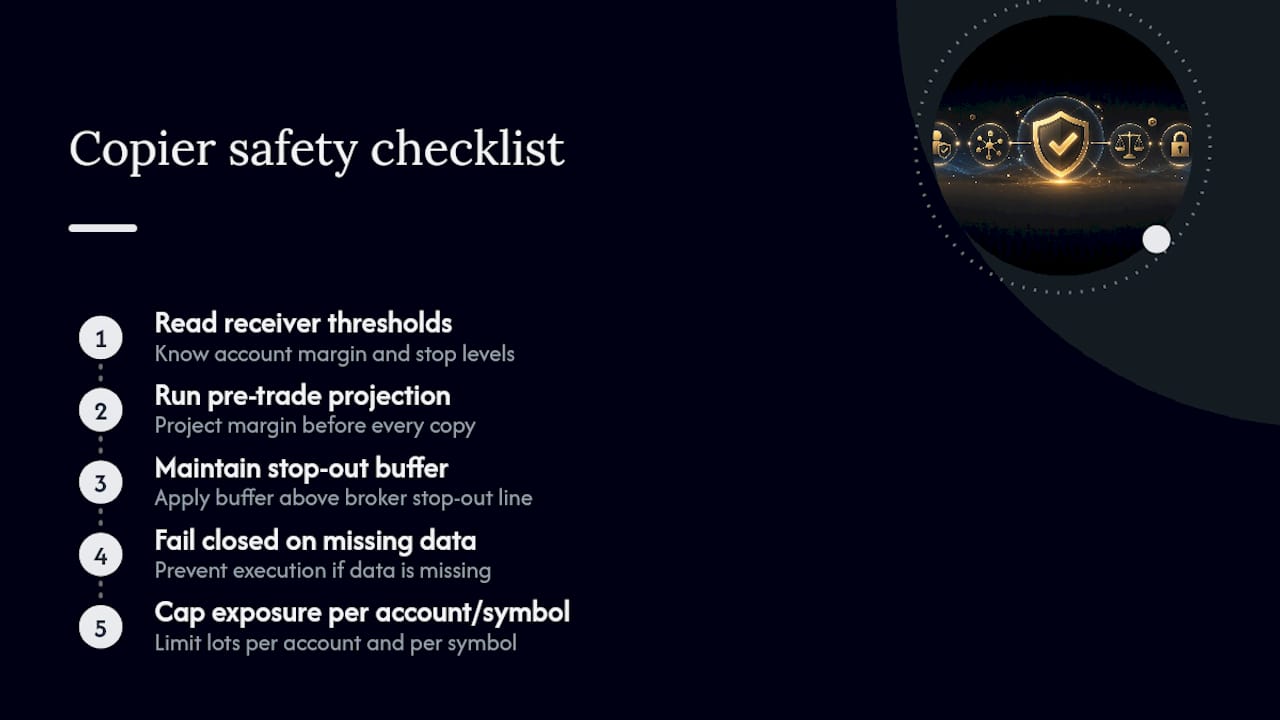
Strip away the formulas and the checklist is short: read the receiver’s real thresholds, run OrderCalcMargin before every copy, apply a buffer above the broker’s stop-out line, fail closed when data is missing, and cap exposure per account and per symbol. Skip any one of those five and you’ve reintroduced the exact risk the others were built to catch.
Local execution matters here more than it gets credit for. Running the copier on the same machine or VPS as the terminal, rather than routing through a cloud service, cuts the latency window where account state can go stale between the check and the execution. Local Trade Copier’s safety-focused updates document per-account lot sizing and pre-trade controls built around this exact logic.
Past results do not guarantee future performance, and nothing in this checklist changes market outcomes, it only governs how a copy is sized and whether it executes at all.
Handling Multi-Asset and Multi-Currency Copier Setups
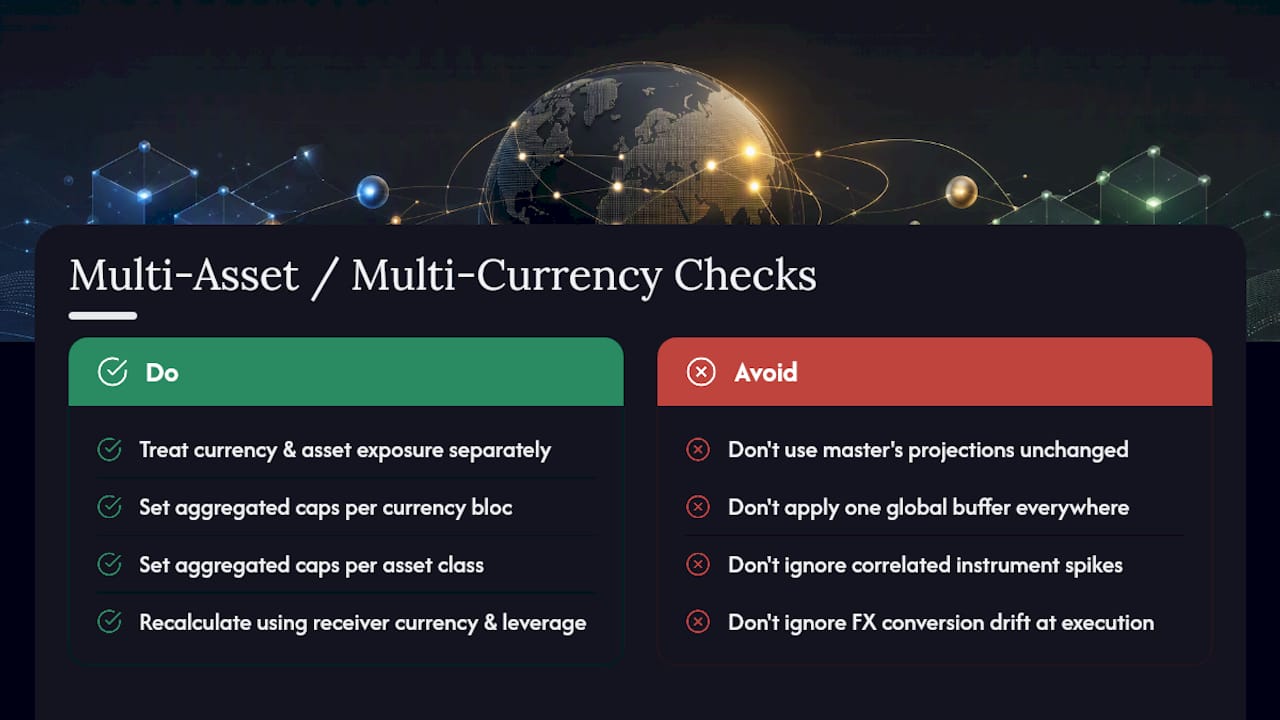
Margin math gets harder the moment a master account trades across asset classes or the receiver’s account currency doesn’t match the master’s. A EUR-denominated master feeding a USD receiver means every projected margin figure has to account for a currency conversion layer, and that conversion rate moves, so a projection calculated at signal time can drift by execution time on a fast-moving pair.
Multi-asset setups add a second layer: forex, metals, and indices consume margin differently even at similar notional sizes, and correlated instruments can spike aggregated margin use even when each individual trade looks fine in isolation. A master trading five correlated JPY pairs simultaneously can push a receiver’s margin level down faster than any single-symbol cap would catch.
The practical fix is treating currency and asset-class exposure as its own limit, separate from the per-trade projection. Set an aggregated cap per currency bloc and per asset class, not just per symbol, and recalculate OrderCalcMargin using the receiver’s actual account currency and leverage, never the master’s. For receivers on DXtrade specifically, factor in that pre-trade validation and liquidation logic differ from MetaTrader, so a buffer tuned for one platform needs separate calibration for the other rather than a single global setting applied everywhere.
Configuration Examples That Prevented Margin Call Propagation
The pattern that shows up repeatedly in well-run copier setups isn’t a single clever setting, it’s the stacking of several conservative defaults at once. A prop-firm trader running one master strategy across a dozen funded accounts with different balances typically applies balance-proportional lot scaling capped by a margin projection, so a $5,000 account and a $50,000 account both stay above the same relative safety buffer despite receiving very different lot sizes from the same signal.
An independent account manager copying to client accounts with mixed leverage settings faces a different problem: identical lot sizes consume wildly different margin depending on each client’s leverage. The workable configuration caps volume individually per receiver using that receiver’s own ACCOUNT_LEVERAGE and OrderCalcMargin result, rather than applying one lot size or one ratio across the group.
EA users running a single licensed strategy across several accounts tend to hit trouble with correlated symbol exposure rather than single-trade sizing, since the same signal fires identically across every account at once. The fix there is a per-symbol aggregated cap that treats all receiver accounts as a connected system, not isolated targets, so a burst of correlated signals gets throttled before it stacks margin pressure across the whole group simultaneously.
Where Copier Operators Get This Wrong
Most of the advice circulating about margin calls treats the problem as a master-account issue, get your own stop-loss and leverage right, and you’re covered. That advice misses the actual failure point for anyone running a copier: the master account can be perfectly healthy while every receiver account gets liquidated because nobody checked whether the receiver could absorb the trade in the first place.
The conventional fix people reach for is a flat lot-scaling ratio and nothing else. That’s a start, but it’s not a safeguard, it’s a guess dressed up as math. A ratio based purely on balance ignores leverage differences, ignores correlated exposure, and ignores the fact that margin requirements shift the moment volatility does. The operators who avoid margin-call cascades are the ones who treat every copy as a calculation to run, not a signal to forward.
If there’s one place to start, it’s fail-closed logic. It’s the cheapest control to implement and the one most builds skip, because refusing to copy feels like a malfunction rather than a feature. It isn’t. A blocked trade is recoverable. A liquidated account isn’t.
— Rimantas
How Local Trade Copier Implements These Protections
Every control covered above, reading receiver thresholds, projecting margin before execution, capping exposure per account, needs software that actually runs the check in the time between signal and execution. The trade copier software runs on a local Windows machine or VPS with low-latency execution and no cloud routing between the master and receiver terminals, which matters when a margin projection has to reflect current account state rather than a stale snapshot from a remote server.

The software includes multiple lot-size and risk-management options, automatic lot scaling per client account balance, and cross-platform compatibility across MT4, MT5, and DXtrade, covering the configuration patterns discussed above for balance-proportional scaling and per-symbol caps; for deeper insights on portfolio strategy and risk controls, see the StockPilot Investor Insights Blog on AI Portfolio Strategy. Independent account managers running mixed-leverage client accounts and prop-firm traders needing on-machine execution use per-account settings to keep receiver margin levels inside a safety buffer.
If you’re running a copier without pre-trade margin checks today, start with the installation guide to see the system requirements, or watch the demo video to see the lot-sizing and risk controls in the interface before committing. A free trial is available for traders who want to test these settings against their own receiver accounts before subscribing. Past results do not guarantee future performance, Local Trade Copier replicates trades based on your configuration; it does not analyze markets or influence trading outcomes.
Sources
- Margin calculation and margin level – MetaTrader 5 Help
- Enhancing broker-dealers’ risk management with DXtrade XT

Leave a Reply