

Account aggregation trading works best with a locally installed trade copier running master and client terminals, MT4, MT5, or DXTrade, on the same Windows machine or VPS. This keeps execution local, avoids cloud routing that prop firms flag, and lets one login control lot sizing across every connected account. Retail traders with funded accounts, independent account managers, and EA users distributing a single license all rely on this setup.
TL;DR:
- Running the trade copier on a local machine or VPS ensures instant execution, preventing cloud routing issues that prop firms flag across funded accounts.
- Proper setup requires manual symbol mapping, appropriate lot sizing modes, and thorough testing with demo trades before live deployment to avoid trade errors.
- Speed of execution is critical, with trade copies ideally completing in under half a second and verified through timestamped logs for accuracy.
- Risk management remains a trader’s responsibility, and understanding broker-specific margin rules and order rejections helps prevent unexpected liquidations.
- Local execution reduces IP exposure and account flagging risks, but strong VPS security and routine audits are necessary for safe operation.
What Account Aggregation Trading Actually Means
In this context, account aggregation trading has nothing to do with linking your bank accounts into one dashboard. It means replicating trades from a single master trading account across multiple client accounts, instantly, using software installed on a local machine rather than routed through a third-party cloud server. If you searched this phrase expecting a personal finance tool, you’re in the wrong place: this is about trade execution, not balance tracking.
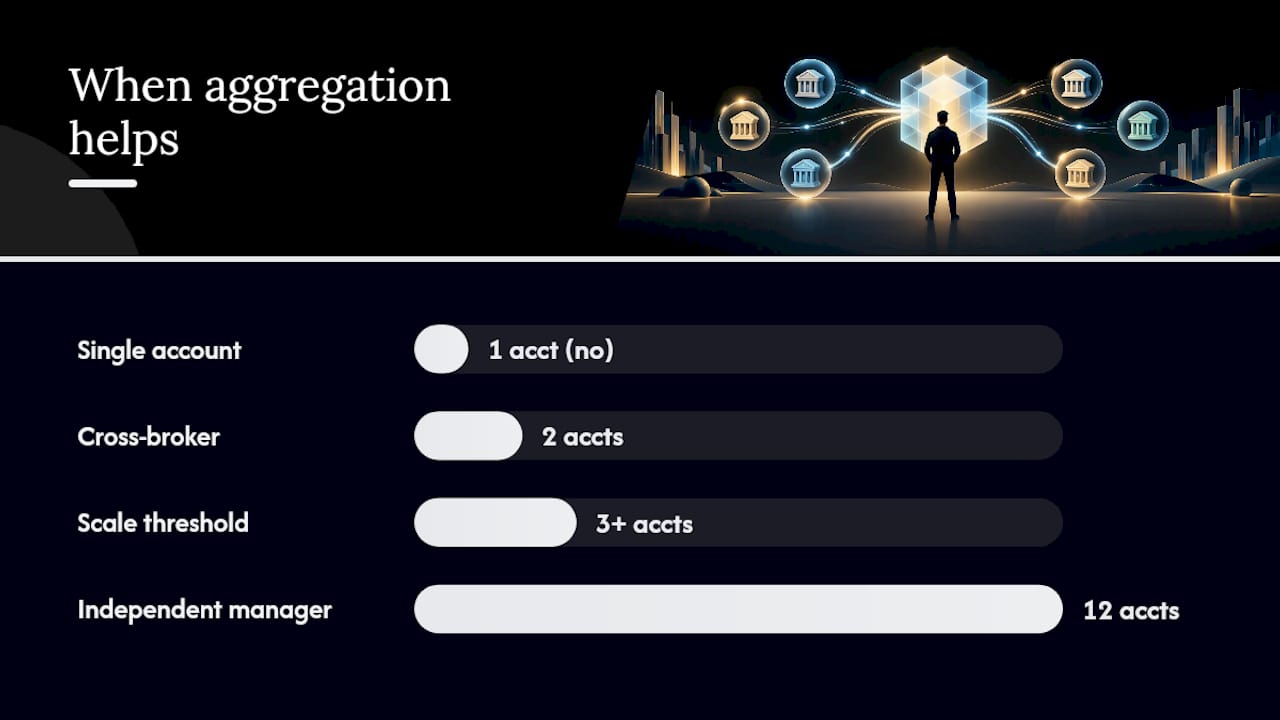
The technique solves a specific problem. Prop-firm traders often manage several funded accounts across different firms and can’t afford to manually re-enter the same trade five times before the market moves. Independent account managers copy one strategy to a dozen client accounts and need lot sizes scaled to each client’s balance. EA developers with a single license want that strategy mirrored across accounts without buying multiple EA seats. Cross-broker traders running the same setup on two brokers need trades synced without symbol mismatches breaking the copy.
A few operational realities apply no matter which group you fall into:
- Each platform instance (MT4, MT5, or DXTrade) generally needs its own login, running as a separate terminal instance on the machine.
- Master and client terminals need to run on the same physical machine or VPS for local execution to work as intended.
- You should be comfortable installing an Expert Advisor (EA) and adjusting basic settings. This isn’t drag-and-drop software.
If you’re managing one account with no plans to scale, this setup adds complexity you don’t need. If you’re juggling three or more accounts, or you distribute a strategy to clients, it solves a real bottleneck.
Features and System Requirements That Actually Matter
Not every trade copier is built the same, and the gaps show up exactly when you need reliability most, during a fast market. Here’s what separates a setup that holds up from one that quietly drops orders.
Local execution and a single IP address. Running everything on one machine means one IP address touches your accounts, not a cloud server relaying commands from somewhere else. Prop firms increasingly scrutinize IP patterns across funded accounts, and cloud-routed copiers can trigger those flags. On-machine execution sidesteps this risk entirely.
Cross-platform support with symbol mapping. If you’re copying MT4 to MT5, or either into DXTrade, broker symbol names rarely match exactly. One broker lists “EURUSD,” another “EURUSD.a,” a third “EURUSDm.” Without manual symbol mapping for mismatched instrument names, copies fail silently.
- Execution speed matters more than most traders realize. Local copying should complete in a fraction of a second, not several seconds, and your software should log every execution with a timestamp so you can verify it later.
- Lot sizing needs flexibility beyond a single multiplier: balance-ratio scaling, fixed lots, risk-percent sizing, and manual overrides all serve different account types.
- Trade filtering lets you exclude specific symbols, magic numbers, or order types from copying, which matters when a master account runs multiple strategies but you only want one mirrored.
On the hardware side, a Windows PC or VPS with stable network connectivity is non-negotiable. Each additional platform instance draws more CPU and RAM, so ten client accounts on a low-spec VPS will behave differently than three.
Pro Tip: Run a VPS speed test before committing to a provider. A copier that executes in under half a second on your desktop can lag noticeably on an underpowered VPS with high ping to your broker’s server.
Setting Up and Testing Multi-Account Replication
Get the sequence wrong here and you’ll find out during a live trade, which is the worst possible time. Follow this order and test everything on demo first.
- Install the Server EA on your master account and a Client EA on each account you want to receive copies. Both need to run in the same terminal environment, on the same machine.
- Set filtering rules using Signal Provider ID or account-number matching, so the master only sends trades to the intended clients, not every terminal on the machine.
- Choose your lot sizing mode. Start conservative: fixed lots or a low balance ratio, not an aggressive multiplier, until you’ve confirmed the logic behaves as expected.
- Map symbols manually wherever broker naming conventions differ, following the MT4 to MT5 trade copying guide for the exact format your platform expects.
- Run pending-order tests first. Place a pending buy limit or sell stop on the master with no real capital at risk, and confirm it appears correctly on every client account before touching live orders.
- Test with tiny demo trades across every symbol you plan to trade live, checking execution timestamps in the logs against the master’s execution time.
- Review logs after every test batch. A copier worth using timestamps every trade attempt, success or failure, so you can trace exactly where a copy broke down.
- Have a rollback plan. Know in advance how to disable copying on a single client, pause the master entirely, or manually close a position if something behaves unexpectedly.
Pro Tip: Don’t skip the pending-order test even if you’re in a hurry. It’s the single fastest way to catch a symbol mapping error before it costs you a mis-sized live position.
Once you’ve run this checklist across a few sessions without unexplained gaps in the logs, you can start scaling to more client accounts with confidence.
Managing Risk Across Multiple Copied Accounts
Copying software moves your orders faster, but it doesn’t manage your risk. Margin calls, stop losses, and position sizing remain entirely your responsibility, and the CFTC’s Technology Advisory Committee has flagged exactly this point about automated trading tools generally: automation demands more oversight, not less, and firms and individual users need to maintain transparency and human supervision over automated decision systems.
A few specific risks deserve attention:
- Broker and prop-firm liquidation rules differ. Some firms calculate margin differently when multiple correlated positions open simultaneously across accounts. Confirm your firm’s specific rules before scaling to more clients.
- Netting versus hedging accounts behave differently when a copied trade lands. MetaTrader’s own documentation explains that netting accounts merge same-symbol positions while hedging accounts keep them separate, which changes how a copied trade affects your existing exposure.
- Order rejections happen. Server-side checks on available margin or price deviation can reject a copied order outright, per MetaTrader’s execution mode documentation. Filtering rules and lot-size caps reduce how often this occurs.
- VPS security matters even without cloud routing. Local execution reduces IP exposure, but a weak VPS password or unpatched remote desktop connection is still an open door.
Keep an incident checklist on hand: how to disable the copier instantly, how to manually close every client position, and who to contact if a broker flags unusual account activity. Past results do not guarantee future performance, and no copying software, however fast, changes the underlying risk of the trades themselves.
Why Local Execution Is the Only Setup I’d Trust
Cloud-based copiers look convenient until a prop firm flags a shared IP across five funded accounts and freezes the lot. Local execution avoids that entirely, which is why every serious multi-account setup I’ve seen eventually moves on-machine. The three mistakes that trip people up most: running mismatched EA versions across terminals, skipping symbol mapping until a trade fails, and trusting an aggressive lot-scaling rule without demo-testing it first. Test on demo, log every change you make, and audit your setup monthly. That habit prevents more losses than any feature comparison ever will.
— Rimantas
Try Local Trade Copier for On-Machine Replication
There are trade copier software options that run everything on one machine, avoiding external servers relaying orders or shared IP issues. Some of these are Expert Advisor based and support MT4, MT5, and DXTrade, offering fast local execution and multiple lot sizing and risk management options, including automatic scaling per client account balance.

During the 7-day free trial, run the exact checklist covered above: install the Server and Client EA components, test with pending orders before anything live, configure symbol mapping for any mismatched instruments, set your lot sizing mode, and check the execution logs after each test batch. It’s trade replication software only. It copies existing trades and carries no market logic or strategy layer of its own, and past results do not guarantee future performance.
Plans are available in different tiers including PERSONAL, MANAGER, and VIP, serving from individual funded-account traders to account managers with many clients. See the pricing page for the latest details or refer to the installation guide for setup instructions.
Sources
- Artificial Intelligence in Financial Markets (CFTC TAC report)
- Trading operations — MetaTrader 5 help
- MT4 to MT5 Trade Copying Guide | Local Trade Copier Setup
FAQ
What Is Account Aggregation Trading?
It’s the practice of replicating trades from one master trading account across multiple client accounts using software installed locally on a computer or VPS. It applies to MT4, MT5, and DXTrade, and it’s distinct from personal finance apps that aggregate bank account data.
Is a Locally Installed Copier Safer Than a Cloud-Based One?
Local execution keeps all trade data on one machine with a single IP address, which reduces the routing exposure that prop firms often flag on funded accounts. It still requires strong VPS security practices like unique passwords and secured remote access, since local doesn’t mean unattended.
How Do I Test a Multi-Account Copy Setup Before Going Live?
Start with pending-order tests on demo accounts to confirm symbol mapping and lot sizing behave correctly, then move to tiny live trades once the logs show clean execution. Local Trade Copier’s setup pages walk through installing the Server and Client EA components needed for this testing sequence.
What Does Local Trade Copier Cost?
Local Trade Copier offers a PERSONAL Plan at €29 per month, a MANAGER Plan at €89 per month, and a VIP Plan at €199 per month, each also available annually at a reduced rate, listed on the pricing page. A 7-day free trial is available before committing to a subscription.
Recommended
- Trading Performance Tracking Methods for Multi-Account Forex Traders
- 90 Day Survival For Funded Account Management: Operations First Rules
- Manual Trade Copying Workflow: A Step-by-Step Guide
- Many-To-One Portfolio™ Framework (Merging Multiple Systems)
