

To calculate lot size in MT4, decide how many dollars you are willing to risk, divide that by your stop-loss distance in pips times the pip value of one lot, and round down to your broker’s lot step. MT4 does not do this for you: the order ticket takes a volume in lots and nothing else. Below you get the formula, four worked examples, the broker settings to check and what changes when the same trade runs on several accounts.
TL;DR
- Formula: lots = (account balance × risk %) ÷ (stop-loss pips × pip value per lot).
- Pip value depends on the pair and your account currency. EUR/USD on a USD account is $10 per pip per standard lot, but JPY pairs and crosses are different.
- Always round down to the broker’s lot step. Rounding up breaks the risk you planned.
- Leverage changes margin, not the dollar cost of a pip at a given volume.
- Past results do not guarantee future performance. Position sizing limits the planned loss in normal conditions, not in every market.
What lot size and position size mean in MT4
In MetaTrader 4, every order is defined by a symbol, a volume in lots, and optional Stop Loss and Take Profit levels, as the MetaTrader 4 help on opening positions describes. The lot is the unit of volume.
Position size is the decision behind that number. FXStreet’s learning center frames it as choosing how many lots to buy or sell before entry, based on account value, acceptable percentage loss, stop distance and pip value, rather than guessing a favorite lot number. So “lot size” is what you type into MT4, and “position size” is the answer to the risk question that produces it.
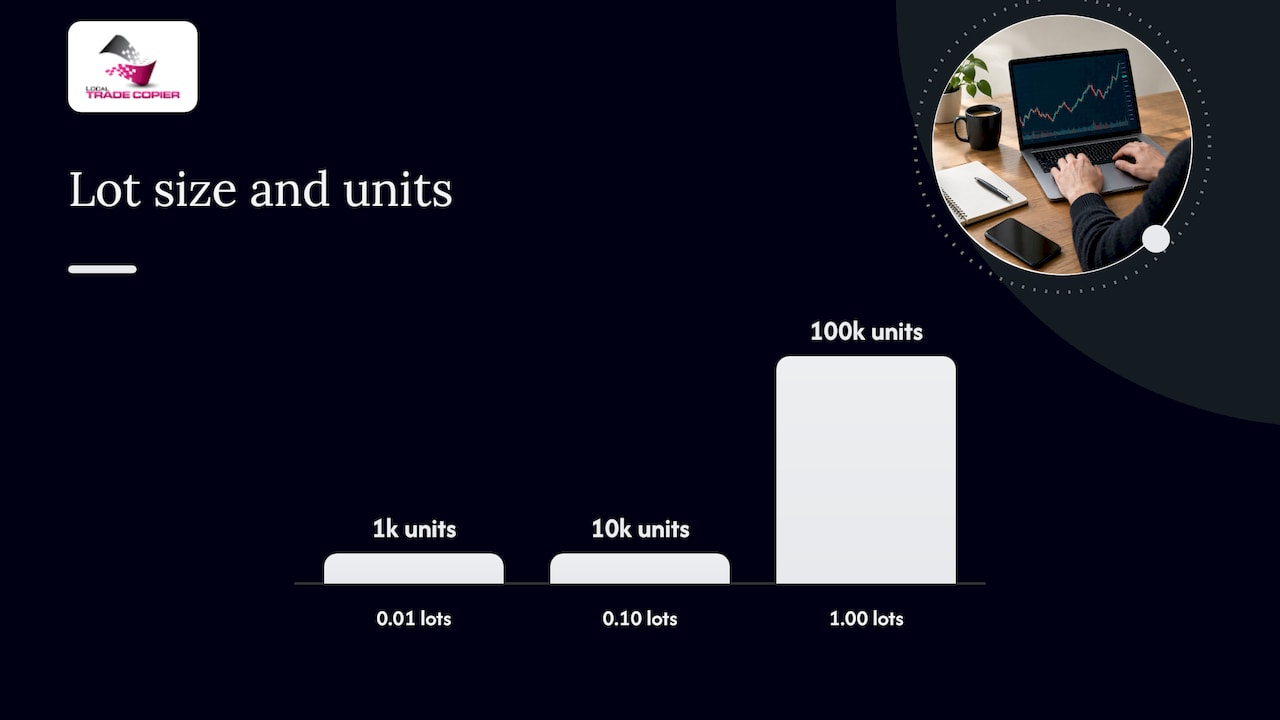
On a typical US forex account, OANDA’s MT4 guide lists 0.01 lots as 1,000 currency units, 0.10 as 10,000 and 1.00 as 100,000. Contract sizes can differ by broker and instrument, so confirm them in the symbol specification. For a plain-language refresher, see our guide to what a lot is in forex trading.
The lot size formula
The risk-based formula has three steps:
- Risk money = account balance (or equity) × risk percentage.
- Risk per lot = stop-loss distance in pips × pip value per one standard lot.
- Lots = risk money ÷ risk per lot, rounded down to the broker’s step.
Written in one line, it is the same formula FXStreet gives: position size equals account value times risk per trade, divided by pips risked, divided by the pip value per standard lot.
The risk percentage is your choice. Many traders keep it small and constant so that no single trade dominates the account, but the number is yours to set. Past results do not guarantee future performance, and a percentage you pick today says nothing about what any one trade will do.
Worked examples
Run the formula a few times and the pattern becomes automatic. These examples come from published guides, and I have rechecked the arithmetic.
EUR/USD on a $10,000 account
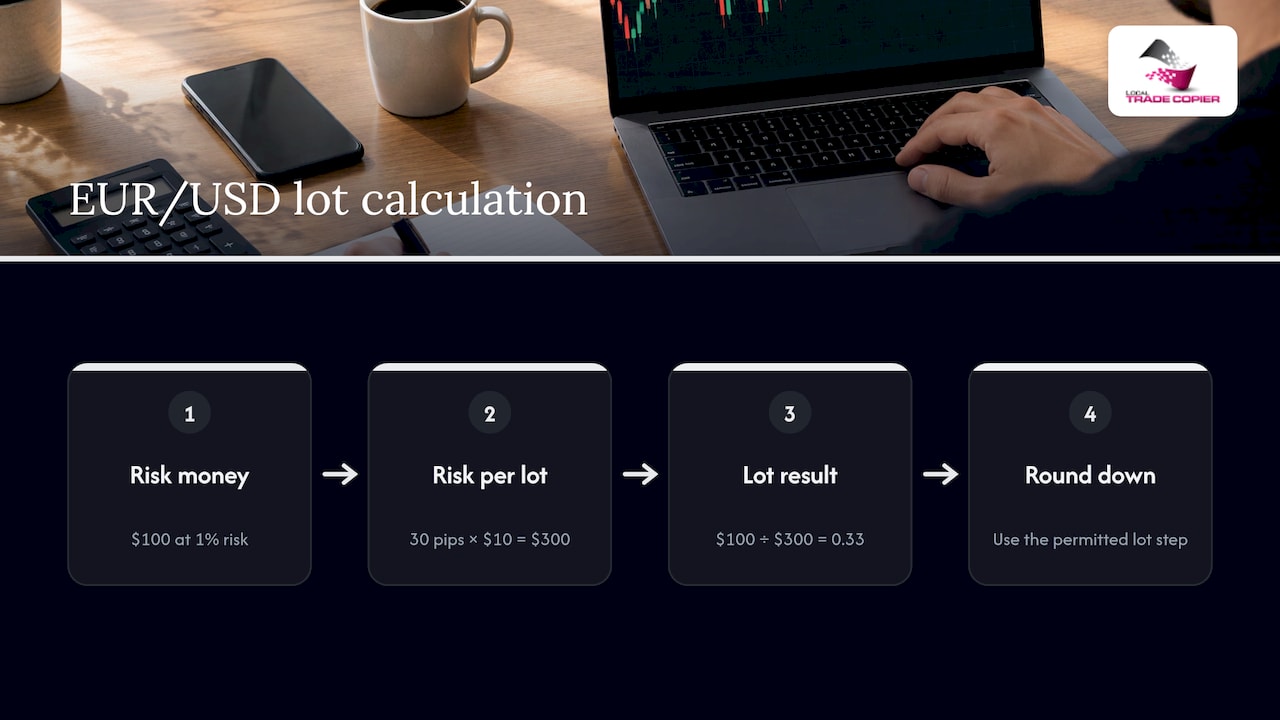
Risk 1% with a 30-pip stop and $10 per pip per standard lot. Risk money is $100. Risk per lot is 30 × $10 = $300. Lots = $100 ÷ $300 = 0.33. As this position sizing guide notes, rounding down to an allowed step keeps the risk under your cap.
USD/JPY on a $10,000 account
Risk 2% with a 50-pip stop and a pip value of $9.85 per standard lot, the figures in the FXStreet example. Risk money is $200. Divided by 50 pips, that is $4 per pip. Divided by $9.85, you get about 0.406, which becomes 0.40 lots after rounding down.
A small $500 account
Risk 1% on EUR/USD with a 25-pip stop. Risk money is $5. Risk per lot is 25 × $10 = $250. Lots = 0.02, or two micro lots, according to this beginner walkthrough.
A quick reference table
| Account | Risk % | Risk money | Pair | Stop | Pip value per lot | Lots (rounded down) |
|---|---|---|---|---|---|---|
| $10,000 | 1% | $100 | EUR/USD | 30 pips | $10 | 0.33 |
| $10,000 | 2% | $200 | USD/JPY | 50 pips | $9.85 | 0.40 |
| $500 | 1% | $5 | EUR/USD | 25 pips | $10 | 0.02 |
These are arithmetic illustrations of the formula, not recommendations of a risk level or a trade. Past results do not guarantee future performance.
Pip value: the number most people get wrong
The formula is simple. The pip value is where errors creep in, because it depends on the pair and on your account currency.
- USD is the quote currency (EUR/USD, GBP/USD): Capital.com puts the pip at $10 per standard lot, $1 per mini lot and $0.10 per micro lot.
- JPY pairs: the pip is the second decimal (0.01), not the fourth. Tecnemia’s guide explains that you compute the pip value with that pip size and then convert yen to your account currency. At a USD/JPY rate of 150, ¥1,000 per pip works out to about $6.67 per standard lot. Use the live rate, because the figure moves with it.
- Crosses without USD (EUR/GBP on a USD account): the pip value is first found in the quote currency, then converted. Tecnemia’s example is 10 GBP per standard-lot pip, which at GBP/USD 1.27 is about $12.70.
- Gold: Vantage’s academy points out that XAUUSD is quoted to two decimals and has a 100 oz contract, so the standard forex pip formula gives the wrong answer.
For CFDs and metals, the safest source is your own broker. Open the symbol’s Specification in MT4 (right-click the symbol in Market Watch) and read the contract size and tick value. The same pip-value differences matter when you replicate trades between accounts, which we cover in our piece on pip value differences across accounts.
Pips versus points in MT4
Most brokers quote five digits on EUR/USD. That means one pip is ten points. In the example from this MT4 guide, a move from 1.10500 to 1.10200 is 30 pips but 300 points. If you measure a stop with the Crosshair tool and plug the point count into a formula that expects pips, you will size the trade ten times too small. Always confirm which unit your number is in.
Broker settings to check before you click
A raw result such as 0.3333 lots is not something MT4 will accept. Before sending the order, check these items in the symbol specification and account details:
- Contract size
- Digits and point format
- Tick or pip value
- Minimum lot, maximum lot and lot step
- Margin requirement and leverage
- The account-currency conversion your calculation assumes
That list follows this checklist. Two rules deserve emphasis.
Round down. The Tickwire guide explains that rounding up can push the loss past your intended maximum, before spread, commission, swap or slippage are added.
Respect the minimum. If your raw result is below the broker’s minimum lot, rounding up exceeds your planned risk. The same guide suggests skipping or redesigning the trade, for example with a tighter or wider stop that fits, instead of quietly increasing size.
If you write your own scripts, the MQL4 constants MODE_MINLOT, MODE_MAXLOT and MODE_LOTSTEP return those broker limits, and this MQL4 tutorial shows how to normalize a volume with them.
Leverage, margin and gaps
Leverage and risk are separate checks. The MQL4 documentation states that required margin is inversely proportional to leverage, while the cost of a point in deposit currency has nothing to do with leverage. Higher leverage lets you open a bigger volume. It does not make each pip cheaper.
So do two calculations: one for risk (the formula above) and one for margin (does the account support the volume). And remember that stops are not guarantees. Tickwire notes that weekend gaps and fast markets can fill a stop beyond its price, so treat position sizing as normal-condition risk, not an absolute ceiling. Past results do not guarantee future performance.
Calculating in MT4: by hand or with an indicator
MT4 has no built-in risk-based calculator, so you have three options.
- By hand. Use the formula and a calculator. Slow, but it teaches you what each input does.
- A spreadsheet. Set up columns for balance, risk %, stop, pip value and a ROUNDDOWN to your lot step. Reuse it for every trade.
- A position size indicator. Free MQL4 indicators read your balance or equity, take a risk percentage and stop distance, and display a lot size. One open-source example described on MT4 Indicator Central derives pip value from the broker’s tick value, tick size and point, floors the result to the lot step and clamps it between minimum and maximum lot. You then enter the displayed volume manually in the order ticket.
Whichever you choose, verify the first few outputs against your own hand calculation and against the broker’s specification. Indicators only display a number. The decision and the order are yours.
When the same trade runs on several accounts
Sizing gets harder when one trade must appear on more than one account. Balances differ, brokers use different lot steps, and pip values differ by account currency. A volume that is right for a $10,000 account is wrong for a $500 one.
This is where a trade copier’s lot options come in. A copier does not decide whether to trade or how much you should risk; it replicates trades you or your strategy already placed. What you configure is how the copied volume relates to the original: the same lot size, a fixed lot, a multiplier or a size scaled to each account’s balance. Our pages on copying with the same lot size, proportional lot sizing and auto lot sizing on MT4 walk through each approach and its safety checks.
The rounding rules matter here too. A scaled volume of 0.037 lots has to become something the receiving broker accepts, and on small accounts that rounding decides whether the trade is valid at all. See lot rounding rules for small accounts and handling lot size decimals across accounts.
Our perspective
We have built Local Trade Copier since 2010, and the most common question we hear is not about speed or setup. It is about size: “Why did my second account open a different volume?”
Our view is that you should do the risk thinking first, in your own way, and then let the software carry it out consistently. Local Trade Copier is replication software only. It has no market logic and no strategy layer, and it does not change what you decided. What it does is remove the manual re-entry and the arithmetic slips that come from typing volumes into several terminals by hand.
That is why we offer 8 money management modes plus risk limits, including automatic lot scaling by each account’s balance. Because it runs locally on your Windows PC or VPS, with no cloud routing, every copied order is handled on your own machine, and you can see exactly what it is doing. Past results do not guarantee future performance, and we never suggest otherwise.
Try the lot options on your own accounts
If you run more than one MT4 or MT5 account, Local Trade Copier lets you set the lot behavior for each receiving account and replicate trades from one master. It works with MT4, MT5 and DXTrade, on Windows PC or VPS, and on Mac via Wine. Plans are listed on our pricing page: Personal at €29 per month or €290 per year, Manager at €89 per month or €890 per year, and VIP at €199 per month or €1,990 per year. Every plan starts with a 7-day free trial.

Want to see it first? Watch the demo video or follow the installation guide for MT4 and MT5.
A repeatable routine before every order
- Decide your risk percentage and the stop distance from your own plan.
- Convert risk to money using balance or equity.
- Look up the pip value for the pair in your account currency (or the tick value for CFDs).
- Divide, then round down to the lot step.
- Compare the result with the broker’s minimum and maximum lot, and check margin.
- Enter the volume in the order ticket, with the stop attached.
If you manage multiple accounts, repeat the check for each receiving account once, then save the settings. Our risk mitigation workflow lays out a review you can run before going live.
FAQ
How do I calculate lot size in MT4 for a 1% risk?
Multiply your balance by 0.01 to get the risk in dollars. Divide that by the stop-loss in pips times the pip value per standard lot, then round down to your broker’s lot step. For a $10,000 account, a 30-pip stop on EUR/USD gives about 0.33 lots.
What lot size should a $500 account use?
The formula decides, not the balance alone. With 1% risk and a 25-pip stop on EUR/USD, the result is 0.02 lots. If the raw result falls under your broker’s minimum lot, skip that trade or change the stop instead of rounding up. Past results do not guarantee future performance.
Is lot size the same as position size?
Not quite. Lot size is the volume you enter in MT4. Position size is the volume you arrive at after considering account value, risk percentage, stop distance and pip value. One is the unit, the other is the decision.
Does higher leverage let me risk less per trade?
No. Leverage lowers the margin needed to open a position, but the dollar value of each pip at a given volume stays the same. Size the trade for risk first, then confirm the margin is available.
Can a trade copier calculate the lot size for me?
It does not choose your risk. A copier replicates trades that already exist and applies the lot settings you configure, such as same lot, fixed lot or balance-based scaling. You still decide the risk behind the original trade.
Sources
- MetaTrader 4 help: Open Positions
- FXStreet Learning Center: The Position Size
- OANDA: Market order management in MT4
- Forex position sizing calculator: lot size formula
- How to place a trade on MT4: beginner guide
- Capital.com: lots in forex
- Tecnemia: pip value by account currency
- Vantage academy: calculating pips and lot size
- MT4 position size calculator guide
- MT4 position size calculator checklist
- Tickwire: lots, pips and position size
- Normalizing lot size in MQL4
- MQL4 book: opening and placing orders
- MT4 Indicator Central: lot size calculator
