

Start your deviation setting at roughly two to three times the typical spread on the instrument you’re copying, entered in MT4 points, not pips. For example, on a five-digit EUR/USD feed with a 1-pip spread, set deviation at an appropriate points value that reflects that spread. Go tighter and you’ll block more bad fills but see more rejected or delayed copies; go wider and fills go through more often at the cost of absorbing more slippage. Watch your rejection rate for the first few sessions and adjust from there.
TL;DR:
- Setting deviation at two to three times your instrument’s spread in points helps balance rejection rates and slippage during trade copying.
- Deviation only restricts fills that move worse than your requested price, while positive slippage often occurs silently without rejection.
- Most copy failures are caused by broker minimum distance rules or market volatility rather than deviation misconfiguration, requiring logs for troubleshooting.
- Use session-specific deviation values and monitor rejection rates to optimize fill accuracy without unnecessary slippage or trade rejections.
- Starting with a clear understanding of your broker’s quote digit count ensures your deviation settings in points or pips are correctly calibrated.
What Does Deviation Mean in MT4 Copy Trading?
Deviation, sometimes called slippage tolerance or max price deviation, sets a ceiling on how far a trade’s fill price is allowed to drift from the price you requested. Cross that ceiling and the platform rejects the fill rather than executing it at a worse price. That’s the entire mechanism, and understanding it correctly is the difference between a copier that runs quietly in the background and one that generates a stream of rejected orders you have to babysit.
The catch that trips up almost everyone new to this: MetaTrader expects deviation input in points, not pips. On most brokers today, quotes run to five decimal places (or three for JPY pairs), so a single pip equals 10 points. On a five-digit EUR/USD feed, two pips of tolerance equates to a certain number of points. Typing a smaller number into a deviation field expecting points results in an overly tight tolerance, causing many copied trades to reject due to normal spread fluctuations.
This single mixup, pips versus points, is probably the most common cause of copier trades failing to open at all. If you inherited a strategy’s settings from someone trading on a four-digit account, or you copied a config from an old forum post, check the digit count on your broker’s quotes before trusting any number. A setting of “30” means very different things on a four-digit versus a five-digit feed.
One more nuance worth knowing: deviation is usually a one-directional gate. Most platforms only block fills that are worse than your requested price. If the market happens to move in your favor between the request and the fill, that positive slippage gets accepted silently, no rejection, no alert, nothing in the log. Deviation exists to protect you from paying more (or receiving less), not to prevent you from getting a lucky fill. Keep that asymmetry in mind when you’re troubleshooting: a rejected trade almost always means the price moved against the direction you wanted, past your tolerance line.
How Deviation Works Inside an MT4 Trade Copier
A copier isn’t executing your master trade twice, it’s watching your master account, capturing the entry, and placing a brand new order on each slave account at whatever price that account can currently get. That distinction matters because it explains almost every deviation-related headache you’ll run into.
Here’s the sequence. The master account opens a trade at, say, 1.10500 on EUR/USD. The copier detects that entry and immediately checks the current market price on each slave account. If the slave’s price is within your configured deviation from the master’s entry price, the copy fires as a market order. If it’s outside that range, because of latency, a different broker’s liquidity, or a fast-moving news tick, the copier has to decide what to do next.

Deviation applies specifically to market order execution. Pending orders (limit and stop orders) get copied to a specific price level and are governed by a different set of rules entirely: your broker’s minimum distance requirements for stops and limits, not the deviation setting. That’s a distinction a lot of traders miss when they’re debugging a rejected pending order and keep adjusting deviation with zero effect, because deviation was never the blocking factor in the first place.
When a market-order copy falls outside tolerance, decent copier software has three possible responses. It can delay, holding off and rechecking the slave price every few hundred milliseconds until it drifts back within range. It can reject the copy outright and log the failure. Or, less commonly on MT4, it can request a requote from the broker, effectively asking “here’s the best price you can currently offer, do you accept it?” Copier EAs that expose a MaxPriceDeviationPips input typically choose the delay path by default, skipping the copy only if the price never returns within the window before a timeout.
Negative deviation values add a layer worth understanding on their own. Rather than accepting any fill within a tolerance band around the master price, a negative setting requires the slave’s price to be better than the master’s entry by the specified amount before the copy executes at all. It’s a conservative filter: you’re refusing to copy unless you get an edge over the master, which sounds appealing until you realize how often the market simply won’t cooperate, and how many otherwise-good trades never get copied because that price improvement never materializes.
How to Choose the Right Deviation Value
Picking a number out of a forum thread and hoping it works is how most traders end up either flooding their logs with rejections or eating slippage they never notice until the equity curve tells them. A better process takes fifteen minutes and pays for itself the first time a news event hits.
- Measure your actual spread first. Pull up the symbol’s spread during the session you actually trade in, not the tightest moment of the European open if you trade the New York close. Spreads on the same pair can double or triple between sessions.
- Apply the 2 to 3x rule and convert to points. A tolerance of roughly two to three times your measured spread is the standard starting point. If your session spread on EUR/USD averages 1.5 pips, that’s 3 to 4.5 pips of deviation, or 30 to 45 points on a five-digit feed.
- Set a wider baseline for volatile instruments. Gold, indices, and exotic pairs routinely carry spreads three to ten times wider than majors; scale your starting point proportionally rather than reusing your EUR/USD number everywhere.
- Run it for a few sessions and log the rejection rate. Most copiers write a log entry for every skipped copy. Count how many you’re seeing relative to total master trades.
- Adjust based on what the log tells you, not intuition. A rejection rate above roughly 5 to 10% on a stable instrument usually means your tolerance is too tight for the actual spread conditions. A near-zero rejection rate paired with consistently poor fill prices suggests you’re too wide and quietly absorbing avoidable slippage.
Scalping strategies and anything sensitive to entry precision should sit toward the tighter end of that range, because a few extra points of slippage can erase the edge the whole strategy depends on. Swing or position strategies copying less frequent trades can tolerate a wider setting without materially changing the outcome, since a handful of points on an entry rarely matters over a multi-day hold.
Pro Tip: Keep a simple spreadsheet with three columns: date, rejection count, average slippage on filled trades. Five minutes of logging a week tells you more about whether your deviation setting is right than any rule of thumb ever will.
Configuring MaxPriceDeviationPips and Related Settings
Local Trade Copier and comparable copier EAs expose the deviation control through a parameter typically labeled MaxPriceDeviationPips. Despite the name, check whether your specific build calculates that value in pips or points before you enter a number, since many copiers include a separate Calculate on Pips/Points toggle that changes how the same numeric input is interpreted. Set that toggle wrong and a value that should mean “3 pips” gets read as “3 points,” a tenfold difference that will either reject almost everything or accept almost anything.
Here’s how three common settings actually behave in practice:
- Tight (5 points): Roughly half a pip on a five-digit feed. Expect frequent rejections on any pair with a spread wider than that, useful mainly for testing or for instruments with unusually stable, tight spreads.
- Moderate (50 points): About 5 pips, a reasonable middle ground for major pairs during normal trading hours, wide enough to absorb typical spread fluctuation without inviting excessive slippage.
- Wide (150 points): About 15 pips, appropriate for volatile instruments like gold or during high-impact news windows, but it means accepting meaningfully worse fills in exchange for a near-guaranteed copy.
A default MaxPriceDeviation value of 10 shows up frequently in copier documentation and user guides, which sounds reasonable until you consider a common real-world scenario: activating a slave account after the master already has open positions. If those master trades were opened well below current market price, a default of 10 points may be nowhere near wide enough to let the copier bring those existing positions across, and traders often widen the setting substantially just to catch up, accepting the larger slippage that comes with it.
Negative values invert the whole logic, requiring the slave’s price to beat the master’s entry by the configured amount before a copy fires. Some copiers pair this with a MasterNeg/MasterPos override behavior, letting you apply negative deviation only when the master trade is showing a loss versus only when it’s in profit, a way to be more conservative about chasing entries that have already moved against the master position. It’s a niche setting, but worth knowing it exists if you’re managing accounts where entry price discipline matters more than catching every single trade.
Past results do not guarantee future performance. None of these settings change what a copied trade does once it’s open. Deviation controls execution quality on the copy itself, nothing about market direction or trade outcome.
Why Copied Trades Get Rejected or Delayed
Most copy failures trace back to one of four causes, and MT4’s error codes usually tell you exactly which one you’re dealing with if you know where to look.
- Error 130 (invalid stops): the stop loss or take profit level violates your broker’s minimum distance rule from the current price, unrelated to deviation but often mistaken for it.
- Error 133 (trade disabled): trading has been disabled on that symbol or account, sometimes temporarily during high-impact news, and no deviation adjustment will fix it.
- Error 136 (off quotes): the broker has no tradable price at that instant, common during fast markets and often resolves itself once volatility settles.
- Error 148 (too many orders): the account has hit its maximum open order limit, a capacity issue rather than a pricing one.
Broker-imposed minimum stop and limit distances deserve separate attention because they interact badly with copied pending orders. If your master’s stop loss sits closer to price than the slave broker’s minimum distance allows, that stop copy will fail even with generous deviation settings, since deviation never governed that rejection in the first place.
When something fails, check two logs in order. First, the MT4 Journal tab, which shows the raw error code the broker returned. Second, your copier’s own log file, which usually records the master price, the slave price at attempt time, and the configured tolerance side by side, making it obvious whether the gap was a genuine price move or a unit conversion mistake. Error 133 specifically has its own set of common triggers worth checking against your setup.
Pro Tip: If the copier log shows the slave price only a point or two outside tolerance repeatedly, you likely don’t have a deviation problem at all, you have a broker with a marginally worse feed. Widening deviation by 5 to 10 points usually fixes it without meaningfully changing your slippage exposure.
Fixes generally fall into four buckets: widen the deviation value, extend the waiting/delay window so the copier has more time to catch a favorable price swing back, choose brokers with more closely matched liquidity for master and slave accounts, or switch specific trade types from market-copy to pending-copy rules where broker distance restrictions are the actual constraint.
Keeping Copy Reliability High Without Overpaying in Slippage
A few operational habits separate copier setups that run for months without intervention from ones that need constant tuning.
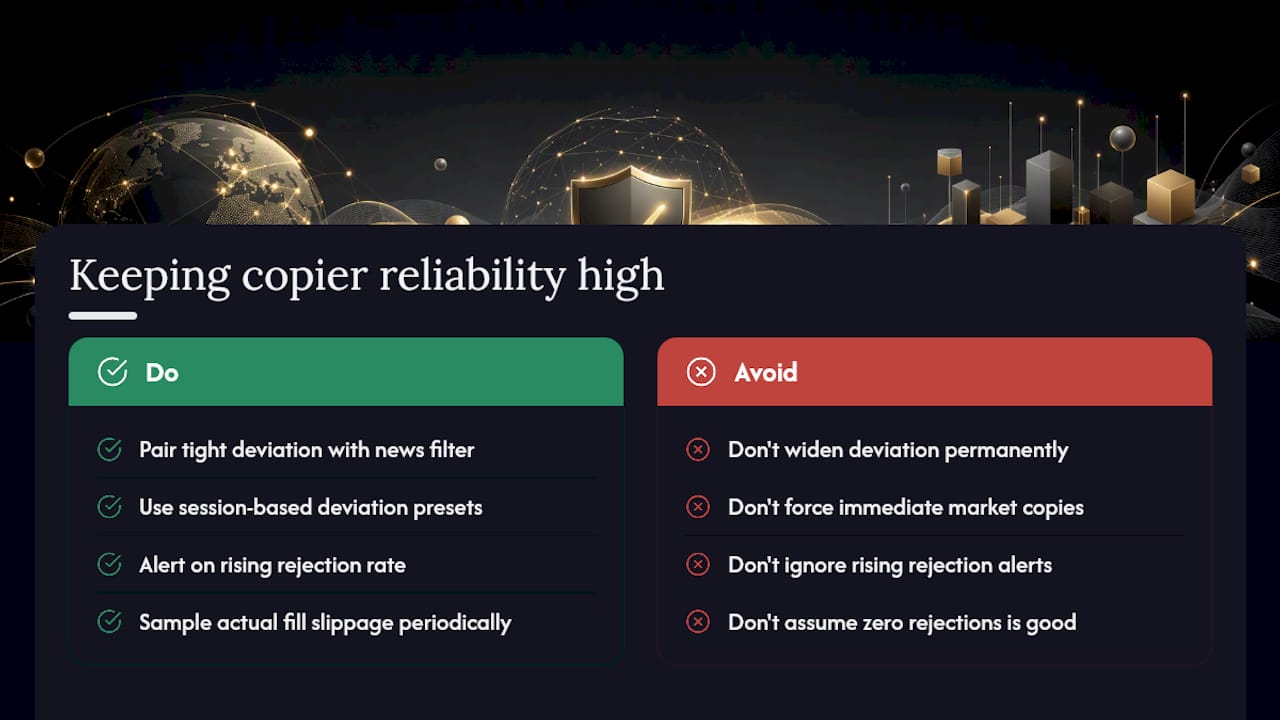
Pair a tighter deviation setting with a news or economic calendar filter rather than widening deviation across the board to survive volatile releases. Widening permanently to handle occasional spikes means eating worse fills every single day for a problem that only shows up a few times a week.
Session-based presets help more than most traders expect. London spreads and New York spreads on the same pair can differ enough to justify separate deviation values, and Asian session liquidity on minor pairs often demands a wider tolerance simply because normal spread conditions are wider to begin with.
Set an alert, even a basic one, for a rising rejection rate rather than discovering the problem days later in a monthly review. Sample your actual fill slippage periodically too. A copier that never rejects anything might just be quietly costing you more per trade than a tighter setting would.
For master trades that have been open a while before a new slave account joins, favor pending-order copying over forcing an immediate market copy. It avoids chasing a price that’s already moved and sidesteps the wide-deviation workaround entirely.
Why Local Trade Copier Builds Deviation Around Waiting, Not Just Rejecting
Most deviation logic treats a price outside tolerance as a dead end: reject and move on. That’s the wrong default for anyone managing multiple client accounts, because a price that’s five points outside your window often comes back within it a second or two later. Local Trade Copier’s waiting/delay behavior around MaxPriceDeviationPips exists specifically to give the market that second chance before giving up on the copy.
Exposing the setting in points, matched to how MT4 itself thinks about price, also removes the pips-versus-points guesswork that causes most misconfigurations in the first place. If you’re setting this up for the first time, run it against a demo account before trusting it on live client capital, and expect to spend your first week watching the log more than adjusting the number itself.
— Rimantas
Get Your Deviation Settings Right From the Start With Local Trade Copier
Configuring deviation correctly matters more when you’re managing several client accounts at once, since one wrong point-versus-pip entry doesn’t just cost you a rejected trade, it costs every account downstream of that master. Local Trade Copier gives you a direct MaxPriceDeviationPips input with a clear points/pips toggle, so you set the number once and know exactly what it means on every connected account, along with the waiting/delay logic covered above that gives near-miss fills a second chance before skipping them.

You can see the settings panel in action on the Local Trade Copier demo, or go straight to the installation guide if you already know your setup. Every plan runs on a 7-day free trial, no performance claims attached. It’s trade replication software: it copies orders that already exist on your master account, nothing more. Start the trial, connect a demo account first, and dial in your deviation setting before you ever point it at live capital.
Sources
- Explaining Max Price Deviation Pips feature
- Ultimate Trade Copier: Detailed User Guide – Traders’ Blogs
Recommended
- The use of Magic Numbers with the Local Trade Copier on MT4 platform
- Local Trade Copier installation on MT4 and MT5
- Local Trade Copier installation on MT4 (old version)
- How to Copy Trades as “Placed Manually” Between MT4 and MT5
