
Auto lot sizing for MT4 converts your risk percent, account balance, and stop-loss distance into the exact lot size for a trade, then either displays it on your chart or places the order for you. The formula is simple: Lot Size = (Account Balance × Risk%) ÷ (Stop-Loss Pips × Pip Value per Lot). You have three practical ways to put it to work in MetaTrader 4:
- An on-chart lot-size indicator that calculates the number but leaves order entry to you
- An expert advisor (EA) that calculates and fires the trade automatically
- A trade copier that scales lot size per account balance across multiple accounts at once
Before any of these touch live money, confirm your broker’s lot-step, minimum, and maximum lot values, and run the setup on a demo account first. Skipping that check is the single most common reason automated sizing produces a rejected order or an oversized position on the first live trade.
Key Takeaways
Auto lot sizing works when the formula, the broker’s lot constraints, and your risk percent are all configured correctly and tested on demo before going live.
| Point | Details |
|---|---|
| Core formula | Lot Size = (Account Balance × Risk%) ÷ (Stop-Loss Pips × Pip Value per Lot). |
| Currency conversion | Convert pip value using the live exchange rate whenever account currency differs from the quote currency. |
| Clamp to broker limits | Round down to LOTSTEP and respect MINLOT/MAXLOT to avoid rejected orders. |
| Risk percent discipline | Stick to 1% to 2% per trade and set stops from chart structure, never from a desired lot size. |
| Multi-account scaling | Mt4copier’s Local Trade Copier applies automatic lot scaling per client account balance with local execution and 18 risk-management options. |
How Auto Lot Sizing MT4 Calculates Position Size
The formula has four moving parts, and getting any one of them wrong throws off the whole calculation. Account balance (or equity, if you prefer a more conservative live number) sets the ceiling for how much money you’re willing to risk. Risk percent is the slice of that balance you’re comfortable losing on a single trade, typically 1% to 2%. Stop-loss distance in pips comes from your chart, not your wallet. Pip value per standard lot depends on the currency pair.
Here’s where most traders trip up: pip value isn’t fixed. On a pair like EUR/USD, one pip on a standard lot is roughly $10 when your account is denominated in US dollars. But if your account currency doesn’t match the pair’s quote currency, you need to convert pip value using the current exchange rate so your risk amount is measured correctly in your own currency, not someone else’s.
Worked example: Say your account balance is $10,000, you’re risking 1% ($100), your stop-loss is 40 pips away, and pip value is $10 per standard lot. That’s $100 ÷ (40 × $10) = 0.25 lots. If your broker’s lot step is 0.01, that number needs no rounding. If it landed at 0.253, you’d floor it to 0.25 rather than round up, since rounding up increases your risk beyond what you approved.
A free MT4 lot-size calculator indicator handles this arithmetic automatically, auto-detects pip size for 5-digit brokers, and normalizes the result to your broker’s LOTSTEP while clamping to MINLOT and MAXLOT.
- Pull account balance or equity from the terminal.
- Apply your chosen risk percent.
- Measure stop-loss distance in pips from your entry.
- Divide by pip value, adjusted for account currency if needed.
- Round down to the nearest lot step and clamp to broker limits.
For a broader primer on how lot sizes and pip values interact, see what a lot actually means in forex trading.
Indicator, EA, or Trade Copier: Which Fits Your Workflow?
The three tools solve the same math problem differently, and the right pick depends on how much of the process you want to automate.
A lot-size indicator sits on your chart and shows a suggested position size based on your inputs. It doesn’t touch your orders. This suits traders who want to place trades manually but hate doing mental math under pressure, especially during fast-moving sessions.
An EA takes the same calculation and acts on it, opening the position at the size it computes. This removes hesitation and manual error, but it also removes your last chance to sanity-check the number before it hits the market. Parameters like RiskPercent, StopLossPips, and a UseEquity toggle (equity versus static balance) need to be set correctly before you ever attach it to a live chart.
A trade copier is the right tool when you’re managing more than one account and need each one sized according to its own balance, not a single fixed lot replicated everywhere. This is the scenario indicators and single-account EAs weren’t built for.
Before enabling any of these, run through this checklist:
- Confirm RiskPercent matches your actual risk tolerance, not a default value
- Verify UseEquity vs UseBalance is set the way you intend
- Check pip-value auto-detection works correctly on JPY pairs and 5-digit brokers
- Confirm the tool respects your broker’s LOTSTEP, MINLOT, and MAXLOT
Pro Tip: Run any new EA or indicator on a demo account for at least a week before going live, and deliberately test it on a JPY pair. Pip-size detection breaks more often on JPY crosses than on any other pair type, and you want to find that out before real money is on the line.
Why Broker Lot Limits Break Careless Automation
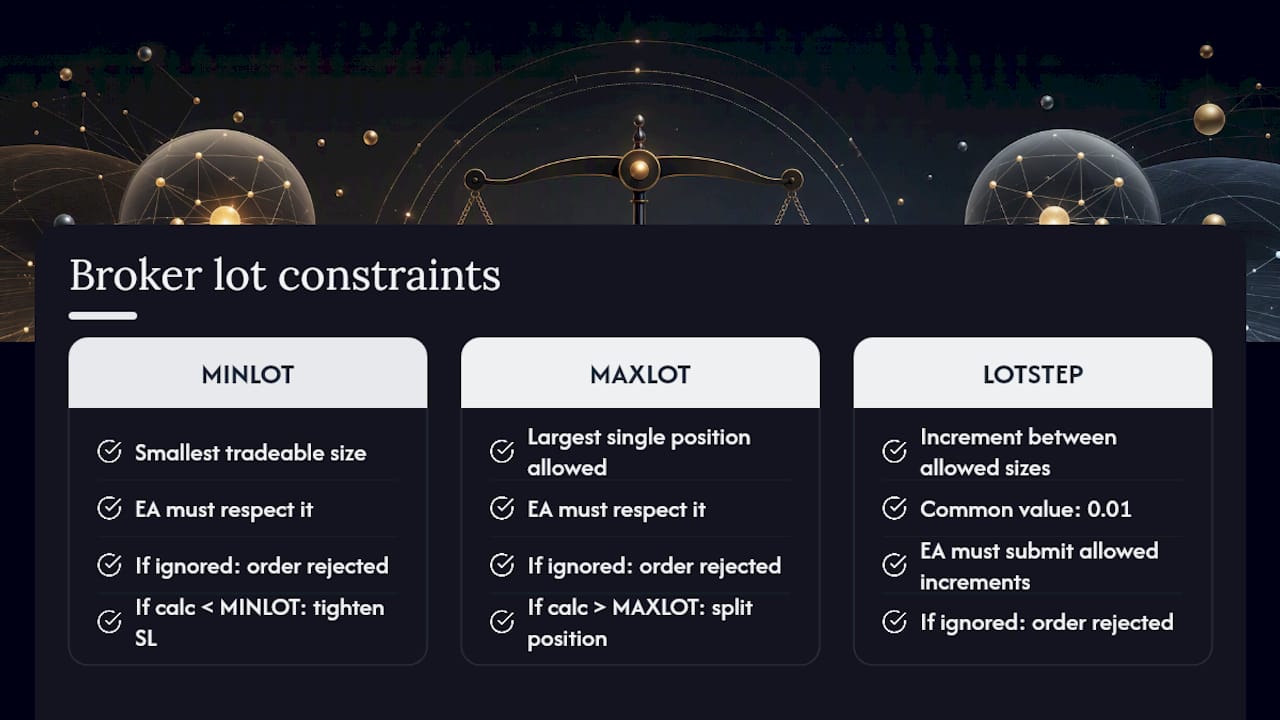
Every broker enforces three constraints your automation has to respect: MINLOT (the smallest tradeable size), MAXLOT (the largest single position allowed), and LOTSTEP (the increment between allowed sizes, often 0.01). An EA that ignores these will submit orders your broker simply rejects.
Spread and slippage add another layer of risk. During thin liquidity or around news releases, your actual fill can land well past your intended stop, which means the position you sized for a 40-pip risk might behave like a 60-pip risk once it’s filled. Padding your stop distance during high-volatility windows, as position-size guides commonly recommend, helps offset this.
When your calculated lot size falls below MINLOT, you have three options: tighten your stop-loss, add funds to the account, or accept the floored minimum lot (which raises your effective risk above your target percent). When it exceeds MAXLOT, split the position into multiple smaller orders or scale down your risk percent for that trade. A copier that splits master trades into multiple client positions handles this automatically when the constraint sits at the account level rather than the trade level.
What Risk Percent Should You Actually Use?
Fixed-fractional sizing, risking a set percentage of your account rather than a fixed dollar amount, is the standard retail approach for a reason. Traders who commit to 1% to 2% per trade can absorb a string of losses without their account taking a crippling hit, because each loss is measured against a shrinking balance rather than a static number.

One rule matters more than the percentage itself: never move your stop-loss to manufacture a lot size you like better. Set your stop from technical levels, chart structure, recent swing points, volatility bands, then size the position to fit the risk you’ve already decided on. Reversing that order, sizing first and adjusting the stop to match, defeats the entire purpose of risk-based sizing.
A scaling checklist before you raise your risk percent or lot multiplier:
- Accumulate a meaningful sample of trades, commonly framed as several dozen, before adjusting anything.
- Confirm the results reflect a repeatable process, not a lucky stretch.
- Check that you can watch a losing streak unfold without abandoning the system.
- Increase risk in small increments, not by doubling overnight.
Past results do not guarantee future performance, no sample size converts a losing edge into a winning one. For a deeper look at scaling mechanics, see this guide on auto lot scaling.
How to Set Up Auto Lot Sizing in MT4 Step by Step
Getting the tool onto your chart correctly matters as much as the math behind it. Here’s the sequence:
- Copy the
.mq4or.ex4file into your MT4 data folder underMQL4/Indicators(for an indicator) orMQL4/Experts(for an EA). - Restart MT4 or refresh the Navigator panel so the new tool appears.
- Drag it onto the chart of the pair you intend to trade.
- Set your inputs: RiskPercent, StopLossPips, UseEquity vs UseBalance, and confirm the lot-step handling matches your broker’s specification.
- Confirm your account-currency setting matches your broker statement, especially if you’re trading pairs quoted in a different currency.
Before trusting any output with real money:
- Run it on demo for at least several sessions, including a JPY pair and a cross-currency pair.
- Compare the tool’s suggested lot size against your own manual calculation for three or four trades.
- Review the terminal’s Experts log for any rejected-order or normalization warnings.
- Test the min-lot and max-lot edge cases deliberately by setting an unusually tight or wide stop.
If you manage several accounts, copying trades across different account currencies requires the same pip-value conversion logic, applied per account rather than once. For a broader look at strategy validation before going live, this step-by-step backtesting guide covers the testing discipline worth applying to any new EA, lot-sizing included.
How Local Trade Copier Handles Auto Lot Sizing Across Accounts
A single-chart indicator or EA works fine for one account. It falls short the moment you’re managing three, five, or a dozen accounts with different balances, and each one needs its own correctly scaled lot size. That’s the specific gap Mt4copier’s Local Trade Copier was built to close.
The software runs locally on your Windows machine or VPS, with no cloud routing, and includes 18 lot-size and risk-management options alongside automatic lot scaling per client account balance. Key capabilities that address the automation problems covered above:
- Automatic lot scaling per client account balance, so each account gets a correctly sized position without manual recalculation
- Configurable lot-clamping to respect each broker’s MINLOT, MAXLOT, and LOTSTEP automatically
- The ability to split master trades into multiple client positions to work around broker lot caps
- Sub-0.5-second local execution across MT4, MT5, and DXTrade accounts
Local Trade Copier is trade replication software. It copies existing trades and applies your configured lot-sizing rules; it does not generate signals or influence strategy outcomes. Past results do not guarantee future performance. Traders who want to see the risk-parameter options in action can review the money management settings before trialing the full setup.
What Most Guides Get Wrong About Auto Lot Sizing
Most articles on this topic treat the formula as the hard part. It isn’t. Dividing account balance by stop-loss pips and pip value is arithmetic a spreadsheet handles in one line. The part that actually breaks live accounts is everything downstream of that number: lot-step rounding, MINLOT floors, MAXLOT caps, and pip-value detection on JPY pairs or unusual account-currency combinations.
I’d argue the conventional advice, “pick a risk percent and let the EA handle it,” is dangerously incomplete. An EA that calculates a perfect number and then submits an order your broker rejects, or worse, silently rounds up past your intended risk, has failed at its one job. The traders who get burned aren’t usually wrong about their risk percent. They’re wrong about assuming their tool clamps correctly.
If you manage multiple accounts, the priority should shift entirely. Per-trade math matters less than per-account consistency: does your sizing tool apply the same risk logic uniformly across every balance you’re responsible for? That’s a harder problem than most single-chart EAs were designed to solve, and it’s worth solving before you scale up the number of accounts you’re running.
— Rimantas
Get Consistent Auto Lot Sizing Across Every Account You Trade
If you’ve made it this far, you already know the formula isn’t the hard part, keeping it consistent across multiple accounts with different balances is. Mt4copier’s Local Trade Copier applies your chosen lot-sizing rule per account automatically, so a $5,000 account and a $50,000 account each get correctly scaled positions from the same master trade, without you recalculating anything by hand.

It runs locally on your own Windows machine or VPS, which means no cloud routing and no third-party server sitting between your master and client accounts. That matters if you’re managing funded or prop firm accounts where execution location gets scrutinized. The software includes 18 lot-size and risk-management options, automatic lot scaling per account balance, and the ability to split trades across positions when a broker’s lot cap would otherwise block the full size.
If you’re currently sizing each account manually or patching together separate EAs per chart, start with the 7-day free trial and see how automatic balance-based scaling handles your actual account mix.
Sources
Recommended
- What Is Auto Lot Scaling? A Forex Risk Management Guide
- Setting the Trade Copier EA copy trades using same lot size
- Money Management settings explained in MT4 Trade Copier
- The use of Magic Numbers with the Local Trade Copier on MT4 platform
