
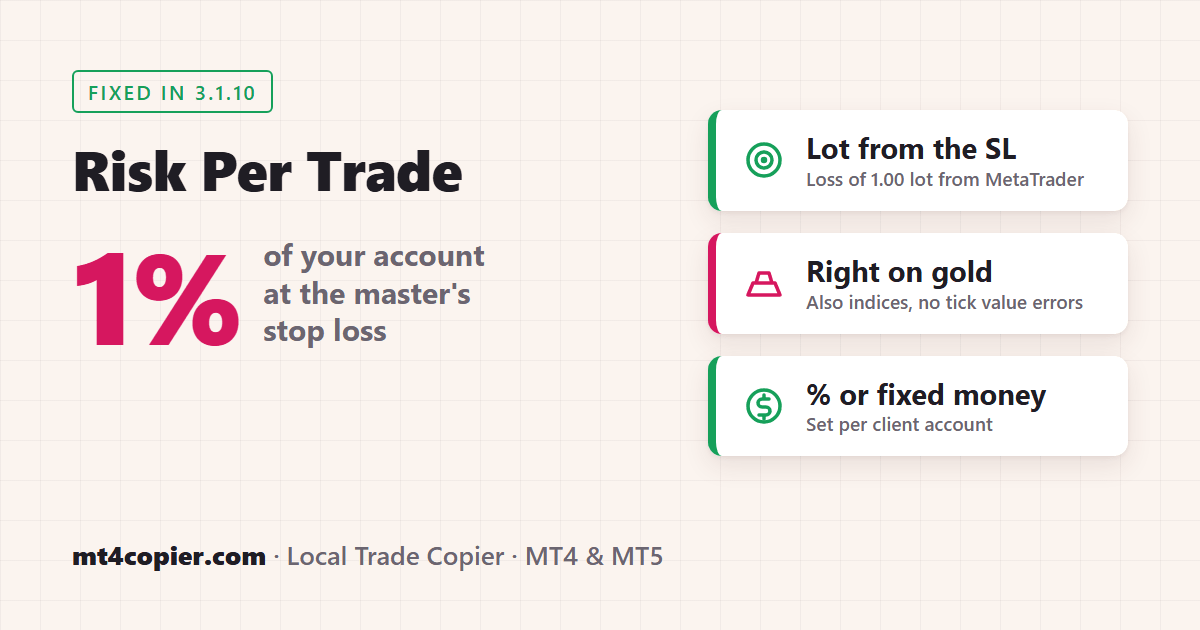
Short answer: Local Trade Copier (LTC) by Algonexis Technologies can size every copied trade by risk instead of by lot. In the LTC Client EA, set Money Management Mode to Risk Per Trade (%) and Money Management Value to, for example, 1. Each copy then gets the lot size that loses about 1 % of your client account if the master’s stop loss is hit. Risk Per Trade (Money) does the same with a fixed amount, such as 50 USD per trade. Since version 3.1.10, LTC Client for MT5 asks MetaTrader itself how much 1.00 lot loses at the stop loss, so the risk is right on gold and indices too. On MT4, 3.1.10 fixes the calculation for indices.
Why size copies by risk?
Most copy settings scale the master’s lot size: the same lot, a multiple of it, or a lot adjusted to the account size. That works when the master trades with a steady risk. Risk-based sizing ignores the master’s lot size and looks only at its stop loss:
- A trade with a tight stop loss gets a bigger lot, and a trade with a wide stop loss gets a smaller one. Every copy risks the same share of your account.
- You decide the risk on each client account yourself: 0.5 % on one account, 1 % on another, or a fixed 50 USD, from the same master.
- It is useful when the master’s own lot sizes don’t fit your account at all, for example a master on a much larger account or a master that trades very different symbols.
Key takeaways
- Risk Per Trade (%): lot = (client balance or equity × Value %) ÷ loss of 1.00 lot at the master’s stop loss.
- Risk Per Trade (Money): lot = Value ÷ loss of 1.00 lot at the master’s stop loss. The amount is in your client account’s currency.
- The lot is sized for the stop loss the copy gets. Normally that is the master’s: from the master’s entry price to the master’s stop loss. With a fixed stop loss in points it is your fixed stop loss, and when the master has none, your
EmergencyStopLossPoints. - A master trade without a stop loss waits until the master sets one, and is then copied with the lot size for that stop loss. If you set
EmergencyStopLossPointsor a fixed stop loss, it is copied at once and sized for that stop loss instead. - New in 3.1.10: on MT5 the loss of 1.00 lot comes from MetaTrader’s own profit calculation. Before, LTC used the tick value reported by the broker, and on some brokers’ gold symbols that value was wrong by a factor of 10.
The settings
The main settings are in the MONEY MANAGEMENT section of the LTC Client EA inputs (press F7 on the Client’s chart and open the Inputs tab). The optional AccountSizeClient settings are further down, under OTHER SETTINGS. They are the same in MT4 and MT5 and in every LTC edition.
| Setting | What to enter |
|---|---|
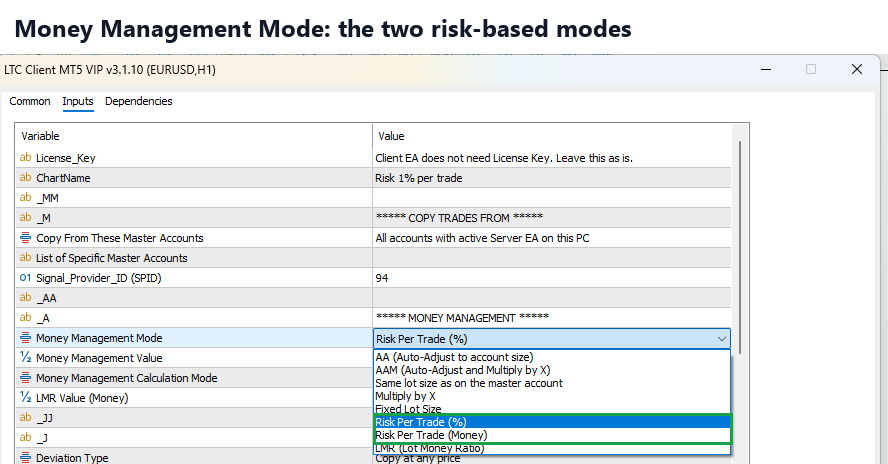
Money Management Mode (inputMoneyManagementMode) |
Risk Per Trade (%) or Risk Per Trade (Money). The default is “AA (Auto-Adjust to account size)”. |
Money Management Value (inputMoneyManagementValue) |
The risk per trade. For Risk Per Trade (%), a percentage: 1 means 1 %, 0.5 means 0.5 %. For Risk Per Trade (Money), an amount in your account currency: 50 means 50 USD on a USD account. |
Money Management Calculation Mode (MMCalcMode) |
Only for Risk Per Trade (%). Pick an option that ends with “Client Balance” (the default is “Server Balance / Client Balance”) to take the percentage from the client’s balance, or one that ends with “Client Equity” to take it from equity. The server part of the name doesn’t matter in this mode. |
AccountSizeClient and AccountSizeClientMode |
Optional, in OTHER SETTINGS. Of the two risk modes, only Risk Per Trade (%) uses them. “Add to current Account Size” (the default) adds the amount to the client’s balance or equity before the percentage is taken. “Replace current Account Size” uses the amount instead: AccountSizeClient = 10000 risks 1 % of 10,000 whatever the real balance is. |
How the lot size is calculated
When a new master trade arrives, LTC Client works it out in three steps:
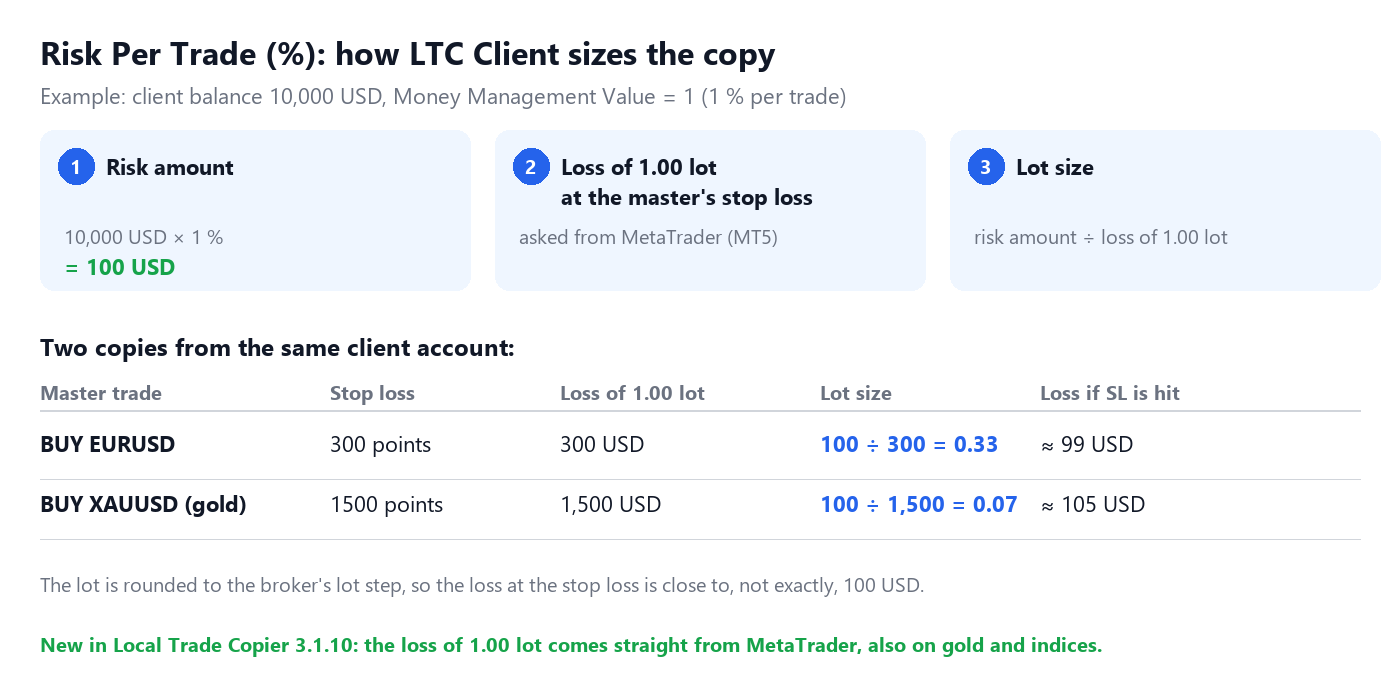
- The risk amount. Risk Per Trade (%): your balance (or equity) times the percentage, so 1 % of 10,000 USD is 100 USD. Risk Per Trade (Money): the amount you entered.
- The loss of 1.00 lot at the stop loss. LTC Client takes the distance between the master’s entry price and the master’s stop loss (or your own stop loss for the copy, see “Trades without a stop loss”) and asks MetaTrader how much 1.00 lot of the client’s symbol loses over that distance, in the client’s account currency.
- The lot size is the risk amount divided by that loss, rounded to the broker’s lot step.
Two examples from the same 10,000 USD account with 1 % risk, on a broker that quotes gold with 2 decimals:
| Master trade | Stop loss | Loss of 1.00 lot | Copied lot size |
|---|---|---|---|
| BUY EURUSD | 300 points | 300 USD | 100 ÷ 300 = 0.33 |
| BUY XAUUSD | 1500 points | 1,500 USD | 100 ÷ 1,500 = 0.07 |
Both copies lose about 100 USD if their stop loss is hit. The small difference (99 or 105 USD) comes from rounding to the lot step of 0.01.
What changed in version 3.1.10
Before 3.1.10, step 2 used the tick value that the broker reports for the symbol, per point. That is fine when the broker’s value is right, but not every broker gets it right. On one MT5 demo server, gold reported a tick value 10 times smaller than the real one. In our test before the fix, Risk Per Trade (Money) with 30 USD opened 0.20 lots of gold, which would have lost about 300 USD at the stop loss: 10 times the setting. On symbols where one tick is more than one point, as on some indices, the lot came out too small instead.
Since 3.1.10:
- MT5: LTC Client uses MetaTrader’s own profit calculation (the same one MetaTrader uses for the profit of your open trades) to get the loss of 1.00 lot at the stop loss. The broker’s tick value is used only as a fallback, if MetaTrader can’t calculate the profit. With the same test, the gold copy was 0.02 lots, and the log showed a loss of 1,502 USD for 1.00 lot at the stop loss.
- MT4: LTC Client uses the tick value per tick size instead of per point, which fixes the indices case.
If you used Risk Per Trade on gold or indices with an older version and saw copies that were much bigger or smaller than expected, update the LTC Client EA to 3.1.10.
Step-by-step setup
Step 1: Make sure the master uses a stop loss
Risk-based sizing needs the master’s stop loss. If the master sometimes opens trades without one and adds it later, that’s fine: the copy waits for it (see below). If the master never uses a stop loss, set EmergencyStopLossPoints so that every copy gets one and can be sized, or choose another money management mode.
Step 2: Open the LTC Client EA inputs
On the client account, click the chart where the LTC Client EA runs and press F7. Open the Inputs tab and scroll to MONEY MANAGEMENT. The window title shows your Client version, for example “LTC Client MT5 VIP v3.1.10”.
Step 3: Choose the mode and the risk
Double-click the value of Money Management Mode and select Risk Per Trade (%). Double-click Money Management Value and enter your risk per trade, for example 1.
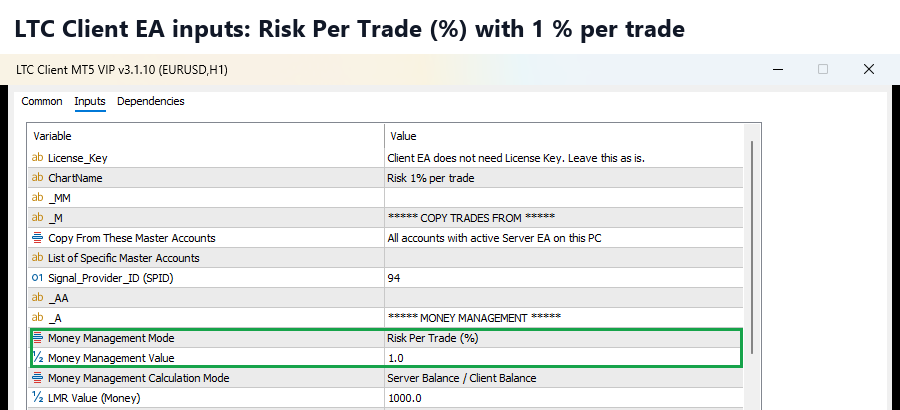
Leave Money Management Calculation Mode on a “Client Balance” option unless you want the percentage taken from equity.
For a fixed amount instead, select Risk Per Trade (Money) and enter the amount, for example 50.
Step 4: Click OK and check the Experts tab
Click OK. The Client EA restarts with the new settings. For each copied trade, the Experts tab of the client terminal shows how the lot was calculated, for example:
Position size calculated by: client account balance (10000.00 USD) Loss of 1.00 lot at the stop loss: 300.00 USD.
With Risk Per Trade (Money) it reads Position size calculated by: Risk to lose approx. 50.00 USD on client account in case SL is hit. Loss of 1.00 lot at the stop loss: ... USD. The value after “Loss of 1.00 lot at the stop loss” is what MetaTrader calculated in step 2, so you can check the lot size yourself: risk amount ÷ that value.
The test: EURUSD and gold on two demo accounts
We tested this on 10 November 2026 with the released Local Trade Copier 3.1.10 VIP on two MT5 demo accounts: the master at MetaQuotes and the client at IC Markets. The Client was set to Risk Per Trade (%) with 1, and to make the numbers easy to follow we set AccountSizeClient to 10000 with “Replace current Account Size”. So every copy should risk 1 % of 10,000 USD, which is 100 USD.
The master opened 0.10 lot of EURUSD with a Stop Loss 301 points away and 0.01 lot of gold with a Stop Loss 1495 points away. The client ignored those lot sizes and copied 0.33 lots of EURUSD and 0.07 lots of gold:

The Experts tab of the client shows the numbers behind each lot size. The original balance of the demo account was about 47,196 USD, but the Client used 10,000 USD because of AccountSizeClient. For EURUSD, MetaTrader reported that 1.00 lot loses 301.00 USD at the stop loss (100 ÷ 301 = 0.33 lots), and for gold 1,495.00 USD (100 ÷ 1,495 = 0.07 lots):

Then the master sold 0.10 lot of GBPUSD without a stop loss. The Client wrote a DELAYED line and copied nothing. About 20 seconds later the master set a stop loss 400 points from its entry price, and the Client copied the trade at once with 0.25 lots (100 ÷ 400). The copy opened at the current price, so its own stop loss is 403 points away:

Trades without a stop loss
Without a stop loss there is no risk to size by. If you haven’t set a stop loss of your own for the copies (see the next section), LTC Client does not copy the trade yet. The Experts tab shows one line like:
DELAYED: Trade #... (BUY EURUSD) delayed because stop loss is not set yet. EA needs to know stop loss to calculate lot size based on RiskPercent (1.0%)
With Risk Per Trade (Money) the line ends with RiskMoney (50.0 USD).
LTC Client checks the trade again on every update. As soon as the master sets a stop loss, the trade is copied with the lot size for that stop loss, at the current price. If the master adds the stop loss 20 seconds after opening, the copy opens about 20 seconds later. If the master closes the trade without ever setting a stop loss, it is not copied at all.
With your own stop loss: EmergencyStopLossPoints or a fixed stop loss
If the Client gives the copy a stop loss of its own, it doesn’t wait for the master’s. We tested this on 10 November 2026 on the same demo accounts, with 1 % of 10,000 USD (100 USD) per trade and the Client’s own stop loss at 500 points:
| Client setting | Master opens without a stop loss | Master adds a 400-point stop loss 2 seconds later | Master opens with a 400-point stop loss |
|---|---|---|---|
| No stop loss of your own (default) | Not copied yet (DELAYED) | Copied with 0.25 lots (100 ÷ 400) | 0.25 lots |
EmergencyStopLossPoints = 500 |
Copied at once with 0.20 lots (100 ÷ 500) and a 500-point stop loss | The copy’s stop loss moves to the master’s 400 points, the lot size stays 0.20 | 0.25 lots (the master’s stop loss is used) |
| How to copy Stop Loss? = “Fixed X value in Points”, X = 500 | Copied at once with 0.20 lots and a 500-point stop loss | The copy keeps its 500-point stop loss and 0.20 lots | 0.20 lots (your fixed 500 points are used) |
So with EmergencyStopLossPoints, a master that adds its stop loss a second or two after opening gets a copy sized for your emergency stop loss, not for its own stop loss. The copy then takes the master’s stop loss, but its lot size doesn’t change. If your master trades like that, leave EmergencyStopLossPoints at 0 in Risk Per Trade mode, so the copy waits for the master’s stop loss, or set it close to the stop loss the master usually uses.
With a fixed stop loss, the lot size always matches the copy’s own stop loss, so every copy risks the amount you set.
Things to know
- The lot size is fixed when the copy opens. If the master moves its stop loss later, the copy’s stop loss follows (depending on your stop loss copy settings), but its lot size stays the same. If the master removes its stop loss, the risk you set no longer applies to that trade.
- A fixed stop loss changes the size too. With How to copy Stop Loss? set to “Fixed X value in Points”, every copy gets that stop loss and its lot is sized for it, whatever stop loss the master uses.
- Pending orders work the same way. The distance is measured from the pending order’s entry price to its stop loss.
- Very small lots. If the calculated lot is below the broker’s minimum lot, LTC Client opens the minimum lot only when that is no more than twice the calculated lot (
MaxMinLotUpsize = 2, the default). Otherwise the trade is not copied, and the Experts tab says why. WithDiscardDisallowedTradeSizes = true, a lot below the minimum is never raised and the trade is not copied.MinLotSizeAllowedandMaxLotSizeAllowedwork as usual. - Currency. The risk is always in the client account’s currency, whatever currency the master account uses. With Risk Per Trade (Money),
50means 50 EUR on a EUR account. - Gaps and slippage. The calculation assumes the stop loss is filled at its price. A price gap over the weekend or slippage on news can make the real loss bigger, as with any stop loss.
- Each Client EA has its own setting, so one master can drive several accounts with different risks.
FAQ
How do I copy trades with a fixed risk per trade?
In the LTC Client EA, set Money Management Mode to Risk Per Trade (%) for a percentage of your balance, or Risk Per Trade (Money) for a fixed amount, and enter the risk in Money Management Value. The lot size of every copy is then calculated from the master’s stop loss.
Which stop loss is used for the calculation?
The stop loss the copy gets. Normally that is the master’s: the distance from the master trade’s entry price to its stop loss. With “Fixed X value in Points” it is your fixed stop loss, and when the master trade has no stop loss, your EmergencyStopLossPoints.
What happens if the master trade has no stop loss?
Without your own stop loss settings, the trade is not copied until the master sets a stop loss. Then it is copied with the lot size for that stop loss. A trade that closes without ever having a stop loss is not copied. With EmergencyStopLossPoints or a fixed stop loss, the trade is copied at once and sized for that stop loss.
Why was my gold lot size too big in older versions?
Before 3.1.10, LTC Client used the tick value that the broker reports, and some brokers report a wrong tick value for gold. Since 3.1.10, on MT5, LTC Client asks MetaTrader how much 1.00 lot really loses at the stop loss, so a wrong tick value from the broker no longer sets the lot size. Update the LTC Client EA to 3.1.10.
Does it work with MT4?
Yes. Both modes are in LTC Client for MT4 and MT5, whatever platform the master uses. On MT4, version 3.1.10 calculates the loss per tick size instead of per point.
Can I use equity instead of balance?
Yes. Set Money Management Calculation Mode to an option that ends with “Client Equity”. This applies to Risk Per Trade (%) only. Risk Per Trade (Money) always uses the amount you entered.
Related guides
- Money management settings of Local Trade Copier
- LTC Client EA settings and parameters explained
- Local Trade Copier quick start
- Local Trade Copier changelog
Don’t have Local Trade Copier yet? Try it free for 7 days on your own PC or VPS.
