
If your trade copier dies mid-trade, the broker leaves your follower positions exactly where they were. Nothing closes automatically. The only protections still working are orders resting directly at the broker, such as a stop loss or take profit already attached to the position. Trade copier redundancy comes down to one priority above all others: get protective orders onto the broker’s books and build a reconciliation step into every restart, because the copier process itself is not what’s keeping you safe.
TL;DR:
- Protect existing trades by placing stop loss and take profit orders directly at the broker, not relying solely on copier logic to manage exits.
- In case of a copier process crash, open positions remain active and expose the account to market risk, emphasizing the importance of broker-resident protective orders.
- Regular reconciliation on reconnect is essential to align local copier records with actual broker positions and avoid unintended reentries or manual interventions.
- Auto-restart can fix process crashes but cannot recover from host or network outages, which require additional monitoring and VPS health checks.
- Using a backup copier instance without proper leader election or lock management can increase risk, so rely on broker protection and alerting instead of overcomplicated multi-instance setups.
What Actually Happens to Open Positions When a Copier Dies
Here’s the part that surprises new users of any forex trade copier: the broker doesn’t know or care that a copier exists. A position at the broker is just a position, tagged to an account number, with no field recording whether a human, an Expert Advisor, or a copier opened it. When the copier process crashes, the broker doesn’t generate any corrective event. No auto-close, no alert, no rollback. The position just sits there, accruing profit or loss like any other trade, waiting for something (or someone) to act on it.
MetaTrader’s own documentation on the general concept of trading makes this explicit: positions and orders live on the broker’s server, and the terminal is essentially a window into that state, not the authority over it. Your local software, including any copier, is a cache of what the broker last reported. When that cache stops updating, reality at the broker keeps moving without it.
This split matters because it separates what survives a crash from what doesn’t:
- Survives: stop loss and take profit orders already placed at the broker.
- Survives: the open position itself, which stays exposed to the market at whatever size it was last set.
- Does not survive: any copier logic that was supposed to mirror a future exit, adjust a trailing stop, or scale a position based on account balance.
- Does not survive: partial-fill handling or lot-size recalculation that the copier would normally apply mid-sequence.
The practical effect on your monitoring is that margin exposure keeps changing even though your dashboard looks frozen. A follower account can drift from 2% risk to 6% risk over a weekend gap with zero software involved, purely because price moved and nothing was there to intervene. That’s the core danger in any conversation about trade copier reliability: the silence looks like stability, but it’s actually just an absence of information.
Which Failure Is It? Five Failure Modes and Their Exposures
Not every outage behaves the same way, and treating them all as one problem is how traders under-prepare. Each failure mode has a different blast radius.
- Process crash on the local machine. The copier’s Expert Advisor or executable stops running, but the operating system and network stay up. An auto-restart supervisor can bring the process back within seconds, but only if it also re-syncs state before resuming. Restart without resync is where most silent damage happens.
- VPS or network outage. The whole host goes dark. No supervisor script running inside that VPS can save you, because the supervisor dies with the host. This is the failure mode people most underestimate, since they’ve configured auto-restart and assume they’re covered.
- Master account disconnects. The trader or system generating signals goes offline while followers stay connected. Followers keep their existing positions but stop receiving new instructions, so a master’s later exit, if it eventually reconnects and closes, may never propagate.
- Follower disconnects or partial fills. One follower account drops out mid-copy while others complete normally. You now have divergence across accounts that were supposed to mirror each other, and reconciling that gap manually gets harder the longer it’s left.
- State desync or ledger mismatch. The copier’s internal record of “what I last did” no longer matches what the broker actually shows. This is the most dangerous mode because a naive restart might try to replay actions that already happened, potentially reopening a position you closed manually during the outage.
Auto-restart supervisors, by design, can only address the first failure mode. As Local Trade Copier’s own troubleshooting guidance notes, a process-level restart cannot fix a host-level network or power failure, and pairing restart with a reconciliation routine is what prevents a blind resume from making things worse. Past results do not guarantee future performance, and no supervisor script changes that.
Where Does Your Protective Stop Actually Live?
The single most consequential decision in any redundancy plan is whether your stop loss is a broker-resident order or a piece of software logic waiting to fire. NinjaTrader’s support documentation on where orders reside draws this line clearly: orders that sit at the broker persist independently of whatever platform or add-on submitted them. Orders that exist only as conditional logic inside a copier or EA vanish the moment that process stops running.
That distinction changes how you should configure every follower account:
- Place stop loss and take profit as native broker orders attached to the position, not as a “watch price and send close command” script inside the copier.
- Confirm with your broker whether a given order type is a true pending order (persists on their server) or a client-side conditional order (persists only in your terminal or copier).
- Re-verify this after any platform update, since some brokers reset conditional order types differently across MT4, MT5, and DXTrade integrations.
- Avoid relying on trailing stops calculated by the copier unless you’ve confirmed the broker also holds a static backstop order underneath it.
Pro Tip: Open a demo or small live position, place your stop through the copier’s normal workflow, then close the copier entirely and check the position from your broker’s mobile app. If the stop still shows as an open order at the broker, you’re protected. If it disappears from the broker’s order book the moment the copier closes, that stop was never actually resting at the broker.
Local Trade Copier’s guidance on waiting for a stop loss or take profit to be hit walks through exactly how this behaves when the copier goes offline mid-trade, which is worth reading before you assume your current setup is covered.
A Timeline Where the Master Exits While Followers Are Unmanaged
Consider a sequence that plays out more often than most traders admit. A master account opens a EUR/USD position at 10:14 AM. Three follower accounts copy it in about a second, each with its own lot sizing. At 10:22 AM, the copier process on the master’s machine crashes silently, perhaps from a Windows update or a dropped VPS connection.
- 10:14 AM – Master fills, followers fill, everyone’s positions match.
- 10:22 AM – Copier process dies. No alert fires because no monitoring was configured.
- 11:40 AM – Master’s trader, working from a different terminal, manually closes the position after price hits their target.
- 11:40 AM onward – Because the copier is dead, that close never propagates. Followers remain open, now completely disconnected from the strategy that generated them.
- 2:15 PM – Trader notices the copier’s status light is off and reconnects.
On reconnect, the first thing to check is not whether the copier “looks fine.” It’s the actual state at each broker: open positions, working orders, and recent fills, pulled directly from the broker’s terminal or mobile app, not from the copier’s last known cache. Then triage in order: halt any further automatic copying until you’ve confirmed state, reconcile each follower’s ledger against the master’s actual current position, and only then decide whether to manually close the orphaned followers or leave them with a fresh stop attached. Guessing based on what the copier “should” have done is how a two-hour gap turns into a much bigger loss.
Why Reconcile-on-Reconnect Is the Single Most Valuable Behavior
Reconciliation is the discipline of treating the broker as the only source of truth every time a connection is reestablished, rather than assuming your local records are still accurate. It sounds simple. Most failures that turn into real losses happen because someone skipped it.
The sequence that works:
- Query the broker for current positions and working orders (not what the copier logged last).
- Diff that broker snapshot against your local ledger of what the copier believes should be open.
- Resolve every mismatch explicitly, closing positions that shouldn’t exist or placing stops on positions that lack them, before resuming automated copying.
- Resume cautiously, ideally with a brief delay and a manual glance, rather than instantly re-enabling full automation the second the connection returns.
Blind resume, meaning restarting the copier and immediately trusting its old event log, is unsafe because it can try to replay actions against a state that’s already changed. If you closed a position manually during the outage and the copier’s log doesn’t know that, a naive resume might attempt to “correct” a position that no longer exists, or worse, reopen one. Reconciliation routines should key off current broker positions rather than replaying historical logs, precisely to avoid this trap.
The protocol concepts to look for when evaluating any copier or building your own checks are position and order status queries, similar in spirit to what FIX-based platforms expose. cTrader’s FIX specification documents request types built for exactly this purpose: asking the broker “what do I actually have open right now” rather than trusting a locally cached answer. Whether your platform speaks FIX directly or not, the underlying idea, querying broker truth before acting, is what separates a copier that recovers cleanly from one that compounds an outage into a bigger problem.
Pro Tip: If you’re evaluating copier software, ask the vendor directly whether reconciliation runs automatically on every reconnect or only on manual trigger. “Automatic” is the answer you want; “you can run a check if you remember to” is a gap waiting to bite you.
Why Running Two Copier Instances Can Be Worse Than Running One
The instinct to run a backup copier instance on a second machine, “just in case,” feels like redundancy. In practice, without proper coordination, it’s often a way to multiply your exposure instead of protecting against it.
Here’s the mechanism: if both instances are watching the same master and both are healthy at the same moment, they can both act on the same signal. Two unauthorized instances reacting to one master event can double a position size transiently, and if both also send matching exit orders later, the whole episode can leave almost no trace in your end-of-day statement. The damage happens while the trade is open, in the exposure window, not in any log you’d casually review afterward.
The formal fix is leader election: a mechanism where only one instance is allowed to act at a time, enforced through a lease with a time-to-live and ideally a fencing token that the broker or a shared coordination layer can validate. That’s the architecturally correct answer, and it’s genuinely effective in distributed systems generally. The catch is that broker APIs for retail forex platforms rarely support fencing tokens natively, so most “leader election” in this space ends up being a homemade lock file or database flag, which is only as reliable as the process checking it.
For most individual traders, the more realistic path is layered simplicity rather than distributed-systems architecture:
- Rely on broker-resting protective orders as the real backstop, not on a second copier instance.
- Invest in fast alerting so a human finds out about a failure in minutes, not hours.
- If you do want a standby machine, configure it as a cold standby with an explicit lock file the primary instance must hold, so the backup only activates after confirming the primary is truly down.
Pre-Flight Checklist You Can Run This Week
Redundancy in trading systems doesn’t require a rebuild. It requires a short list of changes, done in the right order, most of which take under an hour each.
- Attach broker-resting stop losses and take profits to every follower position, not just the master. Verify this per broker, since order persistence behavior can differ between MT4, MT5, and DXTrade integrations.
- Set up heartbeat monitoring that pings you the moment the copier process stops responding, through SMS or email, rather than relying on you noticing a dashboard has gone quiet.
- Add VPS health checks separate from the copier itself, since a VPS can be reachable while the copier process is hung, or vice versa.
- Enable auto-restart, but make reconciliation mandatory on every restart, not optional. A restart that skips the broker-state check is functionally a blind resume with extra steps.
- Run a scheduled disconnect and reconnect test, ideally monthly, where you deliberately kill the copier process during a demo or small live position and confirm the reconciliation step catches the mismatch correctly.
- Document the manual triage steps (check broker positions, check working orders, halt copying, reconcile) somewhere you can find them at 2 AM, not just in your memory.
Pro Tip: Treat the disconnect and reconnect test the same way you’d treat a fire drill: scheduled, boring, and non-negotiable. The traders who skip it are the ones who discover their reconciliation logic has a bug during an actual outage, which is the worst possible time to find out.
Local Trade Copier’s best practices guide for multi-account copying covers configuration details for several of these steps if you want a starting template rather than building the checklist from scratch.
What to Build First, and When a Copier Is the Wrong Tool
Not every mitigation deserves equal attention right away. Ranked by value against the effort required, the order looks like this: broker-resting protective orders first, since they cost nothing and protect you even if every other system fails. Alerting second, because knowing about a failure in minutes instead of hours is what turns a manageable problem into a non-event. Auto-restart paired with mandatory reconciliation third. Leader election and multi-instance architecture last, since it solves a narrower problem and carries real implementation risk if done sloppily.
There are situations where a locally installed copier simply isn’t the right layer to solve your problem:
- If you need guaranteed uptime independent of any single machine’s power or internet connection, a broker-hosted copy-trading feature or a managed replication service removes the local-machine failure mode entirely, at the cost of routing your trade data through a third party.
- If you’re a prop firm trader specifically required to avoid cloud IP routing for detection reasons, local execution on your own machine or VPS is often the requirement itself, not just a preference, which is a case where a local copier is the right tool rather than the wrong one.
- If your setup involves dozens of accounts across multiple firms with strict compliance logging needs, that’s closer to an institutional monitoring problem than something a single desktop copier should be stretched to cover.
Copying That Doesn’t Depend on Your Desktop Staying Awake
A copier running on your personal laptop is one closed lid away from an outage. Moving execution to a VPS solves the most common cause of downtime, but only if it’s configured properly: run the copier as a supervised service that restarts automatically, keep the VPS in a data center with a strong reconnect track record, and never store broker credentials in plain text where a compromised VPS could expose them. Local Trade Copier’s security guidance for VPS setups covers the credential and hardening side of this in detail.
Cloud-based or fully managed copying engines take this a step further by removing the single-machine dependency entirely, but that comes with tradeoffs: your trade data routes through a third-party server, which some prop firms explicitly prohibit, and you’re now trusting someone else’s infrastructure and pricing model instead of your own.
The practical answer for most traders isn’t choosing one architecture and calling it done. It’s combining a properly supervised VPS with broker-resting protective orders and real alerting, so that even if the VPS has a bad night, the position isn’t naked and you find out fast enough to act.
Data Consistency Challenges During Failover and Methods to Ensure Synchronization
The hardest part of failover isn’t restarting a process. It’s making sure the copier’s internal record of “what should be open” matches what the broker actually shows, especially when the outage happened mid-sequence, say, after a master fill but before a follower confirmation completed.
Partial fills are the most common source of drift. If a follower’s order was submitted but the confirmation never reached the copier before it crashed, the local ledger might show that trade as “pending” or “unknown” while the broker shows it as filled. Resuming without checking creates a mismatch that compounds with every subsequent trade.
The safest synchronization method is to treat every reconnect as a fresh read, not an incremental update. Pull the complete current position and order list from each account’s broker, compare it line by line against what the copier expects, and resolve discrepancies before allowing new signals to flow. Event-driven replication engines that use per-account confirmation before marking a trade “complete” reduce this class of problem by design, because they don’t assume success until the broker has actually confirmed it. Skipping that confirmation step to save a few hundred milliseconds of execution speed is a common shortcut that creates exactly the desync problem reconciliation is meant to catch.
Backup and Failover Strategies for Trade Copier Systems
A backup strategy for a trade copier setup isn’t about having a second copy of software installed somewhere. It’s about having a clearly defined sequence for what happens when the primary path fails, and making sure that sequence doesn’t introduce new risk.
The layered approach that holds up in practice starts with broker-level protection that needs no software at all: every follower position carries its own stop loss and take profit resting at the broker, so a total software failure still has a floor. Above that sits the operational layer, auto-restart with mandatory reconciliation, which handles the most common failure (a process crash) cleanly. Above that sits monitoring and alerting, which shortens the time between “something broke” and “a human knows about it.” Only at the top of that stack does a standby machine or secondary instance make sense, and only with explicit locking so it doesn’t act unless the primary is confirmed down.
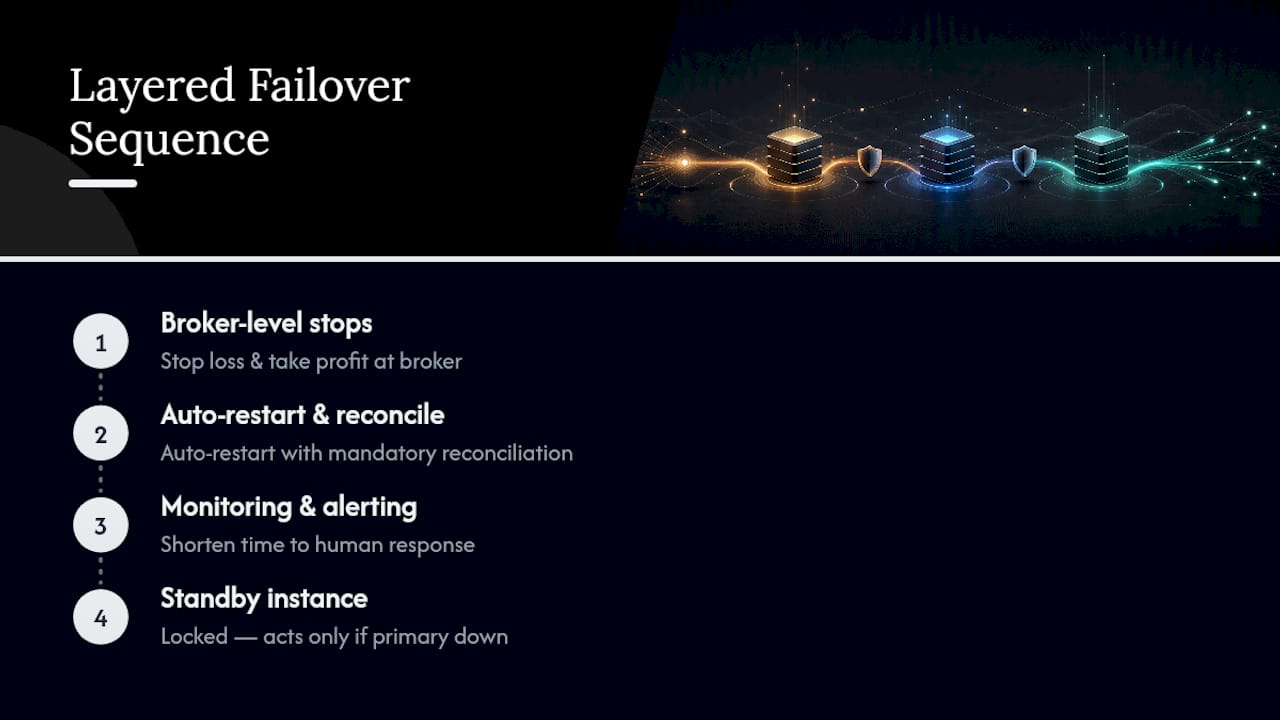
Trying to build the top layer first, a fancy multi-instance failover system, while skipping broker-resting stops at the bottom is backward. It’s the equivalent of installing a home security system before locking the front door. Get the cheap, reliable layers in place before investing in the complex one.
Impact of Network Failures on Trade Copier Redundancy and How to Mitigate Them
Network failures are the failure mode most likely to defeat a naive redundancy setup, because they take down everything running on that connection simultaneously, the copier, its supervisor, and any local monitoring script all at once.
The mitigation isn’t a single fix but a combination that covers different failure points. A VPS in a reputable data center reduces the odds of a residential internet outage taking down your execution machine, but the VPS itself can still lose connectivity to its host provider, so health checks need to run from outside that VPS, not just inside it. A monitoring service that pings your VPS from a separate location will catch an outage that a local script running on the same failed machine never could.
On the account side, network failures are exactly why broker-resting orders matter so much: a stop loss placed at the broker keeps working even if every layer of your local infrastructure, VPS included, goes dark simultaneously. That’s the one piece of protection that doesn’t depend on any network path you control staying up.
Monitoring and Alerting Best Practices for Early Detection of Copier Failures
The gap between a manageable outage and a costly one is almost always detection time. A copier that fails silently at 2 AM and gets discovered at 9 AM has had seven hours to drift; the same failure caught within five minutes rarely causes meaningful damage.
Effective monitoring for a copier setup checks more than “is the process running.” It should verify that trades are actually being copied within an expected time window, that the connection to each broker account is live, and that the VPS or host machine itself is reachable, since any one of those three can fail independently of the others. Heartbeat pings sent at short intervals, paired with SMS or email alerts rather than a dashboard you have to remember to check, close most of the detection gap.
The best-tuned alerting setups also distinguish between severity levels: a brief reconnection blip doesn’t need to wake you up, but a sustained disconnect on an account carrying open positions should trigger an immediate notification. Treating every alert with equal urgency trains you to ignore all of them, which defeats the purpose.
What Solo Traders Get Wrong About Redundancy
Most traders who ask about trade copier redundancy are really asking the wrong question first. They want to know how to build a failover system before they’ve confirmed their existing stop losses actually rest at the broker. That’s backward, and it’s the single most common gap I see when people describe their setup.
Solo traders tend to over-invest in software-level redundancy, running a backup instance, scripting elaborate restart logic, because it feels like engineering the problem away. Teams managing multiple client accounts usually get this right faster, mostly because a blown-up follower account is a client conversation they don’t want to have, so broker-resting protection becomes non-negotiable early. The lesson generalizes: fix the cheap, reliable layer before the expensive, complex one.
Local Trade Copier’s architecture reflects this priority. Running entirely on a local machine or VPS means there’s no cloud routing step to add latency or a third-party outage to your risk surface, and its auto-restart behavior is built around reconciling against actual broker state rather than blindly resuming from a cached log. That design choice maps directly to the mitigation this article keeps circling back to: know what the broker actually shows before you let automation touch it again.
— Rimantas
How Local Trade Copier Supports Your Redundancy Plan
Local Trade Copier doesn’t promise to prevent losses or improve trading outcomes. It’s trade replication software: it copies existing trades across MetaTrader 4, MetaTrader 5, and DXTrade accounts, with no market logic or strategy layer of its own. What it does support directly is the operational side of redundancy this article has walked through. Because it runs entirely on your Windows machine or VPS, with local execution in about 1 second, there’s no cloud routing step to fail independently of your own connection, and auto-restart pairs with reconciliation rather than a blind resume.

If you’re setting up a new follower account this week, start with the fundamentals: confirm your protective orders rest at the broker using the guidance in Local Trade Copier’s stop loss and take profit documentation, then review the VPS and security setup guide before your copier goes live on a hosted machine. From there, the PERSONAL Plan at €29 per month covers individual traders running a handful of accounts, while the MANAGER Plan at €89 per month and VIP Plan at €199 per month scale up for account managers and larger multi-account setups. Every plan includes a 7-day free trial, so you can test the reconciliation and auto-restart behavior on a demo account before committing. Past results do not guarantee future performance, and Local Trade Copier does not influence trade outcomes; it replicates trades you or your strategy already generate.
Authoritative Protocol and Platform Documentation
For implementation details, consult MetaTrader’s page on the general concept of trading, NinjaTrader’s explanation of where orders reside, and cTrader’s FIX specification for order and position query primitives. For configuration specifics, Local Trade Copier’s installation guide covers VPS setup for MT4 and MT5.
This article is general information, not a substitute for advice from a qualified financial advisor. Consult a qualified financial professional about your own circumstances before acting on anything here.
Sources
FAQ
Is Copy Trading Illegal?
Copy trading itself is not illegal in most jurisdictions, including for retail forex traders in the United States, though the specific service or platform you use must comply with local securities and brokerage regulations. Trade replication software like Local Trade Copier simply copies trades between accounts you control; it carries no market logic and doesn’t manage funds on your behalf, which is a different regulatory category than a licensed money manager.
How Does a Trade Copier Work?
A trade copier monitors a master account for trade activity and sends matching orders to one or more follower accounts, typically with configurable lot sizing per account. Local execution, as used in software like Local Trade Copier, processes this entirely on your own machine or VPS rather than routing through a third-party cloud server, which keeps trade data on a single controlled IP address.
Is Copy Trading Actually Profitable?
Profitability depends entirely on the underlying strategy being copied, not on the copier software itself, since a copier has no strategy layer and cannot improve or worsen trade outcomes. Past results do not guarantee future performance, and any specific return figures should come only from a strategy’s own verified, publicly disclosed track record rather than assumptions about copying itself.
Which Futures Trade Copier Is the Best?
The right choice depends on which platforms you need to bridge and whether local execution matters for your compliance needs. For traders working across MetaTrader 4, MetaTrader 5, and DXTrade specifically, Local Trade Copier is built around local, on-machine execution with reconciliation on restart, which fits traders prioritizing broker-resting protections and prop-firm-friendly IP handling over cloud-hosted alternatives.
What Happens if My Trade Copier Crashes While a Trade Is Open?
The open position stays exactly as it was at the broker, since brokers don’t automatically react to a copier going offline. Only stop loss and take profit orders already resting at the broker keep working, which is why confirming those orders are broker-resident, not copier-dependent, matters more than any other single setup step.
