

Use a locally installed trade copier or a dedicated-IP VPS so every order exits from one IP address. That’s the core fix for prop firms flagging shared-server activity as multi-accounting. Local execution keeps trade data on one machine, cuts round-trip latency, and gives you a clean audit trail if a firm ever questions a payout. One direct, supported option built specifically for this offers a 7-day trial for traders who want to test it before committing.
TL;DR:
- Using a locally installed trade copier on a single machine ensures all trades exit from one IP address, reducing the risk of flagged multi-accounting by prop firms.
- A dedicated-IP VPS must be confirmed in writing to avoid sharing an IP with other users, as shared IPs frequently trigger compliance flags and payout investigations.
- Running the copier entirely on your own machine or VPS eliminates latency issues, provides precise control, and simplifies logging of timestamps, IPs, and trade details.
- Cloud relay services route trades through external servers, which can increase latency and produce shared IP addresses, raising the likelihood of detection and payout delays.
- Proper setup involves verifying IP dedication with a WHOIS or ASN lookup, conducting demo tests, and diligent logging of trade timestamps and account activity to pass payout audits smoothly.
How Does Single IP Trade Copying Actually Work?
Every trade copying setup follows the same basic shape: one master account generates the trades, and one or more follower accounts mirror them. What changes is where that mirroring happens and how many network hops sit between the master’s order and the follower’s fill.
A locally installed copier runs the whole process on one machine, often through a shared file or local interprocess signal that both the master and follower terminals read. Nothing leaves the box except the broker connection itself, so the exit IP stays constant across every account tied to that machine. Cloud-based relay services work differently. They route your trade signal through an external server, which means the fill executes from that server’s IP, not yours, and that server may be hosting dozens of other traders’ accounts at the same time.
The gap between these two models shows up in timing and in risk exposure:
- Local execution typically completes the copy in under half a second, since it skips the internet round trip entirely.
- Cloud relays add network latency on both legs of the trip, which can shift entry prices on fast-moving pairs.
- Local setups put you on a single, traceable IP that only your accounts use.
- Shared cloud nodes put your fills on the same address as strangers’ accounts, some of which may be violating the same rules you’re trying to follow.
Symbol mapping and lot scaling matter here too. If your broker labels gold as “XAUUSD” and another labels it “GOLD.a,” a copier that doesn’t handle prefix and suffix translation will simply skip the trade or copy it to the wrong instrument. Magic numbers, the identifiers Expert Advisors attach to their own orders, also need consistent handling so the copier doesn’t confuse a manually placed trade with a robot’s trade. Get these details wrong and you’ll see copy mismatches long before you see an IP flag. Copy trading itself, as IG’s overview of the practice explains, is simply automated mirroring of another account’s open and closed positions, not manual re-entry, and the mechanics behind that mirroring are exactly what determine whether your setup holds up under scrutiny.
Why Do Prop Firms Flag Shared IP Addresses?
Prop firms run automated checks that compare the IP address behind every trade against every other funded account on their books. When two accounts show the same exit IP, the firm’s compliance system treats that as a strong signal of prohibited multi-accounting, even when the two accounts belong to completely unrelated traders who just happened to rent server space from the same cheap VPS provider.
TradersProxy’s engineering notes on dedicated IP setups point out that shared-IP nodes are a common trigger for payout audits, because the firm has no way to distinguish “coincidence” from “coordinated rule-breaking” once two accounts share an address. A dedicated static IP removes that ambiguity entirely.
IP collision rarely travels alone. Firms typically cross-reference it against device fingerprints, near-simultaneous fills across accounts, and sudden geographic jumps in login location. PickMyTrade’s breakdown of the prop firm IP rule notes that firms pair IP reputation with these correlated signals specifically to catch multi-accounting, and that a dedicated-IP VPS usually satisfies firms that permit VPS use in the first place.
The consequences escalate in a fairly predictable order: a support ticket asking you to explain the overlap, a frozen payout while the firm investigates, then either clearance or account closure. Most published firm policies either explicitly ban shared logins and shared VPS instances outright, or they permit VPS use only when you can prove the IP is dedicated to you. Cheap, shared-tier VPS plans almost never meet that bar.
Which Setup Actually Produces One Exit IP?
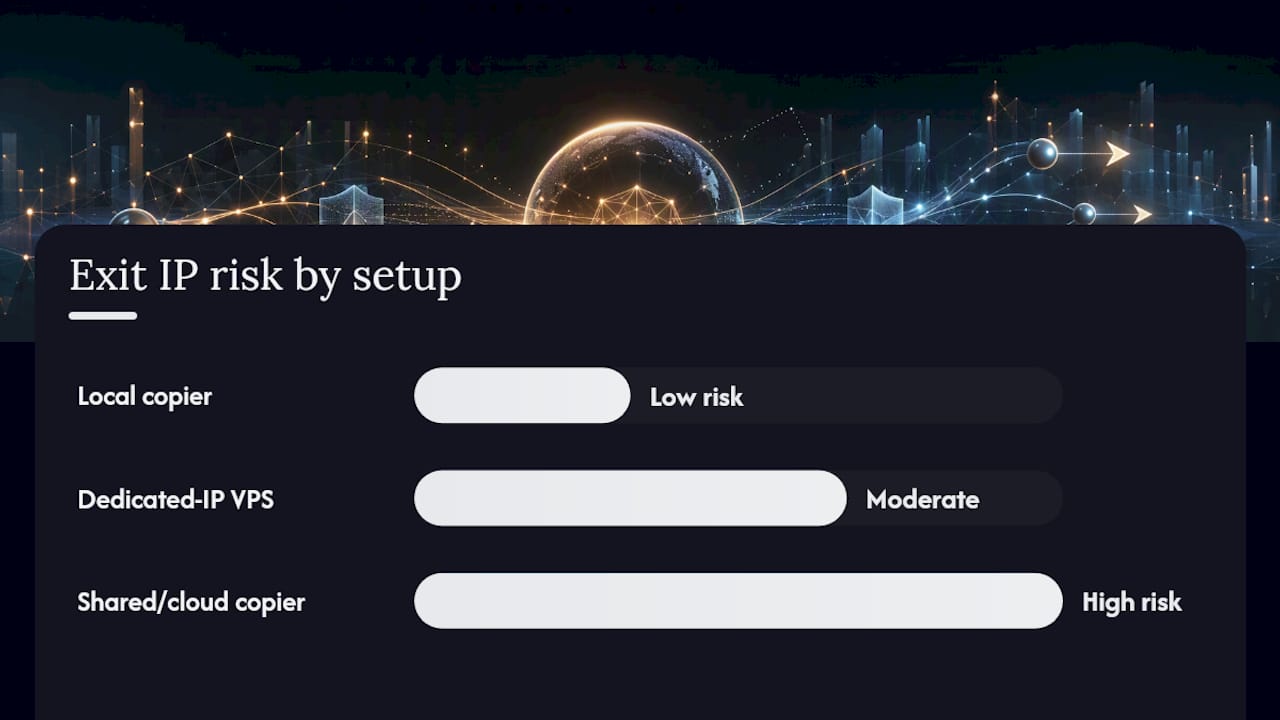
Three realistic paths exist, and they carry very different risk profiles for a funded account.
- A locally installed trade copier on a desktop or dedicated VPS. This is the most direct route to a single exit IP because everything, master account, follower accounts, and the copier itself, runs on one machine you control. Management is minimal once it’s configured: you monitor uptime, keep Windows updated, and check logs periodically. One software option falls into this category, running entirely on a Windows machine or VPS with no cloud routing involved.
- A dedicated-IP VPS paired with a cloud-based or bridge copier. This works, but only if “dedicated” is verified in writing from the provider, not just implied by the plan name. Ask for a written statement confirming the IP is not shared with other tenants, and avoid any entry-level or “economy” VPS tier, since providers frequently pool IPs on their cheapest plans to cut costs.
- Shared or cloud-hosted copier services. These route your trades through infrastructure shared with other users, which is exactly the pattern that triggers collision flags. For a personal or demo account, that risk might be acceptable. For a funded account, it’s the setup most likely to cost you a payout over something you didn’t even do.
Whichever option you choose, a few configuration habits reduce flagging risk regardless of infrastructure: run one Expert Advisor instance per terminal (duplicate EAs on the same chart cause duplicate fills), use unique credentials for every account rather than reusing a login across terminals, and keep symbol prefix and suffix mapping consistent so the copier doesn’t silently drop trades on mismatched instrument names.
Pro Tip: Get the “dedicated IP” claim in writing from your VPS provider before you fund a challenge account on it. A verbal assurance from a sales rep is not evidence in an audit; a written statement or an ASN lookup is.
Setup Checklist: From Installation to Payout-Ready
Before you request a payout, run through a short verification pass rather than assuming the setup is working correctly just because trades are copying.
- Confirm your exit IP is dedicated, not shared, using a WHOIS or ASN lookup against your VPS provider’s IP block.
- Run a demo test with timestamped fills on both master and follower accounts to confirm execution speed and accuracy.
- Verify stop-loss and take-profit levels are copying correctly, not just entry and exit prices.
- Double-check symbol mapping across every follower account, especially if the accounts use different brokers.
- Keep a running log of trade timestamps, IPs, and account activity for at least the length of your evaluation window.
A dry run matters more than it sounds like it should. Open a handful of demo trades on the master account, let the copier mirror them to followers, and compare timestamps and fill prices side by side. Any drift wider than a second or two on a local setup usually points to a configuration issue, not a broker delay.
The single biggest reason traders fail a payout audit isn’t the IP itself. It’s not having timestamped logs ready to show the firm exactly what happened and when.
If mismatches show up, check for duplicate EA instances first, since running the same EA twice on one chart is the most common cause of doubled trades. Fix prefix and suffix mapping second. If you’re using a file-based sync method rather than a network bridge, disk input and output speed becomes the bottleneck instead of your internet connection, so a VPS with slow storage can cause copy delays that look like a network problem but aren’t.
What the Product Behind This Guide Actually Does
One locally installed trade copier software has run entirely on local machines since 2010, with no cloud relay in the execution path. It supports MT4, MT5, and DXTrade, offers 18 lot-sizing and risk-management options, and scales lot sizes automatically against each follower account’s balance. For a funded-account trader, a copier that never leaves the machine is a way to avoid the audit trigger discussed above.
The Part Most Setup Guides Get Wrong
Most guides on this topic treat single-IP compliance as a checkbox: buy a dedicated VPS, done. That’s incomplete. A dedicated IP fixes the address problem, but it doesn’t fix latency, symbol mapping errors, or the duplicate-EA mistakes that cause copy mismatches in the first place, and those mismatches create their own audit trail that looks just as suspicious as a shared IP.

The conventional advice also underweights logging. Traders spend money on infrastructure and then have nothing to show an auditor beyond “trust me.” A timestamped log of fills across master and follower accounts is worth more in a dispute than an expensive VPS plan with no proof behind it.
If you take one thing from this guide, prioritize local execution first, infrastructure second. A locally installed copier solves the IP problem as a side effect of solving the latency and reliability problem. That’s a more durable fix than layering a dedicated IP on top of a setup that still has mapping errors or duplicate EA instances quietly running in the background. Get the execution right, and the compliance question mostly takes care of itself.
— Rimantas
Try Local Trade Copier Before Your Next Funded Challenge
One software solution is a direct route to single-IP execution: everything runs on your own Windows machine or VPS, with no cloud server sitting between your master and follower accounts.

The software offers sub-0.5-second local execution, multiple lot-sizing and risk options, automatic lot scaling per account balance, and copying across MT4, MT5, and DXTrade under one plan. Some traders use it to avoid the shared-IP problem covered above, since every follower trade executes from the same address as the master. Past results do not guarantee future performance, this software copies existing trades only; it has no strategy layer and does not influence trading outcomes.
Start with the 7-day free trial and follow the setup checklist from this guide before you fund your next challenge. If you want to see the execution speed firsthand first, the demo walkthrough shows the copier running live on MT4 and MT5.
This article is general information, not a substitute for advice from a qualified financial advisor. Consult a qualified financial professional about your own circumstances before acting on anything here.
Sources
- IG — What is copy trading?
- TradersProxy — Dedicated IP for Prop Firm Traders
- PickMyTrade blog — The prop firm IP address rule
FAQ
What Is Single IP Trade Copying?
It’s a setup where every trade across a master account and its follower accounts exits through the same IP address, typically achieved with a locally installed copier or a verified dedicated-IP VPS.
Does a VPS Automatically Give Me a Dedicated IP?
No. Many budget VPS tiers share IP addresses across multiple tenants, so you need written confirmation from the provider that your IP is dedicated, not pooled.
Can Local Trade Copier Run on a VPS Instead of My Desktop?
Yes. The software runs on either a Windows desktop or a Windows VPS, and both configurations keep the same single exit IP since the software never routes trades through an external cloud server.
How Do Prop Firms Detect Shared IP Addresses?
They cross-reference exit IPs across all funded accounts on their books and pair any collision with device fingerprints, near-simultaneous fills, and login location jumps to flag suspected multi-accounting.
What Should I Log Before Requesting a Payout?
Keep timestamped records of every fill across your master and follower accounts, along with your dedicated IP verification, for the full length of your evaluation or funded window.
Recommended
- Local Trade Copier 3.0.0 Introduces New Execution Controls for Prop Firm and Multi-Account Traders
- Prop trading best practices: Multi-account copying in 2026
- Multi-Asset Trade Copying Examples for Traders in 2026
- Prop firm trading advantages with smart trade copying
