

TL;DR:
- Managing multiple forex accounts effectively requires a structured workflow covering five key trade lifecycle stages.
- Automation and thorough preparation are essential to minimize errors and ensure accurate trade replication across accounts.
- Clear documentation, regular reconciliation, and error escalation procedures differentiate professional, scalable multi-account trading systems.
Managing multiple forex accounts without a clear system is like running a trading desk blindfolded. Orders get missed, lot sizes get mixed up, and one bad entry on the wrong account can wipe out a week’s gains. Whether you’re an independent account manager copying trades to a dozen client accounts or a retail trader juggling funded accounts across MT4 and MT5, the difference between consistency and chaos comes down to workflow. This guide gives you a step-by-step trade management process, the right tools, and pro tips that actually come from experience running multi-account setups every day.
Key Takeaways
| Point | Details |
|---|---|
| Structured workflow matters | Breaking your trade management into clear stages prevents errors and missed steps. |
| Preparation is key | Careful account and tool setup sets the foundation for efficient multi-account trading. |
| Automation boosts accuracy | Using trade copiers and workflow tools makes trade execution faster and reduces mistakes. |
| Verification closes the loop | Checking settlements and documenting trades ensures you stay profitable and compliant. |
Understanding the stages of the trade management workflow
Every trade you place moves through a defined lifecycle before it’s truly complete. Skipping a stage or blurring the lines between them is where costly mistakes happen. A practical trade lifecycle stages workflow mirrors five key phases: pre-trade preparation, execution, clearing, settlement, and ongoing position and risk management.
Organizing your process around these stages gives you checkpoints instead of guesswork. You know exactly where each trade stands at any moment, and you can spot problems before they become losses.
Here’s how each stage breaks down for multi-account traders:
| Stage | Core task | Common bottleneck |
|---|---|---|
| Pre-trade | Account setup, risk parameters | Missing configs on new accounts |
| Execution | Placing orders across accounts | Slippage from manual entry delays |
| Clearing | Confirming trade details with counterparties | Discrepancies in order fills |
| Settlement | Funds and assets transferred | Timing mismatches between brokers |
| Ongoing management | Monitoring open positions and risk | No audit trail, reactive decisions |
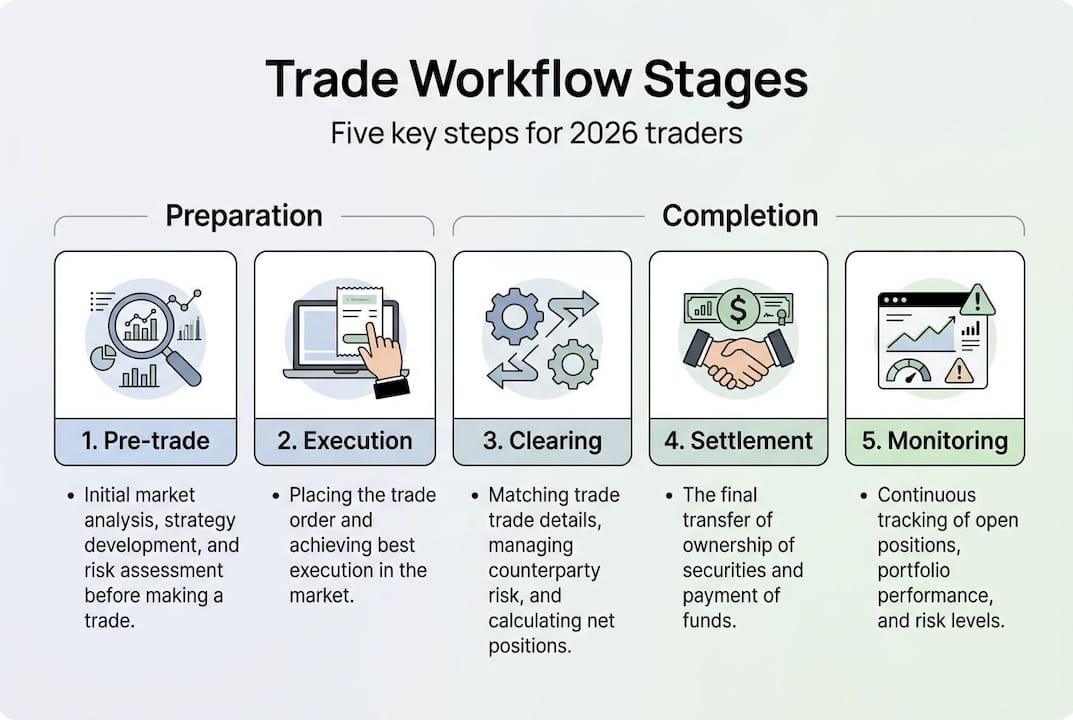
For traders running a single account, this lifecycle is manageable manually. But add three, five, or ten accounts and the cracks appear fast. Each stage multiplies in complexity. A missed configuration on one account at the pre-trade stage, for example, can cascade into mismatched lot sizes during execution and unresolved discrepancies at settlement.
A well-designed automated trading workflow handles the high-frequency, repetitive parts of these stages so your attention stays on strategy. Here’s where multi-account setups specifically need extra rigor:
- Pre-trade: Every client or funded account needs individual risk parameters confirmed before any signal fires.
- Execution: Manual re-entry across terminals is error-prone and slow. Automation is not optional at scale.
- Clearing: Discrepancies between what the master account filled and what client accounts show must be caught immediately.
- Settlement: Different brokers settle at different speeds. Track each account separately.
- Ongoing management: Position monitoring across accounts requires a centralized view, not tabs scattered across three monitors.
Understanding why automation in forex trading matters at each of these stages sets you up to make smarter tool choices in the next steps.

Preparation: Setting up accounts and workflow tools
Preparation before trade execution is the first essential stage of any professional workflow. Most traders skip this or treat it as a one-time task. It’s not. Every time you add an account, bring on a client, or switch brokers, you’re back in preparation mode.
Here’s a numbered setup process to follow every time:
- Create and verify all trading accounts with correct leverage and currency settings per broker.
- Configure risk parameters per account including maximum lot size, drawdown limits, and allowed instruments.
- Install your trade copier on a VPS or Windows PC and connect master and client accounts. Detailed trade copier installation steps save time here.
- Run a parameter audit to confirm lot scaling rules match each account’s balance and risk tolerance.
- Test the full workflow in a demo environment before going live. A single misconfigured multiplier can massively over-expose a client account.
- Document everything. Broker credentials, account numbers, lot size rules, and emergency contacts should be in one place, not your memory.
The tools you choose at this stage determine how much friction the rest of your workflow carries. Here’s a quick comparison of essential tool types:
| Tool type | What it handles | Key feature to check |
|---|---|---|
| Trade copier (local) | Replicates trades across accounts in real time | Execution speed under 0.5 seconds |
| VPS | Keeps terminals running 24/5 without your PC | Latency to broker server |
| Platform plugin | Adds order management features to MT4/MT5 | Compatibility with your broker |
| Journal/log software | Records every trade and decision | Export format for auditing |
Pro Tip: Before going live, backtest your copier settings using historical data on a demo account. This catches lot size calculation errors that won’t show up until a volatile session. If you’re planning to automate forex trading across platforms, verify cross-platform compatibility during this test phase, not after.
Execution: How to manage trades efficiently across accounts
Trade execution is the pivotal stage where orders are placed in the market, requiring speed and accuracy, especially in multi-account workflows. Manual execution across multiple terminals is not just slow. It introduces human error at the worst possible moment.
Here’s a five-step execution workflow designed for account managers and multi-account traders:
- Confirm signal validity on the master account before it copies. Set entry criteria in advance so you’re not deciding in real time during volatile moves.
- Let the copier handle replication across client or additional accounts. The copier fires sub-0.5-second copies from the master to all linked accounts the instant the master order is filled.
- Monitor fill confirmation on each account. Check that every account received the trade within the expected time window.
- Log any discrepancies immediately. If one account failed to fill or got a different price, document it and decide whether to manually correct it.
- Review lot sizes post-execution. Confirm the copier applied the correct scaling per account balance, especially after any recent balance changes.
For independent account managers, local execution is not just a speed preference. Running a locally installed copier means all data stays on one machine, one IP address. Cloud-routed solutions pass your trade data through external servers, adding latency and, more importantly for prop firm accounts, creating IP footprints that some prop firms flag. Local execution eliminates that risk entirely.
Pro Tip: Use batch execution settings in your copier if you’re managing more than five accounts simultaneously. This groups replication commands to minimize slippage variance between accounts during fast-moving markets.
Following trade copying best practices at execution reduces the most common failure points. And if you manage CFD instruments alongside forex, check whether your copier handles both. CFD trading automation introduces additional instrument-specific rules that your copier’s configuration must account for.
Verifying, clearing, and settling trades with confidence
After executing trades, the workflow isn’t finished. Clearing, settlement, and ongoing position management are vital to the trade workflow’s integrity and trader accountability. This is the part most retail traders rush through or skip entirely, and it’s where small errors quietly compound into big problems.
Post-execution steps you should complete after every session:
- Reconcile account statements against your trade log. Confirm every executed trade appears correctly in every account.
- Check profit and loss per account to verify that scaling worked as intended. An account that received a 2x lot should show roughly 2x the P&L.
- Document any fills that deviated from the master, including reasons and any corrections made.
- Review open positions for overnight risk. Confirm that each account has the correct stop loss and take profit levels applied.
- Export logs from your copier and platform for your records.
Clearing and settlement are two distinct steps that traders often blur. Clearing is the process of confirming trade details between counterparties before funds move. Settlement is when assets and payments actually transfer. For retail forex traders, your broker handles most of this behind the scenes, but understanding the difference matters when there’s a dispute about a fill.
Risk warning: Settlement errors that go undetected for more than one session are significantly harder to unwind. A trade that settles on one account but not another creates an asymmetric exposure that can distort your overall risk picture. Catch it within the same session.
Ongoing monitoring is where tools like algorithmic trading in forex play a long-term role. Automated risk alerts and position trackers flag deviations you’d miss watching multiple terminals manually. For deeper context on trade finance basics as they apply to multi-account structures, it’s worth understanding how institutional workflows handle this at scale.
A smarter approach: What most guides ignore about multi-account management
Here’s what we see from traders who’ve run multi-account setups for years: the ones who fail aren’t using the wrong tools. They’re using too many tools with no clear audit trail connecting them.
Most workflow guides tell you to automate everything. That’s only half right. Automation handles repetitive execution perfectly. But the human checkpoints, reviewing documentation, reconciling statements, and escalating errors to a defined procedure, are what keep the whole system honest. Without those checkpoints, automation just fails faster and at greater scale.
The counterintuitive truth is that simpler workflows outperform complex ones almost every time. Two or three tightly integrated tools with a clear process beat a dozen loosely connected apps with no accountability structure. We’ve watched traders spend more time managing their tools than managing their trades.
One specific area that almost no guide covers: error escalation procedures. What happens when an account fails to receive a copied trade? Who decides whether to manually correct it? At what point do you close the master trade to protect overall risk? Having a written answer to those questions before the situation happens is what separates a professional workflow from a reactive one. Real automation insight comes from knowing exactly where to draw the line between what the machine handles and what you decide.
Take your trade management to the next level
If this guide showed you where your current workflow has gaps, the next step is putting the right tools in place to close them. Local Trade Copier has been helping retail traders and account managers run efficient multi-account workflows since 2010, with over 3,000 active users and 491 Trustpilot reviews backing its reliability.
The software runs entirely on your local Windows machine or VPS, delivering sub-0.5-second trade replication across MT4, MT5, and DXTrade accounts with no cloud routing. Start with the Local Trade Copier installation guide to get your setup running in minutes. Then review the best practices for trade copying to dial in your configuration for your specific account structure. A 7-day free trial is included with every subscription.
Frequently asked questions
What are the five stages of the trade management workflow?
Pre-trade preparation, execution, clearing, settlement, and ongoing position and risk management form the five essential stages. Each stage has distinct tasks and failure points that compound when managing multiple accounts.
How can I avoid errors when copying trades across multiple accounts?
Double-check settings, backtest copier setups in demo mode, and use workflow checklists at each stage. Preparation before execution is critical, and skipping it is the most common source of copying errors.
Why is ongoing position management important in trade workflows?
It ensures you identify risks and track profits after trades settle, which is crucial for long-term account health. Ongoing risk management anchors the final stage and protects against overnight exposures you might otherwise miss.
What tools are recommended for efficient trade management?
Trade copiers, a reliable VPS, and a trading journal cover the core needs for most multi-account setups. Specialized tools streamline workflow and reduce the human errors that scale with account volume.
How do I ensure accurate settlement of trades?
Always reconcile account statements against your trade log within the same session, verify documentation, and audit your workflow regularly. Clearing and settlement are critical workflow stages for maintaining accountability across multiple accounts.
Recommended
- Optimize automated trading workflow: forex replication guide
- Prop trading best practices: Multi-account copying in 2026
- Trade copying best practices for efficient forex management
- How to manage prop trading accounts with trade copying
