

You can copy MT5 trades two ways: subscribe to MetaTrader 5 Signals, or run a local trade copier that mirrors a master account to one or more slave accounts. Signals work best when you want to follow a professional provider with minimal setup. A local or EA-based copier suits traders who need lower latency, multi-account replication, or control over lot sizing. Either way, demo-test first: past results do not guarantee future performance.
TL;DR:
- MT5 signals are suitable for quick setup and minimal control but may be less responsive during high market volatility or connection drops.
- Local EA copy methods require on-machine or VPS setup, offering lower latency and more precise lot-size control but demand more technical configuration and testing.
- Proper symbol mapping, broker-specific trading rules, and account type distinctions are critical to prevent execution errors in trade copying.
- Connectivity stability and persistent ticket mapping are essential to avoid duplicate trades or missed fills, especially after reconnections or restarts.
- Both methods do not eliminate underlying trading risks; performance mainly depends on the copier’s fidelity and broker execution conditions.
How to subscribe to and configure MetaTrader 5 Signals
MT5 Signals let you follow a provider’s trades through MQL5.community without installing anything extra. The setup happens entirely inside the terminal.
- Open MT5, go to the Community tab, and sign in with (or create) an MQL5.community account.
- Switch to the Signals tab and browse or search for a provider that matches your risk appetite.
- Click Subscribe, then enable realtime signal subscription so new trades copy as they happen, according to MetaTrader 5’s own signals documentation.
- Set “Use no more than [A]% of deposit” to cap how much of your account is exposed to copied trades.
- Configure stop-if-equity, maximum slippage or deviation, and decide whether to enable “synchronize positions without confirmations” for automatic resync after disconnects.
Copying only starts once the realtime subscription is active, and deposit allocation directly scales the volume you receive, according to MetaTrader 5’s signals documentation. Pending orders only copy once they trigger, so a provider’s resting order will not appear on your side until it fills.
Pro Tip: Keep your subscriber terminal running on a VPS rather than a home PC, since a dropped connection means missed trades until resynchronization catches up.
How to install and configure a local EA trade copier for MT5
A local trade copier runs as an Expert Advisor on both the master and receiver terminals, copying trade requests directly instead of routing through a cloud signal service.
- Install the copier EA on your master MT5 terminal and on each receiver terminal you want to copy into.
- Set the operation mode: Sender or Master on the source terminal, Receiver or Slave on each destination terminal.
- Match the channel ID or file identifier across all terminals so the master and receivers recognize each other.
- Enable AutoTrading (Algo Trading) on every terminal, since no EA can place trades without it.
- Run all terminals on the same Windows machine or VPS, or use the copier’s supported file-based or local communication method.
- Choose a lot sizing mode: match the master’s lot, use a fixed lot, apply a multiplier, or scale by balance or equity ratio.
- Turn on persistent ticket mapping and retry logic so a terminal restart does not duplicate open trades.
Local EA copiers typically require master and receiver terminals on the same machine or VPS, and they commonly support Master and Slave modes with a shared file or channel identifier, according to a trade copier product listing on the MQL5 Market. A copier that writes ticket maps to disk and retries failed sends is far less likely to reopen a position it already copied after a crash or reboot. If you manage several receiver accounts from one master, a guide to copying trades between multiple MT5 accounts walks through the same setup in more detail.
Pro Tip: Test a restart mid-session on demo before going live: close the terminal, reopen it, and confirm no duplicate trades appear on the receiver.
Configure lot sizing, risk controls, and synchronization rules
The lot sizing mode you choose determines how faithfully your account mirrors the provider or master, and it should match your risk tolerance rather than default settings.
- Risk percent ties your position size to the provider’s stop loss distance, which keeps dollar risk consistent even when stop distances vary.
- Multiplier scales every trade by a fixed factor, useful when your account is a known ratio of the master’s size.
- Fixed lot ignores the source volume entirely and opens the same size every time, which is predictable but ignores account balance differences.
- Deposit allocation (the percentage of balance used for copying), stop-if-equity, and a daily loss cap are the protections to set before any live use.
Initial synchronization matters too. When you first connect, MetaTrader may prompt you to close existing non-signal positions or leave them alone, according to MetaTrader 5’s subscriber documentation. Changing your deposit allocation after positions are already open can trigger volume corrections, sometimes partially closing a position to bring it back in line. For a deeper look at how copied trades behave around pending stop and take-profit levels, see this explanation of trade copier SL/TP handling.
Symbol mapping, broker limits, and account-type caveats
A copied trade fails or looks wrong more often because of broker-side mismatches than because of the copier itself.
- Set symbol prefix or suffix mapping so EURUSD on the master matches EURUSD.m or similar variants on the receiver broker.
- Netting accounts allow only one net position per symbol, while hedging accounts permit multiple simultaneous positions, so test how partial closes behave on each receiver type.
- Watch for minimum lot size, volume rounding, order filling type, and market hours, since a destination broker processes every copied trade as a new order under its own execution rules, according to MQL5’s trade request reference.
These mismatches explain most “trade didn’t copy” reports, and checking broker specifications first saves time before you assume the copier is broken.
Testing checklist and common troubleshooting steps
Run through a demo checklist before risking real capital, since a copier that looks fine on paper can still fail on edge cases like reconnections or partial closes.
- Open a small-lot trade on the master and confirm it copies at the expected size.
- Modify the stop loss or take profit on the master and check that the receiver updates.
- Partially close a master position and verify the receiver’s position adjusts correctly.
- Place a pending order, let it trigger, and confirm the copy fires only after the trigger.
- Disconnect and reconnect a terminal, then check that resynchronization catches any missed trades.
- Verify symbol mapping across every instrument you actually trade, not just majors.
When something goes wrong, check the Expert and Journal logs first, confirm AutoTrading is enabled on every terminal, and review the ticket map after any restart. Adjust deviation or slippage settings if orders are rejected, and double-check the broker’s minimum lot and filling type rules.
Pro Tip: On a VPS, set MT5 and the copier EA to launch automatically on reboot, and pick a VPS location close to your broker’s server to cut down on execution lag for time-sensitive setups.
Publisher proof: what Local Trade Copier offers and how to use it safely
There is EA-based copier software available for MT4, MT5, and DXTrade that runs on a Windows PC or VPS, featuring very low-latency local execution and multiple lot sizing and risk management options. This software supports a master-to-receiver structure, automatic lot scaling per client account balance, and cross-platform copying between MT4, MT5, and DXTrade.
Before using any capital, the installation guide and demo video walk through setup on demo accounts, and the 7-day free trial gives enough time to run the full testing checklist above. The software replicates existing trades: it has no strategy layer and does not influence market outcomes. Past results do not guarantee future performance, and no copier removes the underlying risk of the trades it copies.
Security and privacy considerations when copying MT5 trades
A trade copier needs access to your terminal, and in the case of signal subscriptions, your MQL5.community credentials, so treat that access with the same care as any trading account login. A local EA copier keeps all trade data on one machine, meaning there is no cloud server storing your positions or account details, which reduces the number of places your data could leak.

Use strong, unique passwords for your MQL5 account and each trading terminal, and enable two-factor authentication where your broker or MetaTrader account supports it. If you run terminals on a VPS, secure remote desktop access with a strong password and restrict access to your own IP address where possible. For prop firm accounts, running the copier locally rather than through a cloud service means all activity originates from one machine and one IP address, which matters for firms that flag shared or rotating IPs. A dedicated look at these protections is covered in this trade copier security guide.
Never share your MQL5 account credentials or terminal login details with a third party claiming to manage the copying process for you. Legitimate signal subscriptions and local copiers do not require handing over your broker password to anyone outside your own broker relationship.
Legal and regulatory aspects of copying trades
Copying trades, whether through MT5 Signals or a local EA, does not exempt you from the rules that apply to any retail forex account. The CFTC warns retail forex traders that automation does not remove market risk and that many retail traders lose money, a caution that applies equally to manual trading and to copied trades. Past results do not guarantee future performance, and no software, copier or signal service can promise otherwise.
Before subscribing to any signal provider or account management arrangement, confirm whether the provider or manager is required to hold any license or registration in your jurisdiction, since rules vary by country and by whether a third party is trading on your behalf versus you copying trades yourself. A local EA copier that only replicates trades between accounts you own and control sits in a different category than a service where someone else trades your account without your direct oversight, so understand which arrangement you are actually entering.
Read your broker’s terms of service regarding automated trading and Expert Advisors, since some brokers restrict or require disclosure of EA use, particularly for accounts tied to prop firm evaluations.
Performance metrics and how to evaluate copier effectiveness
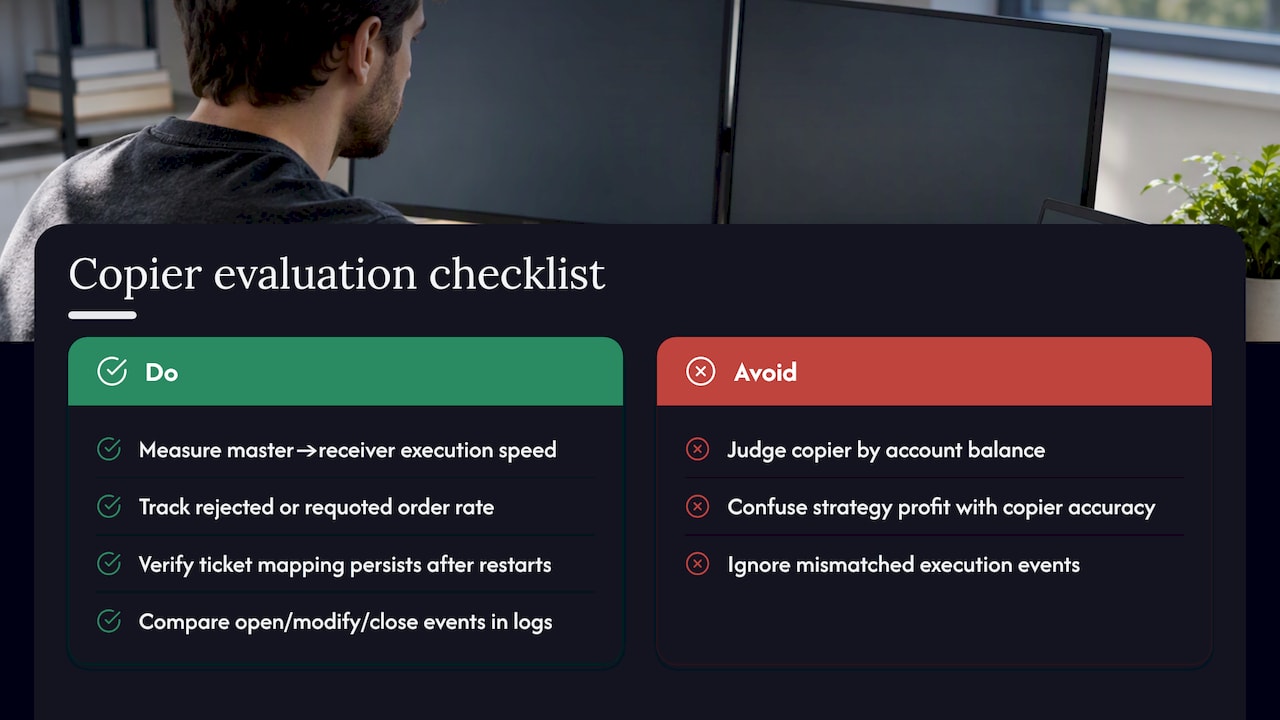
Judge a copier by how faithfully it replicates trades, not by any profit outcome, since replication accuracy is the only thing the software actually controls. MT5’s signal monitoring shows expected slippage, calculated from the difference between provider and subscriber execution, which helps gauge how closely your fills matched the source, according to MetaTrader 5’s signal monitoring documentation.
For a local EA copier, track execution speed from master trade to receiver trade, the rate of rejected or requoted orders, and whether ticket mapping stays consistent after restarts. Compare open, modify, and close events between master and receiver in your logs rather than relying on your account balance alone, since balance reflects the underlying strategy’s results, not the copier’s accuracy. A copier that opens trades quickly, handles partial closes correctly, and reconnects without duplicating positions is doing its job. Whether the underlying strategy makes money is a separate question the copier has no influence over.
Common risks and how to mitigate them when copying trades
Slippage and execution differences are the most common source of mismatched fills, since a destination broker processes every copied order under its own execution rules and filling type, according to MQL5’s trade request reference. Set a reasonable deviation or slippage tolerance so orders are not rejected outright during fast markets, but not so wide that you accept poor fills.
Connectivity loss is the second major risk: if your terminal drops offline, you miss trades until resynchronization runs, so a VPS with reliable uptime is worth the cost for anyone copying multiple accounts. Duplicate trades after a crash or restart are avoidable with persistent ticket mapping and retry logic, a feature worth confirming before you rely on any copier setup, according to MQL5 Market product listings for trade copier EAs.
Finally, remember that no copier changes the risk of the underlying strategy. It only reproduces trades faster or across more accounts, so oversized master positions still carry the same risk once multiplied across receivers. The CFTC’s guidance on retail forex is worth revisiting here: automation does not remove market risk, and copying trades is a form of automation.
When to choose signals vs. local copying
Choose MT5 Signals when you want a managed provider relationship with minimal setup and are comfortable with a subscription fee. Choose a local EA copier when you need lower latency, control over lot sizing across several accounts, or compatibility with a prop firm’s on-machine execution requirements. The decision comes down to how much control, privacy, and multi-account scale you actually need.
— Rimantas
Next steps if you want to try Local Trade Copier
If the local EA route fits what you need, Local Trade Copier runs on your own PC or VPS across MT4, MT5, and DXTrade, with all trade data staying on one machine instead of routing through a cloud server.

- Start with the 7-day free trial on a demo account and follow the installation guide step by step.
- Compare the PERSONAL, MANAGER, and VIP plans on the pricing page based on how many receiver accounts you need to run.
- Watch the demo video before committing any real capital, and confirm every test in the checklist above passes on demo first.
Sources
FAQ
Can I do copy trading in MT5?
Yes, MetaTrader 5 supports copy trading through its built-in Signals service, which lets you subscribe to a provider’s MQL5.community signal directly inside the terminal, as described in MetaTrader 5’s signals documentation. You can also run a local EA-based copier alongside MT5 to mirror trades between accounts you control.
Which copy method works best for my situation?
There is no single best method: MT5 Signals suit traders who want a managed provider with little setup, while a local EA copier suits traders who need lower latency, multi-account replication, or prop firm compatibility. The right choice depends on how much control and scale you need rather than any universal ranking.
How do I copy trades between accounts on MT5?
For signals, subscribe to a provider through the Signals tab and enable realtime subscription. For a local setup, install a copier EA on a master terminal and each receiver terminal, set the correct sender and receiver modes, and match lot sizing to your risk tolerance, as outlined in this guide to copying trades between MT5 accounts.
Is copy trading actually profitable?
Copy trading reproduces another account’s trades or a strategy’s execution, but it does not change the underlying risk of those trades. The CFTC cautions that many retail forex traders lose money and that automation does not remove market risk, so past results do not guarantee future performance regardless of the copying method used.
Recommended
- Local Trade Copier DEMO on MT4 and MT5
- Scalping and Copy Trading on MT4 and MT5 (Best Setup to Avoid Delay and Slippage)
- Local Trading Server Advantages for MT4/MT5/DXTrade Users
- Local Trade Copier installation on MT4 and MT5
