

Yes, a master account’s “close all” action can be mirrored to receiver accounts, but only when the copier’s synchronized trade closure setting is enabled and the receiver’s clock matches its own server time. Get either wrong and the master closes while receivers stay open, or a scheduled close fires when you didn’t expect it. Check your copier’s closure settings and the receiver’s Market Watch clock before you trust it live.
TL;DR:
- A master account can trigger a “close all” action for receiver accounts only if synchronized trade closure mode is enabled and both terminals are correctly synchronized with the same server clock.
- Confirm that the receiver’s scheduled close uses the receiver’s server time and that the AutoTrading and magic number settings match on both terminals to ensure accurate replication.
- Unattended VPS environments require disabling confirmation dialogs, as they can cause close instructions to stall, leading to mismatches and failures in trade closure.
- Regularly test close all actions on demo accounts, verifying timestamps and retry counts in audit logs to confirm proper execution and distinguish between master-triggered and scheduled receiver closes.
- Common issues include account type mismatches, symbol name discrepancies, offline receivers, and broker execution differences—address these before relying on automatic close functions.
How master close all works in local trade copiers
Local trade copiers run as Expert Advisors inside the same Windows session or VPS as your terminals. The master EA watches the master account for events (opens, partial closes, full closes, pending order changes) and publishes them; receiver EAs subscribe and act on matching tickets in their own accounts. This is why a “close all” on master isn’t magic: it’s an event the master EA detects and forwards, and the receiver has to be listening and configured to act on it.
Two distinct mechanisms often get confused:
- A master-triggered close fires when the master account actually closes a position, and the copier propagates that specific close event to matching receiver trades.
- A receiver-scheduled close is a separate, receiver-side timer that closes all copied positions at a set day and time, independent of anything happening on the master.
Partial closes, pending order deletions, and stop loss or take profit changes are usually mirrored too, but each depends on specific copier flags being enabled. Unattended VPS operation adds another wrinkle: if a confirmation dialog pops up and nobody answers it, the close instruction can stall on the receiver side even though the master already closed.
Key settings to check for reliable close all replication
Before you trust a master close all to reach every receiver, walk through these settings in order:
- Synchronized Trade Closure mode. Most copiers offer values like true or false, true for market trades only, true for pending orders only, and true for same trade or order type only, each controlling exactly which closed instruments get mirrored on receivers according to Local Trade Copier’s settings documentation.
- Close All Copied Market Trades schedule. If you use a scheduled receiver close, the day and time must be entered in the receiver terminal’s own server time, shown on its Market Watch clock, not your local computer clock, per MetaTrader’s Signal Subscriber documentation.
- Synchronize positions without confirmations. MetaTrader’s own signal synchronization can close positions at market price and delete pending orders automatically once this option is enabled, and the same official documentation warns that running this unattended on a VPS means no one is there to catch an unexpected automatic close.
- Magic number, symbol mapping, and AutoTrading flags. Confirm AutoTrading or AlgoTrading is enabled on both terminals, magic numbers are stamped consistently, symbol names match exactly (or a replacement list handles the mismatch), and the poll interval is short enough that closes aren’t delayed.
Reopen closed copies is worth a special mention. If it’s enabled, a receiver position that closes may reopen on the next tick, which looks like a failed close all when it’s actually a setting working exactly as configured.
Pro Tip: Change one closure setting at a time on a demo account and re-run the same test before touching anything else, or you won’t know which setting fixed (or broke) the behavior.
Step-by-step testing and verification plan
Test this on demo accounts before you go anywhere near live capital.
- Set up two demo accounts on the same machine or VPS, one as master and one as receiver, and enable AutoTrading on both.
- Open a 0.01 lot trade on master and confirm it appears on the receiver within a second or two.
- Partially close the master position and confirm the receiver reflects the same partial close.
- Trigger a full “close all” on master and confirm every matching receiver position closes.
- Separately, set a receiver-side scheduled close and verify it fires at the receiver’s own server time, not your local clock, since MQL5’s trade copier manual notes these are two different functions that need independent tests.
- Open the copier’s audit or journal CSV file and check the timestamps, retry counts, and latency for each action.
Local copiers that run entirely on one machine typically log every action with its own timestamp and retry count, and that log is your evidence a close actually replicated rather than a coincidence of timing, according to a trade copier user guide covering audit behavior. Treat the schedule test and the master-triggered test as separate proofs. Passing one doesn’t mean the other works.
Troubleshooting the most common mismatches and failures
Most “it didn’t close” problems trace back to one of five causes.
- Account type mismatch. Netting and hedging accounts represent positions differently, and this can change how a close all maps onto the receiver: check the limitations around netting and FIFO accounts before assuming a setting is broken.
- Symbol name mismatches. A receiver broker using “EURUSD.a” instead of “EURUSD” won’t match tickets unless you set up symbol replacement between different brokers.
- Receiver offline or AutoTrading disabled. No amount of correct configuration helps if the receiver terminal isn’t running or AutoTrading is switched off.
- Confirmation dialogs blocking unattended sync. On a VPS with no one watching the screen, a pending confirmation can leave a close instruction stuck exactly where MetaTrader’s own documentation warns it will.
- Broker execution differences. Slippage, requotes, or broker-side rules can cause a close attempt to fail and force a retry, which shows up in the audit log rather than as a visible error.
If a specific trade should never be touched by an automated close all, exclude it explicitly with a rule to protect certain trades from closure rather than relying on manual vigilance.
Vendor notes: settings and proof points in Local Trade Copier
Trade copier software typically exposes settings for synchronized trade closure modes, scheduled closes, timed trade closures, and options to close transmitters when receivers are closed. A few specifics worth knowing before you configure it:
- Partial close transactions are supported and copied to MT4 client accounts, with the same schedule and minutes-based closure options documented on the partial close feature page.
- Trade copier software often writes audit logs and journals that can be reviewed to confirm which closes replicated, their timing, and latency.
- Some trade copier software has been available for several years, serving a user base for MetaTrader 4, MetaTrader 5, and DXTrade platforms without cloud routing use.
Trade copier software replicates trade actions only and does not include any market logic or strategy layer and makes no trading decisions of its own. Past results do not guarantee future performance.
What I recommend as a starting configuration
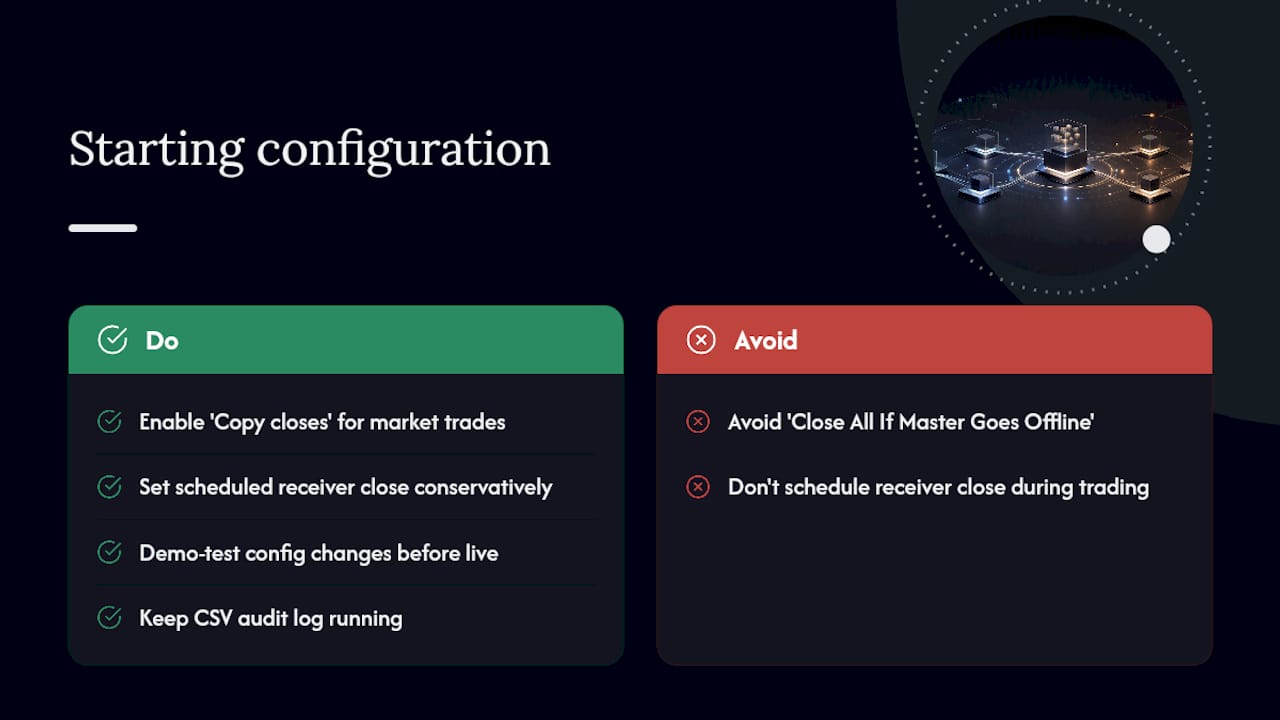
I default to enabling “Copy closes” for market trades and leaving “Close All If Master Goes Offline” turned off unless you specifically want that behavior, since an unplanned connectivity drop shouldn’t trigger a mass close on every receiver. Set any scheduled receiver close conservatively, well outside your normal trading hours, and confirm it against the receiver’s own server clock.
Demo-test every configuration change before it touches a live account, keep the CSV audit log running, and check on your VPS and terminal health on a regular schedule rather than waiting for something to break. If you run into an edge case this setup doesn’t cover, it’s worth documenting exactly what happened so the next test accounts for it.
— Rimantas
Getting close all synchronization right with Local Trade Copier
Local Trade Copier gives you the synchronized closure modes, the scheduled “Close All Copied Market Trades” option, partial close support, and per-action audit logs this guide describes, running locally across MT4, MT5, and DXTrade with no cloud routing in between.

Before switching any live account over, install it following the installation guide for MT4 and MT5, and run the full demo test checklist above during the 7 day free trial. When you’re satisfied the master close all replicates the way you expect, the pricing page lists the PERSONAL, MANAGER, and VIP plans so you can pick the account limits that match your setup.
Docs worth keeping open while you configure
Keep these open in a browser tab while you work through settings: MetaTrader’s Signal Subscriber help page for platform-level sync behavior, and the Local Trade Copier settings guide for closure and schedule fields.
Sources
- Signal Subscribers – Signals – MetaTrader 4 Help
- Local Trade Copier EA MT4/5 Settings/Inputs Guide – Part 2
- Trade copier – User manual
FAQ
Does MetaTrader support closing all trades on sync natively?
MetaTrader’s own Signal Subscriber feature can close positions and delete pending orders automatically during synchronization when the “without confirmations” option is enabled, according to MetaTrader’s official documentation. This is platform-level signal behavior, separate from third-party trade copier settings, so check both if you’re troubleshooting.
Why didn’t my receiver account close when the master closed?
The most common causes are a disabled synchronized trade closure setting, a receiver terminal that’s offline or has AutoTrading turned off, or an unanswered confirmation dialog sitting on an unattended VPS. Symbol name mismatches and netting versus hedging account differences can also stop a close from mapping correctly, as explained in Local Trade Copier’s netting and FIFO limitations.
Can I schedule receiver accounts to close automatically at a set time?
Yes, most copiers include a scheduled “Close All Copied Market Trades” option where you set a day and time using the receiver terminal’s own server clock. This is a separate function from master-triggered closes and should be tested independently, per the trade copier user manual.
How do I verify that a close all actually replicated correctly?
Check the copier’s audit or journal CSV file, which logs each action with a timestamp and retry count so you can confirm the receiver closed and how long it took. Run the same check after a demo test of both a master-triggered close and a scheduled receiver close to distinguish the two.
Does trade copier software affect my trading strategy or results?
No, trade replication software like Local Trade Copier only copies existing trades between accounts and has no market logic or strategy layer of its own. Past results do not guarantee future performance, and the tool does not influence trading outcomes.
Recommended
- How To Copy Trades From Selected MetaTrader 4 Master Accounts
- Local Trade Copier DEMO on MT4 and MT5
- Verification Steps for Prop Traders: MT4/MT5 & DXTrade
