

Yes. You can copy trailing entries and pending orders across MT4, MT5, and DXTrade accounts, provided your trade-copier EA supports pending-order replication, real-time SL/TP synchronization, symbol mapping, and per-account lot scaling. Miss any one of those four capabilities and you get partial fills, orphaned orders, or a receiver account whose stop loss no longer matches the sender’s. Verify all four on a demo account before going live.
TL;DR:
- Proper configuration of all four capabilities—pending-order replication, real-time SL/TP synchronization, symbol mapping, and per-account lot scaling—is essential to avoid partial fills or orphaned orders.
- Verifying all settings through staged demo tests, including creating, modifying, triggering, and canceling pending orders, is critical to ensure reliable copying before live deployment.
- Delays or failures in real-time trailing stop updates can leave client accounts exposed to unintended risk, emphasizing the importance of a copier that supports continuous SL/TP sync.
- Using a local trade copier on a single machine or VPS offers lower latency, increased security, and better risk management compared to cloud-based solutions.
- Common setup issues like symbol suffix mismatches or disabled settings often cause copying failures, so thorough testing and correct symbol mapping are vital.
Why Pending Orders and Trailing Stops Have to Be Copied Correctly
A Buy Stop or Sell Limit sitting on a chart isn’t a trade yet, but it represents a decision. If your copier only replicates positions after they trigger, you lose the whole point of a breakout or pullback entry: the order that was supposed to fire at a specific price never exists on the receiver account. By the time the copier notices there’s a new position, the price has moved and the entry is stale or missing entirely.
The same logic applies after entry. A trailing stop isn’t a one-time setting. It moves every time price moves in your favor, and if you manually tighten a stop loss or take profit mid-trade, that edit has to land on every receiver account within a reasonable window. Trailing-stop strategies make real-time synchronization the single capability that matters most beyond the initial copy — without it, your risk management on client accounts quietly falls apart while the master account looks fine.
When copying breaks down at either stage, the failure modes are predictable:
- Orphaned pending orders sit on a receiver account after the sender cancels theirs, exposing you to a fill you never intended.
- Margin mismatches appear when a triggered order doesn’t scale correctly to the receiver’s balance.
- Desynchronized trade management happens when a trailing stop update never reaches one or more accounts, leaving that account’s risk exposed longer than planned.
How a Copier Replicates a Pending Order From Entry to Exit
The lifecycle of a single trailing entry, from creation to close, runs through four distinct stages. Each one is a point where a weaker copier can lose sync.
- Creation. When you place a Buy Stop, Buy Limit, Sell Stop, or Sell Limit on the sender account, the copier reads the order type, entry price, volume, and any attached SL/TP, then maps the symbol to the receiver’s broker naming convention before creating a matching pending order there. Order type, entry price, volume, SL/TP, modifications, and cancellations all need to be synchronized for the receiver to end up with a true copy rather than an approximation.
- In-session modification. If you drag the entry price, tighten the stop, or adjust the take profit while the order is still pending, the copier needs to catch that change and push it to every receiver, not just log the original order and move on.
- Trigger. Once price hits the entry level and the pending order fills, the copier has to preserve the link between that sender position and its receiver counterpart. This matters because a trailing stop applied after the trigger has to keep syncing to the same linked position, not a new, disconnected one.
- Cancellation. If you cancel the pending order on the sender before it triggers, the receiver’s matching order needs to disappear too. A copier that misses this step leaves a live, unmanaged order sitting on a client account.
Reverse-mode copying (where the receiver takes the opposite side of the sender’s trade) follows the same four stages, just with the direction flipped. The symbol mapping and cancellation logic still apply exactly as described.
The Settings Checklist for Reliable Trailing-Entry Copying
Most copying failures trace back to a setting that was never turned on, not a bug in the software. Before you trust any account pair with real trailing entries, walk through this list.
- CopyPending must be enabled, or pending orders never leave the sender account.
- CopyStopLoss and CopyTakeProfit need to be active for every SL/TP edit and trailing movement to reach receivers.
- EnableSymbolMapping should be turned on any time sender and receiver use different symbol names, which is common across brokers.
- Trailing inputs — Trailing Start, Trailing Stop, and Trailing Step — need to match your strategy, and basket trailing options should be reviewed separately if you manage grouped positions.
- Lot management should be set deliberately: fixed lot, multiplier, or balance-ratio scaling, each paired with a maximum lot cap so one oversized position doesn’t blow past a receiver’s risk limit.
- Login type matters. Use the full trading login on receiver accounts, never an investor password, since investor access can’t place or modify orders.
- Symbol suffixes (like a broker appending “.r” to a pair) are a common cause of failed pending-order replication when left unmapped.
Pro Tip: Never log a second account into the same terminal while copying is active. Terminals aren’t built to distinguish between your manual clicks and the copier’s automated ones, and that overlap is where accidental double-orders come from.
For symbol-specific setup, the guide to copying trades with different symbols walks through mapping conventions broker by broker.
How Do You Test Trailing-Entry Copying Before Going Live?
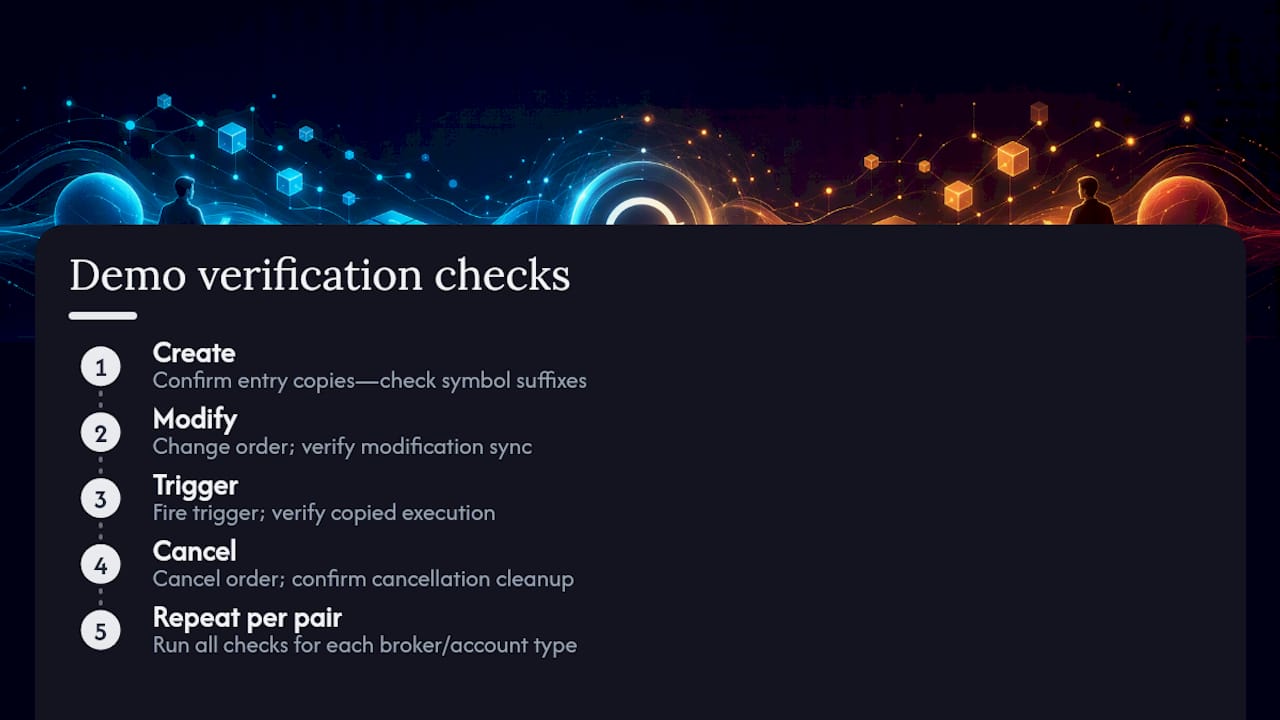
Run a staged sequence on demo accounts, in this exact order, before you trust a copier with real capital:
- Create a pending order on the sender and confirm it appears on every receiver with matching type, price, and volume.
- Modify the SL and TP on the sender and time how long it takes each receiver to reflect the change. Event-driven execution produces tighter replication timing than polling-based systems, so watch for gaps of several seconds, which usually signal a polling architecture rather than an event-driven one.
- Let the order trigger and verify the resulting position on each receiver carries the same trailing-stop behavior as the sender going forward.
- Cancel a separate pending order on the sender and confirm it disappears from receivers rather than sitting there unmanaged. This exact create, modify, trigger, cancel sequence is the standard test for verifying SL/TP synchronization end to end.
Beyond the sequence itself, confirm your setup handles the unglamorous parts: automatic reconnection after a dropped internet connection, a position reconciler that catches anything missed during downtime, and a manual flattening procedure you can trigger by hand if something goes wrong mid-session. Check contract multipliers between platforms too. A lot on DXTrade doesn’t always represent the same notional exposure as a lot on MT5, and that mismatch alone can quietly break your intended risk sizing. Past results do not guarantee future performance, and none of this testing predicts future fills. It only confirms the software is copying correctly.
Why a Local EA Often Beats Cloud-Based Copying for This
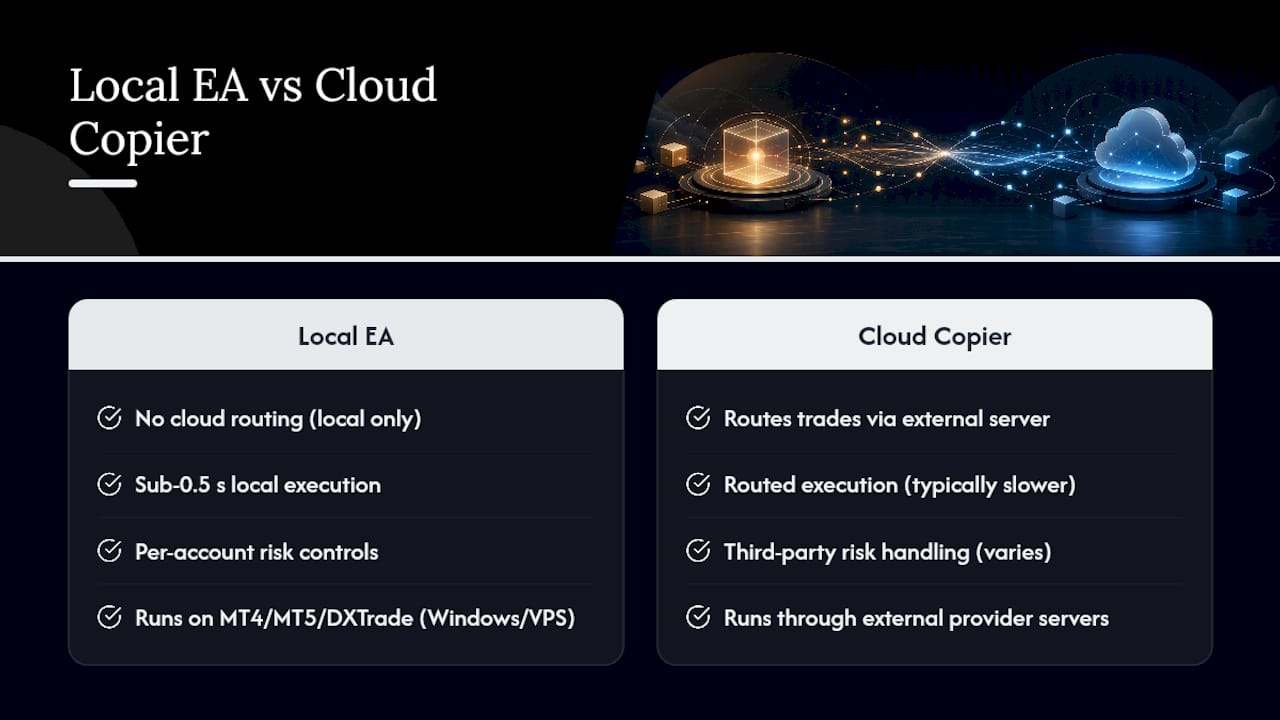
Cross-firm and cross-platform replication tends to expose the weaknesses of copiers that route trades through an external server first. Third-party copiers built for precision generally outperform native platform tools because they handle synchronization and per-account risk controls more deliberately, and that gap widens further when execution stays entirely on your own machine.
Local Trade Copier is built as an Expert Advisor that runs on MT4, MT5, and DXTrade accounts from a single Windows machine or VPS, with no cloud routing involved. Every trade stays local, which matters for prop-firm traders worried about IP-based detection tied to third-party servers. The software has been running since 2010, with over 3,000 users and 491 Trustpilot reviews behind it, and it advertises sub-0.5-second local execution with 18 lot size and risk management options, including automatic lot scaling by account balance.
Worth repeating plainly: this is replication software. It copies orders that already exist on a sender account. It carries no strategy logic and makes no trading decisions of its own.
What the Research Actually Supports
The evidence here points to a narrower conclusion than most trading forums suggest. Copying trailing entries isn’t a matter of finding the “best” copier. It’s a matter of confirming four specific settings actually work on your specific broker pair, because symbol suffixes and account types vary enough that a setup that works flawlessly for one trader fails silently for another.
Conventional advice tends to treat copying as a set-and-forget install. That’s backwards. The lifecycle stages that break, modification sync and cancellation cleanup, rarely fail on day one. They fail three weeks in, after you’ve stopped watching closely, when a broker changes a symbol format or a connection drops for ten minutes overnight.
If you take one thing from this guide, prioritize the demo sequence over the settings screen. A trader who runs the create, modify, trigger, cancel test on a demo account learns more in twenty minutes than a week of reading EA documentation. Configuration matters, but verification is what actually protects a live account.
— Rimantas
Try Local Trade Copier’s Pending-Order and Trailing-Stop Tools
Local Trade Copier is built specifically for the workflow this guide describes: pending-order copying, real-time SL/TP synchronization, symbol mapping, and per-account lot scaling, all running locally on MT4, MT5, and DXTrade without routing trades through an outside server.

That local-only execution is the real difference from cloud-based alternatives. There’s no external server in the loop, no added latency from a round trip to a third-party host, and for prop-firm traders, no shared server IP tying multiple accounts together. Start with the 7-day free trial, then follow the installation walkthrough for MT4 and MT5 and run the demo video alongside your own accounts to reproduce the staged test sequence covered above. Confirm everything on demo first, then move to live accounts once every stage of the pending-order lifecycle checks out.
Where to Go Deeper on This
For the mechanics behind pending-order lifecycle handling, read the breakdown on advanced pending-order management and the companion piece on real-time SL/TP synchronization. If you’re comparing execution models before committing to any copier, the trade copier buyer’s guide covers event-driven versus polling architecture in more depth than this article can. For setup issues specific to Local Trade Copier, the installation guide and the troubleshooting page for trades that won’t copy cover most common fixes.
Sources
- MT5 Trade Copier Real-Time SL/TP Synchronization: Keeping Every Receiver in Sync – Other – 25 August 2026 – Traders’ Blogs
- Trade Copier Buyer’s Guide – How to Choose the Right One
FAQ
Can Trailing Stops Be Copied in Real Time Across Accounts?
Yes, when the copier includes real-time SL/TP synchronization. Trailing-stop movements and later SL/TP edits need to be detected and applied to receivers as they happen, not on a delay, or dynamic risk management on client accounts falls out of sync with the master.
What Happens if a Pending Order Is Canceled on the Sender Account?
A properly configured copier removes the matching pending order from every receiver account automatically. If that cancellation sync fails, the receiver is left holding a live order the sender never intended to keep, which is one of the most common causes of unexpected fills.
Does Local Trade Copier Support DXTrade Along With MT4 and MT5?
Yes. Local Trade Copier copies trades across MT4, MT5, and DXTrade accounts from one local installation, and current subscription pricing for the PERSONAL, MANAGER, and VIP plans is listed on the pricing page.
Why Would a Pending Order Fail to Copy Even With the Right Settings?
Symbol suffix mismatches are a frequent cause. Broker-added suffixes like “.r” need to be mapped correctly in the copier’s settings, or the receiver account won’t recognize the symbol and the order never gets created.
How Do I Verify a Copier Is Handling Trailing Entries Correctly?
Run a staged demo test: create a pending order, modify its SL/TP, let it trigger, then cancel a separate one, checking each receiver account after every step. This sequence exposes lifecycle gaps that a quick glance at a live account would miss.
Recommended
- Local Trade Copier DEMO on MT4 and MT5
- Avoid Order Rejections: MT4 to DXTrade Symbol Mapping and 5 Demo Tests
- How to Copy MT4 to DXTrade Without Losing Your Setup
