

Partial position copying means that when the master account reduces an open trade, for example closing 0.30 lots of a 1.00-lot buy, each client account reduces its own matching trade by a proportional amount instead of ignoring the event or closing everything. It is a feature of how a copier handles an open position. It is not a strategy, and it does not change what the master trades. This guide explains how it works on MetaTrader 4 and MetaTrader 5, where it goes wrong, and how to set it up so your accounts stay in sync.
TL;DR
- A partial close reduces a position that is already open. A partial fill is an entry order executing in pieces. Most readers searching this topic mean the first, and a copier should say which one it supports.
- The client account must close a proportional volume of the matching position, then round it to the broker’s minimum volume and volume step.
- Small client accounts are where partial copying breaks: a 30% close of a 0.02-lot trade cannot be executed if the minimum lot is 0.01 and the step does not allow it.
- MT5 netting accounts and hedging accounts treat opposite trades differently, so test on a demo account first.
- Partial copying manages execution, not risk. Past results do not guarantee future performance.
Partial close vs. partial fill: two different events
The two terms get mixed up constantly, and the confusion causes real setup mistakes.
Partial close. You hold a position and reduce part of it. In MetaTrader 5, a position can be closed fully or partially depending on the volume of the opposite operation. The practical steps: open the Trade tab, select the position, choose Close position, enter a smaller volume, and confirm. The remainder stays open.
Partial fill. You send an entry order for 5 lots and the market returns it in stages, say 2, then 1, then 2. The order itself is the thing being filled in pieces. We cover that case separately in our guide to handling partial fills when copying and in avoiding overclosing with partial fills.
This article is about the first event. A copier’s partial-position feature normally concerns reducing a position that is already open, and any documentation you read should state clearly which event it supports. If it does not, test it.
What happens on the client account when the master closes part of a trade
When you reduce a trade on the master account, a copier has to do four things in order:
- Detect the event. It sees that the master ticket’s volume decreased, or that a new closing deal was recorded against that ticket.
- Match the ticket. It finds the client trade that was copied from that master ticket. This is the step that fails in simple copiers, because without ticket-level tracking the software cannot tell which client trade to reduce.
- Calculate the volume. If the master closed 30% of the position, the client closes 30% of its own position, not 30% of the master’s lot size.
- Normalize and send. The result is rounded to what the client’s broker allows, then sent as a close order for that volume.
The MQL5 community describes the same logic for custom code: partial exits should be tied to tracked position records holding the position ticket and the next partial-close level. The same article notes that the volume must be checked against the symbol’s minimum tradeable volume before the close is submitted. A percentage is only an instruction. The executable volume is whatever your broker’s rules allow.
A worked example
Suppose the master holds a 1.00-lot buy on EUR/USD and closes 0.40 lots. That is 40% of the position, leaving 0.60.
| Client account | Copied volume | 40% of position | Broker step | Result after close |
|---|---|---|---|---|
| Client A (scaled up) | 2.00 lots | 0.80 | 0.01 | 1.20 lots remain |
| Client B (1:1) | 1.00 lots | 0.40 | 0.01 | 0.60 lots remain |
| Client C (scaled down) | 0.10 lots | 0.04 | 0.01 | 0.06 lots remain |
| Client D (small) | 0.02 lots | 0.008 | 0.01 | Rounds to 0.01 or 0.00, depending on rules |
Client D is the case to plan for. At 0.008 lots there is no valid order. Depending on how the copier rounds, the client either closes nothing, closes 0.01 (50% of the position instead of 40%), or waits until the master’s final close. None of these is wrong by itself, but you should know which one you get before real money is on the line.
Why lot scaling makes partial copying harder
Copying a trade 1:1 is easy to reason about. Copying with lot scaling means every client position has a different size, so every partial close must be recalculated against that client’s own volume.
If you scale lots by account balance, the open-time ratio should be kept for the life of the trade. One broker-side copy trading knowledge base makes the point that allocation methods apply only when a position is opened, and the size is not recalculated afterward even if balances change. That is the behavior you want from a partial close too: the proportion closed should follow the position, not the client’s current balance on the day of the close.
Three things follow from that:
- Use percentages of the position, not fixed lots. A master closing 0.40 lots out of 1.00 should become a 40% reduction everywhere.
- Expect rounding drift. After several partial closes on a small account, the remaining volume can differ slightly from the exact proportion. The final close of the master trade should always close the client trade fully.
- Check the minimum lot on every client broker. Some brokers offer 0.01, others 0.10 on certain instruments, and step sizes differ on metals, indices and CFDs.
MT4 vs. MT5: where the platforms differ
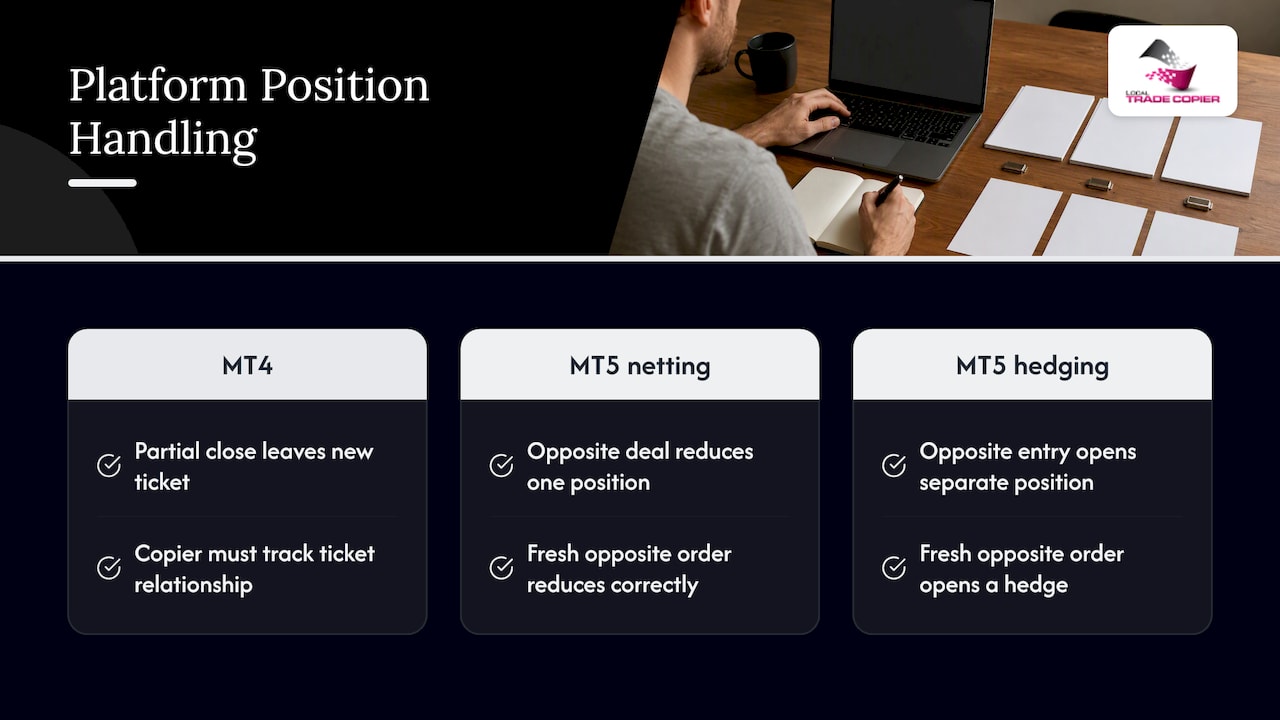
MT4 always works with individual tickets. Each order has its own ticket, and a partial close of a ticket normally leaves a remainder under a new ticket number in many broker setups. A copier has to follow that relationship, otherwise it sees a closed trade and a brand new trade and gets confused. This is a well-known source of duplicated or orphaned positions.
MT5 depends on the account’s position accounting system, which your broker sets. On a netting account, an opposite deal reduces, closes or reverses the single position for that symbol, while on a hedging account a new opposite entry opens a separate position. So a copier that expresses a partial close as a fresh opposite order will behave correctly on netting and wrongly on hedging, where it would open a hedge instead of reducing the trade. When you copy from an MT4 master to an MT5 client, or the reverse, check which account type each side is.
Our MT4 to MT5 setup guide walks through the cross-platform configuration, and the MT5-to-MT5 guide covers same-platform copying.
Perspective: what we have learned about partial closes
We have built Local Trade Copier since 2010, and partial closes are where we see most of the support questions from people who run several accounts. The pattern is consistent. Entries are easy. Exits, and especially repeated partial exits on the same trade, are where copiers lose track of what belongs to what.
Our view is simple. A copier should track the ticket, not just the symbol. It should treat a partial close as a reduction of a specific position by a proportion. It should never guess. And it should be open about what it cannot do: local execution keeps latency very low because everything runs on one machine, but it cannot force two different brokers to fill at the same price.
There is a switch for this in the settings. Our published settings guide describes an option called Apply Partial Closure, which enables or disables copying of partial closures from the transmitter to the receiver. If you do not want clients to follow partial exits, you turn it off. If you do, you leave it on and make sure lot scaling and minimum volumes are what you expect. We describe the behavior in more detail on our page about partial close transactions copied to a client account.
We also want to be plain about scope. A copier replicates trades that already exist. It has no market logic, and it does not make any trade better or worse. Partial copying exists so that your accounts mirror the master’s position management, not to change results.
— Rimantas
Setup checklist for partial position copying
Work through this on demo accounts before connecting live ones.
- Confirm account types. Note whether each MT5 account is netting or hedging. Note the minimum lot and volume step on each client symbol.
- Install the copier on one machine. Run the master and client terminals on the same Windows PC or VPS. Our installation guide covers the steps for MT4 and MT5.
- Enable partial closure copying. Make sure the partial closure option is on for the client EA.
- Choose your lot method. Decide between fixed lots, a multiplier, or scaling by balance. Write down the expected client volume for a sample trade.
- Open a test trade on the master. Use the minimum sensible size on a liquid pair.
- Close part of it, then part again. Repeated partial closes on the same ticket are the real test. Check each client account after each step.
- Close the remainder. Confirm every client position reaches zero, with no orphaned leftovers.
- Test a small client. Use an account where the proportional volume falls below the minimum step and note the result.
- Check filters and stops. If you use profit-based closing rules, see our explanation of how Close and Stop works, because it can interact with partial exits.
- Go live gradually. Add one account at a time.
Opening trades that were already partly closed
A special case comes up when you attach a copier to a master that already has open trades. If the master has already reduced a position once, the client should match the current open volume, not the original one. Our page on copying already-open trades explains how that works. Check the volumes against your master’s history before trusting the first partial close.
Common problems and how to prevent them
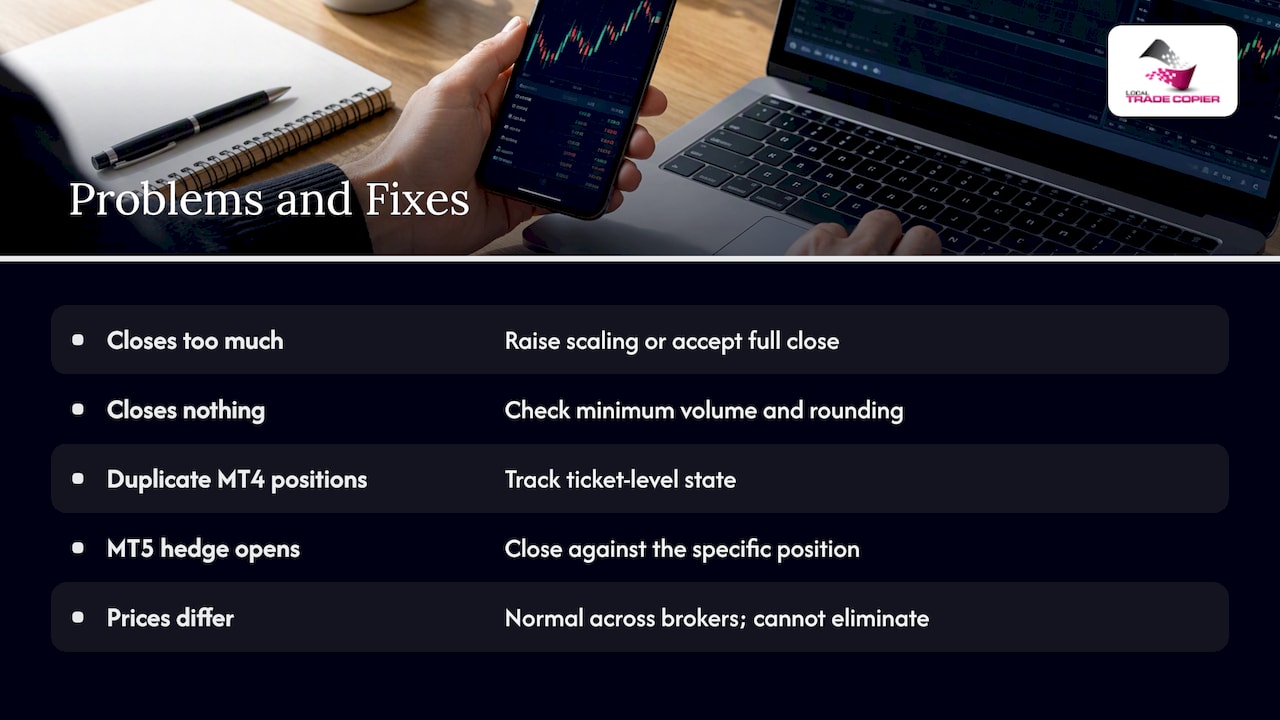
Client closes too much. Usually caused by rounding up on a small account, or by a copier that treats a partial close as a full close. Fix: raise the client lot scaling, or accept that tiny accounts will close fully on the first partial.
Client closes nothing. The proportional volume is below the minimum, and the copier skips the order. Fix: check the minimum volume and rounding rules, and test.
Duplicate positions after a partial close on MT4. The copier saw the remainder ticket as a new trade. Fix: use software that tracks ticket-level state.
Hedge opened instead of a reduction on MT5. The close was sent as a new opposite order on a hedging account. Fix: use a close order against the specific position.
Prices differ between accounts. Different brokers fill at slightly different prices and times. This is normal and no copier can remove it entirely. If you want to understand wider failure modes, our article on copy trading pitfalls and the best practices page go deeper.
Stops and take profits behave unexpectedly. If you want the copier to wait for the master’s stop loss or take profit rather than closing early, read how a copier can wait for SL or TP to be hit.
Partial copying and prop firm accounts
Some funded-account programs restrict automated trading, and some look at how orders are placed. Whether a partial close copied by software is acceptable depends on that firm’s own written rules, which you must read yourself. Our copier includes a manual-like entry mode so that copied trades look like they were placed by a human trader, which is useful where a program does not allow EA trading. It does not remove your obligation to follow the rules you agreed to, and we cannot tell you what any specific firm permits. When in doubt, ask the firm’s support in writing before you connect anything.
Because Local Trade Copier runs entirely on your own Windows machine or VPS, all of your copying comes from one IP address with no cloud routing. For a broader look at keeping that setup safe, see trade copier security and VPS basics.
Costs and risks to weigh before you copy anyone
Partial copying is mechanical. It does not reduce the risk of the underlying trades. The CFTC states that about two out of three retail forex traders end each quarter in the red, and it advises checking that any forex dealer, or anyone offering to trade for customers, is properly registered through CFTC and NFA resources. Leverage can quickly eliminate deposited funds and, in some cases, losses can exceed margin. Past results do not guarantee future performance.
A few practical points for US individual traders:
- Copying another person’s trades can lose money, regardless of how smooth the execution is. Past results do not guarantee future performance.
- Subscription fees, spreads, commissions and taxes all reduce what you keep. If your tax situation is unclear, speak to a CPA familiar with forex.
- Be skeptical of anyone who promises results from software or signals. If you suspect you have been caught up in a fraudulent copy trading scheme, this Spanish-language guide on spotting and responding to copy trading scams explains how forensic analysis can help document what happened. For a US-specific view of safer options, read our page on copying a forex trader as a US retail trader.
Which plan fits
Local Trade Copier is delivered as a subscription with a 7-day free trial, and the MT4 and MT5 copier components come under one plan. Published prices are as follows.
| Plan | Monthly | Yearly |
|---|---|---|
| PERSONAL | €29 per month | €290 per year |
| MANAGER | €89 per month | €890 per year |
| VIP | €199 per month | €1990 per year |
If you want to test partial close copying on your own demo accounts, you can start the trial from the pricing page. Run the checklist above, and decide only after you have seen the behavior on your own brokers.
FAQ
Does a trade copier copy partial closes automatically?
Only if the software supports it and the option is enabled. In our copier there is an Apply Partial Closure setting for this. Always test on a demo account with repeated partial closes before going live.
What happens if the proportional close is smaller than the minimum lot?
The broker cannot execute a volume below its minimum, so the copier has to round, skip, or close the whole client position, depending on its rules. Check your broker’s minimum volume and step on each symbol and test a small account first.
Is partial position copying the same as copying partial fills?
No. A partial close reduces a position that is already open. A partial fill is an entry order that executes in stages. A copier may handle one, the other, or both, so check which one the documentation describes.
Does partial close copying work from MT4 to MT5?
Yes, cross-platform copying is supported, but account structure matters. MT5 netting and hedging accounts treat opposite orders differently, so confirm the account type on the MT5 side and test the partial close behavior before using real funds.
Can partial copying improve my results?
No. It copies position management that already exists on the master account and adds no market logic. Trading forex carries a high risk of loss. Past results do not guarantee future performance.
Sources
- Opening and Closing Positions, MetaTrader 5 for Android Help
- Implementing Partial Position Closing in MQL5, MQL5 Articles
- Forex Frauds, CFTC
- Local Trade Copier EA MT4/5 Settings/Inputs Guide, Part 2, MQL5 Traders’ Blogs
- Allocation methods and their effect on open positions, B2COPY knowledge base
- MT5 Netting vs Hedging: What Opposite Trades Really Do
