

Stop every extra MT4 instance and pause your copier or client EAs the moment you spot a duplicate. That single action halts new duplicates instantly. Once things are quiet, turn on duplicate-signal filtering in your copier and add an OrdersForSymbol or magic-number check to any EA sending live orders. That second step is what keeps the problem from coming back.
TL;DR:
- Running multiple instances of the same EA or copier client on local and VPS setups often causes duplicate trades, which can be fixed by stopping the extra instance.
- Most duplicate errors result from missing order checks in the EA code or copier settings that fail to prevent reorders for the same symbol and direction.
- Using duplicate-suppression features such as ignore-until-close or freeze time in the copier settings effectively reduces repeated signals, especially when configured with appropriate time windows.
- Implementing order checks within the EA, including magic number filtering and pre-send order validation, can drastically cut down internal duplicate trades.
- A dedicated local trade copier with built-in duplicate filtering and configurable safeguards offers a faster, more reliable solution than patching various tools separately.
Avoid Duplicate Trades on MT4: The 5-Minute Triage Checklist
Before you touch a single setting, spend five minutes gathering facts. Guessing at the cause of an MT4 trade duplication error wastes more time than it saves, and half the “fixes” traders apply address the wrong layer entirely.
Run this sequence in order:
- Check for instance overlap. Is the same EA or copier client running on your local PC and on a VPS at the same time? This is one of the most common causes of duplicated orders, and simply stopping the extra instance resolves a large share of reported cases.
- Verify Auto Trading status. Open each terminal and confirm Algo Trading is enabled only where you actually want orders sent, per the MetaTrader terminal controls.
- Read the Journal and Experts tabs. Look at magic numbers, order comments, and ticket timestamps side by side. Two tickets seconds apart with different magic numbers point to a second signal source, not a bug.
- Pause copying and observe. Turn off the copier or disable the EA, then wait through a few signals. If duplicates stop immediately, you’ve isolated the source to something in your automation chain.
- Log everything. Write down ticket IDs, server timestamps, and any broker error messages before you change anything else. You’ll need this evidence if the pattern returns.
This isn’t a diagnosis. It’s the groundwork that makes the actual diagnosis fast instead of a guessing game across three terminals.
Why Do Duplicate Trades Happen on MT4?
Not every repeated trade is a mistake. Some are two legitimate signals arriving close together. Telling the two apart is the entire game.
The most frequent causes break down into five categories:
- Multiple running instances copying the same master. A client EA active on both your desktop and a VPS will happily execute the same signal twice, since neither instance knows the other exists.
- Two independent signal providers. If you follow more than one strategy provider and they both trade the same pair in the same direction, you’ll see what looks like a duplicate but is actually two separate, valid orders.
- EA race conditions. An EA that checks conditions and sends an order without first confirming no matching order already exists on that symbol will fire twice on a fast tick sequence. The absence of an
OrdersForSymbolcheck is the single most common code-level gap behind this. - Misconfigured copier channels or account mapping. If a Slave account is accidentally linked to two Master feeds, or magic numbers overlap between EAs, the copier will faithfully duplicate whatever it receives.
- Broker-side requotes and resends. Occasionally a server-side requote or connection hiccup causes MT4 to resend an order that already executed, producing a genuine trade execution issue rather than a logic error on your end.
Some duplication is even intentional. Certain duplicator utilities exist specifically to multiply a position inside a single terminal for scaling purposes, with their own filters for minimum and maximum lot size. If you’ve ever installed one of these and forgotten about it, that’s worth checking before you tear apart your main EA’s logic.
Which MT4 Auto Trading Settings Stop Duplicate Copies?
Most trade copiers ship with duplicate-suppression controls that go unused simply because nobody reads the settings panel closely. These are the ones worth configuring today.
- Turn on “Check for duplicates” and pick a duplicate condition. Most copier software lets you define a duplicate as matching symbol, matching direction, or both together, as documented in typical duplicate signal handling configurations.
- Use “Ignore until trade close.” This tells the copier to skip any repeat signal on the same symbol and direction until the original position closes, which is the safest option for trend-following strategies that might otherwise fire the same setup twice.
- Or use “Ignore for time” (freeze time). Instead of waiting for the trade to close, the copier ignores duplicate signals for a set number of seconds or minutes. Pick a freeze window slightly longer than your strategy’s normal signal spacing, not an arbitrary round number.
- Confirm only one Slave is attached per account. Two Slave instances pointed at the same receiving account is a classic setup mistake that produces silent duplicates nobody notices until the equity curve looks wrong.
- Map magic numbers per EA and account, then test on demo. Reserve number ranges per EA (documented in this guide to magic number conventions) so a watchdog or copier can filter by range instead of guessing.
Too short and duplicates slip through; too long and legitimate re-entries get blocked.*
If you’re troubleshooting a copier that seems to skip trades instead of duplicating them, the fix often lives in the same settings panel. Check how the copier is handling open, modify, and close events before assuming the logic is broken.
How Do You Code an EA to Block Duplicate Orders?
Copier settings handle duplicates between accounts. Code-level checks handle duplicates inside a single EA. Both matter and skipping the second one is why some traders fix the copier and still see doubles.
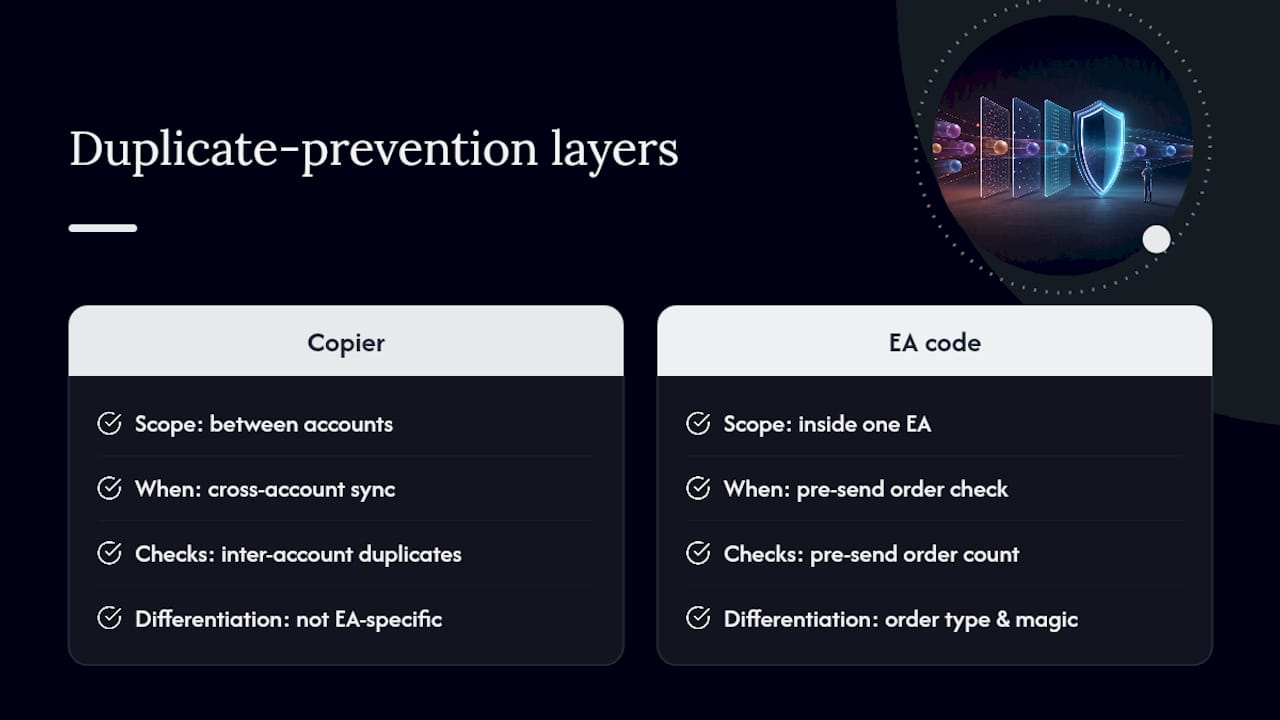
The foundational pattern is a pre-send order count. Before an EA calls OrderSend(), it should verify no matching order already exists:
if (OrdersForSymbol(Symbol()) == 0) {
   // safe to send new order
}
This exact approach is laid out in detail in the MQL4 guidance on preventing duplicate orders, and it’s the single most effective line of defense against an EA duplicating its own trades on a busy tick stream. A more refined version differentiates by order type and magic number, so the EA only blocks itself, not every other strategy running on the same chart.
Layer in a magic-number guard as a second checkpoint:
for (int i = 0; i < OrdersTotal(); i++) {
   OrderSelect(i, SELECT_BY_POS);
   if (OrderMagicNumber() == MyMagic && OrderSymbol() == Symbol())
      return; // matching order already exists
}
Many duplicate trades in MT4 trace back to a single missing line: the EA never checked whether an order for that symbol already existed before calling
OrderSend(). Add that one check and a huge share of “random” duplication complaints disappear.
Race conditions deserve separate attention. A fast market can trigger OnTick() multiple times before the first order finishes processing, so a simple boolean lock flag or a mutex-style guard around your order-sending block prevents two overlapping executions from both passing the check simultaneously. Pair that with sensible handling of failed OrderSend() calls: log the error, wait, and retry once with a timeout rather than looping blindly, which is how a slow connection turns one intended order into three.
Do You Need a Watchdog EA for Duplicate Trades?
Prevention settings will fail occasionally. That’s not pessimism, it’s just how live trading works across brokers, connections, and multiple moving parts. A watchdog EA is your backstop when they do.
- Duplicate positions remover EAs scan for identical symbol, direction, and volume combinations and automatically close every copy except the original.
- Equity guardian style EAs enforce hard limits on maximum lot size, maximum equity exposure, or a maximum loss threshold per trade, which is exactly the kind of automated safety net described in guidance on protecting accounts from over-leveraging.
- Magic-number and symbol filters keep the guardian scoped to the trades you actually want it watching, so it doesn’t interfere with legitimate multi-EA setups.
- Logging and push alerts confirm the guardian actually acted, instead of you finding out days later from a strange equity dip.
A lightweight guardian that only watches and never opens trades is a particularly good fit for funded or prop accounts, where a single unnoticed duplicate can breach a daily loss limit. Using such a guardian is meant as a net under the primary prevention work above, but does not change your strategy’s underlying risk. Treat it strictly as a net under the primary prevention work above, not a replacement for it. For broader risk-control thinking around thresholds and exposure limits, this risk management resource is worth a read alongside your own account rules.
What Is the Right Order to Diagnose and Fix Duplicate Trades?
Random troubleshooting wastes hours. A fixed sequence gets you to a resolution in one sitting.
- Stop the bleeding first. Pause the copier or disable the relevant EAs immediately so no further duplicates accumulate while you investigate.
- Collect your evidence. Pull ticket IDs, exact timestamps, the relevant Experts and Journal lines, and every magic number involved.
- Isolate one variable at a time. Disable the local terminal and watch. Then re-enable it and disable the VPS instance instead. Test each Slave account individually if you run more than one.
- Apply the specific fix. That might mean setting a copier freeze time, switching to ignore-until-close, adding an
OrdersForSymbolcheck to the EA, or correcting an account mapping error, depending on what step three revealed. - Restore and test in demo before going live again. Run the corrected setup on a demo account, confirm no duplicates appear across several signal cycles, then re-enable your monitoring EA before flipping everything back to a live account.
Pro Tip: Change exactly one setting per test cycle. Traders who adjust the freeze time, the magic numbers, and the EA logic all in the same afternoon rarely know which fix actually worked, which means the next duplicate incident starts the whole investigation over from zero.
If the copier itself seems to be the broken link rather than the EA, this troubleshooting walkthrough for copier failures covers the checks worth running before assuming your code is at fault.
Why Local Execution and Magic-Number Discipline Actually Reduce Duplicates
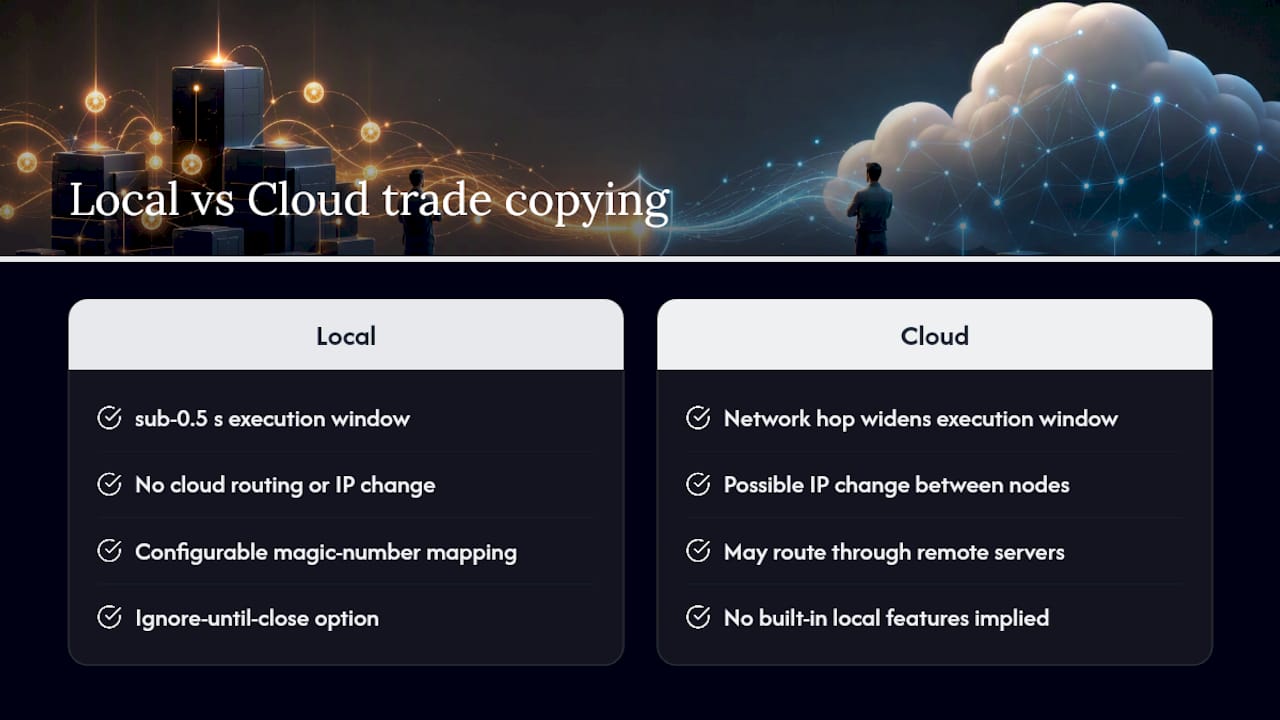
Local Trade Copier has run entirely on-machine since 2010, with no cloud routing between master and client accounts. That architecture matters here for a specific reason: cloud-based copiers introduce a network hop and, in some cases, an IP change between signal and execution, both of which widen the window where a duplicate or race condition can slip through. Running locally, on a Windows PC or VPS, keeps that window as tight as sub-0.5-second execution allows.
The features built into the software map directly onto the fixes above: configurable magic-number mapping per account, an ignore-until-close option, adjustable freeze time, and one execution path per Slave account instead of an ambiguous multi-instance setup. None of this changes market outcomes. Local Trade Copier replicates existing trades only, with no strategy logic of its own, and is designed to reduce duplicate trades through its built-in features.
Mistakes I See Traders Repeat With Duplicate Trades
Most duplicate trade problems I’ve walked through trace back to the same handful of habits. Running the same client or Slave instance on two machines at once is the biggest offender by far, usually because someone set up a VPS “just in case” and forgot the local terminal was still active.
A close second is skipping a documented magic-number convention. If you can’t tell at a glance which number range belongs to which EA or account, you’re guessing every time something looks off. Test every settings change in a demo account first, not live, and keep a monitoring EA running with conservative thresholds even after you think the problem is solved. Duplicate trades rarely announce themselves before they happen. The habits above are what catch them before they become expensive.
— Rimantas
Fix It Once With the Right Copier, Not Another Patch
You’ve now got the settings, the code checks, and the watchdog logic to stop duplicates at every layer. The faster path is running a copier that already has those controls built in instead of stitching them together across three tools. Local Trade Copier includes duplicate-signal filtering, per-account magic-number mapping, ignore-until-close, and adjustable freeze time in one local install, running at sub-0.5-second execution with no cloud hop to widen your race-condition window.

Start with a demo account: install the software following the installation walkthrough, configure your magic-number ranges, and watch it run alongside a monitoring EA before touching a live account. You can see the duplicate-filter settings in action in the demo video. Local Trade Copier replicates trades only. It has no strategy layer and no influence on market outcomes, and past results do not guarantee future performance. A 7-day free trial gets you into the settings today.
Sources
- Preventing an EA from Opening Multiple Orders for the Same Symbol – MQL4 BASICS
- EA placing duplicate trades
- Duplicate Signal/Ignore Options – Telegram To MT4 Online Guide
Recommended
- Fast Trade Copier on MetaTrader 4 (10 orders in 1 second)
- Local Trade Copier DEMO on MT4 and MT5
- Copy Forex trades from one MT4 master into 3x MT4 clients
- Scalping and Copy Trading on MT4 and MT5 (Best Setup to Avoid Delay and Slippage)
