

Stop loss synchronization means that when you place or change a stop on a master account, every linked account ends up with the same protective exit, or a deliberately scaled version of it. It sounds simple. In practice the stop has to be copied with the trade, kept in step when you move it, and survive differences between brokers, platforms and account sizes. This guide covers how that works, where it breaks, and how to check it on your own accounts.
A short note before we start: a stop loss limits the loss on a position, it does not remove risk. Leveraged forex can magnify small price moves, and Investor.gov warns that losses can exceed the initial investment in some circumstances. Past results do not guarantee future performance.
TL;DR
- Synchronizing a stop loss has three parts: copying the first stop with the entry, mirroring later edits (breakeven moves, trailing, removal), and handling the fact that the same price distance means different money on different accounts.
- A copier only replicates what the master does. It adds no market logic, so the stop you set on the master is the stop your clients inherit.
- Different brokers, spreads, minimum stop distances and execution speed can leave stops a few points apart even when the copier did its job.
- Verify on a demo first: open, move, trail and close a test trade, then compare every account side by side.
- Run the copier on one local machine or VPS so stop updates travel from terminal to terminal without a cloud hop.
What stop loss synchronization actually means
When you copy trades between MetaTrader accounts, a trade carries several pieces of information: symbol, direction, volume, entry, stop loss and take profit. Synchronization is about the last two staying aligned over the life of the trade, not just at the moment of entry.
There are really three separate events:
- Initial stop. The master opens a trade with a stop attached, and the copy opens with the same stop.
- Stop modification. You drag the stop to breakeven, tighten it after a news spike, or widen it. The copies should follow.
- Stop removal or replacement. You delete the stop, or an EA replaces it. The copies should do the same.
Many problems traders blame on “the copier” come from confusing these. A trade that copies with the right stop but ignores later edits looks like a sync failure, yet it is often a setting. Likewise, a stop that is hit on the master a second before the copy’s stop is hit is not an error at all, it is price and spread.
Why identical stops produce different results
Two accounts can hold the same stop price and still lose different amounts. Four things cause this.
Lot size
A 40-pip stop on 1.00 lot and the same stop on 0.10 lot differ by a factor of ten in money. That is expected if the accounts are different sizes. The question is whether the difference is intentional. With automatic lot scaling per client account balance, the copied volume follows the account size, so a stop that costs a given share of the master’s balance costs a similar share of a smaller or larger account’s balance. Our copier offers 18 risk and lot management options for exactly this reason.
This is arithmetic about position size, not a promise about outcomes. Past results do not guarantee future performance.
Spread and execution
Brokers quote different spreads, and a buy position closes at the bid. A stop at the same price can therefore trigger at slightly different moments on two feeds. Execution policy matters too: IG’s March 2022 U.S. order execution policy says speed and likelihood of execution and settlement may take precedence over price and cost, including when a stop is triggered. In plain terms, a stop is a trigger, not a guaranteed fill price, and each broker handles it under its own rules.
Minimum distances and symbol differences
Brokers can set a minimum distance between the current price and a stop, and they may reject modifications that sit too close. Symbol names and digits also differ (a suffix on one broker, five-digit pricing on another). If a stop is rejected on one account and accepted on another, the accounts stop matching. Your broker’s contract specifications list these rules for each symbol.
Latency
A copy that arrives later sees a different market. Local execution keeps the delay short: the copier runs inside MetaTrader on your own Windows PC or VPS, so there is no external server between the master and the clients. For the infrastructure side, see our piece on reducing copy slippage with three infrastructure fixes.
How the initial stop is copied
In a typical setup, the master terminal sees the new position with its stop and take profit, and the copier opens the matching position on each client account with those levels attached. Three choices decide how closely the client matches.
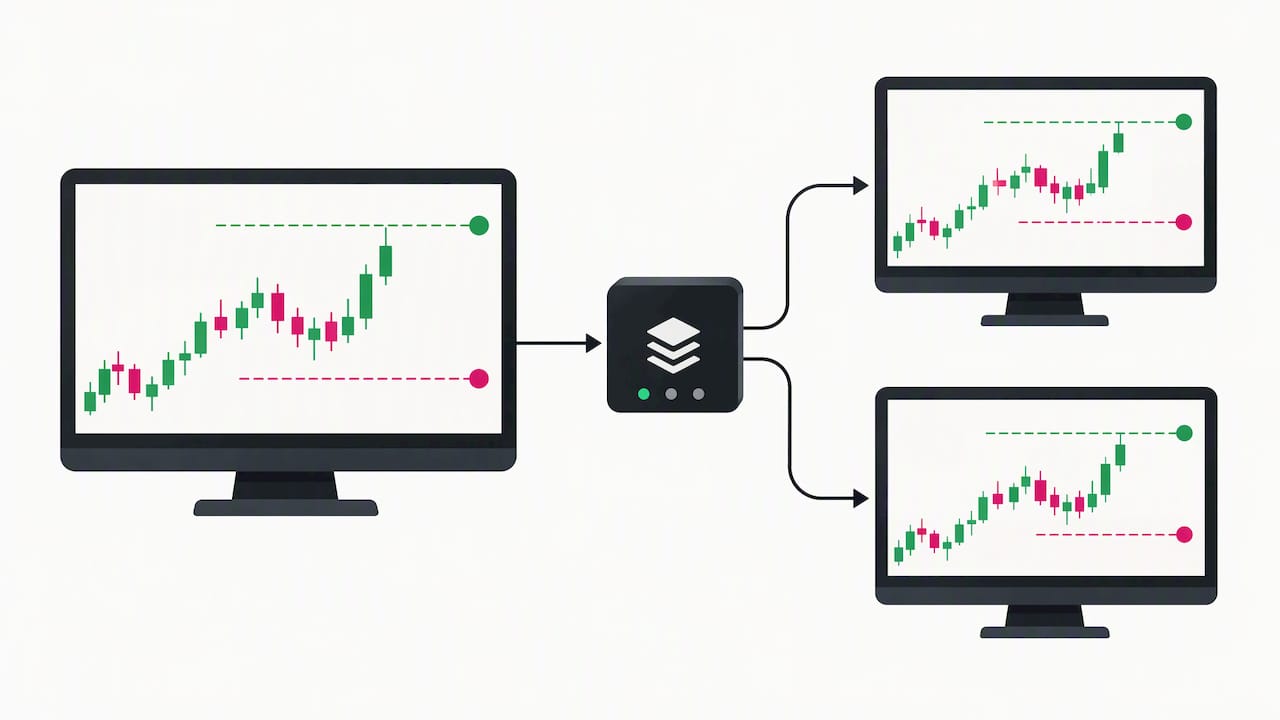
Same price or same distance. Copying the absolute price is natural when both accounts trade the same symbol on similar feeds. Copying the distance from entry is safer when the client fills at a slightly different price, because the risk per lot stays the same.
Order of operations. Some setups open the trade first and attach the stop a moment later. For a short time the client holds an unprotected position. If you manage this manually, set the stop in the same ticket as the entry whenever the platform allows it.
Delayed stops by design. Sometimes you do not want the client’s stop visible at the broker. Our page on a copier that waits for stop loss or take profit to be hit explains how to hold the exit on the copier side instead of attaching it to each order. That is a different risk profile, because the exit then depends on the machine and terminal staying online.
Keeping later stop changes in sync
The first stop is the easy part. The ongoing edits are where accounts drift.
Breakeven and manual moves
When you drag a stop on the master, the copier should detect the modification and send it to every client. If the new level violates a client broker’s minimum distance, that client’s modification can be rejected while the others succeed. Check the journal tab on the rejecting terminal.
Trailing stops
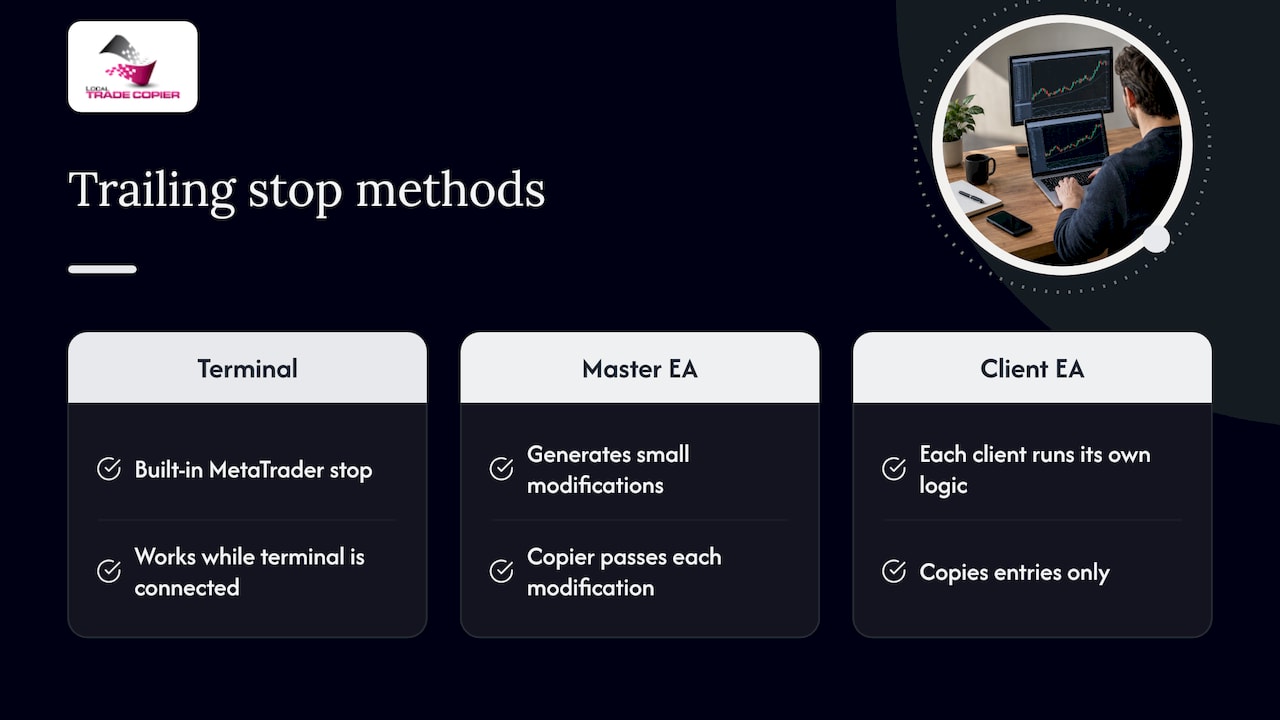
There are two different things people call trailing. A trailing stop built into MetaTrader runs inside the terminal that holds the position, so it only works while that terminal is running and connected. A trailing stop produced by an EA on the master generates a stream of small modifications, and a copier then has to pass each along. A third approach is to let each client run its own trailing logic and copy only entries.
Pick one on purpose. Running a trailing stop on the master and on the clients at once makes two systems fight over the same stop. We wrote a hands-on guide to test this safely: copy trailing entries with four demo tests to verify sync.
Partial closes and profit taking
When you scale out, the remaining volume may keep its stop, or you may move it. Our page on the Close & Stop profit taking feature shows how that behavior works in the copier, which is worth reading if you manage positions in stages.
Removing a stop
If you delete a stop on the master, a faithful copy removes it everywhere too. Think before doing it on prop firm accounts, which often require a protective stop to be present. Check each firm’s rules directly.
Manual, EA and mobile trades
The master does not have to be a human at a desk. The same synchronization applies whether the master trade came from:
- You, manually, on desktop or mobile. The copier watches the master terminal, so a stop you set from your phone is picked up once it appears on that account.
- An Expert Advisor. Stops produced by an EA copy like any other, but make sure the EA itself is not also running on the clients.
- Several masters into one client. Here, stops from different sources can conflict on a netting account, which merges positions per symbol. See our notes on netting and FIFO limitations before you combine masters.
For prop firm accounts that do not allow EA trading, our manual-like execution mode enters copied trades so they look like they were placed by a human trader. Read how manual-like execution works and check your firm’s own terms before using any automation.
A setup checklist
Work through this in order on a demo account.
- Install the copier on the master and each client terminal. The installation guide covers MT4 and MT5.
- Match symbols. Confirm that suffixes and symbol names map correctly between brokers.
- Choose the lot mode. Fixed, multiplier or balance-based scaling. Decide this before you worry about stops, because it determines the money at risk per stop.
- Decide who owns the stop logic. Master only, or each client on its own. Do not mix.
- Test an entry with a stop. Compare price levels on every account.
- Test a modification. Move the stop on the master, then check each client.
- Test removal and closing. Remove the stop, then close the trade, and confirm every client follows.
- Simulate a bad connection. Close one client terminal briefly and see what happens when it reconnects.
For a concrete multi-account example, see how to copy trades from one MT4 master into three MT4 clients. If your accounts span platforms, the MT4 to MT5 replication setup guide covers the differences, and our overview of trade synchronization best practices goes deeper on routine checks.
Verifying and troubleshooting stops
Do not assume sync works because the entry copied. Build a small routine.
A side-by-side check
Open the trade list on each terminal and compare ticket, volume, stop and take profit. Differences of a few points are normal between brokers. Differences of tens of points, or a missing stop, are not.
Common causes of a mismatch
| Symptom | Likely cause | What to check |
|---|---|---|
| Client has no stop | Stop copying disabled, or the modification was rejected | Copier settings, then the terminal journal |
| Stop is a few points off | Different spread, digits or distance mode | Whether you copy price or distance |
| Stop moved on master, not on client | Modification rejected or terminal offline | Journal entries, connection status |
| Client stop hit first | Different feed or spread | Compare bid and ask at the time |
| Trailing stop erratic | Two trailing systems active | Disable one of them |
| Nothing copies at all | Setup or permissions problem | What to do when the copier does not copy trades |
Margin and risk checks
A client that is short of margin may open a smaller position than expected, or none, so its stop protects a different amount. Our five checks to prevent margin call copies are a good companion to any stop audit.
Automation also adds risks of its own. Investor.gov notes that automated systems can carry risks from misunderstood parameters, bad data and execution faster than you can monitor. Check settings after every change, and re-test after updating a terminal or a broker’s server. Past results do not guarantee future performance.
Our view on stop synchronization
We have built trade copying software since 2010, and the most common stop-related support question is not “why did the copier fail”. It is “why does the client look different from the master”. Most of the time the copier did exactly what it was told, and the difference came from lot scaling, spread or a broker rule.
So we design around a plain principle: the copier is replication software. It has no market logic and no strategy layer, so it does not decide where a stop should be, it carries yours. That makes the discipline sit with you: choose one owner for the stop logic, scale volume deliberately, and test on demo.
We also believe local execution is the right model for stops. When the copier runs in your own terminals on one Windows PC or VPS, you can see every modification in the journal, there is one IP address, and there is no cloud service between your master and your clients. If something looks wrong, you can inspect it directly.
One more point from experience: do not fix a sync issue by adding another tool on top. Find the first account where the stop diverges and work out why.
— Rimantas
Trying it with the Local Trade Copier
Local Trade Copier replicates trades between MT4 and MT5 accounts from one or more masters, with configurable lot sizing, balance-based scaling, trade filtering and reverse copying. You can test every step in this article during the 7-day free trial, which is the right way to check stop behavior against your own brokers.
Plans are billed monthly or yearly and include the MT4 and MT5 components: PERSONAL at €29 per month or €290 per year, MANAGER at €89 per month or €890 per year, and VIP at €199 per month or €1990 per year. Compare them on the pricing page. A Windows PC or VPS is required.
FAQ
Does a trade copier set stop losses for me?
No. A copier replicates the trades and stop levels that already exist on the master account. It has no market logic, so it will not choose or improve a stop. You decide where stops go, and the copier passes them on.
Why did my client account’s stop trigger at a different time than the master’s?
Brokers use their own price feeds, spreads and execution rules, so the same stop price can trigger at slightly different moments. A stop is a trigger, and the fill depends on the broker’s execution policy. Compare the two accounts’ price history at that moment before assuming a copier error.
Do trailing stops copy to client accounts?
They can, but you need to decide where the trailing logic runs. A trailing stop built into MetaTrader works only while the terminal holding the position is running and connected. Test your chosen method on a demo account before using it on live accounts.
How do I keep risk similar when client accounts are different sizes?
Use lot scaling instead of a fixed volume, so the position size follows each account’s balance. The stop distance then represents a comparable share of each account. This is an arithmetic match, and it does not reduce market risk. Past results do not guarantee future performance.
Sources
- Investor.gov: Foreign Currency Exchange (Forex) Trading for Individual Investors
- IG U.S. order execution policy summary (March 2022)

Leave a Reply