

Manual forex trading demands constant screen time, split-second decisions, and emotional discipline that even experienced traders struggle to maintain. Automating forex trading on MetaTrader involves developing Expert Advisors in MQL4/MQL5 or using built-in generators for strategies. This guide walks you through building Expert Advisors, configuring trade copiers, and implementing robust automation that reduces human error while scaling your trading operations across multiple accounts. Whether you manage prop firm capital or trade your own funds, MetaTrader’s automation tools can transform your workflow and improve consistency.
Table of Contents
- Key takeaways
- Preparation: tools and prerequisites for automating forex trading
- Execution: building expert advisors and setting up trade copying
- Verification: troubleshooting, managing risks, and optimizing performance
- Optimize your forex automation with trusted trade copying solutions
- How do I create a basic Expert Advisor for forex trading?
- What are the latency considerations when using trade copiers?
- How can I manage risks with automated forex trading strategies?
Key Takeaways
| Point | Details |
|---|---|
| Multi account replication | Trade copiers let you mirror master account trades across follower accounts to scale automation for prop firms or managers. |
| Latency matters | Local VPS based copiers deliver sub 5 millisecond latency, which is critical for precise execution in automated strategies. |
| Backtesting and validation | Strategy Tester lets you test EA logic against historical data before risking real capital. |
| Risk parameter controls | Inputs such as maximum lot size, stop loss distance, and position sizing govern how aggressively the EA trades. |
Preparation: tools and prerequisites for automating forex trading
Before automating your trading, you need the right foundation. MetaTrader 4 and MetaTrader 5 serve as the primary platforms for forex automation, each offering native programming environments called MQL4 and MQL5. These languages let you write Expert Advisors that execute trades based on technical indicators without manual intervention.
For multi-account management, trade copiers replicate trades from a master account to follower accounts. Local copiers install directly on your computer or VPS, while cloud solutions run on remote servers. Local options deliver latency under 5 milliseconds, critical for prop firms with strict execution requirements. Cloud copiers introduce 100 to 500 milliseconds of delay but offer easier setup for beginners.
Hardware matters significantly. A Virtual Private Server located near your broker’s data center minimizes network lag and keeps your automation running 24/7 without interruptions from power outages or internet failures. Choose a VPS provider with servers in the same city as your broker for optimal performance.
You’ll work primarily in MetaEditor, the integrated development environment for writing and compiling Expert Advisors. The Strategy Tester built into MetaTrader lets you backtest your automation against historical price data to validate performance before risking real capital. Understanding technical indicators forms the knowledge foundation. Moving Averages smooth price action to identify trends, while the Relative Strength Index measures momentum to spot overbought or oversold conditions.
Key inputs for any automated system include risk parameters like maximum lot size, stop loss distance, and position sizing rules. These settings determine how aggressively your automation trades and how much capital each position risks. For algorithmic trading in forex, you’ll define these parameters based on your account size and risk tolerance.
Essential software checklist:
- MetaTrader 4 or 5 platform installed and connected to your broker
- MetaEditor for writing and compiling Expert Advisors
- Strategy Tester for backtesting automation logic
- Trade copier software for multi-account replication
- VPS with low latency to broker servers
Pro Tip: Test your VPS latency by pinging your broker’s server IP address. Anything under 10 milliseconds provides excellent execution speed for automated strategies.
| Tool | Purpose | Cost Range |
|---|---|---|
| MetaTrader Platform | Base trading environment | Free |
| VPS Hosting | 24/7 uptime near broker | $15-50/month |
| Trade Copier Software | Multi-account replication | $30-100/month |
| Custom EA Development | Tailored automation logic | $200-2000 one-time |
Execution: building expert advisors and setting up trade copying
Creating your first Expert Advisor starts in MetaEditor. Open the tool from your MetaTrader platform, click New, and select Expert Advisor template. The wizard generates basic code structure with essential functions already in place.
Define your input variables at the top of the code. These parameters let you adjust settings without recompiling. Common inputs include lot size, stop loss pips, take profit pips, and indicator periods. For example, you might create an input for moving average period that defaults to 20 but can be changed during optimization.

The OnTick function executes every time price updates, making it the heart of your automation logic. Inside OnTick, you’ll check indicator conditions and place trades when signals align. A simple moving average crossover strategy checks if a fast MA crosses above a slow MA for buy signals, or below for sell signals. Add position checking to ensure you don’t open duplicate trades when signals persist across multiple ticks.
Compile your code by clicking the Compile button. MetaEditor highlights syntax errors that need fixing before the EA can run. Once compilation succeeds without errors, your Expert Advisor appears in the Navigator panel under Expert Advisors.
Backtesting validates your logic against historical data. Open Strategy Tester, select your EA, choose a currency pair and timeframe, set the date range, and click Start. The tester shows profit curves, drawdown, and trade statistics. Run multiple tests across different periods to ensure your strategy performs consistently rather than getting lucky during one market phase.
For trade copying, managing prop trading accounts with trade copying requires configuring master and follower accounts. Install your trade copier software on each MetaTrader instance. Designate one account as the master where you’ll execute or automate trades. Configure follower accounts to replicate those trades with appropriate risk scaling.
Local versus cloud trade copiers present distinct tradeoffs. Local copiers run on your computer or VPS, delivering sub-5ms latency and complete data privacy since no trades route through external servers. They require all MetaTrader instances running simultaneously on the same machine or network. Cloud copiers operate remotely, letting you copy trades between accounts on different computers or brokers, but introduce 100 to 500 milliseconds of delay and monthly subscription costs.
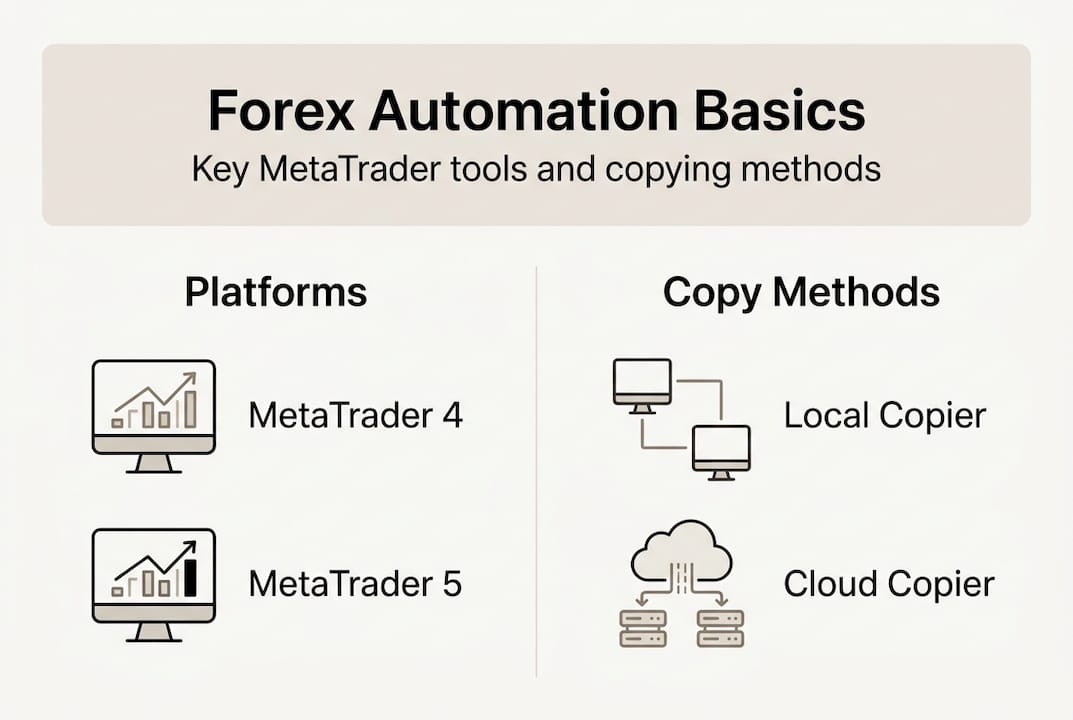
| Feature | Local Trade Copier | Cloud Trade Copier |
|---|---|---|
| Latency | 1-5ms | 100-500ms |
| Setup Complexity | Moderate | Easy |
| Data Privacy | Complete | Depends on provider |
| Cross-Broker Support | Limited | Full |
| Monthly Cost | One-time license | Ongoing subscription |
Risk management modes determine how follower accounts size positions relative to the master. Fixed lot mode copies exact lot sizes, suitable when all accounts have similar balances. Balance-based mode scales lots proportionally to account equity, protecting smaller accounts from over-leveraging. Multiplier mode lets you amplify or reduce position sizes by a fixed factor, useful for aggressive or conservative copying.
Configure partial close replication so when you close 50% of a master position, followers automatically close 50% of their corresponding positions. Enable stop loss and take profit modification copying to maintain synchronized risk management across all accounts. Some copiers support reverse trade copying, opening opposite positions on follower accounts for hedging strategies.
Pro Tip: Implement new bar detection in your Expert Advisor by storing the current bar time and only executing logic when a new candle forms. This prevents your EA from opening multiple positions during the same price bar, reducing over-trading and slippage costs.
Steps to deploy your automation:
- Drag your compiled EA from Navigator onto a chart in MetaTrader
- Set input parameters in the dialog box that appears
- Enable AutoTrading by clicking the AutoTrading button in the toolbar
- Verify the EA is running by checking for a smiley face icon in the chart’s upper right corner
- Monitor the Experts tab in the Terminal window for trade execution logs
- Configure trade copier connections between master and follower accounts
- Test with small position sizes before scaling to full risk parameters
Trade copying best practices emphasize testing your setup thoroughly with demo accounts before risking real capital. Verify that trades copy correctly, lot sizing scales appropriately, and stop losses replicate accurately. When issues arise, local trade copier troubleshooting guides help diagnose common problems like connection failures or incorrect risk calculations.
Verification: troubleshooting, managing risks, and optimizing performance
Even well-coded automation encounters issues. Latency spikes cause slippage between intended and actual execution prices, especially during high-impact news releases. If your trade copier fails to replicate positions, check that all MetaTrader instances remain connected to their brokers and that the copier software shows active status. Error codes in the Experts log provide specific diagnostic information. Error 130 indicates invalid stops, often caused by setting stop loss too close to current price. Error 134 means insufficient margin for the requested position size.
Curve-fitting represents a critical risk where optimization produces strategies that perform brilliantly on historical data but fail in live trading. This happens when you over-optimize parameters to fit past price patterns that won’t repeat. Understanding the risks of martingale expert advisors shows how over-optimization and martingale risks can cause exponential drawdowns, and simpler models often outperform complex ones. Avoid excessive optimization passes and validate strategies on out-of-sample data not used during development.
Martingale and grid strategies double position sizes after losses, attempting to recover with one winning trade. While tempting during backtests, these approaches expose accounts to catastrophic drawdowns when markets trend strongly against positions. A losing streak of just seven trades with position doubling can wipe out an entire account.
Maximum drawdown matters more than profit for evaluating automation quality. A strategy generating 100% annual returns with 80% drawdown is far riskier than one producing 40% returns with 15% drawdown. Monitor your equity curve’s peak-to-trough decline and set hard stops when drawdown exceeds acceptable thresholds.
VPS placement near your broker’s server minimizes execution delay. A trader in New York using a London-based broker should choose a London VPS rather than a local server. This geographic optimization reduces round-trip latency from 100 milliseconds to under 10 milliseconds, improving fill prices and reducing slippage costs that compound over hundreds of trades.
Pro Tip: Combine automation with human oversight by setting alert notifications for unusual activity. Review your automated trades daily and be prepared to disable automation during extreme volatility or black swan events when historical patterns break down completely.
Common troubleshooting checklist:
- Verify AutoTrading is enabled in MetaTrader
- Check that your EA shows a smiley face icon, not a crossed-out face
- Confirm sufficient margin exists for new positions
- Review broker-specific restrictions on minimum stop loss distance
- Test trade copier connections with small demo trades first
- Monitor VPS uptime and connectivity to broker servers
- Validate that netting accounts don’t conflict with hedging logic
Netting accounts combine multiple positions in the same instrument into one net position, complicating trade copying when your master uses hedging mode. Local trade copier safety improvements address these account type differences with smart position tracking that adapts to each follower’s account mode.
Best practices for sustainable automation include starting with simple, robust strategies rather than complex systems with dozens of parameters. Use walk-forward analysis to test how strategies perform on new data after optimization. Diversify across multiple uncorrelated strategies and currency pairs to reduce single-strategy risk. Set maximum daily loss limits that automatically disable trading when exceeded.
“The goal of automation is not to eliminate human judgment but to scale your best decisions across more opportunities while removing emotional interference from execution.”
Optimize your forex automation with trusted trade copying solutions
Now that you understand how to build and deploy forex automation, the right tools make implementation faster and more reliable. Local Trade Copier software delivers the sub-5ms latency prop firms require while maintaining complete data privacy since trades never route through external servers. The platform handles complex scenarios like partial closes, stop loss modifications, and reverse copying that basic solutions miss.
Detailed guides walk you through every setup scenario, from basic master-follower configurations to advanced multi-strategy portfolios across dozens of accounts. Trade copying best practices cover risk scaling, lot calculation methods, and troubleshooting common issues before they impact live trading. The definitive guide to trade copying provides comprehensive coverage of advanced features and optimization techniques.
Flexible pricing plans scale from individual traders managing a few accounts to prop firms coordinating hundreds of follower accounts. One-time licensing eliminates ongoing subscription costs that erode profitability over time. Start automating your forex trading with tools built specifically for MetaTrader’s ecosystem and designed around real trader workflows.
How do I create a basic Expert Advisor for forex trading?
What are the initial steps to build an EA?
Open MetaEditor from your MetaTrader platform and select New Expert Advisor from the wizard. Define input parameters like lot size and indicator periods, then implement your trading logic inside the OnTick function that executes on each price update. Compile the code and backtest using Strategy Tester before deploying to live trading.
Which indicators work best for automated strategies?
Moving averages provide reliable trend signals when faster periods cross slower periods. Relative Strength Index identifies overbought conditions above 70 and oversold below 30 for mean reversion entries. Combining two or three uncorrelated indicators reduces false signals while keeping logic simple enough to avoid curve-fitting.
What are the latency considerations when using trade copiers?
How fast do local trade copiers execute?
Local trade copiers deliver 1 to 5 milliseconds of latency when all accounts run on the same VPS. This speed meets prop firm requirements for synchronized execution and minimizes slippage between master and follower fills.
Why does VPS location matter for automation?
A VPS located near your broker’s data center reduces network round-trip time from 100 milliseconds to under 10 milliseconds. This geographic optimization improves execution quality across hundreds of trades, reducing cumulative slippage costs that impact profitability.
How can I manage risks with automated forex trading strategies?
What risks should I avoid in automated trading?
Avoid over-optimization that fits strategies perfectly to historical data but fails in live markets. Martingale position sizing doubles lots after losses, creating exponential drawdown risk during losing streaks. These approaches look profitable in backtests but destroy accounts when market conditions shift.
How do I monitor automation performance effectively?
Track maximum drawdown rather than focusing solely on profit metrics. Set alert thresholds when equity declines exceed acceptable levels and review automated trades daily for unusual patterns. Maintain manual oversight capability to disable automation during extreme volatility or black swan events when historical patterns break down.
What makes a robust automated strategy?
Simple strategies with few parameters typically outperform complex systems in live trading. Use walk-forward analysis to validate performance on new data after optimization. Diversify across uncorrelated currency pairs and strategies to reduce single-system risk while maintaining consistent overall returns.
Recommended
- Algorithmic Trading in Forex: Automating Your Success
- Trading dozens of MT4 accounts on different computers from your laptop and smartphone | Trade Copier for MT4 & MT5
- Copy Forex trades from one MT4 master into 3x MT4 clients
- Copy & Paste Your Forex and Gold Trades From MT5 to MT4
