
Local Trade Copier runs on your own PC or VPS and copies trades directly between MetaTrader accounts.
No third-party cloud infrastructure. No shared servers.
×
Subscribe
---
Copy MT4 & MT5 trades locally — without relying on cloud servers
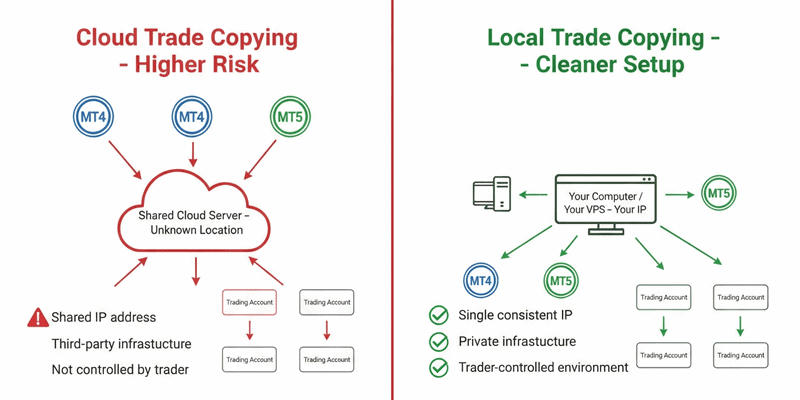
All trade copying happens locally on your machine or VPS. No cloud routing.

Most trade copiers rely on cloud servers and external infrastructure.
Local Trade Copier works differently.
It runs locally on your PC or VPS and copies trades directly between MT4 and MT5 terminals you control.
This gives traders more control over execution, infrastructure, and setup.
Local Trade Copier is designed as infrastructure, not a trading system.
Local setup means predictable infrastructure
When Local Trade Copier runs on your PC or VPS, all MetaTrader terminals operate from your own machine and IP address.
There are:
-
no shared hosting environments
-
no third-party routing
-
no randomly changing server locations
This gives traders full control over where their trading activity originates and how their setup is structured.
17 Common Trade Copying Scenarios Supported
Local Trade Copier supports the most common MT4/MT5 copying setups traders actually use:
-
MT4 → MT4 trade copying
-
MT5 → MT5 trade copying
-
MT4 → MT5 trade copying
-
MT5 → MT4 trade copying
-
Copying trades from Expert Advisors (robots)
-
Copying trades from investor-password accounts
-
Copying trades from one master to multiple accounts
-
Copying trades from multiple masters into one account
-
Copying trades between accounts with different balances
-
Reverse trade copying (BUY ↔ SELL)
-
Copying trades when symbol names differ (symbol mapping)
-
Copying indices, crypto, and CFDs
-
Copying trades on the same PC or VPS (local setup)
-
Copying trades without cloud servers or shared infrastructure
-
Copy filtering based on master account conditions (MAAB Trade Filter)
-
Multi-layer copying architecture: many → one → many (SMART INVESTOR BRIDGE™)
-
Copying trades placed via MT4/MT5 mobile apps (with local MT4/MT5 running)
Important setup note
Local Trade Copier always runs on MT4/MT5 installed on your PC or VPS.
Trades placed from MT4/MT5 mobile apps can be copied only when the same trading account is running on MT4/MT5 on your PC or VPS at all times.
This keeps all copying local and under your control.
Local Trade Copier is for traders who:
-
Copy trades between MT4 and MT5 accounts
-
Run multiple accounts from one setup
-
Use VPS or local machines for trading
-
Need control over how trades are copied
-
Want to avoid dependence on third-party servers
It is NOT for traders who:
-
Expect guaranteed results
-
Want a “plug-and-profit” system
-
Do not want to run MT4/MT5 on PC or VPS
Compatible with any MetaTrader 4 & 5 account
Local Trade Copier works with all major MetaTrader account types and brokers — including ECN, STP, RAW, FIFO, Demo, and Real accounts.
Works on PC, Mac (via Wine), or VPS
Local Trade Copier runs on Windows PC or VPS, and Mac users can run it via Wine or a Windows VPS.
Works with Expert Advisors (Forex robots)
You can use LTC with your MT4/MT5 trading bots — trades generated by EAs are copied just like manual trades. Expert Advisors (EAs) are supported when each EA is attached to its own chart.
MAAB Trade Filter
Local Trade Copier can optionally filter copied trades based on conditions of the master account — using a moving-average-based activity filter applied to account balance behavior.
This allows traders to control when trades are copied instead of blindly mirroring every trade.
SMART INVESTOR BRIDGE™ Setup
Local Trade Copier supports a multi-layer copying architecture where trades from multiple master accounts can be merged into a single MT4 or MT5 “bridge” account and then redistributed to multiple client accounts.
This setup is commonly used for signal aggregation, portfolio blending, and structured trade distribution.
Start with a local, controlled setup
Local Trade Copier runs on your own PC or VPS and copies trades directly between MetaTrader accounts.
No third-party cloud infrastructure. No shared servers.