

A trade copier does one job: it repeats a trade from a master account on one or more client accounts. Everything about how big that repeated trade is, and when copying stops, comes from the risk settings. Get them right and each account carries a position that fits its own balance, leverage and broker rules. Get them wrong and a trade that was sensible on the master can be oversized, rejected or stuck on a follower account.
This guide walks through the settings in the order you should configure them: sizing mode first, then balance scaling, then lot limits, then exposure caps, then a checklist for when the copied lot size is not what you expected. Trading leveraged forex carries a real risk of loss. Past results do not guarantee future performance.
TL;DR
- Choose the sizing mode first: fixed lot, multiplier or proportional to balance. Everything else builds on it.
- The same lot size means a very different share of the account on a small follower than on a large master, so scale by account size when balances differ.
- Leverage, account currency and broker volume limits (minimum, maximum, step) can all change the lot that actually opens.
- Set a maximum lot and a total exposure cap per account, so one oversized signal cannot run past what the account can carry.
- When a lot comes out different from your setting, check the broker symbol limits, rounding and margin first.
What risk settings a trade copier actually controls
Our copier is replication software only. It has no market logic and no strategy layer: it copies trades that already exist and applies the size and filter rules you give it. That makes the risk settings the only place where you decide how much each follower account takes on.
Most copiers, including ours, group these settings into a few families:
- Lot sizing mode. How the follower lot is derived from the master lot.
- Balance or equity scaling. Whether the lot adapts automatically to the size of each account.
- Lot limits. A minimum and a maximum per account, plus rounding to the broker’s lot step.
- Exposure and margin caps. Limits on total loss, number of trades or margin use.
- Filters. Which symbols, directions or trades get copied at all.
Each family answers a different question. Sizing mode answers “how big?”, limits answer “how big at most?”, and caps answer “when do we stop adding?”. Treat them as layers, not alternatives. For a per-account walkthrough of how these combine, see our practical guide to per-account risk settings.
The three sizing modes and when each fits
Fixed lot
Every copied trade opens at the same lot you set, no matter what the master traded. It is the simplest mode and the easiest to reason about: if you set 0.10, every trade is 0.10.
It suits a follower account that should behave consistently, or a master who varies size a lot while you want a steady footprint. The weakness is that it ignores both the master’s sizing logic and your own balance. If the master scales into a position with several entries, a fixed lot repeats each entry at the same size. Our page on copying trades with the same lot size covers that setup, and the guide on moving from fixed lot copying to a hybrid approach explains how risk drifts when a fixed lot meets changing account conditions.
Lot multiplier
The follower lot is the master lot times a factor. A multiplier of 0.5 halves every trade, 2 doubles it. It keeps the master’s relative sizing (a larger master trade stays larger on the follower) while shifting the whole scale up or down.
Multipliers work well when the accounts are similar in size and you want to dial exposure up or down by hand. They do not react to balance changes: if the follower account shrinks, the multiplier stays put.
Proportional to balance or equity
The copier compares the follower’s balance (or equity) with the master’s and scales every lot by that ratio. This is the mode to use when accounts differ in size, which is the usual case for traders running several personal accounts or an account manager handling clients with different deposits. Our copier supports automatic lot scaling per client account balance, and we cover the checks in proportional lot sizing for funded traders.
If you cannot or do not want to expose the real balance of an account, our guide to allocating account size for copy position sizing shows how to tell the copier what size to treat the account as.
How to calculate copied lot size from balances
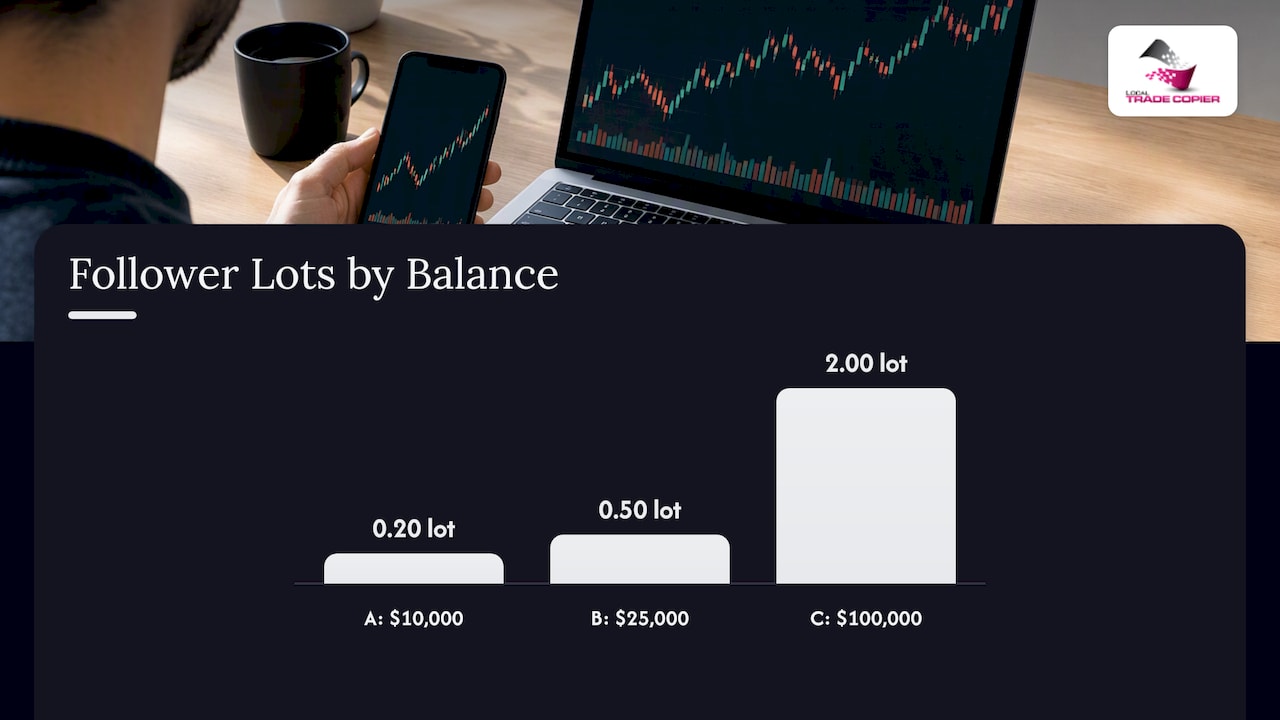
The core arithmetic is a ratio:
follower lot = master lot × (follower balance ÷ master balance)
Here is an illustration with made-up numbers, not a recommendation:
| Account | Balance | Master trade | Proportional follower lot |
|---|---|---|---|
| Master | $50,000 | 1.00 lot | n/a |
| Follower A | $10,000 | 1.00 lot | 0.20 lot |
| Follower B | $25,000 | 1.00 lot | 0.50 lot |
| Follower C | $100,000 | 1.00 lot | 2.00 lot |
Without scaling, the $10,000 account would open the full 1.00 lot, five times the share of its balance that the master risks. That is the reason a bare lot copy is dangerous across unequal accounts. Past results do not guarantee future performance, and a position that was comfortable on a large account can threaten a small one.
A few practical points:
- Balance versus equity. Balance ignores open floating profit or loss, so it changes only when trades close. Equity moves with every tick. Balance gives steadier sizing, equity gives sizing that tracks current exposure more tightly. Pick one and use it consistently on all accounts.
- Deposits and withdrawals. A large deposit on a follower raises its ratio immediately. Re-check your scaling whenever you add or withdraw funds.
- Rounding. The calculated number rarely matches a tradable lot. The broker’s step (see below) forces a round, and on small accounts that rounding can be a large share of the result.
Leverage, account currency and broker lot limits
The ratio above is only the starting point. Three account-level facts can move the final number.
Leverage. Leverage sets how much margin a position needs, not how big the position should be, but it limits how big a position can be. Two accounts with the same balance and different leverage can support different maximum sizes. MetaTrader 5 also supports floating leverage, which lets a broker adjust required margin depending on the volume of open positions. A follower with floating leverage may need more margin per lot as the copied book grows, even when the lot ratio looks safe. We discuss this in our piece on scaling lots across different leverage levels.
Account currency. If the master is funded in one currency and the follower in another, comparing raw balances is misleading. A copier that converts between currencies when it scales, as the risk-parameters walkthrough for our client EA explains in its video on risk parameters, keeps the ratio fair. In Local Trade Copier, the AA and AAM modes convert currencies automatically, so there is no switch to turn on.
Broker volume rules. Every symbol on MetaTrader has a minimum volume, a maximum volume and a volume step. MetaTrader 5 lists these among the symbol properties. Brokers set them per symbol, so a lot that is valid on gold may be invalid on an index CFD. If your calculated lot falls below the minimum, the copier either rounds up (more risk than intended) or skips the trade (the follower misses a position the master holds). Decide in advance which behavior you accept.
Regulation also frames how much leverage retail traders can use. In the US, a 2015 CFTC commissioner statement noted a proposal that retained a minimum deposit of 2% of notional value for listed currency pairs. Check your own broker’s current margin terms, since they differ by firm and pair.
Max lot, min lot and total exposure limits
Sizing modes decide the normal case. Limits decide the abnormal one.
Maximum lot per trade
A maximum lot caps any single copied order. It protects against a master mistake (an extra zero typed in the lot field), a sudden jump in the proportional ratio after a deposit, or a strategy that occasionally sends a very large order. It also solves a practical problem: many brokers reject orders above their own maximum volume, often 50 lots on MT4 symbols. Our page on avoiding 50-lot rejections with a max lot per account explains the setting, and if you need the full size anyway, you can split a master trade into several positions on the client account.
Minimum lot
A minimum lot (or a rule to force the broker’s minimum) keeps small followers participating when the scaled number would round to zero. Use it knowingly: forcing the minimum means the follower carries more relative risk than the ratio says. On a tiny account, that can matter more than any other setting.
Total account exposure
The most important cap is the one across all copied positions together. Our client EA has no single setting for the combined risk of copied trades, but MarginLimitPercent (90% by default) pauses new copies while the margin in use is at or above that share of equity. Add to that a limit on the number of open trades (MaxTrades) and a margin buffer, so several moderate positions cannot stack into one large one. Our guide on per-account risk settings shows how these look side by side on different accounts.
A sensible configuration order:
- Pick the sizing mode.
- Set the maximum lot slightly below the broker’s own maximum and below the size you would tolerate after an input error.
- Set the minimum lot policy: round up, or skip.
- Set the margin limit and maximum open trades.
- Test on a demo with the master sending a few trades of different sizes.
Safeguards against margin pressure
Limits inside the copier work best alongside limits at the account level. US futures brokers show what mature risk controls look like: CQG’s risk-parameter documentation lists trade-size and trade-margin limits, position limits, purchasing-power limits and daily-loss limits. Forex brokers on MetaTrader offer fewer of these, which is why it pays to build equivalents into the copier setup:
- Daily loss awareness. If your prop firm or personal plan has a daily loss rule, size so that a normal losing day stays well inside it. Add a margin buffer, not just a lot limit.
- Margin buffer. Keep free margin high enough that normal floating loss does not trigger a stop-out. Our checklist on preventing margin-call copies gives five checks for MT4, MT5 and DXtrade.
- Stops and targets. Decide whether the follower uses the master’s stop loss and take profit, its own, or waits for them to hit. See how that behaves in how the copier waits for stop loss or take profit.
- Missing risk management on the source. If the signal or robot you copy never sets a stop, add the control on your side. Our page on adding risk management to a robot or signal explains how.
Be honest about what leverage does. A CFTC commissioner warned that highly leveraged or margined retail forex can be a recipe for financial disaster if you cannot afford to lose the money. Only risk capital should be used for trading. Past results do not guarantee future performance, and a copier does not change that: it replicates trades, good or bad, at the size you set.
If you manage accounts for others in the US, the regulatory side is separate from the software. The NFA’s guide to CTA disclosure documents says disclosures should discuss principal risks such as volatility, leverage, liquidity and counterparty creditworthiness, as applicable. Talk to a registered professional about your own obligations.
Why the copied lot differs from your setting
The most common support question is some version of “I set 0.10 and it opened 0.12” or “it did not open at all”. Work through this list in order.
- Broker step and minimum. Compare the calculated lot with the symbol’s minimum, maximum and step on the follower broker. A step of 0.01 versus 0.1 changes the result.
- Symbol naming and contract size. Suffixes (EURUSD.m) and different contract sizes on indices and metals change what one lot means. Confirm that the follower symbol maps to the right instrument.
- Scaling mode still active. A proportional or leverage-adjusted mode silently overrides a fixed value if both are on. Check which one is selected.
- Balance or equity changed. A deposit, withdrawal or floating loss moves the ratio. Recheck the numbers at the time of the trade.
- Currency adjustment. If accounts use different currencies, confirm conversion is as you expect.
- Margin shortfall. If free margin cannot support the lot, the order may be refused or cut. Look at the terminal’s Experts and Journal tabs for the exact error.
- Max lot or exposure cap hit. A limit you set earlier may be doing exactly its job.
- Floating leverage. On MT5 accounts with floating leverage, margin per lot can rise as exposure grows.
Our video on risk parameters in the client EA also covers what to check when the EA does not always use a fixed lot while configured to.
Our perspective: set limits for the worst day, not the average one
We have built this copier since 2010, and most risk problems we see are not exotic. They come from three habits: copying a bare lot size across accounts of different size, leaving a maximum lot empty, and never testing what happens on a rejected order.
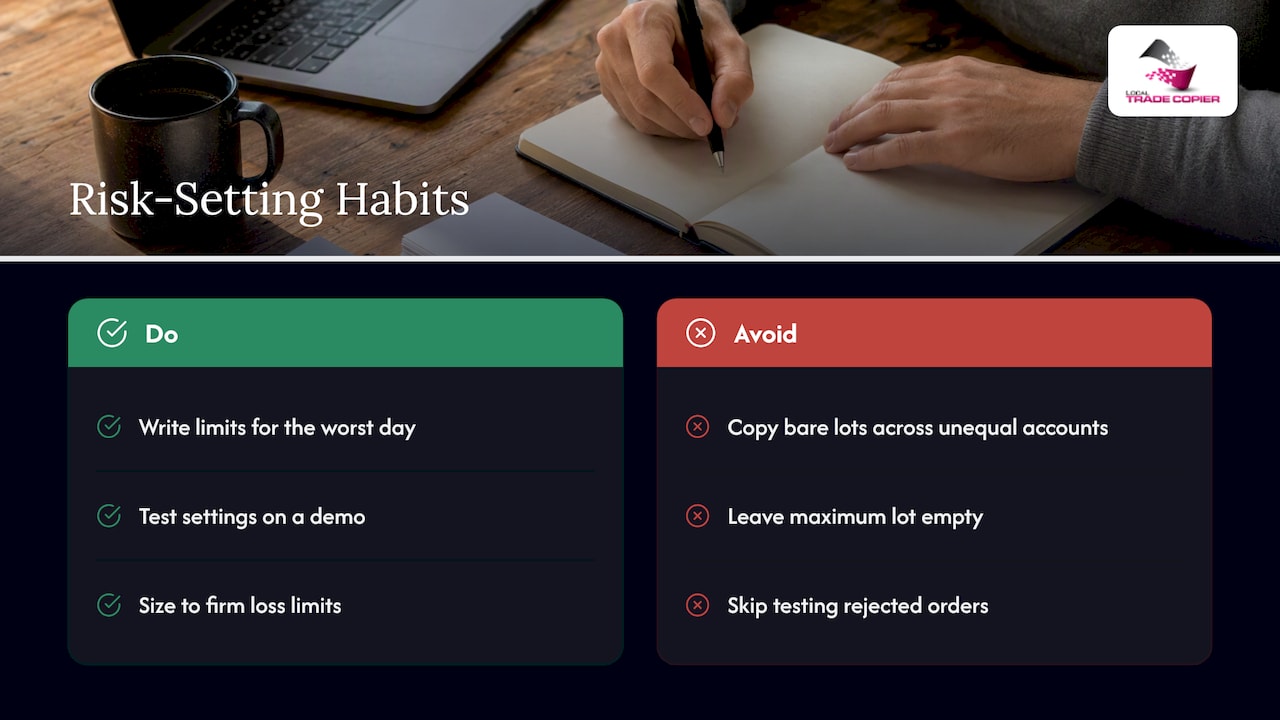
Our view is that risk settings should be written for the worst day the account will see, then checked on a demo. The copier’s job is to be predictable: the same input produces the same size, every time, on your own machine, with no cloud routing between your master and your followers. That predictability is only useful if you have decided what the number should be. We do not touch strategy and we do not claim to improve results: the software replicates, and you set the limits.
If you run funded or prop accounts, read the firm’s rules before you choose a mode, and size for the firm’s loss limits rather than for the master’s comfort. Past results do not guarantee future performance.
Try these settings on your own accounts
Local Trade Copier runs on your Windows PC or VPS and includes the MT4 and MT5 copier components under one plan, so you can test every setting above with a 7-day free trial. Plans start at €29 per month for Personal, with Manager at €89 per month and VIP at €199 per month; annual billing is €290, €890 and €1990 respectively. See the details on our pricing page.

If you want to see the settings screens first, watch the demo video, then follow the installation guide.
A short test routine before going live
Risk settings are only proven when something unusual happens. Before you connect a live follower, run this routine on a demo pair of accounts:
- Send a trade at the master’s normal size and confirm the follower lot matches your calculation.
- Send a trade far above normal size and confirm the maximum lot catches it.
- Send a trade on a symbol with a different step or contract size and confirm it maps correctly.
- Open several trades at once and confirm the exposure cap or open-trade limit pauses copying.
- Change the follower balance (a demo deposit) and confirm the scaling follows.
- Close the master trade and confirm the follower closes as expected.
Our MT4-to-MT5 guide has a section on testing trade copying without risk that you can follow for the same purpose. If you copy only some masters, see how to copy trades from selected MT4 master accounts.
FAQ
What is the safest lot sizing mode for a trade copier?
No mode is safe by itself, because safety comes from the limits around it. Proportional sizing by balance keeps each account’s share consistent when balances differ, and a maximum lot plus an exposure cap protect against unusual orders. Test any mode on a demo first.
Should I scale copied lots by balance or by equity?
Balance changes only when trades close, so sizing is steadier. Equity follows floating profit and loss, so sizing reflects current conditions more tightly but moves more often. Either works if you use it consistently on every account.
Why did my copier open a different lot than I set?
Usually the broker’s minimum, maximum or step for that symbol changed the number, or a scaling mode or limit overrode the fixed value. Check the symbol specification on the follower account and the terminal’s Journal for the exact message.
Do I need a maximum lot setting if my broker has one?
Yes. The broker’s maximum only rejects orders after they exceed it, and that limit is often much larger than you want on a single trade. Your own maximum should sit well below it and reflect what the account can safely carry.
Can a trade copier reduce my risk?
It can enforce the size and exposure limits you choose, which keeps copied positions from exceeding them. It does not change the market behavior of the trades it copies, and it does not improve results. Past results do not guarantee future performance.
Sources
- CFTC: Statement of Commissioner Sharon Y. Bowen on retail forex rules (2015)
- MetaTrader 5: symbol properties and quotes
- MetaTrader 5: native floating leverage support
- CQG: Setting Risk Parameters
- NFA: Disclosure Documents, a Guide for CTAs
