

Handle idle disconnects by detecting dead sockets early with TCP keepalive and application heartbeats, respecting intentional disconnects with intent flags so you never reconnect by mistake, leaning on built-in driver or protocol resiliency where it exists, and retrying with exponential backoff plus jitter. The core primitives are TCP keepalive, WebSocket PING and PONG frames, JDBC and ODBC connectRetry properties, and a simple application-level heartbeat you control yourself.
TL;DR:
- A TCP RST, FIN, or unexpected EOF often signals transport loss, while a WebSocket close without PING/PONG may indicate a server idle timeout.
- WebSocket PING/PONG checks liveness, QUIC needs a frame that elicits acknowledgment before timeout, and IMAP IDLE requires resubscription and mailbox resynchronization after reconnect.
- SQL Server drivers using JDBC, ODBC, or OLE DB support ConnectRetryCount and ConnectRetryInterval, but recover transport only, not transactions, temporary tables, or cursor state.
- Check an intent flag before retrying to avoid reconnecting after deliberate shutdown, then use exponential backoff with jitter and cap attempts to prevent endless loops.
- After reconnecting, refresh authentication and permissions, then revalidate server state such as subscriptions, mailbox listings, or open positions instead of trusting cached data.
Common causes and signals of idle disconnects
Most idle drops do not come from your application code. They come from the infrastructure sitting between your client and server: firewalls and NAT gateways that forget a connection after a few minutes of silence, load balancers enforcing their own idle timeouts, and operating systems shipping with keepalive defaults tuned for general use rather than for your workload. A socket that looks fine to your process can already be dead on the wire.
The disconnect usually announces itself through a specific signal, and recognizing which one you got tells you where to look first.
- A TCP RST or FIN typically means a middlebox or the remote host actively closed the connection.
- An
ECONNRESETor unexpected EOF usually points to a dropped socket that nobody closed cleanly. - A WebSocket Close frame with no prior PING and PONG exchange often indicates a server-side idle timeout.
- A driver-specific error code (for example, a SQL Server connection-reset error) can indicate either a transport failure or an actual server-side termination.
Before any reconnect logic runs, your code needs to know whether the disconnect was intentional. Track a local flag before you close a connection on purpose, and check it in your disconnect handler so a deliberate logout never triggers an automatic reconnect loop, a pattern described in practical reconnect tutorials for multiplayer and networked applications.
Protocol-specific tactics: WebSocket, IMAP IDLE, QUIC, and database drivers
Each protocol gives you a different set of tools for detecting and surviving an idle period, and the fixes rarely transfer directly from one to another.
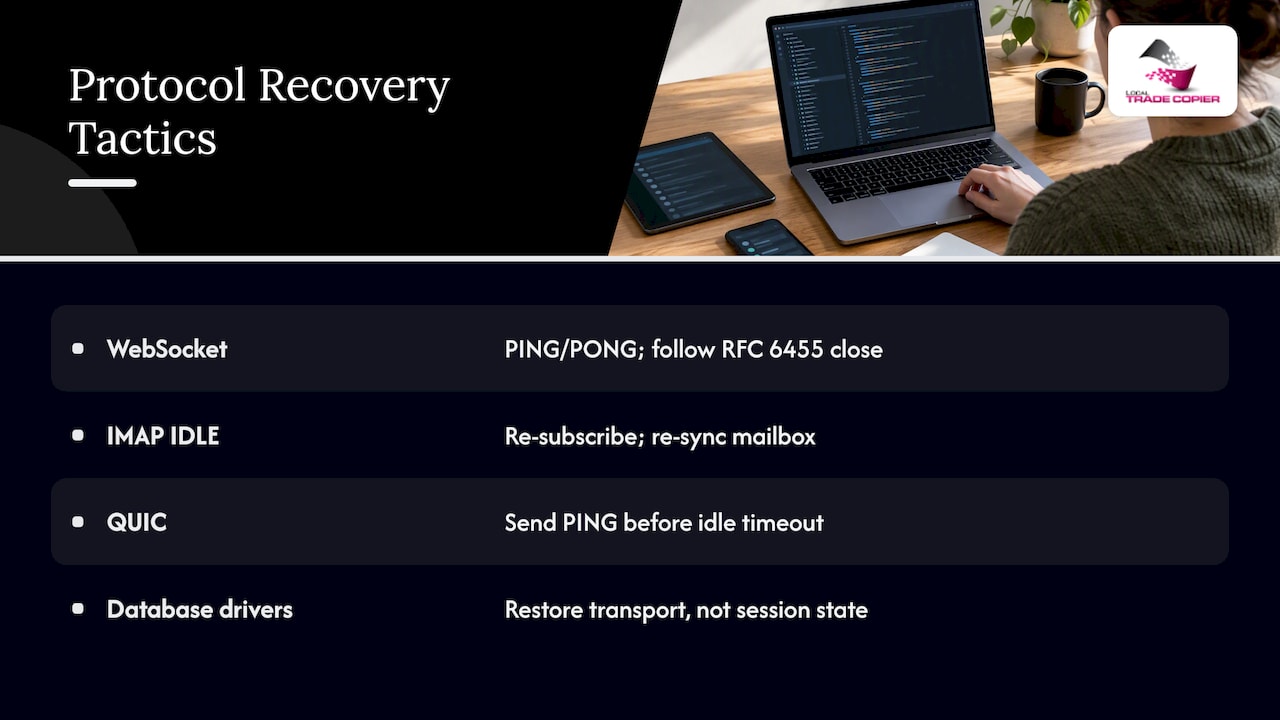
For WebSocket, implement PING and PONG control frames and respect the closing handshake defined in RFC 6455, which specifies exactly how a graceful close should proceed and recommends PING and PONG frames as the mechanism for verifying that a connection is still alive. Reconnect libraries often include automatic retry behavior out of the box, but using it blindly can mask a server-side problem or trigger repeated reconnect storms if many clients drop at once.
For IMAP IDLE, subscribe to the library’s idle error events rather than polling for connection state. When a reset happens mid-idle, reconnect and explicitly re-subscribe to the IDLE command rather than assuming the mailbox state survived; partial state after a reset is common, so re-sync the mailbox listing after reconnecting instead of trusting cached state.
For QUIC, follow the guidance in RFC 9000, which defines idle timeout behavior and recommends sending a PING or another ack-eliciting frame before the idle timer expires, so the connection stays alive without waiting for application data. The same document also covers stateless reset detection, which lets an endpoint recognize when a peer has lost connection state entirely rather than treating it as an ordinary timeout.
For database drivers, JDBC, ODBC, and OLE DB connections to SQL Server support ConnectRetryCount and ConnectRetryInterval properties that let the driver transparently restore an idle connection that was broken in transit, as documented in Microsoft’s connection resiliency reference. This resiliency layer recovers the transport connection itself; it does not replay statements or recover session state like open transactions or temporary tables.
Pro Tip: Test each protocol’s idle recovery in isolation first (WebSocket, IMAP, QUIC, or your database driver) before layering your own retry logic on top, so you know which failures the protocol already handles.
Practical reconnect patterns and safe retry design
A safe reconnect design rests on a handful of reusable building blocks rather than a single clever retry function.
- Set an intent flag before any deliberate disconnect. A field like
isLeavingchecked inside your disconnect handler prevents the same status code from being read as both a graceful exit and a failure, a distinction reconnect tutorials call out directly. - Use exponential backoff with randomized jitter. Doubling the wait time between attempts, with some randomness added, keeps many clients from reconnecting in the same instant and overwhelming a recovering server.
- Cap the maximum retry count or total retry window. An uncapped loop turns a brief outage into a resource drain; stop and surface the failure instead of retrying forever.
- Add idempotency keys for any action replayed after reconnect. If a reconnect might cause a client to resend a request that already succeeded, a deduplication key prevents the side effect from firing twice.
- Escalate to an alert or a circuit breaker once retries are exhausted. Treat repeated failures as a signal worth a human’s attention, not just another retry cycle.
Pro Tip: Log the reason for every disconnect alongside the retry count. A spike in one failure type is often the fastest way to spot a misconfigured idle timeout upstream.
OS and driver tuning: keepalive, registry settings, and connection-resiliency properties
Default keepalive settings on most operating systems are built for general-purpose networking, not for catching a dead socket quickly. On Windows, the KeepAliveTime and KeepAliveInterval registry values under HKEY_LOCAL_MACHINESYSTEMCurrentControlSetServicesTcpipParameters control how long the stack waits before probing an idle connection and how often it retries.
- Microsoft’s own guidance for Azure SQL connections recommends specific keepalive and retransmission settings for faster detection of unresponsive sockets.
- JDBC, ODBC, and OLE DB drivers layer
ConnectRetryCountandConnectRetryIntervalon top of OS-level keepalive, and the driver typically depends on the OS reporting a broken socket before it can act. - These properties interact with
loginTimeoutand command timeouts, so a retry window set too wide can leave a query waiting far longer than expected.
Driver-level connection resiliency does not recover open transactions, temporary tables, or buffered cursor state, a limitation Microsoft documents directly in its configurable retry logic reference. Anything tied to server-side session state needs its own recovery path, separate from the transport-level reconnect.
Testing and monitoring reconnect behavior
Reconnect logic that only gets exercised during a real outage is reconnect logic you have not actually tested.
- Run synthetic failure tests before trusting any retry path. Stop and restart the server process, simulate a TCP blackhole by dropping packets silently, and force a firewall timeout in a controlled window to see how your client reacts.
- Capture the right signals in logs and metrics. Record the disconnect reason, retry count, time to reconnect, and any user-facing impact so a postmortem has real data instead of guesses.
- Write automated tests for the retry logic itself. Unit tests that simulate a dropped socket and assert the correct backoff sequence catch regressions long before a production outage does.
- Keep a short postmortem checklist ready. When a reconnect fails in production, check the intent flag state, the backoff schedule actually used, and whether the retry cap was hit before escalation fired.
Applying these patterns to local trade copier setups
A locally installed trade copier faces the same idle disconnect problem as any other persistent connection to a trading terminal, with one simplification: running entirely on one machine means a single IP address and no cloud routing hop to add its own timeout behavior. Our guide to automatic reconnection in MT4 walks through the same backoff and intent-flag patterns described above, applied specifically to copier connections. A practical VPS checklist covers tuning OS keepalive values, setting a bounded reconnect backoff, confirming no duplicate fills occurred after a reconnect, and watching copy health metrics continuously.
Best practices for session state preservation during idle reconnect
Reconnecting the socket is only half the job. The harder problem is deciding what state survives the gap and what needs to be rebuilt from scratch.
Start by separating transport state from application state. The TCP or WebSocket connection itself can be restored without any special handling, but anything your application assumed was still valid (an open subscription, a cached position list, a mailbox listing) needs explicit re-validation after reconnect rather than blind trust. For IMAP IDLE, that means re-subscribing to idle notifications and re-syncing the mailbox rather than assuming the prior subscription survived. For a trading terminal connection, it means re-fetching open positions and pending orders rather than relying on a stale in-memory snapshot.
A practical pattern is to version your application state with a sequence number or timestamp, so that after reconnect you can ask the server “what changed since sequence N” instead of re-downloading everything or, worse, assuming nothing changed. When the server cannot answer that question, fall back to a full state refresh rather than partial patches, since partial updates on top of unknown state are where silent corruption creeps in.
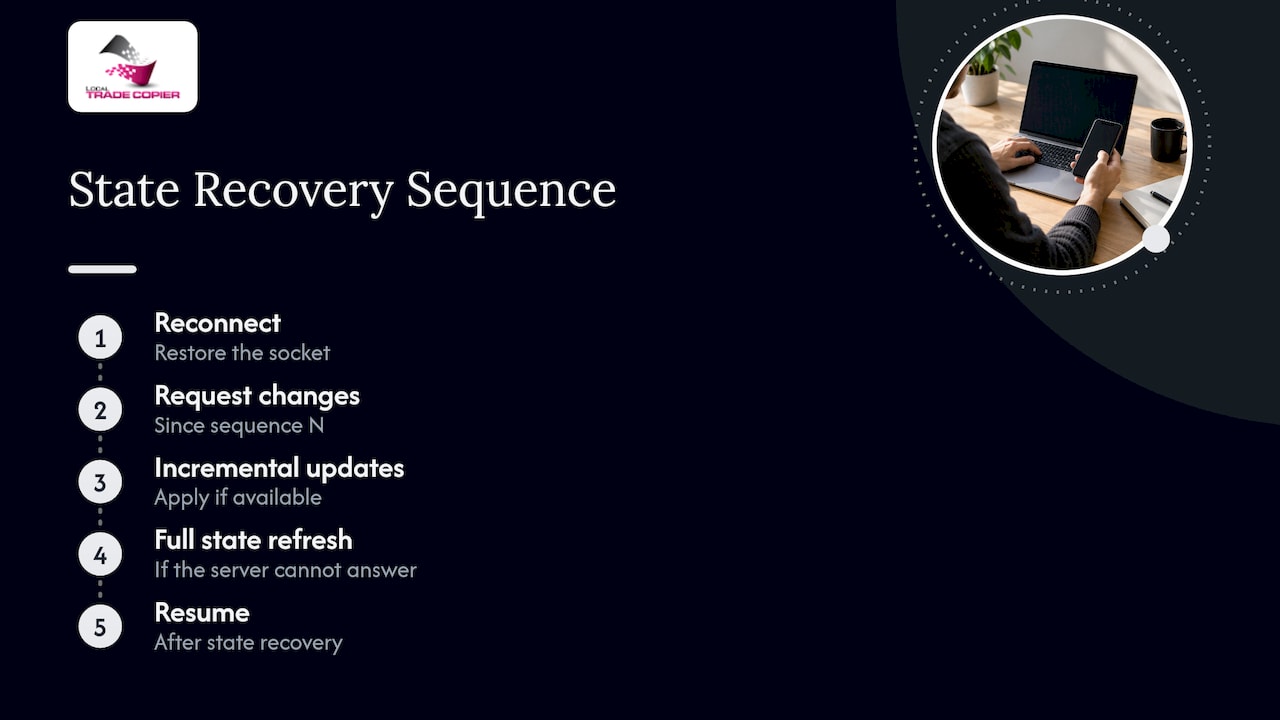
Keep the reconnect window itself short enough that state drift stays manageable. The longer a client is disconnected, the more expensive and error-prone the resync becomes, which is one more reason fast dead-socket detection through keepalive and heartbeats matters more than clever recovery logic after the fact.
Handling authentication and authorization re-validation after reconnect
A reconnected socket is not the same thing as a reconnected session. Tokens expire, permissions change, and a connection that drops for thirty seconds can resume into a world where the credentials it carried are no longer valid.
Treat every reconnect as an opportunity to re-check authentication rather than an opportunity to skip it. If you are using short-lived tokens, refresh the token as part of the reconnect sequence instead of reusing whatever was cached before the drop. If the underlying protocol supports a lightweight re-authentication handshake, use it instead of tearing down and rebuilding the entire session, since a full relogin is often slower and more disruptive than it needs to be.
Authorization deserves the same treatment as authentication. A user’s permissions can change while they were disconnected, particularly in systems with role-based access control, so re-fetch the current permission set after reconnect rather than trusting what was valid before the gap. This matters most in systems where a stale permission check could let a client perform an action it no longer has rights to, which is a quieter failure mode than an expired token but just as damaging.
Build your reconnect handler so that a failed re-authentication is treated as a distinct failure path from a failed transport reconnect. Conflating the two makes debugging much harder, because a credential problem and a network problem call for completely different fixes.
Impact of idle reconnect handling on trade copying accuracy and latency
For any system that mirrors actions from one account to another in close to real time, the time between a disconnect and a verified, re-synced reconnect is the window where accuracy risk concentrates. Local Trade Copier is trade replication software: it copies existing trades from a master account to one or more client accounts and carries no market logic or strategy layer of its own, so its reconnect behavior affects how faithfully and quickly trades get copied, not whether a trade is a good one. Past results do not guarantee future performance, and nothing about reconnect handling changes that.
Running the copier locally, on a single Windows machine or VPS rather than through a cloud relay, removes one layer of network hops that could introduce its own idle timeout or added latency, since the execution path never leaves the local machine. That matters most during the reconnect window itself: a copier that detects a dropped connection quickly through keepalive and application heartbeats, then reconnects with a bounded backoff and a check against the current state of both accounts, closes that window faster than one that waits on a generic timeout or retries blindly.
The practical risk during any reconnect gap is a missed trade event or a duplicated one, which is why the intent flags, idempotency checks, and state re-sync patterns covered earlier apply directly here. A well-designed reconnect sequence confirms the current position state on both master and client accounts before resuming normal copy behavior, rather than assuming nothing changed during the gap.
Common pitfalls and troubleshooting techniques for idle reconnect issues in trade copier software
The most common pitfall is treating every disconnect the same way, regardless of cause. A firewall timeout, a terminal restart, and a deliberate shutdown all produce a disconnect event, but only one of them should trigger an automatic reconnect attempt. Without an intent flag distinguishing them, a copier can end up reconnecting right after a user intentionally closed a terminal for maintenance.
A second common issue is reconnecting the transport layer without re-validating account state. If a copier resumes copying immediately after a socket reconnects, without first checking current open positions on both master and client accounts, it risks acting on stale information gathered before the gap.
Troubleshooting a persistent reconnect problem usually starts with the same few checks. Confirm the OS-level keepalive settings are tuned aggressively enough to detect a dead socket within seconds rather than minutes, since a slow keepalive timer delays every downstream recovery step. Check the reconnect logs for a pattern: a single isolated disconnect points to a transient network blip, while recurring disconnects at a fixed interval usually point to a firewall, NAT, or VPS provider enforcing an idle timeout. If positions do not match after a reconnect, that is a sign the state re-sync step is missing or incomplete rather than a transport problem. Our guide on what to do when trades are not copying walks through these checks in more detail, and our notes on rebooting copier components with open positions cover the specific case of restarting a terminal without orphaning a trade.
Author perspective: engineering tradeoffs and rules of thumb
Layer your defenses before you tune your retries: OS keepalive, driver resiliency, and application heartbeat together, in that order. Instrument the retry path so you can see it fail in a test before it fails in production. Critical systems deserve conservative, well-logged retries; user-facing clients benefit more from fast, visible reconnection.
Local Trade Copier: built for reliable local reconnection
Running a copier on your own Windows machine or VPS, instead of through a cloud relay, means fewer network hops that could introduce their own idle timeout and one IP address to monitor instead of several. We replicate trades across MetaTrader 4 and MetaTrader 5 accounts entirely on your local machine, with reconnect handling built in rather than left to a black-box cloud service: when a master’s heartbeat is more than 60 seconds old, its new trades wait until it is back, and after a Client restart existing copies stay linked to their master trades.

If you manage multiple accounts and want a hands-on look at how local execution and reconnect handling work together, our installation guide walks through VPS setup, and our pricing page lists our plans along with the 7-day free trial available on each.
FAQ
What causes an idle connection to disconnect unexpectedly?
Idle disconnects are usually caused by firewalls, NAT gateways, or load balancers that drop a connection after a period of silence, not by application bugs. Operating system keepalive defaults are often too slow to catch this before the middlebox does, which is why tuning those settings helps.
How do I detect a dropped connection before sending more data?
Use TCP keepalive at the OS level combined with an application-level heartbeat or protocol-native mechanism like WebSocket PING and PONG frames, defined in RFC 6455, or QUIC’s ack-eliciting frames described in RFC 9000. Relying on a failed write to detect a dead socket is usually too slow for time-sensitive applications.
What is the best reconnection strategy after a dropped connection?
Combine exponential backoff with randomized jitter and a capped retry count, checking an intent flag first so a deliberate disconnect never triggers an automatic reconnect attempt, a pattern detailed in reconnect handling tutorials. Escalate to an alert once retries are exhausted instead of retrying indefinitely.
Can database drivers automatically recover from idle disconnects?
JDBC, ODBC, and OLE DB drivers for SQL Server support connection resiliency through the ConnectRetryCount and ConnectRetryInterval properties, which can automatically restore an idle connection that was broken in transit, according to Microsoft’s connection resiliency documentation. This recovery does not extend to open transactions or statements that were already in flight when the connection dropped.
How does idle reconnect handling affect a trade copier’s accuracy?
A copier’s reconnect handling determines how quickly and accurately it resumes mirroring trades after a disconnect, since the gap between losing and restoring a connection is where missed or duplicated trade events can occur. Local Trade Copier is trade replication software with no strategy logic of its own, and past results do not guarantee future performance regardless of how reconnects are handled.
Sources
- RFC 6455: The WebSocket Protocol
- Connection resiliency (Microsoft JDBC driver)
- Handling Disconnects and Reconnecting | Reactor Multiplayer Engine
