

Prop firms spot Expert Advisor (EA) activity mostly by reading data: order metadata, timing patterns, similarity across accounts and device or IP details. Many firms also review activity when you request a payout, not in real time. Whether automation is allowed depends on the firm, the account size and the platform. The rulebook decides, not whether a system happens to catch you.
This guide explains what detection means in practice, which signals firms look at, what can trigger a review even when an EA is permitted, and how to check your own setup before you risk a funded account. It is written for individual traders.
TL;DR
- Firms combine order metadata (such as magic numbers and comments), timing analysis, cross-account comparison and device or IP fingerprinting, and often run a manual check at payout.
- Rules differ widely: some firms restrict EAs by account size or platform, and some ban VPS or remote-server order automation outright.
- Permitted EAs can still trigger reviews through hyperactivity, identical third-party strategies, hedging across accounts or strategies that cannot be replicated in live markets.
- Read the firm’s current rules and get answers in writing before you automate anything. Past results do not guarantee future performance.
- A trade copier only replicates trades. It does not change what a firm allows, so the firm’s copy-trading and automation rules still apply.
What EA detection means at a prop firm
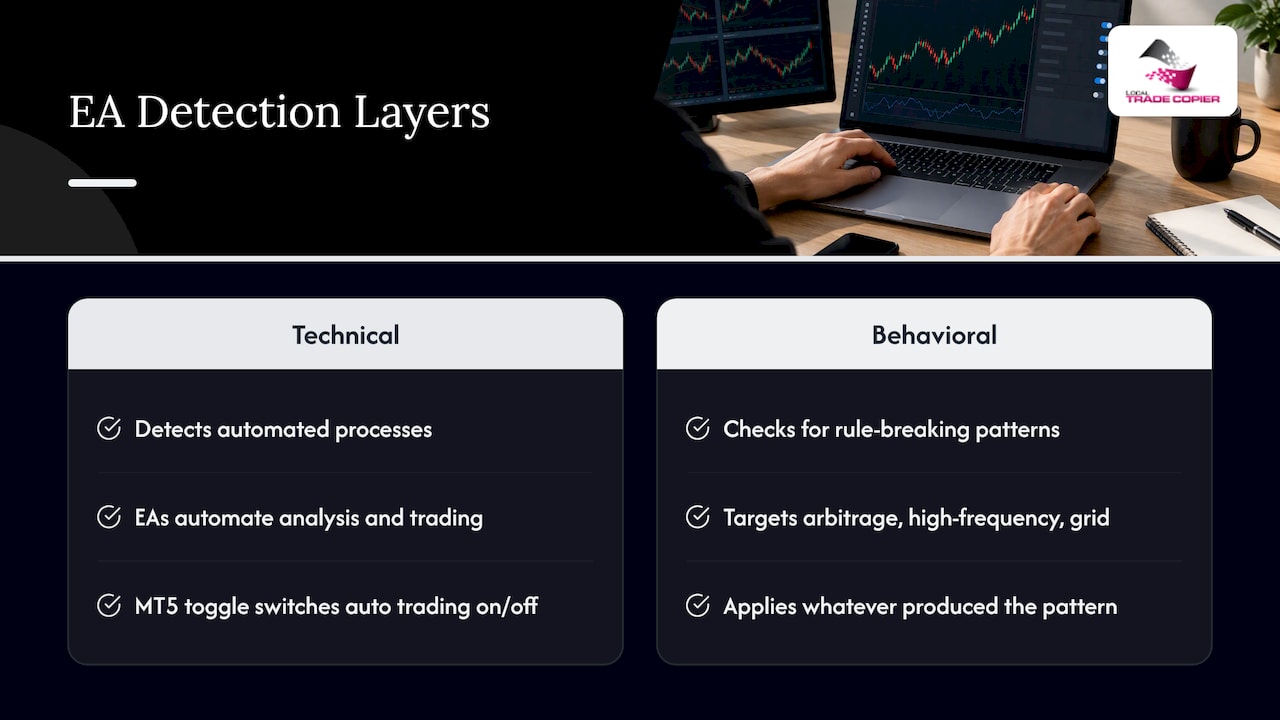
An Expert Advisor is a program that automates analysis and trading inside the platform. MetaTrader 5’s documentation describes Expert Advisors as MQL5 applications that automate analytical and trading processes, and the terminal’s “Allow Auto Trading” control switches them on or off.
EA detection is the set of rules and monitoring methods a firm uses to find automated trading it prohibits, such as arbitrage, high-frequency or grid strategies. The key point is that firms rarely care about software for its own sake. FTMO’s published position is that the question is whether the resulting trading is legitimate, risk-managed, replicable in live markets and distinct from other registrations.
So detection has two layers. One is technical: is this activity coming from an automated process? The other is behavioral: does the trading pattern break a rule, whatever produced it?
How prop firms identify EA and bot trading
One industry write-up describes a five-layer stack that modern firms may use. Treat it as a description of common practice, not a statement about any single firm.
Order metadata
Every MetaTrader order carries fields beyond price and size. The best known is the magic number, an identifier. Manually opened trades have magic number 0, while an EA can assign its own value. The terminal itself shows it: MetaTrader 5 has displayed an Expert Advisor’s trade ID as a tooltip in positions, orders and history since 2014. Comment fields and source flags can also betray automation.
If you use magic numbers for your own bookkeeping, our page on how magic numbers work with the Local Trade Copier explains what the copier does with them.
Timing analysis
Humans react in fractions of a second at best. The same industry write-up says statistical timing analysis can reveal patterns such as reactions faster than 150 ms or near-identical execution across accounts. Perfectly regular intervals between entries are another classic tell.
Cross-account correlation
Firms compare accounts. If several registrations open the same trades at the same moments, that looks like coordinated trading or a shared third-party strategy. Topstep says its monitoring analyzes position timing, size and duration to judge whether a pattern suggests intentional risk elimination, and it states that automated systems and copy-trading tools do not remove the trader’s responsibility.
Device and IP fingerprinting
Logins from the same device or IP address across supposedly separate traders are a flag. Remote servers add another wrinkle: Topstep’s terms state that VPS, VPN and remote-server order automation is prohibited, even though its API allows custom strategies within platform rules. That is a firm-specific rule, and it shows why you should never assume one firm’s policy applies to another.
Manual audit at payout
Many firms do not stop traders in real time. TraderScale says firms generally check for rule violations when a trader requests a payout. That has a practical consequence: months without a warning do not prove your approach is permitted.
What US-facing firms allow
Policies change, so use these as examples of how much rules vary, then read the current page of the firm you plan to use.
| Firm | Published position (per its own pages) |
|---|---|
| FundedNext | EAs depend on account size: manual trading is required for accounts of $50,000 and above on MT4/MT5, and automation is prohibited on cTrader and Match-Trader. It also bans EAs built to pass challenges and EAs tied to apps such as Telegram or WhatsApp. |
| FTMO | Algorithmic trading and EAs can be allowed when trading is legitimate, risk-managed, replicable and compliant with its forbidden-practices rules. |
| Topstep | Custom bots via its API within platform rules and its high-frequency prohibition, but remote-server order automation is not allowed. |
The pattern is clear: “EAs allowed” is never a complete answer. Check account size, platform, server location, strategy type and whether copying between your own accounts is permitted.
What can trigger a review even when an EA is allowed
Permission to automate does not mean permission for every behavior. These are the usual triggers.
- Hyperactivity. FTMO prohibits automated robots that make an account hyperactive through more than 2,000 server requests per day on individual simulated trades or pending orders.
- Strategies that cannot be replicated live. FTMO bans simulated trades that are not replicable in real markets, including overleveraging, one-sided bets and abuse of pricing or data feed errors.
- Banned strategy types. Firms commonly prohibit latency arbitrage, high-frequency and tick scalping, grid and martingale strategies.
- Identical third-party systems. FTMO warns that a commercial EA may be run by many other traders, which can risk denial of a funded account where a unique strategy is required.
- Opposite positions across accounts. Topstep says it accounts for temporary opposite positions caused by technical glitches or copy-trading software, but traders remain responsible and enforcement applies if the positions meet its criteria.
- Drawdown behavior. An EA whose losses could breach a firm’s maximum-loss rules is a risk on its own. Trading involves capital risk. Past results do not guarantee future performance.
What can happen after a violation
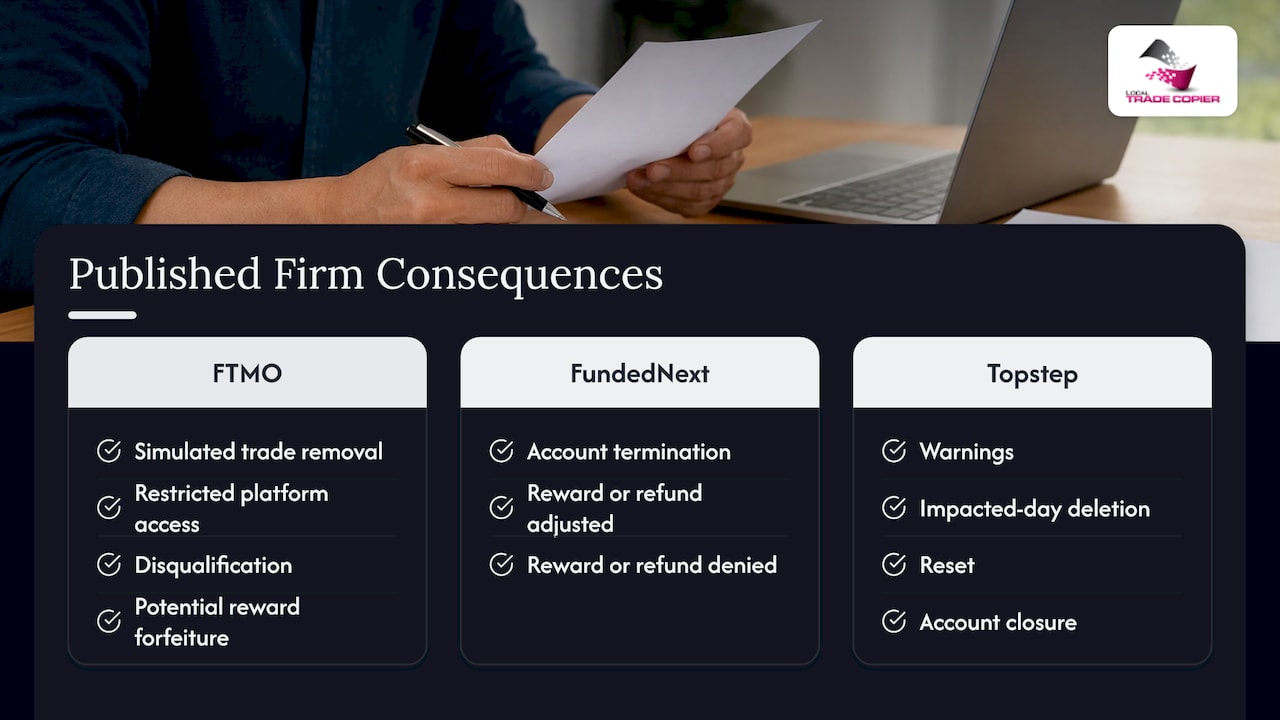
Consequences are published by the firms and they are serious. FTMO says a breach may lead to removal of simulated trades, restricted platform access, disqualification, forfeiture of potential rewards or termination of agreements. FundedNext says confirmed non-compliant EA use after review may result in account termination and an adjusted or denied Performance Reward or Refund. Topstep lists warnings, deletion of an impacted day, reset, account closure or delayed or denied payout.
The most painful outcome is usually at payout, when a review reaches back over the whole account history.
Where a trade copier fits
A trade copier is not an EA strategy. It has no market logic and does not decide what to trade: it replicates trades from a master account to other accounts. That is why it raises its own rule questions, and also why it does not solve every problem.
Two separate questions apply to any copier setup:
- Does the firm allow copying at all? Some firms allow copying between your own accounts, some limit it and some prohibit coordinated trading. FTMO, for example, says copy trading across registrations is not allowed where a unique strategy is required. This is a rule question, and no software changes it.
- Does the firm restrict EA activity specifically? Some firms permit copying but restrict automated order flow. A firm’s rules on copy trading and Expert Advisors apply to the trade itself, however it was placed.
On the technical side, Local Trade Copier runs on your own Windows PC or VPS with no cloud routing, so trade data stays on one machine and one IP address. It also has a manual-like entry feature (trade humanization), which opens each copy through MetaTrader’s New Order window, so MetaTrader records it as a manual trade. It changes how a trade is placed, not what an account’s rules allow. If a firm bans VPS use, as some do, run it on your own PC. Confirm the firm’s position in writing first. Our guide to copying trades on a prop firm account and the page on prop firm friendly settings map the copier’s fields to common firm rules.
If you trade from the US, also read our note on US copy trading and CFTC/NFA registration. It covers when running a copier locally for your own accounts differs from managing other people’s money.
How to check your setup before you automate
- Read the firm’s current rules. Look for the EA, copy trading, VPS, hedging and prohibited-strategy pages, and note the platform and account size they apply to. The Integrity Bureau’s 2026 framework notes that vague definitions of allowed and prohibited EA classes cause frequent disputes, so do not rely on a loose reading.
- Ask support in writing. Describe your exact setup: platform, whether you copy between your own accounts, where the software runs. Keep the reply.
- Test the drawdown profile. FTMO advises checking whether an EA’s drawdowns fit the firm’s maximum-loss rules and whether other users of the same EA could exceed the maximum capital allocation. Past results do not guarantee future performance, so treat any backtest as a limit check, not a promise.
- Avoid identical third-party signatures. If thousands of traders run the same commercial EA with the same settings, your account may look like theirs.
- Keep your own records. Magic numbers, comments and lot sizes should be consistent with what you told the firm.
- Trial before you commit. Run any tool on a demo or the smallest account first. Our demo video and installation guide show the setup step by step.
Perspective
Since 2010 we have watched the same misunderstanding repeat: traders ask whether a firm “can detect” a tool, when the better question is whether the firm allows it.
Local Trade Copier is replication software and nothing more. It has no strategy layer and no influence on outcomes. What it offers is control: execution on your own machine, one IP address, no cloud routing and an optional manual-like entry mode, useful where a broker blocks Expert Advisor trade functions on an account but its rules still allow copying.
We built it that way because individual traders deserve to keep their data and their setup in their own hands. Used inside the firm’s rules, with written confirmation, it removes repetitive manual re-entry across terminals. Used against the rules, no software will protect an account at payout review.
Try it on your own terminals
Local Trade Copier covers MT4 and MT5 in one subscription, with a 7-day free trial. Plans are PERSONAL at €29 per month or €290 per year, MANAGER at €89 per month or €890 per year, and VIP at €199 per month or €1990 per year. You can compare them on the pricing page and start the trial on your own PC or VPS.

It is installed locally, so check your firm’s server and VPS rules before choosing where to run it.
FAQ
Can a prop firm tell if I use an EA?
Often, yes, through order metadata, timing, cross-account similarity and device data, and sometimes through a manual audit at payout. Detection is not guaranteed in real time, but a lack of intervention does not mean the firm allows it. Read the firm’s rules instead of testing its monitoring.
Is a trade copier the same as an EA for prop firm rules?
Not necessarily, but firms decide for themselves. Some treat copying tools as automation, and some prohibit coordinated or copy trading across registrations. Ask the firm in writing and keep the answer.
Do firms check for EAs at payout?
Many do. TraderScale says firms generally check rule compliance when a trader requests a payout. That means a violation can surface late and affect rewards or payouts.
What should I do if my firm’s EA rules are unclear?
Contact support with your exact setup and ask for a written answer before trading. If the answer is still vague, choose a firm that defines its allowed and prohibited automation clearly.
Sources
- MetaTrader 5 Help: Platform settings
- FTMO: Which instruments can I trade, and what strategies am I allowed to use
- FTMO: Forbidden Trading Practices
- FTMO Blog: What to look out for when choosing an Expert Advisor
- EliteMetaTrader: How Prop Firms Detect Algorithmic Trading in 2026
- MetaTrader Magic Number
- MetaTrader 5 build 975 release notes
- Topstep Help Center: Understanding Hedging
- Topstep Help Center: TopstepX API Access
- Topstep Help Center: Prohibited Conduct
- FundedNext: Is EA allowed in FundedNext?
- TraderScale: Prop Firms and Expert Advisors
- The Integrity Bureau: Audit Module for Proprietary Trading Firms
